


 Call Us



Quick Answer
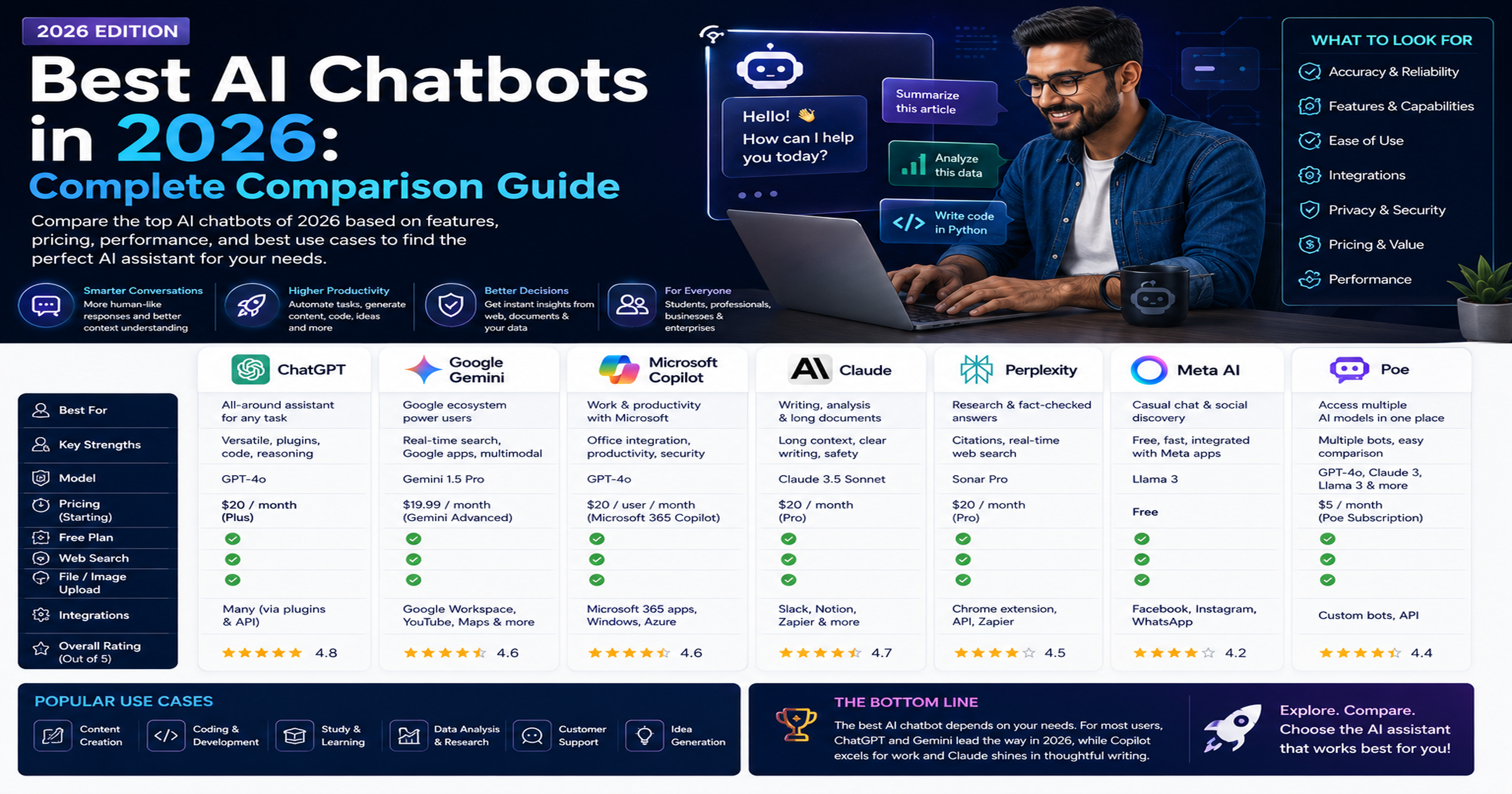
There is no single best AI chatbot for everyone in 2026. ChatGPT remains the strongest all-round pick because of its huge plugin and integration ecosystem, Claude leads on long-document reasoning, careful writing, and coding workflows, Gemini is the natural choice inside Google Workspace and for multimodal tasks, and Perplexity is the best option when you need cited, research-backed answers. Budget-focused users and developers increasingly look at DeepSeek for low-cost reasoning, while Meta AI and Microsoft Copilot are winning by default because they are already built into apps people use every day. The right answer depends on your budget, the software you already use, and whether you value creative writing, coding accuracy, real-time information, or source citations most.
Key Highlights of Best AI Chatbots
- ChatGPT, Claude, and Gemini have all shipped major model upgrades in 2026 (GPT-5.5, Claude Opus 5 and Sonnet 5, and Gemini 3.1 Pro), and all three now offer a 1 million token context window on their flagship or near-flagship tiers.
- Standard paid plans for ChatGPT Plus, Claude Pro, and Perplexity Pro all sit at $20 a month, so at the entry-level paid tier the decision should be based on fit for your workflow, not price.
- Google cut its top-tier AI Ultra plan sharply in 2026, making a premium multimodal plan more accessible than it was in 2025, though check Google's current pricing page since consumer tiers change quickly.
- Free options have become genuinely useful: DeepSeek's web chat and app carry no paywall for individuals, and Meta AI is free across WhatsApp, Instagram, Messenger, and its standalone app.
- Coding-focused comparisons increasingly favor Claude for agentic and long-context development work, while ChatGPT keeps the edge on breadth of integrations and Gemini benefits from direct access to Google Search and Workspace data.
- The most effective professionals in 2026 do not rely on one chatbot. They build a small stack, for example one model for writing and analysis, one for research with citations, and one for coding, and they invest in prompt engineering skills so each tool performs at its best.
What Makes a Good AI Chatbot
Before comparing specific products, it helps to define the criteria that actually separate a good AI chatbot from a mediocre one. Marketing pages tend to emphasize raw benchmark scores, but in day-to-day professional use, a handful of practical factors matter far more.
Reasoning Quality and Accuracy
A chatbot's core value is how reliably it reasons through a problem and how rarely it produces confidently wrong answers, often called hallucination. Independent benchmark leaderboards and vendor model cards are the best way to track this, since it changes with every model release. No chatbot is immune to hallucination, so verifying important facts, figures, and citations independently is still necessary regardless of which tool you use.
Context Window Size
The context window is the amount of text, images, or code a model can consider at once, measured in tokens. A larger context window lets you paste in an entire contract, codebase, or research paper and ask questions across all of it without the model losing track of earlier details. In 2026, context windows of 200,000 to 1 million tokens are common amongflagship models, a substantial jump from the 4,000 to 32,000 token windows that were standard just a few years earlier.
Multimodal Capability
The best chatbots now handle more than text. They can read images, interpret PDFs and spreadsheets, generate images, transcribe or synthesize voice, and in some cases analyze video. If your work involves visual material, such as reviewing screenshots, diagrams, or scanned documents, multimodal support materially changes which tool is worth paying for.
Integration and Ecosystem Fit
A chatbot that already lives inside the software you use daily removes friction. Gemini's integration with Gmail, Docs, and Sheets, Copilot's presence inside Word, Excel, and Teams, and ChatGPT's large library of third-party connectors and custom GPTs are all examples of ecosystem advantages that matter more in practice than a small difference in benchmark scores.
Pricing Transparency and Value
Look beyond the headline subscription price. Check usage limits, whether the plan includes the newest models or an older, cheaper variant, whether API access is billed separately, and whether a business or team plan is actually required to get full functionality. Several vendors also changed their tier structures in 2026, so a price you read last year may already be out of date.
Data Privacy and Enterprise Controls
For regulated industries and larger organizations, admin controls, data retention policies, audit logs, and whether conversations are used for model training are often deciding factors. Enterprise and Team tiers typically offer stronger guarantees on data handling than free or entry-level consumer plans, and this is worth confirming directly with the vendor before rolling a tool out company-wide.
Comparison of the Leading AI Chatbots
The table below summarizes the major consumer-facing AI chatbots as of August 2026. Pricing and model names change frequently in this market, so treat the figures here as a snapshot rather than a permanent reference, and always confirm current pricing on the provider's own site before making a purchasing decision.
| Chatbot | Developer | Best For | Approximate Pricing (Individual) | Standout Feature |
| ChatGPT | OpenAI | General-purpose use, broad plugin and integration ecosystem | Free tier; Go around $8/month; Plus around $20/month; Pro tiers around $100 to $200/month | Widest third-party integration and custom GPT ecosystem, plus built-in image and voice tools |
| Claude | Anthropic | Long documents, careful writing, and coding-heavy workflows | Free tier; Pro around $20/month; Max around $100 to $200/month; Team plans from around $25/user/month | Large context window (up to 1 million tokens on newer models) and strong agentic coding performance |
| Gemini | Google Workspace users and multimodal tasks | Free tier; Google AI Pro around $19.99/month; Google AI Ultra around $99.99 to $199.99/month | Deep integration with Gmail, Docs, Sheets, and Google Search grounding | |
| Microsoft Copilot | Microsoft | Word, Excel, Outlook, and Teams-centric organizations | Free chat tier for Microsoft 365 users; Copilot add-on typically $21 to $30/user/month for business plans | Native embedding inside Microsoft 365 apps and enterprise-grade data controls |
| Perplexity | Perplexity AI | Research with cited, source-backed answers | Free tier; Pro around $20/month; Max around $200/month | Inline citations and a Model Council feature that queries multiple frontier models at once on Max |
| Grok | xAI | Real-time information from X and a more conversational tone | Free tier with limits; SuperGrok around $30/month; higher "Heavy" tier around $300/month | Real-time access to X (formerly Twitter) data and rapid release cadence |
| Meta AI | Meta | Casual, everyday use inside WhatsApp, Instagram, and Messenger | Free, no subscription required | Built directly into apps billions already use, with voice conversation support |
| DeepSeek | DeepSeek | Budget-conscious users, developers, and technical or coding tasks | Free web chat and app; very low-cost API access | Strong reasoning and coding performance at a fraction of the cost of closed competitors, with some open-weight models |
Detailed Profiles of Each Chatbot
ChatGPT (OpenAI)
ChatGPT remains the most recognized AI chatbot brand and continues to serve as the default choice for general-purpose work. OpenAI's flagship model line moved to GPT-5.5 in 2026, and the official OpenAI announcement describes a large context window alongside stronger reasoning. ChatGPT's biggest advantage is breadth: it supports custom GPTs, a large third-party plugin and connector ecosystem, image generation, voice mode, browsing, and code execution inside a single interface, with paid tiers scaling from a Go tier around $8 a month up through Plus, and then Pro tiers priced well above that for power users who need higher usage limits or the most capable model variant. Businesses can review current plans directly on OpenAI's ChatGPT pricing page.
Claude (Anthropic)
Claude has built its reputation on careful, well-structured writing, strong instruction-following, and increasingly on coding and agentic task performance. Anthropic's own Claude pricing documentation confirms that the current model lineup includes Claude Opus 5, Claude Sonnet 5, and Claude Haiku 4.5, with Claude Sonnet 5 and Claude Opus 4.6 and later offering a full 1 million token context window at standard pricing rather than as a paid add-on. Subscription tiers run from a free plan through Pro at roughly $20 a month, Max at higher usage tiers, and Team and Enterprise plans for organizations that need centralized billing and admin controls. Anthropic has also positioned Claude strongly for software development through Claude Code, its dedicated coding agent product bundled into higher-tier plans.
Gemini (Google)
Gemini's core advantage is that it is already where a large share of knowledge workers spend their day: Gmail, Docs, Sheets, and Search. According to Google's official Gemini 3.1 Pro announcement, the newer Gemini model line focuses on complex reasoning and agentic tasks alongside the multimodal strengths (text, images, audio, and video understanding) that have defined Gemini since its launch. Google restructured its consumer subscription tiers in 2026 into Google AI plans, with a mid-tier AI Pro plan and a higher AI Ultra plan that saw a significant price cut compared to its original 2025 launch price. Because exact consumer tier pricing has shifted more than once this year, confirm the live figures on Google's Gemini subscriptions page before budgeting.
Microsoft Copilot
Copilot is less a standalone destination and more an assistant embedded throughout Microsoft 365. Its main selling point for organizations already on Word, Excel, PowerPoint, Outlook, and Teams is that it can reference and act on your organization's own documents and email with appropriate permissions, rather than working purely from a blank chat window. Consumer access to a basic Copilot Chat experience is included for Microsoft account holders, while full "grounded in your data" functionality is sold as a per-seat add-on to existing Microsoft 365 business plans, priced per user per month.
Perplexity
Perplexity is built around answering questions with citations rather than generating open-ended text. Every response links back to the sources it drew from, which makes it a strong fit for research, fact-checking, and any work where you need to trace a claim back to its origin. Its Max tier introduced a "Model Council" style feature that can query multiple frontier models, including OpenAI's and Anthropic's, on the same question simultaneously and compare their answers, which is a distinctive capability among mainstream chatbots.
Grok (xAI)
Grok is built into X (formerly Twitter) and markets itself on real-time awareness of trending conversations and a more informal, less filtered conversational style than some competitors. xAI has shipped multiple Grok versions in 2026 at a rapid pace, and because release cadence and exact API pricing have moved several times within the year, treat any specific Grok version number or price you see, including in this article, as time-sensitive and worth reconfirming on xAI's own site.
Meta AI
Meta AI is free to use with no subscription and is embedded directly inside WhatsApp, Instagram Direct, Messenger, Facebook, and a standalone app and website. It is built on Meta's Llama model family, and Meta has also begun layering in additional proprietary models alongside Llama during 2026. For everyday questions, image generation inside a chat you are already using, and simple voice interaction, Meta AI's main advantage is convenience: there is nothing new to install or pay for.
DeepSeek
DeepSeek gained global attention for offering strong reasoning and coding performance at a small fraction of the cost of closed frontier models, and some of its models are released with open weights that developers can self-host. The free web chat and mobile app do not require a paid plan for individual use, and its API pricing is aimed squarely at cost-conscious developers and businesses that want to build AI features without high inference costs. It is a particularly strong option for technical teams comfortable evaluating a fast-moving, lower-cost alternative to the more established Western AI labs.
Use Cases by Profession and Industry
Project Managers and Business Leaders
Project managers use chatbots to draft status reports, summarize long meeting transcripts, turn rough notes into structured risk registers, and get a fast first pass on stakeholder communications. Claude and ChatGPT both handle long document summarization well, while Copilot has an edge for teams that already track project artifacts inside Microsoft 365 and Teams.
Software Developers and IT Teams
Developers lean on chatbots for code generation, debugging, code review, and explaining unfamiliar codebases. Claude's coding performance and large context window make it well suited to reviewing an entire repository or a long pull request, ChatGPT's Codex-style tooling and broad plugin ecosystem suit teams that want integrations across many tools, and DeepSeek offers a notably cheaper option for high-volume automated coding tasks such as batch code review or test generation.
Data Analysts and Data Scientists
Analysts use chatbots to write and debug SQL and Python, explain statistical concepts, generate visualizations, and interpret model outputs in plain language. Gemini's tight integration with Google Sheets and BigQuery, and ChatGP's code interpreter style tools, are both commonly used here. Professionals building a long-term data science career often pair daily chatbot use with structured learning, and a formal data science certification course can help ensure the underlying statistical and modeling fundamentals are solid before leaning on AI-generated code and analysis in production.
Marketing and Content Teams
Marketers use chatbots for first drafts of blog posts, ad copy variations, SEO outlines, and social captions, then edit for brand voice. Claude and ChatGPT are both strong at matching a specified tone, while Perplexity is useful for gathering current, cited statistics and competitor research before writing begins.
Customer Support and Operations
Support teams increasingly use chatbot APIs, rather than the consumer chat interfaces, to power first-line customer service, ticket summarization, and internal knowledge base search. Cost per conversation matters enormously at this scale, which is why lower-cost models such as Claude Haiku or DeepSeek's API are frequently used for high-volume, lower-complexity support interactions, reserving more expensive flagship models for escalations.
Business Analysts and IT Consultants
Business analysts use chatbots to translate stakeholder requirements into structured user stories, draft process documentation, and prototype workflow diagrams in plain language before handing them to engineering. Professionals in this role who want a structured path to apply generative AI in their existing analyst function may find a course such as Generative AI for Business Analysts and IT Consultants useful for building that bridge deliberately rather than ad hoc.
How Professionals Can Build AI Skills to Use These Tools Effectively
Owning a subscription to a leading chatbot is only the first step. The professionals who get disproportionate value out of these tools tend to invest deliberately in a few underlying skills.
Learn Prompt Engineering as a Real Skill, Not a Trick
How you phrase a request measurably changes the quality of the answer you get, and the techniques that work well differ subtly across ChatGPT, Claude, and Gemini because each model is trained differently and interprets instructions with its own biases. Structuring prompts with clear context, explicit constraints, and a defined output format is a learnable, transferable skill. Simpliaxis's own guide to prompt engineering is a useful starting point for professionals who want a structured introduction before experimenting on their own.
Understand the Difference Between a Chatbot and an Agent
A growing share of 2026's AI capability sits in agentic features, tools that can browse the web, execute code, or take multi-step actions on your behalf rather than simply answering a single question. Getting real value from agentic features means understanding what permissions you are granting the tool and how to verify its work, not just how to trigger it. Structured training such as an Agentic AI Engineering Workshop can help professionals move from casual chatbot use to confidently designing and supervising agent-based workflows.
Build Fundamentals Alongside AI Fluency
Chatbots are excellent at accelerating work you already understand and considerably riskier when used to substitute for expertise you do not have. A developer who understands software architecture will get far more reliable output from Claude or ChatGPT than one who cannot evaluate the generated code. This is why pairing hands-on chatbot practice with a recognized course, such as a broader generative AI certification or a role-specific track like the Generative AI Architect Advanced Program, tends to produce more durable skill than relying on trial and error with the chat interface alone.
Practice Verifying, Not Just Generating
The single most valuable habit for professional AI users is treating chatbot output as a strong first draft rather than a finished answer. This means checking generated citations against original sources, running generated code before trusting it, and cross-checking any number, date, or claim that would be costly to get wrong.
Limitations and Responsible Use Considerations
Hallucination Remains Unsolved
Every major chatbot, regardless of vendor, can still generate plausible-sounding but incorrect information, particularly around very recent events, niche factual details, citations, and numerical claims. Treat any AI-generated statistic, legal reference, or medical claim as a starting point for your own verification, not a final answer.
Training Data Cutoffs and Recency
Even with web browsing or search grounding features, the underlying model's core knowledge has a training cutoff, and different tools handle "current" information differently. When a question depends on very recent developments, tools with strong live search grounding, such as Perplexity or a chatbot's browsing mode, are generally more reliable than relying on the base model's memorized knowledge.
Data Privacy and Confidentiality
Free and entry-level consumer tiers of most chatbots may use conversation data to improve future models unless you explicitly opt out, and policies vary by vendor and by plan. Before pasting confidential business information, client data, or proprietary code into any chatbot, check the specific privacy policy and data retention settings for the plan you are using, and prefer Team, Business, or Enterprise tiers for sensitive work, since these generally come with stronger contractual data protections.
Bias and Overreliance
Language models can reflect biases present in their training data, and overreliance on a single chatbot's phrasing or judgment can quietly narrow a team's thinking over time. Deliberately cross-checking important decisions with a second model, a human expert, or primary sources helps counter both risks.
Cost Creep at Scale
A $20 monthly subscription is easy to justify for an individual, but API costs for automated, high-volume use cases (customer support bots, batch document processing) can scale quickly and unpredictably if usage is not monitored. Vendor pricing pages and usage dashboards should be checked regularly by any team running chatbot-powered automation in production.
Key Takeaways
- No single AI chatbot is best for every use case in 2026. ChatGPT, Claude, Gemini, Copilot, Perplexity, Grok, Meta AI, and DeepSeek each have distinct strengths worth matching to your specific needs.
- Entry-level paid plans from ChatGPT, Claude, and Perplexity all sit around $20 a month, so the decision at that price point should come down to workflow fit rather than cost.
- Context windows of up to roughly 1 million tokens are now available on several flagship models, making it realistic to work with entire documents, codebases, or research papers in a single conversation.
- Free options have become genuinely capable, with DeepSeek and Meta AI offering no-cost access without heavy feature restrictions.
- Data privacy policies differ meaningfully by plan and vendor, so confirm the specific terms before sharing confidential or regulated information with any chatbot.
- Building durable skills, such as prompt engineering and an understanding of agentic AI features, produces more consistent value than simply subscribing to the most talked-about tool.
- This market moves fast. Treat every pricing figure, model name, and feature comparison, including the ones in this article, as a snapshot that should be reconfirmed against the vendor's own site before making a purchasing decision.
Schema and Verification Notes
Recommended schema markup: Article schema for the main page content, and FAQPage schema for the Frequently Asked Questions section above, to support rich results and improve visibility in AI-generated answer boxes.
Facts that could not be fully independently verified at the time of writing: the exact current price of Google's entry-level "AI Plus" consumer tier (sources found during research disagreed, citing figures between roughly $4.99 and $7.99 per month); the precise, current Grok model version and its exact API pricing, since xAI has shipped multiple Grok releases in rapid succession during 2026 with inconsistent pricing reported across sources; and the exact feature differences between OpenAI's two higher-priced ChatGPT Pro tiers. Readers should confirm these specific figures directly on the vendor's official pricing page before making a purchasing or budgeting decision, since consumer AI pricing in this market has changed multiple times within a single year.







 Lowest-Price Challenge











 Personalized Path


.webp)


 USA
USA  Canada
  India
India  UK
UK  Australia
  Singapore


