


 Call Us



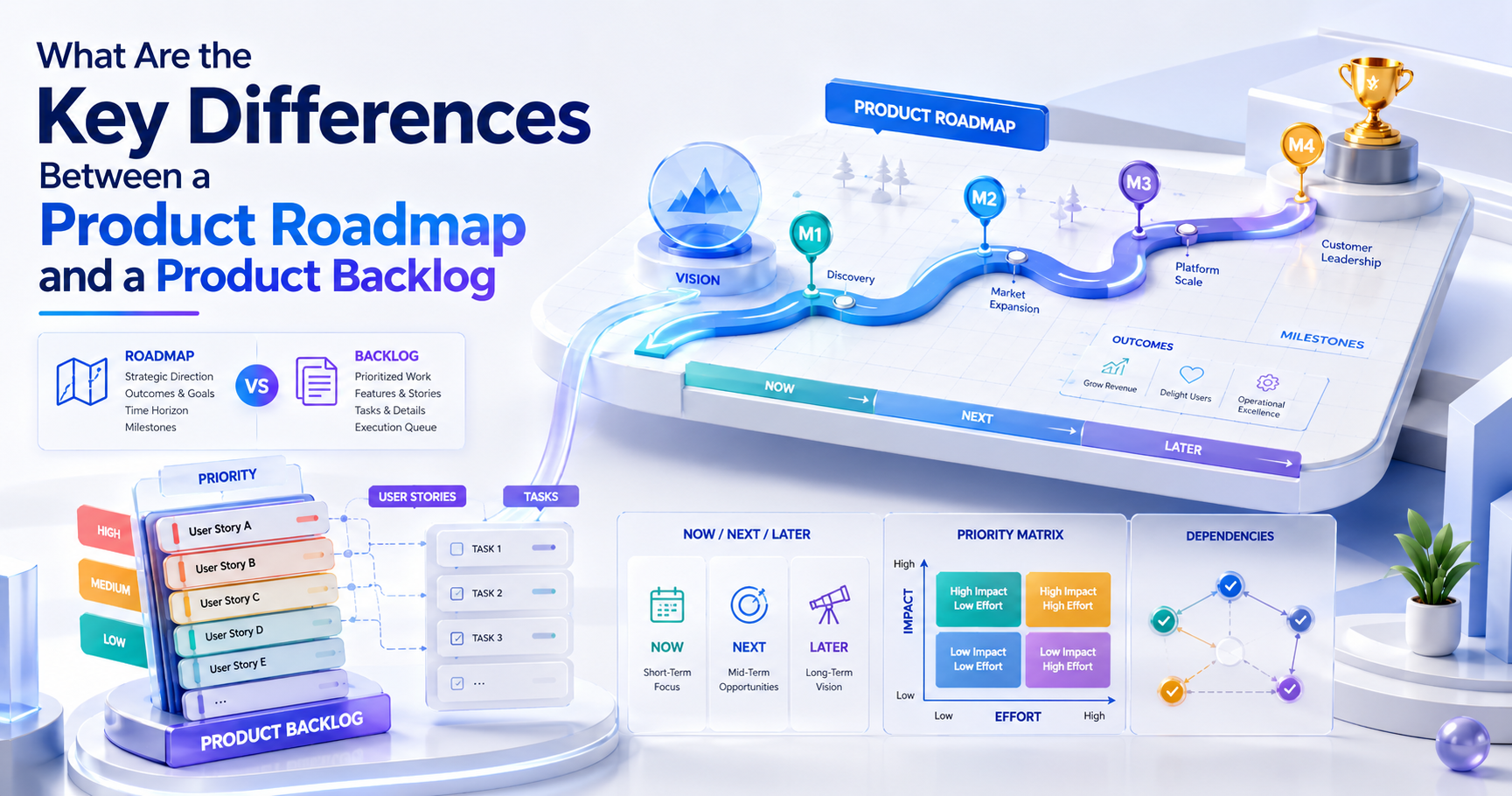
Both a product roadmap and a product backlog are essential to Agile product development. They help teams figure out what to build, why it matters, and what’s next. But they are different things.
The Roadmap shows you the big picture. It indicates where the product is going and what the team wants to do. It is a list of things to do to move toward those objectives. It may contain features, user stories, technical improvements, and bug fixes.
Having an understanding of the difference enables product managers, product owners, developers, and business stakeholders to work with the same expectations. It helps with planning and avoids misunderstandings about priorities, deadlines, and responsibilities.
In this post, we’ll talk about product roadmaps vs. product backlogs and point out the key differences. We’ll also demonstrate how they work together in agile product development.
Quick Answer: Product Roadmap vs. Backlog at a Glance
A product roadmap and a product backlog differ in their purpose. A roadmap shows the path of the product and the reasons for the goals. A backlog is a list of the work the team needs to do to achieve those goals.
These are two different documents; however, they are related. A roadmap helps consumers understand the strategy for the product, while a backlog helps the product team select what work to accomplish next.
Comparison point | Product Roadmap | Product Backlog |
| Focus | Product direction, goals, and priorities | Work needed to improve the product |
| Audience | Leadership, stakeholders, customers, and product teams | Product Owner, Developers, and Scrum Team |
| Timeframe | Longer-term direction, often across months or quarters | Ongoing work, with near-term items ready for selection into a Sprint |
| Detail level | High-level themes, outcomes, and initiatives | Detailed work items, such as user stories, bugs, and technical work |
| Update frequency | Reviewed and adjusted as priorities change | Updated regularly as the team learns and work changes. |
| Owner | Usually the Product Manager or product leader | The Product Owner is accountable in Scrum. |
What Is a Product Roadmap?
A product roadmap is a strategic plan that details the direction of a product. It describes the team's challenges, aims, and key areas of work.
Say, for example, a team has the responsibility of running an online learning platform. Students said: It is difficult to find a course that matches. Course discovery is a priority for the product team; they agree.

One possible roadmap:
- Improve course findability.
- Simplify the learning experience on mobile devices.
- Enable pupils to monitor their progress.
- Increase course completion rates.
These are product-level priorities. They don’t yet cover every screen or program modification or development effort necessary.
The roadmap assists in answering questions such as:
- Where does the stuff go?
- What issues are we attempting to address?
- Why do these priorities matter?
- What do we want to achieve?
- What are the likely future areas of work?
A roadmap is not a guarantee that everything will be delivered on a certain date. In Agile product Management, the strategy should be flexible enough to modify as new information, input from customers, or business requirements arise. Scrum.org defines a product roadmap as a means of discussing the future direction of a product at a high level and connecting it to product objectives.
Key Characteristics
1. Audience
A roadmap is for those who want to know where the product is headed.
This may include:
- Product owners.
- Business people.
- Sales and marketing staff.
- Customer Service Teams.
- Designers and developers.
Share the roadmap, and customers are valuable.
The detail should be adjusted to fit the audience. The leadership team may wish to know the primary company objectives. A development team may want to know which product areas are likely to be addressed. Customers may want a simplified glimpse of anticipated upgrades.
A good roadmap provides enough information for individuals to comprehend the strategy, without requiring them to read every development task.
2. Timeframe
A roadmap is often farther out than a backlog. Depending on the product and the company, it might be for the next few months, a quarter, or even longer.
There isn’t one right time range for the roadmap. For a new product, the planning horizon may be limited since the team is still discovering what buyers want. A mature product may plan over many quarters.
The key thing is that a roadmap demonstrates direction across time, not simply the next job.
Some roadmaps are dated. Some utilize wide periods such as:
- Now
- Next
- Later
Another choice is quarters or release windows. But a roadmap may also be about objectives without committing to delivery dates. Scrum.org suggests that roadmaps should be high-level and flexible to allow teams to alter them as they learn.
3. Content
A product plan might include:
- Product objectives
- Customer issues
- Strategy themes
- Major endeavors
- Anticipated results
- Possible experiments
- Large release regions
Key locations.
Instead of discrete development activities, the roadmap might have one subject called Improve the checkout experience.
Possible enhancements for that theme include fewer checkout steps, easier explanations of payment failures, and better mobile checkout.
The roadmap doesn’t need to enumerate every little tweak. It’s there to explain the big picture.
4. Purpose
The main purpose of a roadmap is to create shared understanding.
Different teams have different ideas on what’s important. Sales can demand a feature for a client. Developers may seek time to increase the dependability of the system. Business executives may seek improved revenue or client retention.
A roadmap pulls these talks together, highlighting the key product goals.
It may assist teams:
- Get on the same page with product direction.
- Explain why some labor is important.
- Speak to stakeholders about priorities.
- Plan out product investments.
- Suggest potential improvements for the future.
- Associate product effort with business or consumer results.
A good roadmap explains why the work is happening, not just the name of the feature.
Types of Product Roadmaps
There is no single format that every product team must use. Different roadmap types help communicate different kinds of information.
1. Theme-Based Product Roadmap
A theme-based roadmap organizes work around a high-level product priority or problem.
Instead of showing a long list of features, it focuses on areas such as:
- Increase product reliability.
- Make reporting easier.
- Improve mobile usability.
This kind of roadmap works well for teams that want to keep the plan flexible. The bigger goal is the same, but the details of the features may change as the team learns more.
2. Feature-Based Product Roadmap
A feature-based roadmap lists major product features that the team plans to develop.
For example:
- Add advanced search.
- Introduce team dashboards.
- Add payment reminders.
- Improve notification settings.
This format is easy for many stakeholders to understand since it names specific product changes.
But this can be inflexible if every feature is a hard promise. A feature-based roadmap is more useful if it shows likely priorities rather than pretending that every detail is already determined.
3. Outcome-Based Product Roadmap
An outcome-based roadmap focuses on the results the product wants to achieve.
Instead of saying:
Build a new search filter.
It might say:
Help users find the right course faster.
That feature is only one possible route to the outcome. The team might find that better search, better categories, or clearer course information might work better.
This is useful when customer needs are not well understood or when the team wants to measure whether its work creates value.
4. Timeline-Based Product Roadmap
A timeline-based roadmap shows product priorities across time periods.
It may use:
- Monthly planning.
- Quarterly planning.
- Release windows.
- Now, Next, and Later.
- Broad delivery stages.
A timeline is most useful when it shows the level of confidence behind the plan. Near-term work may be clearer, while work further away may remain open to change.
Example Roadmap Entry
Here is a basic example of a product roadmap entry for an online learning platform.
Roadmap Theme: Make Course Discovery Better
Problem: Students have difficulty finding classes that meet their needs.
Objective: To facilitate the search for suitable courses for students.
Potential initiatives:
- Enhance course search.
- Clarify the types of courses.
- Add improved course filters.
- Go over search results with pupils.
Expected result: Students may locate more appropriate courses more easily.
Planning period: Coming quarter
Status: Contemplated
This item conveys the product aim and the general area of work. It doesn’t include all user stories or assign duties to the developers.
These belong in the product backlog.
What Is a Product Backlog?
The product backlog is an ordered list of everything known to be needed in the product.
In Scrum, the Product Backlog is the sole source of work for the Scrum Team. It has Product Backlog Items (or PBIs) and is updated as the team learns more about the product and what is needed. The Product Owner is responsible for the content, ordering, and openness of the backlog. A backlog is more tightly related to delivery than a roadmap.
Let’s suppose the product plan looks like this:
Make course discovery better.
Work in the backlog might include things like:
- Add a search box for course titles.
- Let students filter courses by level.
- Show categories by course.
- Correct faulty search results.
- Test search speed.
- Revise the arrangement of the search results.
These are work items that aid the team in approaching the product objective.
The backlog isn’t a to-do list someone made once and never updates. This is a living list. As the team learns more, it may add new things, delete old ones, and reorder current items.
Key Characteristics
1. Audience
The backlog is primarily utilized by those engaged in product planning and delivery.
This includes:
- Product owners
- Developers.
- Scrum Masters
- Designers
- Testers
- Other Scrum Team members
Stakeholders need visibility of the work. The Product Owner decides what work is most critical, using the backlog. Developers utilize it to get a sense of potential future work and plan for delivery.
The backlog needs to be visible and transparent. But not everyone needs to know all the technical details. The team can give stakeholders a simplified view of the progress of the backlog while the delivery team retains the specific technical details.
2. Time Period
A backlog might include work over multiple timeframes.
It may contain:
- Things to be done in the upcoming sprint.
- Work that can be completed during the next several sprints.
- Bigger things that require further exploration.
- Suggestions for future enhancements.
- Bugs to check out.
- Technical work that might be useful later.
- Not all backlog items are ready to be built right now.
Higher priority issues tend to need more description since they're going to be picked soon enough. Less important things can stay less detailed until they become more important.
In Scrum, the activity of adding information, estimates, and order to backlog items is called Product Backlog refinement. This sets the team up for future sprint planning work.
3. Content
Many types of work may exist in a backlog.
- For example,
- New features.
- User stories
- Bugs. Bugs. Bugs.
- Technical enhancements.
- Security employment.
- Performance enhancements.
- Research activities
- Experiments.
- Non-functional needs.
The Scrum Guide does not mandate a specific format for Product Backlog Items. Scrum.org notes that teams may utilize user stories, hypotheses, defect reports, or any other format that helps them comprehend the task.
A backlog item should provide enough information for the team to know what to do. The particulars depend on the nature of the work and how near it is to selection.
4. Objective
Backlog: This is how the team decides what to do next.
It supports the following:
- Prioritization of tasks.
- Creating things for the Sprint Planning.
- Work in progress for development.
- Discussing product requirements.
- Keeping track of tasks to be done.
- In light of fresh knowledge.
- Linking delivery effort to the product goal.
A backlog should not be a place where every idea is a commitment. Some things may never be built. The Product Owner and team should constantly question whether the effort still matters.
What Goes Into a Backlog?
A product backlog might have varying levels of effort. Common kinds of Agile product development include:

1. Epic
An epic is a massive body of work that is too enormous to accomplish in a single short backlog item.
For instance:
Epic: Enhance course discoverability
This may include:
- Enhance search.
- Add filters.
- Enhance course categories.
- Refresh search results.
- Test drive the new experience.
An epic is a container for connected content. It is split into smaller elements that developers are able to grasp and accomplish.
An epic might signify different things to different teams. So the key to Scrum is that Product Backlog Items are refined to the level of detail that allows the team to accomplish the task.
2. User Story
The user narrative is a description of a product requirement from the user’s perspective.
A popular format is:
As a [kind of user], I need [anything] because [benefit].
For example:
As a student, I need to be able to select courses by level so I can see courses that match my experience.
This explains who needs the change, what they desire, and why it is important.
A user narrative is not a full technological design. It provides the team with common knowledge of the requirement. The Product Owner and developers may debate the specifics, viable solutions, and acceptance criteria before the task is chosen.
Each item in the queue doesn't have to be a user story. Bugs, research activities, and technology advancements may need alternative forms.
3. Bugs
A bug is an issue in the product that has to be examined or rectified.
For example:
Bug: Course search pulls irrelevant results.
A good bug item may contain:
- Where it went wrong.
- Where the trouble comes in.
- Steps to replicate.
- Expected behavior.
- Actual conduct.
- Priority.
- Any good proof.
The level of information should be commensurate with the problem. A significant issue impacting numerous users may demand a quick response.
Bugs are part of the product effort. If the team is utilizing one Product Backlog for the product, they need not be immediately moved into a separate backlog.
4. Technical Debts
Technical debt is the additional cost or effort you will have to pay in the future for a technological shortcut, bad design, legacy code, or other technical choice.
For example,
- Revamp an old library.
- Simplify a tough area of the code.
- Improve automated testing.
- Remove redundant code.
- Improve system observation
- Speed up a database query.
Customers often don't see technical debt, but it may impact the product's stability, speed, security, and capacity to adapt.
This job is made apparent to the team via the backlog. If the technical effort isn’t ever documented or spoken about, it might be lost, and new features will continue to take precedence.
Technical debt issues should be evaluated alongside consumer-facing efforts. The correct proportion relies on the product’s demands, dangers, and technical condition.
Product Roadmap vs. Product Backlog: Key Differences:
Strategic vs. Tactical Purpose
The major variation is the level at which each document is used. A roadmap is a strategy. It helps the team prioritize product challenges and objectives that are worth solving.
A backlog is a tactical tool. It helps the team arrange the work that needs to be done to advance toward those objectives.
Think about a meal delivery app. The product plan could contain an objective such as: Make it simple and quick to order meals for consumers.
The backlog may include:
- Better restaurant search.
- Fewer checkout steps.
- Fix sluggish loading on the order page.
- Clarify delivery updates.
- Try the updated checkout flow.
The roadmap outlines why we are going in that direction. The backlog contains work that may benefit it.
This distinction is important because a product team may do a lot of backlog work without realizing any value. It could provide a new search option, but clients may still struggle to locate eateries. The team has to look beyond finished work and ask, “Is the product better?”
A roadmap keeps you focused on the big picture. A backlog allows the team to make realistic measures toward it.
Audience & Style of Communication
Roadmaps and backlogs are also written for various talks.
When talking to company executives, clients, or other teams, we commonly utilize a roadmap. It’s easy enough for folks to comprehend without understanding the technical specifics.
More typically, a backlog is mentioned in delivery negotiations. It may include technical details, estimations, acceptance criteria, dependencies, and questions to be answered.
For example, a stakeholder may say:
What are we going to learn about the product this quarter?
That is what the blueprint can answer.
A developer could ask:
What do we need to alter in the search service, and how will we know it works?
The backlog item and its accompanying information assist in answering that.
This doesn’t imply roadmaps are solely for business folks, or backlogs are only for engineers. Both should be transparent for those who require them. The distinction lies in the level and the aim of the communication.
A roadmap provides direction. A backlog builds a common understanding of the job.
Timeline & Planning Time Frame
A roadmap is generally a longer-term view. A backlog is more about the job that may be picked and delivered.
Example:
Roadmap:
Q1: Better customer onboarding.
Q2: Improve your reporting.
Q3: Extend mobile capabilities.
Backlog:
- User stories for onboarding
- Redesign the new setup screen.
- Fix an account creation issue.
- Add tests for the signup flow.
- Review onboarding feedback.
The roadmap offers a wide perspective of the future. The backlog consists of work at varying stages of readiness.
Dates can be included in a roadmap, but they don’t have to be. A backlog may include work that is anticipated soon enough and work that might not be considered for a long time.
A roadmap date should not be considered a guaranteed delivery date. The team may learn of new consumer demands, technical problems, or shifts in corporate goals. The smart move is to reveal the unpredictability rather than conceal it behind specific deadlines.
Level of Detail & Granularity
Roadmaps are usually high-level. Backlogs may be quite thorough.
A roadmap item may read:
Enhance mobile checkout.
A backlog related to that aim can include:
- Look at the current mobile checkout process.
- Steps that make users depart.
- Develop a user narrative for decreasing checkout procedures.
- Fix mobile payment layout.
- Test compatible devices.
- Measure the new checkout experience.
This level of depth isn’t required for the roadmap. It would be difficult to read and tough to alter if it had everything.
But the backlog should be detailed enough to let the team comprehend and plan the work. Higher priority things tend to be refined more than lower priority items.
Scrum is a continuous refining process. The team learns more about what is required, and the items become clearer.
Update Frequency & Ownership
Both papers need to be watched often, but they don't change in quite the same manner.
When product objectives, customer requirements, business priorities, or critical new information changes, a roadmap is revisited. Other teams look at it regularly, others quarterly, some more frequently.
Backlogs are dynamic, with work being improved, finished, reordered, added, or eliminated. It is expected to change.
The Product Owner is responsible for successful management of the Product Backlog in Scrum. This comprises the creation and communication of the Product Goal, arranging Product Backlog Items, and maintaining the transparency of the backlog.
Scrum does not identify any roles that are necessary to own the Roadmap. In many firms, the person in charge of the roadmap is the Product Manager or the product lead. The Product Owner may assist in tying this into the backlog and delivery activity.
The specific tasks should be known to the organization.
Product Roadmap vs. Product Backlog: Similarities
Roadmaps and backlogs do distinct functions, yet they share certain crucial traits.
Both Support Product Development
Both aid teams in the direction of a better product.
A roadmap points to the bigger direction. A backlog includes the work that may lead to achieving it.
If there’s no clear direction, a team can be working on things that don’t matter. Without an orderly backlog, it may fail to convert product objectives into work that can be acted on.
Both Can Change
Neither paper should be seen as a permanent plan.
The team has a flexible plan and dynamic backlog in place to accommodate such adjustments.
Both Need Clear Priorities
A roadmap should highlight the most important product objectives.
The backlog should have an order to assist the team in selecting what to work on next.
If everything is the most important, nothing is helpful. The team must be able to make decisions.
Both Improve Transparency
A roadmap gives stakeholders insight into product direction. The backlog helps the Scrum team understand the work they have to do.
That doesn’t imply you share every detail with everybody. That includes making the information clear and accessible to those who need it.
Both Should Connect to Value
Product development isn’t just about checking off a list of features.
A roadmap should link work to consumer or company goals. The backlog should assist the team in choosing and completing work that supports the Product Goal.
Why the Roadmap and Backlog Must Stay Separate (But Aligned)?
The roadmap and backlog should be related but not one big list.
The roadmap should be simple to comprehend and flexible enough to enable product choices. The backlog has to include enough information for the team to plan and deliver tasks.
Combining both into one document might make the document tougher to utilize for one of the audiences.
Risks of Merging Them
1. Strategic Flexibility Loss
Suppose a roadmap has 30 features with set dates. The company starts to act as if those dates are guarantees.
Later user research reveals one of the features is not as beneficial as anticipated. A better concept is found, but the team doesn't feel they can revise the plan since the roadmap has already been disclosed.
This may lead to implementing features only because they were mentioned first.
A roadmap should tell the team where you want to go, not stop them from learning.
The separation of strategic objectives from the specific execution makes it easy to revise the solution if necessary.
2. Stakeholder Misperception
A Stakeholder could notice a backlog item with the title:
Updated to validate course search api.
They may not grasp why the task is important.
As a topic for a roadmap:
Allow students to search for appropriate courses more simply.
Helps to clarify the product context for the task.
The stakeholders may not get the wider picture from a lengthy technical list.
However, if a backlog just includes high-level themes, developers may not have enough details to organize the task.
Separate papers make it easy to convey at the appropriate level.
3. Resources Wasted
A team might waste time coming up with comprehensive plans for work that isn’t yet a genuine priority.
For example, it may generate entire drawings, technical estimates, and thorough acceptance criteria for a feature that won’t even be on the table for many months.
That work may be lost if the demands of the consumer change.
A preferable method is to keep roadmap items far out wide and revise backlog items as they become significant enough to consider.
This is not to say that future work should be disregarded. It implies the team should put in the correct kind of effort at the right moment.
Real-World Consequences of Confusing the Two
Let’s say a corporation is building a new client dashboard.
The guidebook states:
Enhance reporting to customers
The backlog is full of activities relating to dashboards, visualizations, exports, filters, and data processing.
If the team interprets every backlog item as a roadmap commitment, it can be over-promising to stakeholders.
If it views the roadmap as a set of fixed development activities, it may cease searching for new methods to enhance reporting.
The outcome may be:
- Disappointed expectations.
- Too many obligations.
- Focus on low-value features.
- Less time for critical technological advancements.
- Confusion as to what is meant to happen next.
- Difficult to react to criticism from clients.
The answer is not additional documentation for the sake of it. The answer is to give each document a specific role.
How Product Roadmaps and Backlogs Work Together?
The roadmap and backlog are aspects of product planning and delivery.
The roadmap offers the team an insight into the product direction. The backlog is useful for turning that direction into work that can be debated, revised, and chosen.

Sequential Planning: From Strategy to Sprint
A basic flow might look like this:
Product vision → Product goals → Roadmap themes → Backlog items → Sprint Planning → Increment
- The product vision defines the higher purpose of the product.
- The product goal is a description of a future state that the Scrum Team aims to reach.
- The roadmap helps to explain the major product direction areas.
- The backlog is the work that could assist us in meeting those objectives.
During Sprint Planning, the Developers and the Product Owner together determine what to take for the Sprint. The Sprint Backlog consists of the Sprint Goal, chosen Product Backlog Items, and the strategy to deliver the Increment.
This is not a strict one-way pipeline. Agile teams learn as they evolve. The plan might alter based on new information; hence, the backlog could change.
The crucial thing is that the effort should be clearly linked to the product objectives.
Translating Roadmap Themes into Backlog Epics
A roadmap subject is frequently too wide to represent a single development assignment.
For example:
Roadmap topic: Streamline customer onboarding.
This may be an epic:
Epic: Simplify account setup.
Then the epic may be decomposed into backlog items:
Review the current account setup procedure.
Simplify the sign-up process.
Make Password Error Messages Better.
- Add a progress bar.
- Test the new flow with users.
- Fix problems detected during testing.
The topic of the guide tells us the way. Related work. The epic groupings. The smaller backlog items assist the team in planning their delivery.
The actual structure may vary. Some teams may utilize initiatives, capabilities, or other groups instead of epics. Names don’t matter as much as the link between product goals and work.
Keeping Them in Sync
A roadmap and backlog shouldn’t be changed only once at the start of a project.
They need periodic evaluation.
Roadmap Review Priorities
When may product teams look at the roadmap?
- Business priorities shift.
- A significant product objective has been reached.
- New knowledge is provided via experiment.
- The intended initiative is no longer useful.
- A fresh opportunity becomes significant.
The roadmap should represent the best knowledge we have at the moment on where the product should go.
Improve the backlog
Backlog refining helps the team add detail, clarify, and arrange tasks.
A backlog item might be a brief concept. The team may talk about its value, needs, dependencies, and estimate when it becomes more significant.
The Scrum Guide states that refining is a continual effort. It may happen during a Sprint, during formal meetings, or as required.
Traceability
Traceability is the ability to track work back to purpose.
For instance:
Roadmap theme: Better course discovery
↓
Epic: Improve course search
↓
Backlog item: Enable students to filter courses by level
↓
Sprint work: Design, construct, and test the filter
This link allows the team to understand the importance of a task.
It also gives stakeholders a view of how delivery activity is supporting a product objective.
Try Different Review Cadences
There isn’t a rule out there that says every roadmap must be revised monthly or every backlog weekly.
A useful approach is:
| Activity | Suggested review |
| Roadmap direction | Regular product planning review |
| Roadmap progress | During product reviews |
| Backlog priority | Whenever new information affects ordering |
| Backlog refinement | Ongoing, based on upcoming work |
| Sprint work | Daily during the Sprint |
These are practical planning suggestions, not mandatory Scrum rules. Teams should choose a cadence that matches their product and how quickly priorities change.
What Are the Common Pitfalls and How to Avoid Them?
Even when a team knows the distinction, they might still do a bad job of managing roadmaps and backlogs.
Three frequent difficulties are listed here.
Backlog Bloat
Backlog bloat occurs when a backlog becomes too huge and difficult to handle.
A squad may keep adding:
- New feature ideas
- Old desires of customers.
- Little bugs.
- Technical upgrades.
- Research task
- Future projects potential
Over time, the backlog can become a long list that no one looks at. That makes major work harder to spot.
How to Keep Backlog from Bloating
Look at ancient stuff. Ask whether the item is still helpful. Get rid of work that is not important. Not every idea has to sit in a backlog forever.
Keep low-priority items at an appropriate amount of detail. Don’t waste time polishing work that may never be chosen.
Keep one Product Backlog for the product in Scrum. In Scrum, maintain one Product Backlog for the product.Scrum.org describes a Product Backlog as a single ordered list, not distinct backlogs for defects, UX work, and other sorts of things.
Often a smaller, clearer backlog is simpler to work with than a very huge one.
Static or Outdated Roadmaps
A stale roadmap is one that no longer represents the product’s current aims.
For example, a corporation may develop a roadmap at the beginning of the year and never look at it again. Customer requirements change after six months, yet the roadmap still exhibits the same strategy.
This creates uncertainty and bad judgments.
How To Stop Your Roadmaps From Getting Out Of Date
- Go back to the roadmap periodically.
- Stay on target with product objectives today.
- Express doubt where it is present.
- No definite dates without need.
- Change when the evidence changes.
- Inform stakeholders of big changes.
Having a roadmap should be helpful for planning today. It should not be just about what the team would have liked to accomplish in the past.
The UK Government Service Manual says that agile roadmaps should be iterated and remain clear and easy to grasp. It illustrates that roadmaps vary from backlogs, which handle minor delivery projects.
Out-of-sync priorities
Misalignment occurs when the backlog and roadmap are not in line with the same product objectives.
For instance:
- Increase client retention rate
- Add a new theme color.
- Redesign a little settings page.
- Add a desired functionality from one internal stakeholder.
- Improve a non-related report.
These things may not be bad, but they might not be the greatest use of the team's time.
The team needs to ask:
This item helps you achieve the product objective of:
- What consumer or company issue does it solve?
- Does it matter more than the job above it?
- What is the evidence for priority?
- Is the job needed now?
Not all backlog items need to be connected to a roadmap topic. There may be bugs, maintenance, and technical work, even if not separately included on the roadmap.
But the total backlog should support the product's present objectives.
Roadmap vs. Backlog: Who Owns What?
Ownership has to be explicit so that choices are not slowed down or muddied.
Product Roadmap Ownership
Roadmaps are often owned by the Product Manager, product lead, or similar role responsible for product direction.
- This individual may, depending on the organization:
- Establish product priorities.
- Collaborate with interested parties.
- Know what the consumer wants
- Define product objectives.
- Share the product’s strategy.
- Assess progress versus anticipated results.
- Adjust the roadmap when priorities shift.
The Product Owner also helps to define product direction in certain Agile teams. How it’s really organized depends on the structure of the organization.
The plan shouldn't belong to a big group that can't make clear judgments. Input from several teams is helpful, but someone has to be responsible for the priorities for the final output.
Product Backlog Ownership
Product Owner is responsible for managing the Product Backlog in Scrum.
The Scrum Guide describes four key accountabilities:
- Developing and conveying the product purpose.
- Writing and conveying product backlog items in straightforward terms.
- Product Backlog Item Ordering.
- The product backlog must be clear, observable, and understood.
The Product Owner may subcontract part of the work but is still responsible for the backlog.
What Developers Own
It is up to developers as to how the chosen task will be performed.
They assist:
- Technical requirements understood.
- Elaboration of backlog items.
- Generate a job estimate.
- Recognize technological danger.
- Plan the work for the sprint.
- Build and test the increment.
The Product Owner is responsible for ordering the Product Backlog. Developers choose how to make the work chosen into a potentially ship-able increment.
What Stakeholders Own
Stakeholders contribute useful information.
They may assist in explaining:
- Customer's requirements.
- Business priorities.
- Changing the market.
- Hazards.
- Requests.
- Expected results.
But stakeholders should not reorder the backlog or assign work directly to the developers on a Scrum Team. They give feedback to the Product Owner, and the Product Owner makes product decisions.
Clear ownership means teams don’t get contradictory instructions, and it’s easy to see who is making what decisions.
What Are Tools for Managing Roadmaps and Backlogs?
Teams use different technologies to manage product direction and development effort. The ideal option depends on team size, process, product complexity, and the amount of information that needs to be recorded.
Your tools should make your task easier, not harder.
1. Roadmap Management Tools
The roadmap tools enable teams to see the product direction, themes, projects, and planning periods.
Helpful qualities could be:
- Thoughts about the timeframe
- Views: Now, then, and later
- Grouped by theme
- Product goals tracking
- Sharing with stakeholders
- Status reports
- Links to backlogs items
- Co-operation
A roadmap tool is helpful when you need to communicate the product strategy to numerous individuals.
For example, a product manager might use a roadmap view to communicate that the next big goal is to improve client onboarding. There may be detailed work still in the queue.
2. Tools for Backlog Management
Backlog tools assist teams in managing job tasks.
Shared characteristics include:
- Numbered lists
- User stories
- Epics
- Bugs
- Technical labor
- The acceptance criterion
- Estimation
- Labels
- Sprint planning.
- Employment status.
- Comments and Attachments
This functionality helps the team to identify what needs to be done and prepare work for delivery.
3. Mixing the two
Some teams may rely on one tool to manage both, while others may use different platforms that integrate.
The key is to maintain the information in sync.
For example,
Roadmap: Make courses easier to find
Backlog: Search enhancements, course filters, category updates, and problems
Sprint: Develop and test the specified search filter work
The roadmap has to be legible nonetheless. The backlog has to include the information the delivery team needs.
4. Checklist of Tool Selection
When you choose a tool, ask:
- Can we display top-level product goals?
- Can we deal with an ordered backlog?
- Can we tie work to product themes?
- Is the correct information being seen by diverse audiences?
- Is it easy to adjust priorities?
- Will the technology support our Agile way of working?
- Can we prevent repeating information in different places?
The tool should make the planning clear. When a team spends more time managing the tool than making choices with it, it’s probably too complicated. Both a product roadmap and a product backlog are essential to Agile product development. They help teams figure out what to build, why it matters, and what’s next. But they are different things.
Conclusion
A product roadmap and a product backlog help teams produce better products, but they serve distinct purposes. The roadmap gives you the wider view. It clarifies where the product is heading, what objectives are important, and what large areas of work could be coming up.
The backlog is the work you need to do to get closer to those objectives. It contains user stories, problems, technical enhancements, and other Product Backlog Items that assist the team in determining what to accomplish next.
The main differences are obvious:
- Purpose: A roadmap defines the product direction. The backlog helps you plan for delivery.
- Audience: Roadmaps are often used by stakeholders and product teams. The backlog is primarily for the Scrum team.
- Timeframe: Roadmaps usually look further out. The backlog builds as work gets clearer and priorities change.
- Detail: A roadmap is a high-level thing. A backlog is a more thorough list of work tasks.
- Ownership: Roadmap ownership varies by organization. In Scrum, the Product Owner is responsible for managing the Product Backlog.
Keeping the two distinct doesn't imply keeping them apart. They care about supporting the same Product Goals. A strong plan helps the team comprehend the importance of the job. A solid backlog helps the team know what needs to happen next.
When both are done properly, product teams can communicate clearly, adjust to change, and concentrate their efforts on work that adds value.






 Lowest-Price Challenge











 Personalized Path


.webp)


 USA
USA  Canada
  India
India  UK
UK  Australia
  Singapore


