


 Call Us



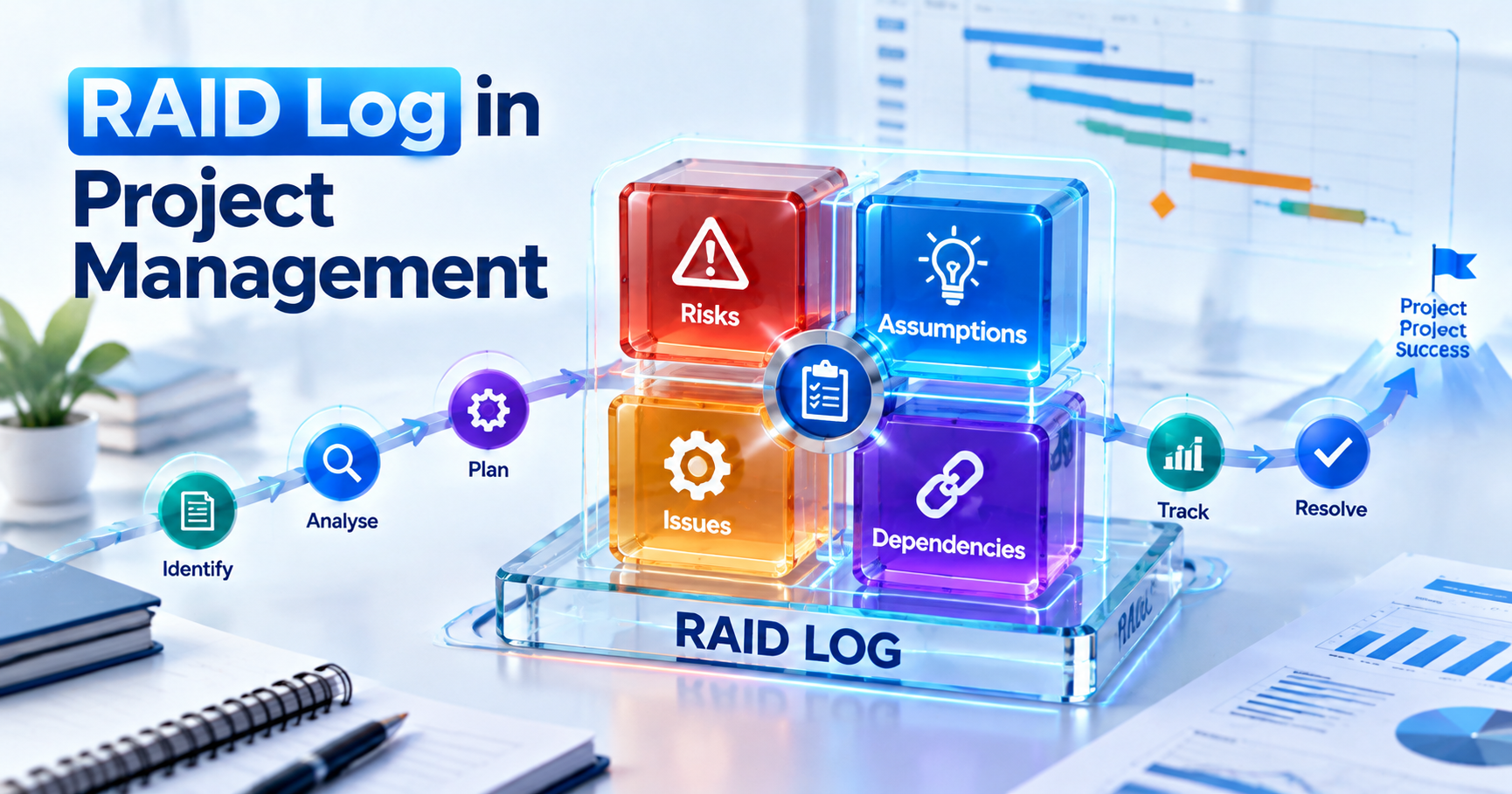
A RAID log is a single project document that tracks Risks, Assumptions, Issues and Dependencies, and every entry carries an owner, a status and a due date. Plenty of teams swap Dependencies for Decisions, or track both. Either way, it gives a project manager one place to see what could go wrong, what the plan is taking on trust, what's already broken and what the team is still waiting on.
Key Highlights of RAID Log
- RAID stands for Risks, Assumptions, Issues and Dependencies. In many PMOs, the "D" stands for Decisions, and some teams use both.
- A useful RAID log template needs about 12 columns, including owner, impact, probability, status, next review date and linked items.
- This guide includes a filled-in RAID log example for a cloud ERP rollout with 11 linked entries.
- Review cadence should match project size: weekly for most projects, twice a week for short, high-pressure releases.
- The RAID log does not replace a risk register on regulated or large projects. It summarises it and links to it.
Introduction to the RAID Log in Project Management
Every project manager has sat through this moment. A steering committee member asks, "Wasn't someone checking whether the vendor's API supports single sign-on?" and the room goes quiet, because nobody remembers who was checking, when, or what they found. A RAID log exists so that question has an answer.
So what is a RAID log in project management? Think of it as a living register where the team records four kinds of uncertainty and commitment as they come up, then reviews them on a fixed rhythm. The Institute of Risk Management's Short Guide to RAID describes it as a tool for keeping track of risks and issues, and recommends creating one during planning on large, complex projects and programmes. Teams use RAID at almost every project size anyway, since a spreadsheet costs next to nothing.
It sits alongside the rest of your project risk management work. It doesn't need to be clever. It needs to be current, owned and actually read.
What Does RAID Stand For?
The usual expansion, and the one the IRM guide uses, is Risks, Assumptions, Issues and Dependencies. Each letter below comes with a one-line example from a software rollout.
Risks
A risk is an uncertain event that would affect the project if it happened. Because it hasn't happened yet, it carries a probability. For example: "The data migration may take longer than the cutover weekend allows."
Assumptions
Anything the plan treats as true without proof is an assumption, and assumptions are dangerous precisely because they feel like facts. "Finance users will be released from month-end work for two days of training" is a typical one. Leave it unvalidated, and it can quietly turn into a risk.
Issues
An issue has already happened and needs action now. The IRM guide puts it neatly, describing issues as problems that arise with 100% probability. A realistic entry would read: "The test environment has been down for three days, blocking integration testing."
Dependencies
If your project needs something from another task, team, vendor or project before work can move, you have a dependency. "Go-live depends on the network team finishing the firewall change for the new cloud tenant" is the kind of line you'd log.
The Decisions Variant (and RAAIDD)
Not every PMO reads "D" as Dependencies. TheUniversity of Waterloo IST Project Management Office defines RAID as risks, actions, issues and decisions, with a decision section that records the decision, the date and who made it. The IRM guide also mentions teams that combine actions and decisions into a RAAIDD log.
Which version should you pick? Follow your organisation's template if one exists, and state the choice at the top of the file. With no standard to follow, track Dependencies in the RAID log and keep decisions on a separate tab.
Why Project Managers Use a RAID Log?
You get one place to look before every status meeting, rather than chasing risks in email, issues in a ticketing tool and assumptions in someone's head. A well-run log pays off in four ways:
- Shorter status meetings: You walk the open, high-priority items instead of going round the table for updates.
- Clear ownership: Every row has one named person. "The team" is not an owner.
- Early warning: A slipping dependency shows up a week before it hurts the schedule.
- Better closure: Waterloo's PMO recommends a final review of the log at closure to feed lessons learned.
The IRM guide adds that the log keeps stakeholders informed of status and progress, which explains why many PMOs attach a filtered view to the steering pack.
RAID Log Template: Columns to Include
Use one table with a "Type" column. That way you can filter, sort and count across all four categories, whereas separate tabs per letter look tidy but make it awkward to link related items.
| Column | What to Record |
| ID | Unique reference with a type prefix, such as R-04 or D-03 |
| Type | Risk, Assumption, Issue, Dependency (or Decision) |
| Title | Short, specific summary |
| Description | Cause, event and effect in one or two sentences |
| Owner | One named person responsible for the next action |
| Date Raised | When it entered the log |
| Impact | 1 to 5 scale, or Low, Medium, High |
| Probability / Priority | Probability for risks, priority for other types |
| Score | Impact multiplied by probability (risks only) |
| Response / Action | What will be done, by whom |
| Status | Open, In progress, Escalated, Validated, Closed |
| Due / Next Review Date | When the next action is due |
| Linked Items | Related IDs |
Names in the Owner column often match people in your stakeholder register, so keep spellings and roles consistent between the two documents.
Copy-Ready Blank RAID Log Template
Paste this into Excel or Google Sheets and convert it to a filterable table.
| ID | Type | Title | Description | Owner | Date Raised | Impact (1-5) | Probability/Priority (1-5) | Score | Response/Action | Status | Due/Next Review | Linked Items |
| R-01 | Risk | Open | ||||||||||
| A-01 | Assumption | Open | ||||||||||
| I-01 | Issue | Open | ||||||||||
| D-01 | Dependency | Open |
Two formulas make the sheet much more useful. In the Score column, use =IF(B2="Risk",G2*H2,""). For an overdue flag, add a column with =AND(K2<>"Closed",L2
RAID Log Example: A Filled-In Project RAID Log
Picture a cloud ERP rollout for a 400-person manufacturer with plants in Pune and Chennai, three weeks before go-live. The example is illustrative rather than a real client project, but the entries are the sort you'd expect to see.
| ID | Type | Title | Owner | Impact | Prob/Priority | Score | Response / Action | Status | Linked |
| R-01 | Risk | Data migration overruns cutover weekend | Data Lead | 5 | 3 | 15 | Second trial migration; rollback plan | In progress | A-01, D-02 |
| R-02 | Risk | Key users unavailable during month-end | Finance Manager | 4 | 4 | 16 | Move training; escalate to sponsor | Escalated | A-02 |
| R-03 | Risk | GST e-invoicing integration fails tests | Integration Lead | 5 | 2 | 10 | Vendor sandbox test; legacy fallback | Open | D-03 |
| A-01 | Assumption | Legacy master data under 5% duplicates | Data Lead | 4 | High | Validate with profiling report | Open | R-01 | |
| A-02 | Assumption | 40 key users released for 2 training days | Finance Manager | 4 | High | Confirm with plant heads | Invalid, raised R-02 | R-02 | |
| A-03 | Assumption | Licence count covers contract staff | Procurement | 3 | Medium | Check licence terms | Validated, closed | ||
| I-01 | Issue | UAT environment down for 3 days | Vendor PM | 4 | High | Daily restore update | In progress | R-01 | |
| I-02 | Issue | Report templates missing GSTIN field | Functional Lead | 3 | Medium | Change request raised | Open | ||
| D-01 | Dependency | Firewall change for cloud tenant | Network Team | 5 | High | Change window 31 Aug | Open | ||
| D-02 | Dependency | Data cleansing by business owners | Plant Heads | 5 | High | Weekly cleansing tracker | In progress | R-01, A-01 | |
| D-03 | Dependency | E-invoicing API credentials | Tax Manager | 5 | High | Application submitted | Open | R-03 |
Four things in this RAID log example are worth copying:
- A-02 became R-02. Once the plant heads wouldn't confirm the training release, the assumption was marked invalid and a new risk went in.
- R-02 is escalated. Its score of 16 crossed the team's threshold of 15.
- I-01 links to R-01. The UAT outage makes the migration risk more likely, and the link makes that chain visible to anyone reading the log.
- Closed items stay. A-03 remains for the audit trail. Filter it out of the meeting view rather than deleting it.
How to Create a RAID Log in 6 Steps?
Building a working RAID log takes under an hour. Keeping it alive through the project is where most teams struggle.
Step 1: Agree What "D" Means and What Goes In
Settle whether D means Dependencies, Decisions or both. The IRM guide warns that logging every small decision clutters the log, so use a simple filter: if it needs an owner and a date, it goes in.
Step 2: Pick the Tool and Set Up the Columns
Start from the template above, and lock Type and Status to dropdown lists so nobody invents new values.
Step 3: Run a RAID Workshop With the Core Team
Book 60 to 90 minutes and walk the plan phase by phase with four questions. What could go wrong? What are we taking for granted? What is already broken? What are we waiting on? For identification techniques in more depth, see the project risk management steps guide.
Step 4: Assign One Owner and One Next Action Per Entry
"Monitor" is not an action. "Run trial migration on 30 Aug and report duration" is.
Step 5: Score and Set Escalation Thresholds
Score risks on impact and probability, and agree up front which scores go to the sponsor. Then write that threshold at the top of the sheet so nobody has to debate it mid-crisis. Our guide to risk assessment explains the scoring methods in more depth.
Step 6: Fix the Review Rhythm and Publish It
Make the RAID review a standing agenda item and share a read-only view with stakeholders, which is the final step the IRM guide recommends.
RAID Log vs Risk Register vs Issue Log
The difference is breadth versus depth. A RAID log summarises four categories in one register, while a risk register and an issue log each go deep on a single category. Small projects can often run on the RAID log alone; on large or regulated ones, it should point to the detailed registers.
| Aspect | RAID Log | Risk Register | Issue Log |
| What it tracks | Risks, assumptions, issues, dependencies (or decisions) | Uncertain future events | Problems happening now |
| Time focus | Past, present and future | Future | Present |
| Typical fields | Type, owner, status, impact, due date, links | Probability, impact, proximity, triggers, response, contingency | Description, impact, resolution, escalation |
| Depth | Summary | Detailed | Detailed |
| Best for | Small to mid-size projects, status meetings | Large, regulated or high-risk projects | Any project with active problems |
| Framework tie-in | Common practice, not mandated by PMI or PRINCE2 | PMBOK risk processes, PRINCE2 risk register | PMBOK issue log, PRINCE2 issue register |
When you need a fuller template for risks alone, our guide to the risk register in project managementcovers scoring and response fields in detail.
How the RAID Log Maps to PMBOK and PRINCE2
PMI draws the connection fairly directly. The PMP Examination Content Outline (July 2026)lists "Maintain a risk register" under the Plan and manage risk task, and "Recognize when a risk becomes an issue" under Remove impediments and manage issues. The Process domain also asks candidates to assess consolidated plans for dependencies, and a RAID log lets you handle all three in one artifact.
PRINCE2 keeps separate records: a risk register, an issue register and a daily log for informal notes. PeopleCert'soverview of PRINCE2 7 issues defines an issue as anything that could affect the project and points out that all changes start as issues. Many PRINCE2 project managers keep a RAID-style view for meetings while the formal registers stay the record of truth. If you work in a PRINCE2 environment and want to see how those registers fit together, Simpliaxis's PRINCE2 Foundation certificationcourse walks through them.
RAID Analysis: How to Review and Prioritise Entries
RAID analysis is the regular review in which the team scores, sorts and acts on what's in the log. Skip it and the log turns into a list nobody acts on.
Scoring
Risks get impact multiplied by probability, each on a 1 to 5 scale, which gives a range of 1 to 25. Assumptions are rated by how badly the plan breaks if they turn out wrong, while issues and dependencies take a High, Medium or Low priority tied to schedule impact. Waterloo's PMO guidance makes a sensible default: escalate high and very high risk scores, and monitor low to medium ones. Probability and impact matrices and other methods are covered in project risk management tools and techniques.
Review Cadence by Project Size
No standard prescribes these intervals; they come from common practice, so adjust them to your governance model.
| Project Type | Team Review | Sponsor or Steering Review | What to Cover |
| Small (under 3 months, one team) | Weekly, 15 minutes | Monthly | Open high items, overdue actions |
| Medium (3 to 12 months, several teams) | Weekly, 30 minutes | Fortnightly or monthly | All open items, new entries, escalations |
| Large programme (12 months plus, vendors) | Weekly per workstream | Monthly steering | Cross-workstream dependencies, top 10 risks |
| Go-live or cutover window | Daily stand-up | Twice a week | Issues, dependencies due this week |
Escalation Rules
Agree escalation rules before you need them, and write them down. A typical set looks like this:
- Risk score of 15 or more goes to the sponsor within two working days.
- A dependency slipping past a milestone goes to the owning team's manager.
- An invalid assumption becomes a risk or issue the same day.
- Issues open beyond two review cycles are flagged in the steering report.
Using a RAID Log in Agile and Hybrid Projects
Yes, agile teams need one too. They have the same risks, assumptions, issues and dependencies, and they simply surface them in different ceremonies. With the PMP outline stating that approximately 60% of exam items cover adaptive/agile and hybrid approaches, it's worth knowing where each type shows up:
- Sprint planning: Capture assumptions behind the sprint goal and dependencies on other teams. Seemanaging dependencies in agilefor practical techniques.
- Daily Scrum: Blockers are issues. Log them if they last more than a day or need someone outside the team.
- Sprint review: Stakeholder feedback often reveals new risks and invalid assumptions.
- Retrospective: Review which risks came true and why.
One team on its own can keep risks and blockers on its board with a label. Things change once several teams depend on each other, because a programme-level RAID log reviewed at a scrum of scrums shows leadership the cross-team picture that no single board can. Hybrid projects often split the work, running a RAID log for vendor, infrastructure and compliance items while delivery teams manage impediments on their own boards. Our guide to hybrid project management covers how to combine the two approaches.
RAID Log Tools: Excel, Google Sheets, Jira, Smartsheet and Others
Pick whichever tool your team already opens every day. A beautiful log in a tool nobody visits is worse than a plain spreadsheet everyone checks.
| Tool | Good For | Watch Out For |
| Excel | Offline work, formulas, PMO templates | Version conflicts when emailed around |
| Google Sheets | Real-time sharing and comments | Messy without dropdowns and filters |
| Jira | Teams already tracking work there | Needs admin setup; harder for business readers |
| Smartsheet and similar work management tools | Sheet-like views with workflow features | Licence cost; another tool to learn |
AI assistants are handy for drafting risk descriptions from meeting notes or summarising open items before a steering meeting. Treat whatever they produce as a first draft and keep a human owner on every row. For guided practice with these planning and reporting use cases, the Generative AI for Project Managers trainingis a reasonable next step.
Common RAID Log Mistakes
Most RAID logs don't fail dramatically. They're full in week one and stale by week six, usually for one of these reasons:
- No single owner. Rows assigned to "IT" or "Vendor" never move.
- Issues logged as risks. If it has already happened, it's an issue, and leaving it as a risk hides the urgency.
- Assumptions never validated. Give every assumption a "validate by" date.
- Vague descriptions. "Resource risk" tells nobody anything. Write the cause, event and effect.
- No link to the plan. If a dependency's date doesn't match the schedule, one of them is wrong.
- Monthly updates only. A RAID log touched once a month is archaeology.
Expect interviewers to probe these, often with "Tell me about a risk that turned into an issue." You'll find more questions in that style in our list of project management interview questions.
Conclusion
A RAID log gives a high return for very little effort: one table, four categories, one owner per row and a review rhythm the team actually keeps. Start with the template above, run a one-hour workshop, set your escalation thresholds and review the log every week. As the project grows, keep the RAID log as the summary and let a detailed risk register and issue register carry the depth.
Risk, issue and dependency management are tested directly in the 2026 PMP exam content outline. If you're preparing for it, Simpliaxis's PMP certification training covers these tasks with scenario practice.






 Lowest-Price Challenge











 Personalized Path


.webp)


 USA
USA  Canada
  India
India  UK
UK  Australia
  Singapore


