


 Call Us



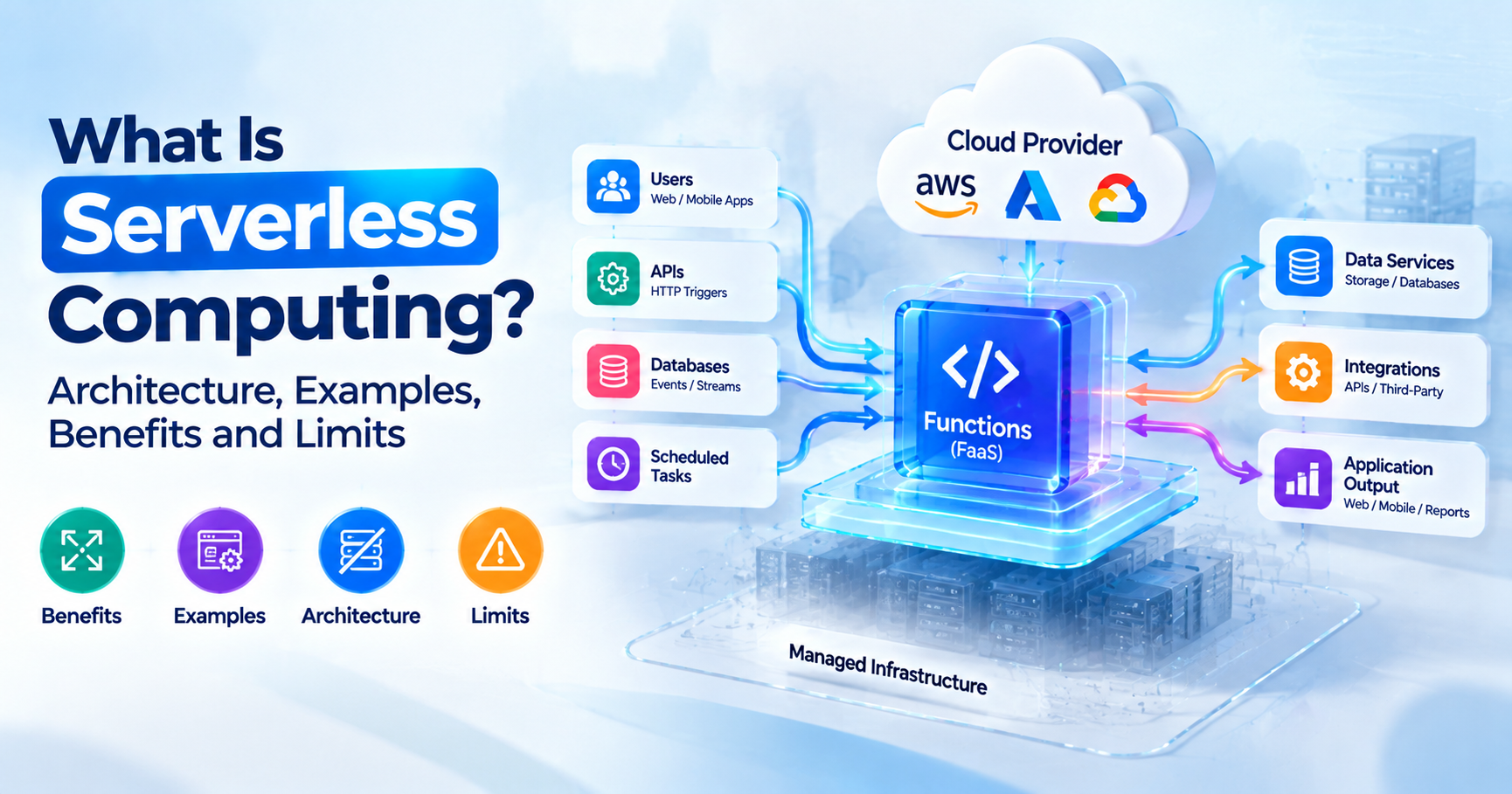
Serverless computing is a cloud model where you deploy code or use managed backend services while the provider takes care of servers, scaling and patching, and you're billed only for the requests and compute time you actually use. In the IaaS/PaaS/SaaS stack, it sits closest to PaaS. The difference is granularity: you hand over individual functions rather than whole applications, and idle time costs nothing.
Key Highlights of Serverless Computing
- Serverless has two halves: Function as a Service (FaaS) runs your code on events; Backend as a Service (BaaS) replaces backend code with managed databases, auth and storage.
- A function's lifecycle is event, trigger, cold or warm start, execution, then scale to zero. That loop explains most serverless costs and bugs.
- Hard limits differ a lot by platform: 15 minutes per AWS Lambda invocation, 10 ms of CPU per request on the Cloudflare Workers free plan, up to 60 minutes for Cloud Run functions.
- Serverless is cheap for spiky, event-driven workloads and often expensive for steady, high-throughput traffic, as the worked pricing example shows.
- Serverless is a deployment and billing model, so it pairs with microservices instead of replacing them.
Introduction to Serverless Computing in Cloud Computing
Think about a college admissions portal in India. For eleven months of the year, it barely gets any traffic, and then results come out, and it gets hammered for two days. On virtual machines, you either pay for peak capacity all year or scramble to add servers the night before. With serverless, the same code handles the quiet months and the rush, and the bill tracks the traffic.
The servers haven't gone anywhere. You've just stopped renting, sizing and patching them yourself. If you're still getting oriented on the major providers, read what AWS is and how its services fit together first and come back.
The classic cloud computing reference modelsplits cloud services into three layers: IaaS gives you machines, PaaS gives you a platform to run applications on, and SaaS gives you finished software. Within that model, serverless is usually described as an evolution of PaaS, because the platform still runs your code, only now it does so one function at a time and charges per invocation.
How Serverless Computing Works?
The platform connects events to short-lived functions, starts each one on demand in an isolated environment, and shuts it down once demand drops. You write the handler and the platform owns everything around it.
Read left to right, a typical serverless architecture diagram looks like this in text form:
- Event source. An HTTP request hits an endpoint, a file lands in object storage, a queue receives a message, or a schedule fires.
- Trigger. The platform maps the event to a function and passes the payload, usually JSON, as input.
- Execution environment. If a warm environment exists, the platform reuses it. If not, it downloads your code, starts the runtime and runs your initialization code. That extra work is the cold start.
- Function code. Your handler runs for milliseconds to seconds, and calls managed (BaaS) services such as a database, cache or queue.
- Response or next event. The function returns a result or emits an event that triggers the next step.
- Scale out, then to zero. Many concurrent events mean many parallel environments; no events means nothing running and no compute charge.
AWS documents this lifecycle for Lambda in some detail. Its execution environment guide says cold starts typically occur in under 1% of invocations and range from under 100 ms to over 1 second, and that they show up more often in dev and test functions because those see less traffic.
One consequence is worth building habits around. Code outside the handler, such as imports, SDK clients and database connections, runs once per environment rather than once per request, so that's where expensive setup belongs.
FaaS vs BaaS: The Two Parts of Serverless
Most real serverless applications use both. FaaS is code you write, and the platform runs in response to events, while BaaS is backend functionality (a database, a login system, file storage) that you consume through an API instead of building it.
TheCNCF Serverless Working Group whitepaperdescribes function as a service as event-driven computing in which small units of code are triggered by events or HTTP requests, and BaaS as third-party, API-based services that replace core pieces of an application's functionality.
| Aspect | FaaS (Function as a Service) | BaaS (Backend as a Service) |
| What you provide | Function code and its dependencies | Configuration, schemas, rules |
| What the provider runs | Your code in short-lived environments | Its own service (database, auth, storage) |
| Typical examples | AWS Lambda, Azure Functions, Cloud Run functions, Cloudflare Workers | Amazon DynamoDB, Amazon Cognito, Firebase Authentication, Amazon S3 |
| Billing unit | Requests plus compute time | Reads, writes, storage, active users (varies by service) |
| Main risk | Cold starts, timeouts | Data model and API lock-in |
If you'd otherwise run a small web server for a piece of work, FaaS is probably the fit. If you'd otherwise install and operate software for it, like a database or an identity server, go looking for a BaaS product first.
Serverless Architecture: Core Components and Patterns
Four building blocks make up almost every serverless architecture: event sources, functions, managed services, and an orchestration layer once the work has several steps. The six patterns below cover the bulk of real workloads.
API Backend Pattern
An API gateway routes each HTTPS path to a function that reads and writes a managed database. Picture a mobile app's /orders endpoint backed by one function per route and a NoSQL table. Keep sessions in the database or in a token, never in function memory, because the next request may land in a different environment.
File and Image Processing Pattern
An upload to object storage triggers a function that resizes images, extracts text or scans for malware. An HR portal, for instance, can generate thumbnails and OCR resumes the moment candidates upload them.
Scheduled Jobs Pattern
A cron-style scheduler invokes a function every hour or every night. A common case is a nightly job that pulls the day's sales from a payment gateway API and writes a summary to a reporting table.
Event Streaming Pattern
Records from a stream or queue arrive in batches, and a function processes each batch. An e-commerce site might update inventory counts and fire low-stock alerts from an order-events stream this way. Keep an eye on batch sizes and retry behaviour, since a single poison message can block a partition.
Chatbot and LLM Tool Pattern
A chat interface calls a function that fetches context from a vector store, calls a model API and returns the answer. Functions also make good agent "tools" for small actions like looking up an order or creating a ticket. For the bigger picture, see how AI workloads are changing cloud computing. Our explainer onretrieval-augmented generation (RAG) shows how that retrieval step works.
IoT Ingestion Pattern
Devices send small telemetry messages to a broker, and functions validate each one and route it to storage or alerting. Cold-chain sensors in pharma trucks are a good example: a function raises an alert as soon as a reading crosses the temperature threshold.
Serverless Computing Examples by Industry and Use Case
You'll find serverless wherever work arrives in bursts or in response to events:
- Retail and fintech: flash-sale checkout APIs, transaction notifications, statement PDFs generated at month-end.
- Education and media: result publishing portals, assignment upload processing, video transcoding triggers.
- Healthcare and IoT: appointment reminders, lab report ingestion, device telemetry pipelines.
- SaaS and data teams: webhooks from GitHub or payment providers, Slack bots, light ETL steps and data quality alerts. For heavier pipelines, see our comparison of the best ETL tools.
What ties these together is uneven demand. If your workload draws a flat line on a graph all day, serverless is less likely to be the cheapest option.
Benefits of Serverless Computing
You give up less time to operations, scaling happens on its own, and you stop paying for capacity that sits idle. Those are the headline benefits of serverless computing, and each comes with a detail worth knowing.
- No server management. No OS patching, capacity planning or instance sizing.
- Automatic scaling. The platform adds environments as events increase, though you still need to know its concurrency limits. AWS Lambda's quotas pagelists a default of 1,000 concurrent executions per Region, which can be raised.
- Pay-per-use pricing. Billing follows requests and execution time, so a side project or low-traffic internal tool can often stay inside a free tier for the whole month.
- Faster small features. A new webhook or scheduled job doesn't need an infrastructure ticket.
Limitations and Challenges of Serverless Computing
You swap operational work for platform constraints, and a few of those constraints hurt more than teams expect.
Cold starts. The first request to a new environment pays for the code download, runtime start and your initialization code. A background job won't notice. A checkout API with a strict latency budget will. Provisioned or always-ready instances help, but you pay for them even when they sit idle.
Execution time limits. A 40-minute video transcode needs a different home, or it has to be split into steps.
Observability. One request may touch five functions, two queues and a database, and without distributed tracing and correlation IDs you're left guessing where it failed.
Vendor lock-in. Your function code may be portable, but triggers, IAM policies, event formats and BaaS data models are provider-specific. The CNCF whitepaper itself flags the lack of standardization between providers as a lock-in risk.
Cost at scale. Per-request pricing that looks tiny at 1 million requests a month adds up at 1 billion, and chatty designs that call several functions per user action multiply it.
State and connections. Functions are stateless and can run as thousands of parallel copies, which can exhaust the connection limit on a traditional relational database. A connection pooling proxy or a serverless-native database solves most of this.
Serverless Platforms Compared: AWS Lambda, Azure Functions, Google Cloud and Cloudflare Workers
Most serverless functions in production run on one of these four platforms. The figures come from each provider's official documentation as fetched on 5 October 2026, and since limits change, check the linked page before you design around any of them.
AWS Lambda allows up to 15 minutes per standard invocation and 128 MB to 10,240 MB of memory, with CPU allocated in proportion to memory, per the Lambda quotas page. Azure Functions now points new apps to the Flex Consumption plan; Microsoft's hosting options pagemarks the original Consumption plan as legacy, with Linux Consumption retiring on 30 September 2028. Google Cloud Run functions is the new name for Cloud Functions, which is now part of Cloud Run. Cloudflare Workers runs code in lightweight isolates at Cloudflare's edge.
| Feature | AWS Lambda | Azure Functions (Flex Consumption) | Google Cloud Run functions | Cloudflare Workers |
| Max run time | 15 minutes per invocation | No enforced maximum; HTTP responses within 230 seconds | 60 minutes (default 5) | Paid: 5 min CPU per request; Free: 10 ms CPU |
| Memory | 128 MB to 10,240 MB | 512 MB, 2,048 MB or 4,096 MB instance sizes | Configurable per service | 128 MB per isolate |
| Languages | Node.js, Python, Java, .NET, Ruby; Go and Rust via OS-only runtime | C#, JavaScript/TypeScript, Python, Java, PowerShell; Go in preview | Node.js, Python, Go, Java, .NET, Ruby, PHP | JavaScript/TypeScript, Python, Rust, WebAssembly |
| Billing model | Requests plus GB-seconds of duration | Executions plus memory while executing, plus any always-ready instances | Requests plus vCPU and memory time | Requests plus CPU milliseconds (wall-clock duration not billed) |
| Official docs | Quotas | Hosting options | Timeouts | Limits, Pricing |
Serverless vs Containers vs Virtual Machines
The real difference is how much of the stack you control and how you pay for it. Virtual machines give you the most control along with the most operations work, serverless gives you the least of both, and containers land somewhere in the middle. If containers are new to you, read what Docker is and how it works.
| Factor | Serverless functions | Containers on Kubernetes | Managed containers (Cloud Run, Azure Container Apps) | Virtual machines |
| Who manages servers | Provider | You manage the cluster (or nodes) | Provider | You |
| Scaling | Automatic, per event, to zero | Autoscalers you configure; zero needs add-ons | Automatic, can scale to zero | Manual or autoscaling groups |
| Billing | Per request and compute time | Per node, running or idle | Per request or per instance time | Per hour or second while running |
| Run time limits | Minutes | None | Per-request timeout | None |
| Wins when | Spiky, event-driven, short tasks | Many services, steady load, need for control | Containerised web apps with variable traffic | Legacy apps, special OS needs, licences tied to hosts |
When teams weigh serverless vs containers, it usually comes down to two questions. Does the work finish inside the platform's time limit, and is traffic uneven enough that scaling to zero actually saves money? If either answer is no, containers usually win. Before committing to orchestration, read Docker vs Kubernetes and thisintroduction to Kubernetes.
Serverless vs Microservices: Are They the Same?
No. Microservices is an architecture style in which you split an application into small services, each owning one business capability and its data, whereas serverless describes how you run and pay for code.
So the two combine freely. You can build microservices from groups of functions behind an API, or from long-running containers on Kubernetes. You can even stuff a whole monolith into a single function, though that rarely ends well.
Plenty of teams settle on a split along traffic lines. Core services with steady, heavy load run as containers, while the event-driven glue around them (webhooks, notifications, file processing, scheduled jobs) runs as functions. If your services will live in containers, Simpliaxis's Docker and Kubernetes training covers the packaging and orchestration side with hands-on practice.
How Serverless Pricing Works?
You pay on two meters: requests and compute. On memory-based platforms, compute is measured in GB-seconds, which is memory in GB multiplied by runtime in seconds.
To make that concrete, take the US East (N. Virginia), x86 rates on the AWS Lambda pricing page as of 5 October 2026: $0.20 per 1 million requests and $0.0000166667 per GB-second, with a free tier of 1 million requests and 400,000 GB-seconds per month.
Assume a function with 512 MB (0.5 GB) of memory and an average duration of 200 ms (0.2 seconds).
| Monthly requests | GB-seconds used | Billable GB-seconds after free tier | Compute cost | Billable requests after free tier | Request cost | Total Lambda cost |
| 3 million | 300,000 | 0 | $0.00 | 2 million | $0.40 | $0.40 |
| 30 million | 3,000,000 | 2,600,000 | $43.33 | 29 million | $5.80 | $49.13 |
For the second row, 30,000,000 x 0.2 s x 0.5 GB = 3,000,000 GB-seconds. Subtract the 400,000 free GB-seconds, and you're left with 2,600,000 x $0.0000166667, which comes to about $43.33.
The table teaches three things:
- Duration and memory drive the bill more than request count.
- The function is rarely the whole bill. API gateways, data transfer, logging and the database are priced separately and aren't in this table.
- Edge platforms meter differently. Cloudflare's Workers pricing page bills the paid plan on requests and CPU milliseconds, with a $5 monthly minimum, and doesn't charge for wall-clock duration. A function that spends most of its time waiting on an external API costs less there.
When Not to Use Serverless?
Plenty of workloads run better elsewhere, and these five are the usual suspects:
- Long-running jobs. Batch processing, model training or rendering that runs past the platform limit belongs on containers or batch services.
- Steady, high traffic. Heavy, flat, round-the-clock traffic is often cheaper on right-sized containers or reserved VMs.
- Strict latency budgets. If p99 latency must stay under tens of milliseconds, cold starts are a risk unless you pay for warm capacity.
- Strict portability needs. Running the same system on two clouds or on-premises gets harder with every provider-specific trigger and BaaS service you adopt.
- Stateful or connection-heavy workloads. WebSocket servers, in-memory caches and apps holding many database connections sit more comfortably in long-running processes.
Picking between Lambda, containers and EC2 for a given scenario is everyday architecture work. If you want structured practice with those trade-offs, theAWS Solutions Architect Associate (SAA-C03) course works through them service by service. The AWS Solutions Architect Associate certification guide explains how the exam tests these choices.
Getting Started With Serverless: A First Project
The fastest way to learn is to build one small event-driven project from start to finish. An "upload and thumbnail" service is a good first choice:
- Create a free-tier account on one cloud and set a billing alert on day one.
- Create two storage buckets, one for uploads and one for thumbnails.
- Write a Python or Node.js function that receives the upload event, resizes the image and writes the thumbnail. Keep library imports and the storage client outside the handler.
- Connect the trigger and grant least-privilege permissions: read on uploads, write on thumbnails, nothing else.
- Test with real files, including a very large one, so you see timeouts and memory errors on purpose.
- Read the logs. Compare the init duration on the first invocation with warm runs.
- Define it as code with AWS SAM, the Serverless Framework, Terraform or Azure Functions Core Tools, so you can tear it down and rebuild it in minutes.
If cloud fundamentals still feel shaky, spend some time on core AWS concepts like IAM, storage and regions before step 1. It'll make the permissions step far less confusing.
Conclusion
Serverless computing hands server management, scaling and idle cost to the provider, and in return you accept time limits, cold starts and tighter coupling to one platform. It's a strong fit for spiky, event-driven work and a poor one for long-running, steady or latency-critical workloads.
Learn the request lifecycle, run the pricing math against your own traffic, and decide between functions, containers and VMs one workload at a time. If you'd like guided labs across compute, storage and serverless services, Simpliaxis'sCloud Computing with AWS training is a sensible place to build that hands-on experience.









 Lowest-Price Challenge











 Personalized Path


.webp)


 USA
USA  Canada
  India
India  UK
UK  Australia
  Singapore


