


 Call Us



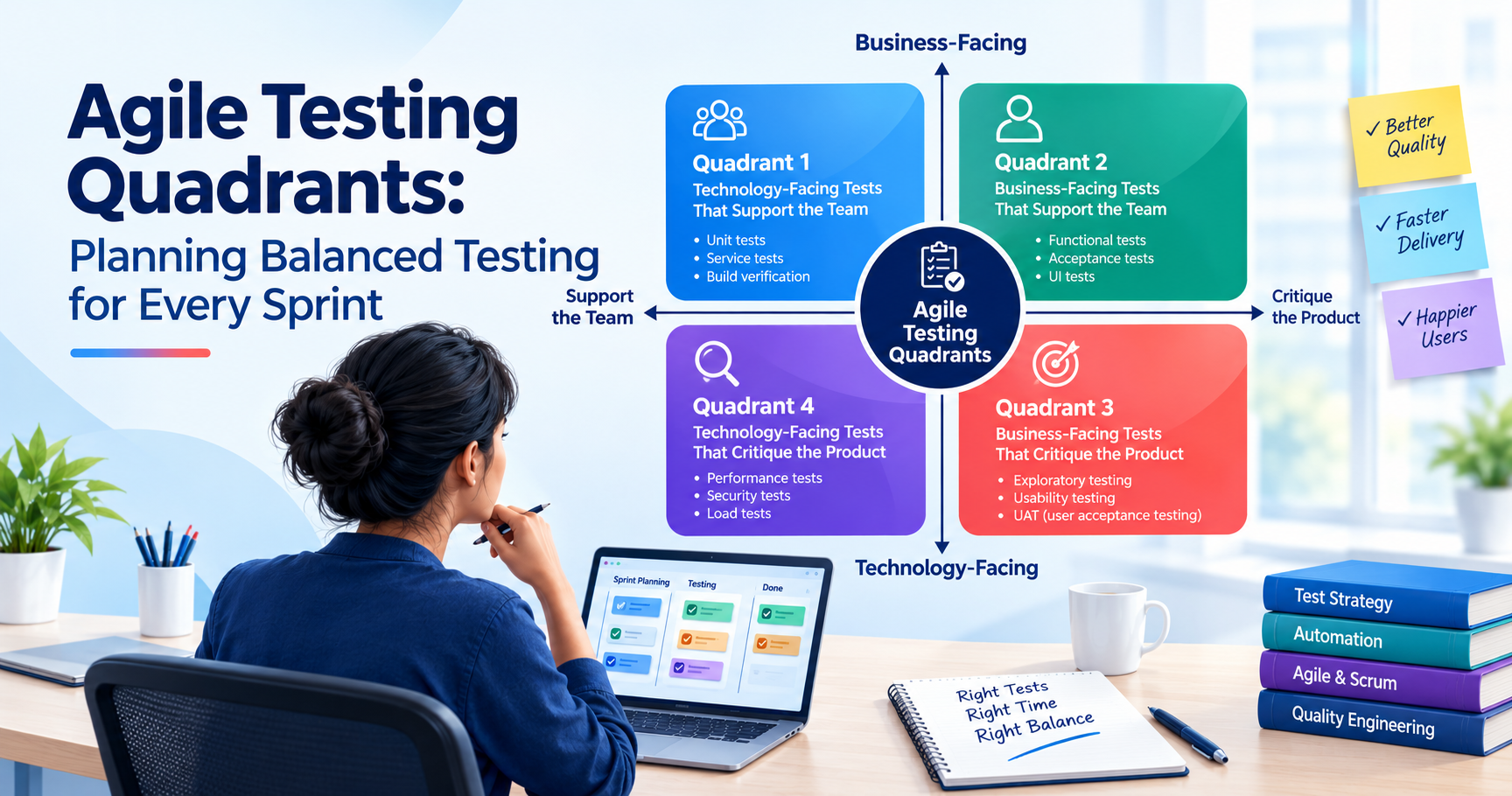
The agile testing quadrants help software teams plan testing from four perspectives: technical correctness, business requirements, user experience, and system quality. The model, developed from Brian Marick’s original testing matrix and popularized by Lisa Crispin and Janet Gregory, groups tests according to whether they support development or critique the product, and whether they are business-facing or technology-facing.
The quadrants are not four stages that teams must complete in order. They are a way to spot gaps in a testing strategy and decide which checks a feature needs before it is released.
Key Highlights of Agile Testing Quadrants
- Agile testing quadrants help teams move beyond functional correctness to a broader view of product quality.
- Q1 and Q2 give feedback to guide development and Q3 and Q4 help reveal problems that predefined checks might miss.
- Developers, testers, product owners and technical specialists can contribute to more than one quadrant.
- The agile testing pyramid complements the model by assisting teams in selecting a sensible combination of unit, integration, and end-to-end tests.
- The number of tests is not a target. The amount of testing effort should be aligned with the risks of the feature.
- Using the quadrants during sprint planning can help teams identify missing checks before development is complete.
Introduction
A checkout feature may calculate the correct order total and still fail when hundreds of customers try to pay at once. A mobile app may meet every stated requirement but leave users struggling to find a basic setting. These problems have something in common: passing functional tests does not necessarily mean a product is ready for everyday use.
Agile teams face this challenge with every release. Requirements change, new features impact existing code and customers want the software to work reliably. Testing has to keep pace, but not be the last barrier to slow delivery.
The agile testing quadrants represent a pragmatic way to handle this problem. The model does not consider testing as one activity. Instead, it divides testing into four different categories that are supposed to answer different questions about software quality.
Imagine an online shop with a discount feature. A developer examines calculation logic, the team reviews promotion rules, a tester explores the checkout experience, and an engineer stress tests the service. Each activity provides a different piece of evidence as to whether the feature is ready.
Knowing these differences helps teams select the right tests, engage the right people, and identify risks before they become costly problems. Let’s take a look at how the quadrants work and how you can use them in your daily agile development.
What Are the Agile Testing Quadrants?
The agile testing quadrants are a classification of software tests based on purpose, a core idea that separates agile testing from traditional testing. They help teams think through different aspects of quality rather than using a single test suite to determine if an application is ready.
The model is two-dimensional:
- Business-facing vs. technology-facing: Is the test more about business behavior and user needs, or is it more about technical implementation and system characteristics?
- Team support or product critique: Is the team driving development or testing the product for vulnerabilities and risks?
These dimensions form four quadrants. They each have a different focus for testing, although there may be some overlap in the activities, depending on what the team wants to learn.
Understanding the Two Dimensions
Business-facing tests are about outcomes stakeholders are able to recognize. For an online store, that could mean checking that a discount is applied to an eligible customer or a canceled order results in the relevant refund process.
The technology-facing tests evaluate technical behavior. Checking the output of a function, verifying communication between services, or measuring how much memory an application uses.
The second dimension is testing purpose.
Testing helps the team understand what to build and if the implementation is meeting the expectations of developers and stakeholders. They often give feedback during development when it is easier to change.
The product critical tests are more investigative. They look for weaknesses, unexpected behavior, and risks that may not be obvious from the requirements alone.
This critique is not to disparage the development team. It requires a deep analysis of the product, not assuming that it works because the expected test cases pass.
Why Do Agile Teams Use Testing Quadrants?
The quadrants give teams a shared way to discuss testing requirements. Instead of asking whether a feature has been tested, they can ask which aspects of its quality have been examined and what evidence is still missing.
Take a password-reset feature. Unit tests can verify that tokens expire, acceptance tests can verify the reset workflow, exploratory testing can uncover confusing error messages and security testing can probe whether reset tokens can be abused.
Each test has a different objective. But if you focus only on the first two, you may not discover problems with usability or security.
The model can be used by teams in backlog refinement, sprint planning, test automation discussions and release reviews. It can also help identify when specialist support is needed.
The quadrants are not a checklist that every feature must satisfy in exactly the same way. A minor text change and a new payment integration carry different risks. The model helps teams decide what deserves attention rather than prescribing an equal amount of testing for every story.
The Four Quadrants
The four quadrants serve different testing needs. Understanding the differences helps to select the correct techniques and to avoid gaps in test coverage.
Quadrant 1: Technology-Facing Tests That Support the Team
Quadrant 1 (Q1) includes tests that help developers confirm that individual pieces of code and components are correct. They are often narrow and give you quick feedback.
Common Q1 activities include:
- Unit testing.
- Component testing.
- Testing functions, classes, and calculations.
- Checking conditions and business logic at the code level.
- Verifying closely related components in isolation.
Think of a shopping app where shipping rates are based on destination, weight, and speed of shipping (overnight, 2-day etc). The developer can then try different combinations of these inputs to make sure the charge returned is correct.
One test could verify that an order that is eligible for free shipping gets it. Another might verify that an order below the eligibility threshold receives the standard fee. If a later code change breaks either rule, the tests can flag the problem before it reaches a customer.
Typical tools and techniques
- JUnit for Java.
- pytest for Python.
- Jest or Vitest for JavaScript and TypeScript.
- NUnit for .NET.
- Mocks, stubs, and test fixtures for isolating components.
Q1 testing is often automated because it’s quick and can be run anytime code changes. Also, they are more likely to make failures easier to investigate because the scope of each test is relatively small.
One approach that can aid this work is test-driven development (TDD). Developers write a test for the expected behavior, then write the code, and then refactor the code until the test passes.
But there is a limit. A passing unit test only proves that the behavior it tests is working. It is not a guarantee that the full application, its integrations or its user interface will work as expected.
Quadrant 2: Business-Facing Tests That Support the Team
Quadrant 2 (Q2) is about the application fulfilling business needs. These tests help the team to convert user stories and acceptance criteria into examples of expected behavior.
Q1 asserts that a discount calculation is returning the expected value, while Q2 asserts that the customer is getting the expected discount through the appropriate purchasing workflow.
Typical activities for Q2 include:
- Functional testing.
- Acceptance tests.
- Tests based on the story.
- API testing for business rules and processes.
- Developed examples together with product owners and domain experts.
- Automated checks on the most important customer journeys.
Imagine a subscription company that goes from monthly to yearly billing. Eligible plans will include a discount for customers.
Examples of such scenarios could be defined by the team, such as an eligible subscription, an ineligible plan, an expired offer, or a customer moving from monthly to annual billing.
These scenarios should help clarify what the feature must do before the team considers it done.
Q2 Tests can be manual or automated. Postman is good for testing API behavior; Playwright or Cypress are good for automating browser-based workflows. Cucumber can support teams cucumber can support teams that express acceptance scenarios in a behavior-driven development (BDD) format (see these BDD tools).
The tool is less important than the question being answered: does the software behave as the business expects?
How Q2 differs from Q1
The distinction is mainly about scope and purpose. Q1 usually concentrates on individual components and their technical behavior. Q2 is all about business needs and user satisfaction.
There can be an overlap. A unit test will validate a business rule for us, but a broader acceptance test will tell us if that rule is working as we expected it to in the customer journey.
Teams can explore test-driven development and BDD vs TDD and learn how these practices help to turn expected behavior into testable examples.
Quadrant 3: Business-Facing Tests That Critique the Product
Quadrant 3 (Q3) examines how well the product serves its intended users. Rather than merely validating pre-defined expected results, testers explore the application, observe behavior, and look for problems that requirements may not have foreseen.
Normal activities for Q3 include:
- Exploratory testing.
- Usability testing.
- User acceptance testing (UAT).
- Session-based testing.
- Beta testing and customer feedback.
- Evaluating important end-to-end user journeys.
For instance, a banking app adds a new screen to manage beneficiaries. The automated tests verify that customers are able to add, edit and delete beneficiaries.
But during exploratory testing, the tester sees the confirmation message disappear before the users have a chance to read it. There is a risk of confusing two similarly named beneficiaries, which could lead to the deletion of the wrong one.
The application may meet its written acceptance criteria but these observations suggest possible problems that can negatively impact user satisfaction.
Here is where the value comes in Q3. No set of requirements can anticipate every interaction, misunderstanding or unexpected sequence of actions. Testers need room to investigate what happens when users behave differently from the expected path.
Tools such as browser developer tools, screen readers, accessibility checkers, and session-recording software can help gather evidence. The important work, however, is interpreting what that evidence means for users.
What makes Q3 different?
Q3 focuses on learning about the product through evaluation. Exploratory testing, however, mixes test design, execution and learning rather than just executing a predefined set of scripted steps.
Teams can also involve product owners, subject matter experts and representative users to evaluate if a workflow makes sense in practice.
Another related learning pathway for professionals wishing to deepen their knowledge of agile development is Certified Scrum Developer training.
Quadrant 4: Technology-Facing Tests That Critique the Product
Quadrant 4 (Q4) includes technical quality attributes that cannot be found out by functional testing alone. It helps teams understand whether the system can be expected to operate reliably under expected conditions and survive relevant technical risks.
Common Q4 activities include:
- Performance and load testing.
- Stress and scalability testing.
- Security testing.
- Reliability and resilience testing.
- Compatibility testing.
- Infrastructure and deployment testing.
- Evaluating resource consumption and system capacity.
Suppose a ticket-booking platform expects a surge of traffic when tickets for a popular event go on sale. Functional tests can check that customers can select seats and make payments. There is no mention of whether the platform can cope with thousands of simultaneous requests without unacceptable delays.
Performance tests can simulate a particular workload and measure response times, throughput and error rates. Security testing may include authentication, authorization, input validation and exposure to common vulnerabilities;
There are tools that can help with some of this work: Apache JMeter, k6, Gatling, OWASP ZAP. JMeter, for example, can be used to perform load and performance testing of web applications and other services. <cite>turn701348search4</cite> Q4 testing is typically performed by developers, quality engineers, security specialists and operations teams.
Some checks can run automatically in a CI/CD pipeline; others need a representative environment and specialist investigation.
The depth of testing should reflect the consequences of failure. A small internal utility may have modest capacity requirements, while a payment service or public booking platform may need careful performance, security, and recovery testing.
The point is not to run every possible technical test. It is to identify the risks that could seriously affect the product and gather evidence that those risks are being managed.
Quadrants With Examples
The following comparison shows how each quadrant approaches quality, along with representative tests and tools.
| Quadrant | Purpose | Example Tests | Typical Tools |
| Q1 | Check technical components and implementation logic | Unit tests for tax calculations; component tests for validation rules | JUnit, pytest, Jest, NUnit |
| Q2 | Confirm business requirements and expected functionality | Checkout acceptance tests; subscription workflows; API business-rule checks | Postman, Playwright, Cypress, Cucumber |
| Q3 | Investigate usability and uncover unexpected behavior | Exploratory checkout testing; account-setup usability tests; UAT | Browser developer tools, screen readers, test-management tools |
| Q4 | Evaluate technical quality and operational risks | Load tests, security assessments, resilience tests, compatibility checks | k6, JMeter, Gatling, OWASP ZAP |
These are common examples, not fixed assignments. A tool can support different quadrants depending on the test's purpose. An API test that verifies a business rule may fit Q2, while an API test that measures throughput under load is more closely associated with Q4.
Example: Testing an E-Commerce Checkout
Picture a team developing a checkout experience, including discount codes, various payment methods, and order confirmation emails.
Different views are offered by each quadrant:
- Q1 Verify calculations: Discount logic, tax rounding and shipping eligibility are tested by developers. A unit test might check that a 10% discount is being applied correctly and that the order total never goes negative due to an invalid calculation.
- Q2 Check the buying rules: The team verifies that valid coupons are accepted, expired coupons show the right message and successful payments create the right order details.
- Q3 Think about the customer experience: Testing reveals an invalid-coupon message below the fold on a mobile screen. Further research found that refreshing the confirmation page would confuse customers about whether or not their payment was successful.
- Q4 Investigate technical risks: Engineers simulate concurrent checkouts, test how the application handles a payment-provider timeout, and check whether sensitive information appears in application logs.
No single activity provides all the necessary evidence. Passing the calculation tests does not establish that the checkout is easy to use, and a successful load test does not prove that payment amounts are correct.
Example: Testing a Healthcare Appointment System
The same approach works for a healthcare appointment application, where both usability and data protection matter.
- Q1: Verify date calculations, the availability of appointment slots and rules that prevent conflicting bookings.
- Q2: Check that patients can search for available appointments, select an appointment slot and receive the correct confirmation.
- Q3. Have representative users try to book an appointment to see if they understand how to make a selection and if they notice any cancellation instructions.
- Q4: Review the controls for access, sensitive information protection and how the system behaves during peak times and how it recovers from service outages.
Testing priorities should be a reflection of consequences of failure. A confusing label could cause trouble for a patient, and an access control problem could put confidential information at risk. Both matter, but they require different responses and levels of urgency.
These examples show why the quadrants are useful: they encourage teams to look at the same feature from several perspectives before deciding that it is ready.
How Teams Use the Quadrants in Sprint Planning
The model is most useful when it informs actual work. During sprint planning, teams can use the quadrants to discuss what could go wrong, how they will verify expected behavior, and what evidence they need before a story is considered complete.
The aim is not to allocate an equal number of tests to each quadrant. It is to make testing needs visible early enough that the team can plan the work.
Step 1: Clarify the Story and Its Acceptance Criteria
Firstly, agree on what the feature should do.
For instance, a user story:
“As a customer, I want to be able to save a preferred payment method so that I can get through future purchases faster.”
That sounds simple enough, but there are still a number of questions the team needs to sort through. What payment methods are accepted? What customer consent do we require? And what does a saved method look like? What if a provider denies a payment or the saved method is expired?
These details give developers and testers something concrete to go on. This also reduces the risk that important requirements appear only after implementation.
Step 2: Identify Risks Across the Four Quadrants
Use the quadrants to guide a short discussion.
- Q1: Which calculations, conditions and components to be checked technically?
- Q2: What business rules and customer flows should behave as expected?
- Q3: What can mislead the user or happen off the expected path?
- Q4: Could the feature introduce security, performance, compatibility, or reliability problems?
The answers will vary from story to story. A minor change to a page heading may require little Q4 investigation. A change to payment-token handling could warrant a much closer security review.
Step 3: Decide What to Automate
Automation works well when a check is repeatable, its expected result is clear, and the cost of maintaining it is justified.
Unit tests are prime candidates to be automated. Automated acceptance tests are stable, especially if they cover important customer journeys. Exploratory testing is usually a human-driven activity, but automation can assist in the creation of test data, navigation to the right screens and collection of diagnostic information.
Q4 work would be a combination of automated performance tests and security scans, with manual specialist analysis.
Before automating a test, consider how often it will run, how reliable it is, how long it takes and how costly a missed defect would be. Picking the right tests is rarely a good substitute for automating every possible interaction. Professionals looking to build these skills can attend the Agentic AI for Software Testers Workshop to learn how to apply agentic AI concepts to modern software testing workflows.
Step 4: Schedule Testing Throughout the Sprint
Testing should start as soon as the team starts learning about the feature, not when the feature is almost finished.
Developers are able to create Q1 tests together with the code. During refinement, the team can agree on examples of acceptance for Q2. At least testers can explore working increments as they become available. High-risk Q4 checks can be planned early enough to allow time for fixes.
For instance, a team should look into provider timeouts and security requirements before they finish implementing a new payment integration. Finding a major limitation on the last day of the sprint can affect the entire release.
Step 5: Review the Evidence Before Declaring the Story Done
At the end of the work, review the results that matter for the feature.
These could be: automated test results, acceptance evidence, exploratory testing findings, accessibility observations, performance measurements and outstanding security concerns.
A green automated test suite is useful, but it is only part of the picture. The team should be able to explain what it tested, what risks remain, and whether the agreed completion criteria have been met.
Example Sprint Planning Matrix
| Activity | Quadrant | Owner or Contributors | Expected Evidence |
| Test payment-validation logic | Q1 | Developer | Passing unit tests |
| Verify the payment workflow | Q2 | Developer and tester | Acceptance test results |
| Explore error handling and checkout usability | Q3 | Tester and product owner | Documented findings and addressed issues |
| Test provider timeouts and peak-load behavior | Q4 | Developers and performance specialists | Failure-handling and performance results |
This matrix is a starting point, not a universal template. Teams should adapt the activities, responsibilities, and evidence to the feature's complexity and risk.
Quadrants and the Test Pyramid
The agile testing quadrants and the agile testing pyramid are often discussed together, but they solve different problems.
The quadrants help teams decide what they need to learn from testing. The pyramid helps them think about where automated tests should sit and how much to rely on each level.
A typical test pyramid has three broad layers:
- Unit tests: Check individual functions, classes, or components. They are generally fast and provide focused feedback.
- Integration tests: Check whether services, APIs, databases, and other components work together correctly.
- End-to-end tests: Verify important workflows across the application, often from the user's perspective.
Some teams add contract tests, component tests, or other layers to reflect their architecture. The pyramid is a guide rather than a rule that every project must follow.
How the Two Models Work Together
Q1 typically includes unit and component tests, which most often represent the bottom of the pyramid; Q2 may include automated acceptance tests at the API, service or user interface level. Q3 is typically about exploratory and usability testing, while Q4 may include performance, security and resilience testing.
These relationships are useful, but not fixed. If a UI test validates a business requirement, it may be in Q2. If the goal is to measure throughput under load, an API test can help support Q4.
The purpose of the test determines its quadrant, not the tool or technical layer.
Why the Test Pyramid Matters
A suite dominated by end-to-end tests can become slow and difficult to maintain. When one fails, the cause may lie anywhere across a long chain of interactions. Smaller, focused tests often make failures easier to locate.
The opposite approach has its own limitations. An application can have great unit-test coverage and still fail when services talk to each other, when users navigate the interface, or when the system is under heavy traffic.
The pyramid encourages a reasonable balance of test levels. The quadrants provide a different perspective, emphasizing usability, business expectations and technical risks.
Together, the models help teams answer two questions: Are we testing the right things, and are we testing them at suitable levels?
Neither model specifies a universal test ratio. The right balance depends on the architecture, the cost of maintaining tests, and the consequences of failure.
Who Owns Each Quadrant
Testing works best when everyone on the team is responsible for quality. For example, a tester might be responsible for coordinating exploratory testing, but that doesn’t mean developers are able to ignore testability or product owners can be vague about acceptance criteria.
Different roles contribute according to what they know and the risks involved.
Developers
Developers often begin Q1 by writing unit and component tests. They also support Q2 by validating business rules, validating integrations and working together on acceptance scenarios.
They do more than that. Developers are able to investigate performance bottlenecks, enhance error handling, inspect security-sensitive code and correct usability problems that testers discover.
Testers and Quality Engineers
Testers collaborate with the team to identify risks, design test scenarios, automate key checks and examine any unexpected behavior.
In Q3, they often play a significant role, as exploratory testing is based on curiosity and the ability to detect inconsistent or confusing behavior. They may also coordinate performance, compatibility, or security testing depending on their expertise.
Testers need to be involved early enough to influence the design of the test, not just brought in at the end to sign off on a feature.
Product Owners & Business Stakeholders
Product owners help define what the end result should be, and what’s acceptable behavior. Their input is especially important in Q2, when business requirements need to be translated into real examples.
They can also join Q3 by reviewing workflows, giving feedback and helping the team decide whether a feature is solving the original problem. Representative users or subject matter experts can provide additional perspective, as required.
Security, Performance, and Operations Specialists
Some risks require knowledge that a general development team may not have.
Security specialists can evaluate controls for access and potential vulnerabilities. Performance engineers can create realistic workload scenarios. Operations and platform engineers can think about monitoring, deployment, recovery and resilience.
Not every team needs a person dedicated to everything. But teams should be aware of when a risk is beyond their internal expertise and arrange for appropriate support.
Shared Ownership in Practice
Let's say that a team adds a new way to pay. A developer might own the implementation and unit tests; a tester might coordinate exploratory tests. The Product Owner defines the expected payment behavior and a security specialist reviews the handling of sensitive data.
Each person has a clear responsibility, but it’s the team as a whole that takes ownership of quality. This approach avoids turning testing into a handoff between dev and QA.
Quadrants and the Definition of Done
The Definition of Done specifies what requirements an increment must meet before the team can call it done. The agile testing quadrants can help teams understand what quality checks fit in those conditions.
Without an agreed standard, one developer might consider a story done once it’s been coded and unit tested, while another might think it needs acceptance tests, integration checks and documentation. Those differences can result in work-in-progress presented as finished.
A shared definition makes expectations clearer.
Mapping the Quadrants to the Definition of Done
A team might include the following conditions, adjusted to the feature's needs:
- Q1: Required unit and component tests pass, and relevant code-level defects are resolved.
- Q2: Acceptance criteria are met, key business workflows are verified, and required functional tests pass.
- Q3: Appropriate exploratory testing is complete, significant usability findings are addressed, and remaining risks are documented.
- Q4: Relevant security, performance, compatibility, and resilience requirements are satisfied.
These conditions should reflect actual risk. A change to a help-page heading may not require a new load test. A change to authentication or payment processing could require a much more extensive review.
Teams can establish baseline expectations for all work and add specific checks for high-risk features.
Example: A Definition of Done for a Payment Feature
For a new payment method, the team might require:
- Unit tests cover payment statuses and relevant error conditions.
- Acceptance tests verify successful, rejected, and interrupted payments.
- Exploratory testing checks whether payment messages and recovery options are clear.
- Applicable security requirements are met.
- Required integration and performance checks pass.
- Defects that violate the agreed completion criteria are resolved, or any permitted exception is handled transparently.
This makes testing part of delivering the feature instead of a separate activity that starts after development.
For more detail on this Scrum practice, see the guide to the definition of Done.
Common Mistakes When Using the Model
The quadrants are easy to draw, but using them well requires judgment. Treating the model as a rigid process can make testing more complicated rather than more effective.
1. Treating the Quadrants as a Mandatory Sequence
The numbering is not intended to say Q1 has to be done before Q2 and then Q3 and Q4. The quadrants are for classifying activities in testing, not for dictating an order. > <cite refs={["turn701348search1","turn701348search10"]}/>
When capacity is a big architectural risk, a team may want to explore performance constraints before building the main feature. Also, while developers are writing unit tests, security requirements can be reviewed.
Pick timing based on dependencies and cost of learning too late that there is a problem.
2. Giving Every Story Equal Testing in Every Quadrant
Balanced testing does not mean equal effort on all four areas.
A small change in appearance may require functional, visual, and accessibility testing. Payment integration may require further investigation into security, error handling and resilience.
Use the possible effect and the probability of failure to measure how much testing is needed. Filling every quadrant with an arbitrary number of activities adds little value.
3. Assuming a Tool Determines the Quadrant
The same tool can support different testing purposes.
Playwright, for instance, can automate an acceptance scenario that checks a business requirement. It can also help a tester investigate a user journey. In the second case, the tool assists the investigation; it does not replace the tester's judgment.
API testing follows the same principle. A test that validates a business rule may fit Q2, while one designed to examine capacity under load may fit Q4.
Classify the activity according to the question it answers.
4. Trying to Automate Everything
Automation makes repeatable checks easier to run, but automated tests still need to be developed, maintained and troubleshot.
A large suite of unstable UI tests can take a long time and give unreliable feedback. Meanwhile, exploratory testing could find a bug no one thought to code a test for.
Automate checks when repeatability and speed warrant the effort. Keep human exploration where discovery, context and interpretation matter.
5. Ignoring Non-Functional Requirements
A feature can be fast, secure, accessible, and reliable, but not work correctly.
Teams should identify key quality attributes before the implementation is complete. For example, a system dealing with sensitive data may need rigorous security testing, and a service with seasonal traffic spikes may need capacity and recovery tests.
“Not all products require the same degree of testing. The trick is to locate the big risks, not to assume that functional tests will catch them.
6. Leaving Testing Until the End of the Sprint
Testing at the end of the sprint when a sprint is coming to an end leaves less time to investigate failures and make corrections. Unfinished stories may then roll over to the next iteration.
It’s better to talk about acceptance criteria in backlog refinement, write tests with implementation, and get working features out there for exploration as early as possible.
Technical checks of high risk should also be planned early enough to allow the team to react to what they find.
7. Measuring Success by Test Count Alone
More tests do not automatically mean better coverage. A hundred tests that verify nearly identical behavior may leave an important failure scenario untouched.
Teams should also look at which risks are covered, how long feedback takes, how often tests fail unpredictably, which serious defects escape into production, and how easily failures can be diagnosed.
Metrics are most useful when they help teams decide what to improve, not when they encourage a higher test count for its own sake.
8. Using the Quadrants Instead of Risk Analysis
The model helps to structure the thinking, but it cannot decide for the team what the priorities are. Architecture, dependencies, customer impact, previous incidents and regulatory obligations may impact testing strategy. A flaw in an internal feature that’s rarely used isn’t a flaw in a payment service.
Use the quadrants to structure the discussion, then apply technical knowledge and risk analysis to decide what needs attention.
Conclusion
The agile testing quadrants help teams to look beyond the passing test cases and think about whether a product is ready for real users. Q1 checks technical stuff, Q2 checks business requirements, Q3 checks user experience and Q4 checks risks such as performance, security and reliability.
Using quadrants during sprint planning can help teams decide what checks to automate, where human investigation is needed and what evidence is required before a feature is considered done, uncovering gaps early. Pairing the model with the agile testing pyramid and a clear definition of Done makes those decisions easier to put into practice.
The aim is not to test everything equally. It’s about directing effort towards what counts and making quality a team effort everyone is responsible for. Pick an upcoming user story to begin with, discuss the risks in each quadrant, and agree on the checks that will give you confidence in the outcome.







 Lowest-Price Challenge











 Personalized Path


.webp)


 USA
USA  Canada
  India
India  UK
UK  Australia
  Singapore


