


 Call Us



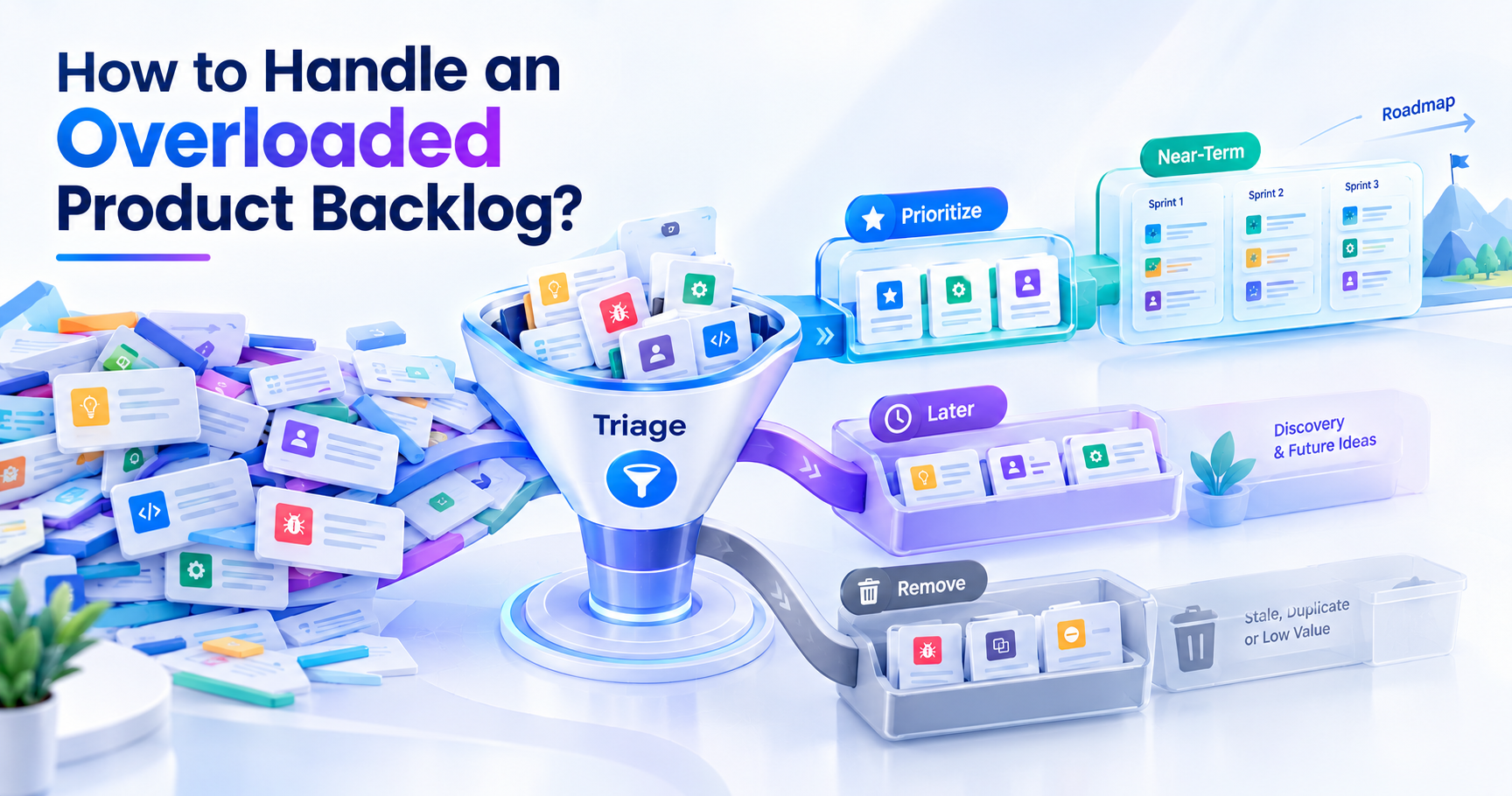
A product backlog helps a product team decide what to work on next. But when it becomes a long list of old ideas, feature requests, client feedback, bugs, technical work, and half-formed thoughts, it becomes less useful. The backlog doesn’t create clarity. It creates more work.
Managing this situation is an important part of the product owner role. The Scrum Guide defines the product backlog as an emergent, prioritized list of items needed to improve the product. It is also the sole source of work undertaken by the Scrum team. So, the backlog should evolve as the team learns more, not sit there as a permanent list of everything anyone’s ever suggested.
This also partly explains why product ownership skills are important when preparing for a Certified Scrum Product Owner (CSPO) role. A CSPO needs to know how to collaborate with stakeholders to drive customer value, prioritize product work, and decide what to do now, later, or not at all. You can read more about CSPO certification training to develop a stronger understanding of product ownership and Scrum practices.
The good news is that an overloaded backlog doesn't always mean a full rebuild. Usually, you can start by removing work that doesn't matter anymore, moving uncertain ideas elsewhere, concentrating the main backlog on realistic future work, and then making simple rules to keep it under control.
Key Highlights
- Eliminate backlog items that no longer support the product.
- Distinguish between ideas, early feedback and work that is ready to go.
- Use product vision and strategy to determine what goes in the backlog.
- Rank the work by its value, risk, effort, and customer need.
- Only keep enough detail for work that is likely to happen soon.
- Only plan as far ahead as is reasonable.
- Regularly check the backlog to remove stale items.
- When stakeholders ask for new work, be clear about the trade-offs.
- Track backlog age, churn, and the amount of stale work.
What Are the Signs Your Product Backlog Is Overloaded?
No strict number of items defines an overloaded backlog. A backlog of 30 items can be hard to manage. A backlog of 100 items can still be useful if the items are properly ordered and kept up to date.
The real problem is almost always a lack of focus.
A clear sign is that no one can tell what the team will likely work on next. The Product Owner might have a long list, but the first few items have no clear reason for being there. But with the backlog, stakeholders get no useful sense of priority, and so they may continue to ask when their requests will be delivered.
Another sign is the abundance of old things. You can see requests that were opened months or years ago and never moved. Some may still be valid, but others may no longer be solving a real customer problem.
If everything is 'important,' a backlog can get backlogged too. If nearly every item is high priority, then the priority labels are no longer helpful for the team to make decisions.
Just look at the level of detail. The backlog may have too much information too far out if the team has invested hours in grooming items that aren't likely to be worked on for several months.
Repeated refinement is another warning sign. If the team keeps talking about the same item without making a decision, it may not be ready for delivery work. Maybe it’s a product question that needs discovery first but is actually unresolved.
Another common signal is stakeholder pressure. With no clear review process and the ability for each department to add to the backlog at will, the Product Ownercan quickly lose control of the list.
Finally, ensure that the backlog is aligned with the product's current direction. A healthy backlog will evolve as the product, customers, market, and information available change. The Product Backlog, as it is defined by scrum.org, also expands, contracts, and evolves.
If the backlog is growing at a rapid pace and very little is being removed, it’s a strong indication that it is being used as a permanent archive, not as a working product management tool.
Why Product Backlogs Become Overloaded (Root Causes)?
There is rarely a single reason for an overloaded backlog. Usually, it creeps up because teams keep adding work but do not develop the corresponding habit of reviewing and removing work.
Often the reasons relate to product strategy, stakeholder management, discovery, and prioritization.
No Clear Product Vision or Strategy to Filter Ideas
A clear product vision helps the Product Owner determine whether an idea is relevant.
Without direction, every request can look useful. A customer requests a feature, sales requests another feature, support reports an issue, and an internal team suggests a new improvement. There is no good reason to reject any request. So, we add each request.
The outcome is a backlog of every possible direction the product could go.
The Product Goal can help to bring focus. Scrum.org describes the Product Goal as the future state of the product that the team needs to work toward.
You can also apply this same principle at a higher product level. When adding an item, ask yourself:
- What product problem does this support?
- Which user wants it?
- Does it fit with the current direction of the product?
- What if we don’t make it?
- Is there any evidence that the problem matters?
If the answers are fuzzy, the idea may need to be discovered before it becomes a delivery backlog item.
Treating the Backlog as a Dumping Ground for Ideas and Feedback
Feedback from customers is good, but not all feedback should be immediately put into the Product Backlog.
The customer may suggest a specific solution because they are trying to solve a problem. Another customer might describe the same problem in entirely different words. When every suggestion is added individually, the backlog gets filled with duplicates.
The better way is to catch the underlying problem first.
For example, the team can create a backlog item for the larger customer problem and find out what is causing it, instead of creating five backlog items for five requests about a difficult checkout process.
The backlog should contain work that the team may actually have to do. An idea list may contain possibilities in need of validation.
This distinction prevents early thinking from taking up space from work that is already known.
Difficulty Saying "No" to Stakeholders
Product Owners have to deal with people who have good reasons for asking for changes. The customer request can come from a sales team. Complaints may be repeated to support. Developers are able to identify technical work that needs to be done. Leadership may have a related business objective.
The problem is that even legitimate requests can compete with each other.
Saying yes to everything creates a backlog where everything is included, but very little is ordered.
It is not the Product Owner’s role to make every stakeholder happy by adding every request. The Product Owner is still accountable for the backlog, and it is the Product Owner who decides what work to do now, later, or not at all, although managing the product backlog is about adjusting and ordering work.
So, a request can be respected without being added right away.
Mixing Product Discovery with Product Delivery
Discovery and delivery are two separate questions.
Discovery asks: Is the problem worth solving? Who has the problem? What solution might work? What evidence supports the idea?
Delivery is about designing and releasing a solution the team has decided to pursue.
Mix the two, and you can get half-baked ideas sitting next to rock-solid development work. A nebulous idea like "add AI recommendations" could be coupled with a well-scoped bug fix.
These things need different amounts of care.
Product Discoverywork can be user interviews, experiments, prototypes, data analysis, or technical investigation. Delivery work may need a clear outcome, acceptance details, dependencies, and an effort discussion.
The separation of these stages helps us understand the main delivery backlog.
No Defined Prioritization Criteria
It becomes difficult to manage the backlog when priority is primarily determined by who requested the item or who last requested it. A straightforward prioritization system provides the team with a common way to compare work.
According to the circumstances, the team may want to consider customer impact, business value, urgency, risk, dependencies, effort, confidence, and strategic fit. The important thing is not to pick a complicated scoring model. It is making the criteria clear enough for the Product Owner and stakeholders to understand why one item is ahead of another.
What Are the Immediate Steps to Triage an Overloaded Backlog?
The backlog is already overloaded; don't start by rewriting every backlog item.
Start with a little bit of housekeeping. The first goal is to make it quieter. The second is to make the top of the backlog useful. The third goal is to create a clear place for uncertain work.
Delete Items You'll Never Do
Let’s start with the simplest option. Watch for items that are clearly out-of-date, duplicated, irrelevant, already solved, or no longer meet a real need.
For example, the item might have been created for a customer segment that the product is no longer serving. Another might describe a feature that was released in a different form. Some may be requests that have not been discussed for years and have no evidence behind them at the moment.
Don't keep these things just because someone spent time making them. Before you delete anything, check to see if there’s any reason to keep it. Remove it, unless there’s a good reason not to.
The process can be a little uncomfortable at first. But there is a price to pay for keeping dead work. You have to read it, debate it, ask questions about what is more important, and move it around when you are looking at the backlog. A smaller backlog is not necessarily better. A better backlog is more relevant.
Create a "Holding Tank" for Uncertain or Future Items
You don’t need to remove everything.
Some ideas might be promising but are not yet ready for action. Don’t let them linger in the active delivery backlog. Create a separate space for ideas that need more information.
You can call it an idea pool, opportunity list, parking lot, or holding area.
The name is less important than the rule.
There should be no item here competing with items ready for delivery.
For each idea, you can collect a summary of the problem, where the request came from, evidence that supports it, and any useful context. Don’t spend too much time perfecting it until you know the idea is worth pursuing
The Product Owner may decide to add new evidence to the Product Backlog as it becomes available. This approach also provides a clear answer to stakeholders. Their idea has been picked up, but no promises were made.
Separate Discovery Artifacts from the Delivery Backlog
If your backlog has research notes, interview findings, assumptions, experiment ideas, solution concepts, and development tasks all in one, split them out.
Discovery information should help the team figure out what to build. It doesn’t always have to be a delivery item.
For example, users might say, “I can’t find this important setting.” Discovery work might involve interviews, usage data, and tests of different navigation options.
The last delivery item may come later.
This prevents the backlog from becoming a log of every thought process step.
It also enables the development team to work on the tasks that are at the right level of clarity.
Apply a Quick Prioritization Pass (MoSCoW, RICE, or WSJF)
Once the obvious clutter is removed, prioritize what is left.
MoSCoW breaks the work down into Must have, Should have, Could have, and Won't have this time. This can be helpful when the team needs to make a clear decision about what is in a fixed scope. The important thing is to avoid putting almost everything into the Must category.
RICE includes 4 factors: Reach, Impact, Confidence, and Effort. The basic formula is as follows.
RICE score = Reach x Impact x Confidence / Effort
This framework was created at Intercom, and it uses the same factors to compare project ideas.
RICE can be useful if the team has enough information to make reasonable estimates. When the numbers are mostly guesses, the score can give a false sense of accuracy.
Another prioritization approach in scaled agile environments is WSJF, or Weighted Shortest Job First. It looks at the size of the job versus the cost of delay. This approach is useful when teams need to compare economic urgency and effort across a larger set of work.
You don't have to use all three methods.
Pick one that works for your team’s needs, use it consistently, and apply judgement to the result.
How to do Structural Fixes for Chronically Overloaded Backlogs?
If every time you clean up the backlog, it gets overloaded again, then it’s not the backlog. The process around it has to change.”
Re-assess If It Is Really One Backlog (Split by Product Area or User Group)
Scrum defines the Product Backlog as the only source of work for a product.
But teams will likely still require separate views, filters, or supporting lists to manage large products.
A product, e.g., may serve multiple user groups or consist of several major product segments. One list is difficult to read, with every team looking at every kind of work.
“Sometimes the answer is not to create multiple independent Product Backlogs. First check if you can structure the existing work around product areas, labels, themes, components, user groups, or filtered views.
The aim is to increase focus, but not lose a shared product view.
If separate teams are working on separate products, then it might make sense to have separate backlogs. But breaking one product into disjointed lists just to hide the size creates new problems.
Put a WIP Limit on the Backlog Itself
Usually, teams discuss WIP, or work in progress, limits in the context of delivery work. But the same idea can help in managing the backlog.
You can establish an internal rule for how much work is permitted to accumulate in the highly polished part of the backlog.
For example, you might decide to do detailed refinement only for the next few likely work items. Higher up, everything else.
This prevents the team from wasting time preparing 50 items when, in the short term, only the next 5 or 10 are likely to matter.
The right number depends on the speed of the team’s delivery, the uncertainty of the product, and the need to plan.
The goal is to avoid unnecessary preparations and to avoid adding another strict rule.
Define a Lookahead Window (How far into the future should the backlog plan?)
Teams often mistakenly treat the whole backlog as if every item needs to be equally ready.
It doesn't.
The better way is to generate levels of detail.
Work that is likely to be included in the next Sprint must have enough information for the team to discuss it properly. Work that is further away in time, perhaps several Sprints away, can be less detailed. Ideas that are far out may only need a brief description and a reason to be considered.
Your lookahead window could be a few Sprints, a release window, or some other planning horizon that makes sense for your product.
The trick is not to waste today’s time solving questions that might change before the work becomes pertinent.
Product Backlog refinement is a continuous activity, not a one-time event. Scrum.org says that refinement can take place during the Sprint and that the team decides how much refinement it requires.
This enables a just-in-time approach to detail.
How to Prevent Overload Going Forward?
Good to get the backlog cleaned up once. It is more important to create habits that keep it from growing out of control.
Filter New Items With Product Vision and Strategy
Each new request should be passed through a simple filter.
Check if it supports the product direction and solves a meaningful problem.
Even a useful request may be denied or delayed if it doesn’t fit the current focus.
This provides the Product Owner with a better basis for prioritization decisions than personal preference.
The Product Goal can be a useful reference point as well. According to Scrum.org, it is the commitment associated with the Product Backlog and the goal that drives the team’s planning.
When a new idea comes your way, ask how it helps achieve that goal.
When the connection is weak, consider whether the idea is better suited for discovery or a future opportunities list.
Just-in-Time Refinement (Only Detail What is Near-Term)
Don’t try to make the whole backlog ready for development.
Instead, elaborate in detail on the work that is coming.
The near-term item may need a clear description, acceptance criteria, dependencies, size, and enough shared understanding for the team to decide whether it can be selected.
The item that’s far away might only need the problem statement.
This method stops the team from wasting effort.
It also safeguards the team from assumptions. The further an item is away from delivery, the more likely demands will change. So, too much refinement too soon can lead to rework.
Set Regular Cadences for Backlog Review and Refinement
The backlog needs to be reviewed often enough to keep it up-to-date.
A review may include:
- Getting rid of old things
- Evaluating the main priorities
- Searching for duplicates
- New information updates
- Verifying dependencies
- Historic requests review
- Uncertain item discovery
- Outlining work in the near term
Alignment check with the Product Goal
Backlog refinement is not a required Scrum event. Scrum.org states that teams decide how and when refinement is done depending on their needs.
In other words, there is no single rule, such as 'refine every Tuesday for an hour.'
The right cadence will depend on how quickly priorities shift and how much work the team is doing.
Define Clear Criteria for What Constitutes a Backlog Item
A simple rule of intake can prevent much clutter.
Before adding an idea to the active backlog, ask for basic information such as:
What is the problem we are trying to solve?
- Who does this affect?
- What does it matter now?
- What evidence of need is there?
- What product goal/outcome does it serve?
- Any known deadline?
- Is there a need for more discovery?
It is not a question of creating bureaucracy.
We want to prevent incomplete thoughts from being counted as committed delivery work.
A useful backlog item can grow in detail with time. Scrum.org describes that Product Backlog itemsbegin as vague ideas and get more refined as information is uncovered.
That means you don’t have to get the exact right item the first time you see it.
How to Say "No" (or "Not Yet") to Stakeholders?
Stakeholder management is one of the most challenging aspects of being a product owner.
The problem isn’t that stakeholders have ideas. Their input can be very valuable. The problem arises when every request is seen as an immediate obligation.
The PO should protect product focus while keeping communication channels open.
Communicating Tradeoffs, Not Just Flat Rejections
Instead of saying, "We are not doing this item," talk about what would have to change to make room for it.
For instance:
"We will have to move one of our current priorities to push this item to the next sprint."
That changes the conversation.
The question is not if the stakeholder’s idea is good. The question is, what work to prioritize given the team's capacity and product goals?
There are always trade-offs in product decisions.
Another question is which result the stakeholder needs. The solution requested may not be the only way to achieve it.
A request for a specific feature might really be a request to reduce customer complaints, improve conversion, reduce manual work, or support a business deadline.
Knowing the answer can suggest a different solution.
Using the Product Vision to Guide Prioritization Decisions
The product vision is a common reference point for the Product Owner.
The explanation for saying "I don't think we should do this" is
"This is not what our product goal is right now, but these other things are solving the exact customer problem that we are solving right now."
This is easier for stakeholders to understand, as the decision is linked to an agreed direction.
It also makes prioritization less subjective.
Backlog decisions shall not be determined by the stakeholder with the loudest voice. It should be linked to product goals, customer needs, evidence, risk, value, and available capacity.
Managing Expectations from the Outset to Avoid Backlog Dumping
Stakeholders need to know how requests are treated.
Simplicity is the key.
A stakeholder makes a request. The Product Owner looks at the problem and the supporting information. That request is then assessed against current priorities. It can be added to discovery, added to the backlog, scheduled for later, or rejected if there is no current reason to pursue it.
This results in a predictable process.
It also prevents stakeholders from thinking that if something is in the tool, the team has committed to building it.
A helpful phrase is:
“Adding a request means we’ve taken it on, not that we’ve committed to doing it.
That little difference can prevent many misunderstandings.
What Are the Tools and Automation to Keep Backlogs Manageable?
Tools can help make managing the backlog easier, but they can’t decide what product priorities are for you.
The tool should help to visualize the important information and reduce manual work.
Jira gives software teams backlog views, prioritization, story management, filters, sprint planning, and reporting. Its Scrum backlog helps teams to identify dependencies and blockers, as well as organize and prioritize work.
You can also use Jira Product Discovery to isolate your ideas and insights from your delivery work. Its product discovery features enable teams to capture opportunities and customer insights, add prioritization fields, and link selected ideas to delivery work.
Routine maintenance can be helped by automation.
For example, teams can set rules to:
- Find items that have not been updated for a long time.
- Remind owners if information is missing.
- Set labels by type of request.
- Remove completed work from active views.
- Notify the correct person when an item’s status changes.
- Search for overdue items.
- Stay connected to related work.
Jira’sautomation can do things like assign work and sync information between projects and products based on rules.
The point is to automate maintenance, not judgment.
Please don't create an automation that just automatically marks all old items as low priority.
Age is a signal, not a choice.
Similarly, don’t let a score automatically tell you what the product team should build. Scores are only as good as the information used to generate them.
For small teams, a simple spreadsheet is often sufficient. If you have a simple backlog with clear fields and you review it regularly, you don’t need a big system.
What Are the Metrics to Monitor Backlog Health?
There is no single official metric that tells you whether a Product Backlog is healthy.
Instead, use a small set of measures to identify problems early.
Backlog Age
Track how long items remain open.
A high number of old items may indicate that the team is not removing outdated requests.
Age should not be used alone. Some valid long-term items may remain open for a long time. The purpose is to identify patterns.
Stale Item Rate
Measure the percentage of items that have not been reviewed or updated within a period that makes sense for your product.
For example, you could define a stale item as one with no meaningful review for six months.
The exact period is a team decision.
The goal is to find work that may no longer reflect current needs.
Backlog Churn
Backlog churn measures how often items are added, removed, changed, or reprioritized.
Some churn is healthy because product teams learn and adapt. Very high churn may indicate unclear strategy, unstable priorities, or frequent stakeholder changes.
Do not aim for zero churn. An emergent backlog should change.
Top-Item Readiness
Look at the items near the top of the backlog.
Can the team understand them? Are the important questions answered? Are dependencies known? Does the team understand the outcome?
If the top of the backlog is vague while hundreds of lower items have detailed descriptions, effort is probably being spent in the wrong place.
Refined Work Versus Future Work
Track how much detailed work exists compared with the amount of work likely to happen soon.
If your team has dozens of fully refined items that may not be touched for months, you may be preparing too far ahead.
Duplicate or Similar Items
Look for repeated requests describing the same problem.
A high number of duplicates often means feedback is entering the backlog without being grouped around common customer problems.
Time From Idea to Decision
You can also track how long it takes for a new request to reach a decision.
The decision does not need to be "build."
It can be:
- Investigate
- Prioritize
- Defer
- Reject
- Merge with another item
Fast decisions help prevent the backlog from becoming a collection of unresolved requests.
What Are the Common Mistakes When Trying to Fix an Overloaded Backlog?
Cleaning up an overloaded backlog can create new problems if you do not do it carefully.
The common mistake is to delete all the old things.
Age is helpful evidence, but age alone is not something that is not important. Remove it, but first check what its current value is.
Another mistake is to create a new "archive," which just becomes another big backlog. Just moving thousands of items to another list doesn’t address the underlying problem if nobody knows why they are there.
Some ideas don't require acceptance criteria, estimates, technical notes, and dependencies. Focus detailed refinement on upcoming work.
Another mistake is to treat prioritization scores as facts.
RICE, WSJF, MoSCoW, and so on are methods that can help you decide, but they don’t get rid of uncertainty. Estimates can be off, evidence can be incomplete, and strategic needs can change.
Another mistake is to think that every stakeholder request is a Product Backlog item.
The first step in a request may be an intake process or a discovery. This means that the main backlog is only for work that has a clear goal.
Another mistake is to have too many priority levels.
If the backlog includes critical, urgent, very high, high, medium, normal, low, future, and someday categories, then the labels may not be of much use.
Often, simple ordering is more useful.
The Scrum Guide defines the Product Backlog as an ordered list.
Another common mistake is to fix the backlog once and never look at the process again.
If new requests continue to come in with no clear criteria, the backlog will be overloaded again.
Finally, don't let backlog management become an administrative chore.
The objective is not to clear the backlog.
The goal is to help the team make better decisions about what to work on and why.
Conclusion
An overloaded Product Backlog is usually a sign that the team needs stricter rules around focus, prioritization, discovery, and review. The solution is not simply to count the items or create another tool.
Get rid of work that no longer counts first. Move uncertain ideas out of the active delivery flow. Use a clear prioritization method when several items compete. Most importantly, use product vision and goals to decide what deserves attention.
A good Product Owner also needs to manage stakeholder expectations. Not every request needs to become a delivery commitment. Saying "not yet" can be just as important as deciding what to build next.
The Scrum approach supports this continuous way of working. The Product Backlog is expected to evolve as new information becomes available, while the Product Owner remains accountable for managing and ordering it.
For professionals building these skills, CSPO training can provide a structured way to understand product ownership, stakeholder collaboration, product value, and backlog management. If you are planning to strengthen your product ownership skills, you can explore Simpliaxis CSPO Certification Training. For professionals looking to build on their product ownership experience, the Advanced CSPO Certification Trainingcan also be relevant.









 Lowest-Price Challenge











 Personalized Path


.webp)


 USA
USA  Canada
  India
India  UK
UK  Australia
  Singapore


