


 Call Us




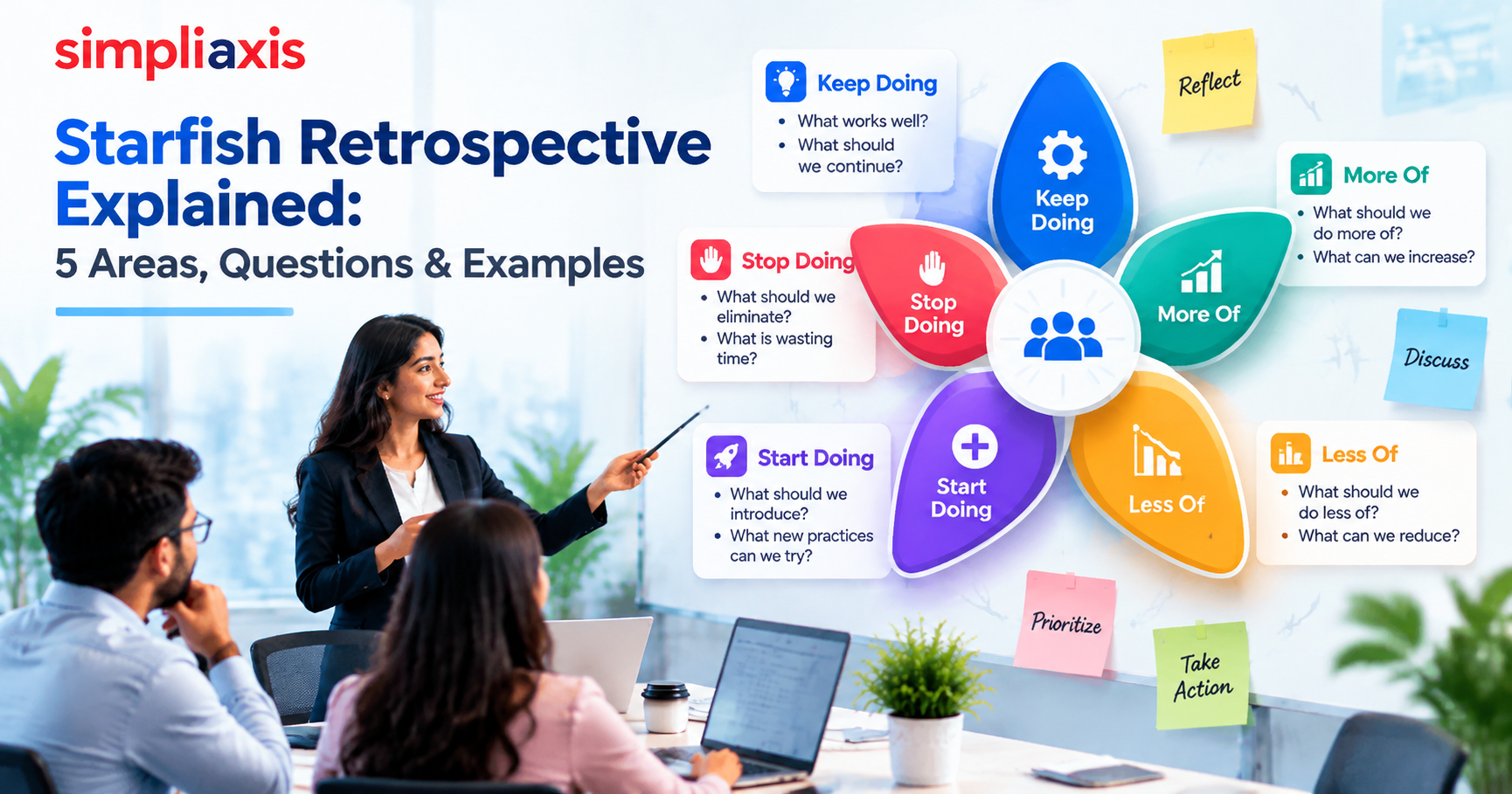
A starfish retrospective is a type of Agile retrospective method that helps teams understand what work to: Keep doing, do more of, do less of, start doing, and stop doing. The five categories of this retrospective help organize tasks that work well from those that need to be adjusted further.
If Scrum teams want to turn this sprint feedback into actionable improvements, then the startfish retrospective is ideal. Team members get to add their insights into each of the five areas, highlight the most important issues, and discuss what action items to handle during the next sprint.
Key Highlights of Starfish Retrospective
- A starfish retrospective has five areas: Keep Doing, More Of, Less Of, Start Doing, and Stop Doing
- The template helps Scrum teams look at their work in different ways, not just what should change, but what ought to be increased, decreased, or kept intact.
- Conducting a starfish retrospective online is as possible as conducting an in-person starfish retrospective by using the right structure
- Scrum Masters can use the starfish retrospective questions to address recurring problems, bottlenecks, and improvement opportunities
- Good retrospectives have a small number of clearly defined action items, owners, and follow-up points
Introduction
Continuous improvement is important in Agile. Scrum events help teams regularly inspect their work Scrum ceremonies help teams regularly inspect their work, look for ways to improve it, and adopt practices based on what they have understood. Sprint retrospectives are one of these events.
But using the same type of retrospective format can make discussions predictable. Team members can often get stuck in the loop of talking about what went well, what didn’t, and what they should do differently all without really addressing anything deep or profoundly unique.
This is when having a starfish retrospective can be handy. This format gives teams five different ways to look at their way of work. It doesn’t just categorize things as positive or negative but instead lets teams decide if a practice should be done more or less, or whether it should be introduced or discontinued.
Think about it like this:
A team agrees that stand-ups are useful and should continue. But, they might want to spend more time discussing complex stories, cut down on unnecessary meetings, and stop accepting last-minute scope changes during a meeting.
That is why the Starfish retrospective format is great for teams that want to move towards process and behavioral changes that are intentional.
What Is a Starfish Retrospective?
Definition and the Five-Armed Model
A starfish retrospective is a type of Agile retrospective format used by teams to inspect their work through five categories represented as the arms of a starfish.
The five-armed model is what makes this retrospective method stand out; the five categories are
- Keep Doing: What works and should continue?
- More Of: What should the team do more/increase?
- Less Of: What should the team do less/reduce?
- Start Doing: What new initiatives should the team bring?
- Stop Doing: What isn’t useful for the team and should end?
These categories aren’t just used to gather opinions; they help the team look for patterns and decide what is worth implementing or changing.
The format can be used whenever teams want or need to look back at the way they work, like during a sprint retrospective or after product release.
To better understand how it is used, imagine this: During a discussion, a team can have this action item: “We need better documentation." While this does highlight what the team needs to do, the statement is still too generic. But, if the team uses a starfish retrospective, they can understand if they need to document more decisions or if they need to less maintain a document no one uses.
Origins With Patrick Kua
The Starfish retrospective became popular thanks to Patrick Kua, an Agile practitioner who helped teams have more defined retrospective categories. Kua described the format in his original blog post, The Retrospective Starfish (2006).” This is his well-known post, but I couldn’t confirm the URL, so open it before publishing.
The concept is simple: improvement isn’t just about starting or stopping something. The right decision sometimes is to increase an action, decrease it, or sustain a practice that is working just fine or stop it.
This goes beyond simple retrospective questions and addresses things that are much deeper.
When to Use It in the Sprint Cadence
A starfish retrospective can be used in a normal sprint cycle, usually after the sprint review and before the next sprint planning session.The Scrum Guide places the Sprint Retrospective after the Sprint Review and before the next Sprint Planning.
But a team does not need to use it for all sprints. In fact, interchanging between different retrospective techniques can bring fresher insights.
Scrum masters can use the Starfish technique when:
- The team is comfortable with the other retrospective formats
- Discussions become repetitive
- The team is going through a process change
- Discussions are becoming repetitive
- There are several behavioral practices that need to be taken into account
To better understand retrospectives, read what a sprint retrospective is in Agile.
The Five Areas of the Starfish
The five categories of the starfish retrospective help teams reflect on their work in different ways.
Keep Doing
Keeping doing helps teams identify practices, tools, and decisions that work well and should continue.
This area helps teams acknowledge the work that went well and prevents the retrospective from becoming a task where only problems are identified.
Some of these questions can look like
- What team practice should we keep?
- What helps us deliver value faster?
- What worked well during this sprint?
- What should we avoid changing since it already works for us?
More Of
More Of helps teams identify actions that are more useful but can be more valuable if they do it more or frequently.
This is different from Keep Doing, a team can be doing something that is useful but agrees that it needs to be done more for better results.
Some questions can look like
- What should we spend more time on?
- What can we do more to improve quality?
- What worked well that we should now do frequently?
- What tasks have improved the way we work?
Less Of
Less of lets the team analyze practices that might be valuable but take too much time, energy, and resources to work on.
The goal here is to not get rid of those activities but discuss whether reducing their frequency helps make workflow and productivity better for the team.
Some useful questions to ask
- What is slowing down the team?
- What should we do less often?
- What activities take up too much of our time?
- Are we spending too much time on low-priority tasks?
Start Doing
Start Doing lets teams explore new tools and practices that can make their performance better. The ideas can be tested in the next sprint and should be measurable and easy to review later.
Some questions to ask
- What practice can help us work better?
- What is a small change that we can immediately bring?
- What new practices can we try?
Stop Doing
Stop Doing helps teams identify practices that might be causing negative outcomes or unnecessary waste.
The goal here is to make workflows better; it isn’t to pinpoint or blame individuals for their actions, so creating a safe environment for honest discussion is one of the core Scrum Master roles and responsibilities.
Some questions to ask:
- What activities are wasting our time?
- What practices are causing unnecessary delays?
- What work do we do that can be done more easily?
- Are there manual tasks that we are doing that can be automated instead?
Why the Starfish Adds Nuance
The starfish retrospective format has an edge over all other retrospective models since it gives more depth to improvement decisions than simply saying yes or no.
Going Beyond Simple "Went-Well" and "Went-Wrong"
Most retrospectives will ask the following:
- What went well?
- What didn’t go well?
- What can be improved
Although they are useful, these questions can give broad answers.
Imagine if a team makes this statement: “We need more meetings with stakeholders.”
Though this statement highlights an improvement possibility, it does not explain what kind of meetings are required or how often they should happen.
But if this was addressed with a starfish retrospective, it could divide the statement into more actionable items like
- More of: Short stakeholder feedback sessions of complex stories
- Less of: Large meetings with no decisions made
- Stop Doing: Repeating updates that are already available on the team’s dashboard
Surfacing Degrees of Change, Not Just Binary Calls
The five areas of the starfish retrospective also give teams other options aside from just adopting or abandoning processes.
This is because some practices can be:
- Useful, but excessive
- Good but underused
- Unnecessary and worth removing
- Missing and worth introducing
- Good and worth preserving
This format is excellent because it lets teams refine their processes instead of building it again from scratch.
existing process rather than rebuilding it from scratch.
How to Run a Starfish Retrospective Step by Step
Knowing how to run a starfish retrospective is easy, but the way that you conduct it tells whether it leads to any type of significant outcome.
Step 1: Draw the Five-Section Starfish
Create a table with five labelled sections. Check out the table before for reference:
| Area | Question |
| Keep Doing | What should we continue? |
| More Of | What should we increase? |
| Less Of | What should we reduce? |
| Start Doing | What should we introduce? |
| Stop Doing | What should we eliminate? |
Explain each category and then ask team members to add their inputs. Based on the size and duration of the retrospective, set a time limit.
Step 2: Individually Add Notes to Each Area
Give team members the time to individually add insights to the five areas. This gives time for all participants to think through and stops letting only a handful of people drive the retrospective. Silent writing before discussion is one of Scrum.org’s recommended facilitation techniques for the Sprint Retrospective.
Make sure that everyone adds specific insights and not vague and weak ones.
Take, for example,
Vague Insight: “The communication was bad”
Specific Insight: “Three stories were delayed because we got answers about the acceptance criteria too late.”
The second insight gives something tangible for the team to discuss.
Step 3: Group and Discuss the Themes
Once you gather individual insights, have a group discussion and identify the common themes amongst participants.
Some possible themes include:
- Testing
- Meetings
- Communication
- Planning
- Dependencies
- Feedback
Having a conversation on important themes is better than addressing every individual insight.
These themes can be supported with these follow-up questions:
- Why did this happen?
- What impact does this have?
- How often does it happen?
- What can we change in the next sprint?
Step 4: Vote on Priorities
While a retrospective can lead to a lot of observations being made, a team cannot have too many action items to work on, since this can dilute priorities.
To counter this, use prioritization methods to pick out the issues that are most important.
For example, give each team member three chances to vote.
The topics voted as high priority become action items.
A good way to prioritize is to do it based on the impact it creates and how controllable it is. Some problems might be important but can be out of the team’s scope; they might need to be escalated rather than being solved by the team.
Step 5: Commit to Action Items and Owners
The discussions and prioritizations need to lead to definite action items.
Each task should be able to answer these questions:
- What will we change?
- When will we try it?
- Who is responsible for it?
- How do we know it worked?
For instance:
Action: Stop updating documents that aren’t used by the team and keep only necessary documents.
Owner: Technical Lead.
Timeline: By the next sprint.
Success indicator: Less time spent on updating unused documents.
Starfish Retrospective Example (Worked)
Imagine a product team is developing a new customer dashboard.
It came to the team’s attention that developers had to constantly redo work because requirements kept changing after development had already started.
So, they used the starfish retrospective format.
| Starfish Area | Team Feedback |
| Keep Doing | Involve developers in product discussions. |
| More Of | Confirm designs with users earlier. |
| Less Of | Changes after development begins. |
| Start Doing | Have a short design review before development starts. |
| Stop Doing | Treating unfinished designs as ready for development. |
Based on this table and group voting, the team came up with these top priorities:
- Confirm designs earlier.
- Reduce requirement changes after development begins.
- Make sure stories have clear criteria before development.
These priorities helped the team develop the following action items:
Action 1: Design Review
Before the development begins, the Product Owner, Designer, and Developer will review major designs.
Action 2: User Feedback
Before the development is completed, changes will be tested on a small group of users to gain feedback.
Action 3: Define What ‘Ready’ Is
A story can’t be developed without clear requirements, design, and acceptance criteria. This is the idea behind a Definition of Ready.
To see whether these changes truly made a difference, teams can check whether the number of reworked stories decreased during the next retrospective.
Running It Remotely vs. In Person
Running a starfish retrospective online is just as effective as running one in person, but you must make sure to have the right structures set up in place for participants.
Whiteboard Setup
For in-person startfish retrospectives, use:
- A whiteboard or large piece of paper
- Five clearly labeled sections.
- Sticky notes.
- Markers.
- Voting dots.
- A visible timer
Make sure the five sections are visible to everyone.
Instruct team members to write one observation in each sticky note; this makes voting and grouping a lot more straightforward.
Digital Templates and Tools
Digital collaboration platforms can help recreate the same experience for remote teams.
Here are some platforms that you can use:
- Miro
- FigJam
- Microsoft Whiteboard
- Mural
A good starfish retrospective template should have enough space for notes and five clearly separated areas.
Scrum Masters need to make sure remote meetings don’t become long video calls where only a few people talk. These best practices for Agile remote working can help.
You can keep the participation alive by using voting and breakout discussion.
Starfish Retrospective vs. Other Formats
Different retrospective formats lead to different types of discussion. The right format depends on what your team needs to learn or discover.
A sailboat retrospective is where teams imagine their sprints as sailboats and use different elements to explore the team’s progress.
Common elements include:
- Wind: What pushes us forward?
- Rock: What risks can hurt us?
- Destination: Where are we trying to go?
- Anchor: What slows us down?
The sailboat retrospective is great for talking about risks, obstacles, external forces, and goals. While the starfish retrospective format looks more at specific behaviors and process tweaks.
Take a look at this example below:
Sailboat: “Our dependency on the Sales Team is an anchor."
Starfish: “We should clarify cross-team dependencies during the refinement process."
Use the sailboat method when you want to look at the team’s journey and potential obstacles. Use the starfish method when you want to decide what the team should continue, discontinue, increase, reduce, or introduce.
Starfish vs. Start, Stop, Continue
The Start, Stop, Continue retrospective format has three sections:
- Start
- Stop
- Continue
The starfish retrospective format is split into five areas:
- Keep Doing
- More Of
- Less Of
- Start Doing
- Stop Doing
The main difference is that the Start, Stop, Continue method does not have the More Of and Less Of category.
These two categories give other options aside from just continuing processes without changing them or stopping them completely.
Check out the example below:
Start, Stop, Continue: “Keep having daily stand-ups."
Starfish: “Keep having the daily stand-up, but spend more time discussing blockers and less time sharing routine updates.”
Extra categories let teams have more defined discussions.
Best Practices for Scrum Masters
Scrum masters play an important role in making sure retrospective conversations are productive.
Check out some of the best practices below:
Timebox Each Section
Timeboxing events lets teams have enough time to discuss various issues instead of spending time only on one difficult one.
Set limits for:
- Theme grouping
- Voting
- Action planning
- Individual reflection
- Discussion
Make changes to the time based on the size of the team and how complex the task is.
Follow Through Next Sprint
Having poor follow-through is caused when teams gather feedback but fail to make any changes to the way they work.
If the same issues appear in sprint back-to-back, it defeats the purpose of having a retrospective in the first place.
Scrum masters can stop this from happening by taking steps like
- Going through previous action items
- Asking if experiments led to expected results
- Stopping actions that give value anymore
Retrospectives need to be made part of a continuous improvement process.
The purpose of a sprint retrospective meeting isn’t to create something perfect. It’s to help teams become more effective with every iteration.
Consider SAFe Scrum Master certification training to learn more about Scrum events, continuous improvement, and Agile principles.
Conclusion
A starfish retrospective gives Agile and Scrum teams five different ways to examine the way they work. These five areas are Keep Doing, More Of, Less Of, Start Doing, and Stop Doing.
These five categories give more depth to an observation, which gives teams a chance to differentiate between practices that should stay the same and those that should be increased or decreased.
The starfish format is simple, easy to run both in person and remotely, and can lead to actionable improvement steps when it is undertaken properly.
The starfish retrospective template is valuable to Scrum Masters because it helps their team find patterns, prioritize improvements, assign ownership, and measure the impact of the changes made during the next sprint.
The starfish retrospective format has the power to transform a normal Scrum event into an important element for continuous improvement.







 Lowest-Price Challenge












 Personalized Path



.webp)


 USA
 Canada
 India
 UK
 Australia
 Singapore


