


 Call Us



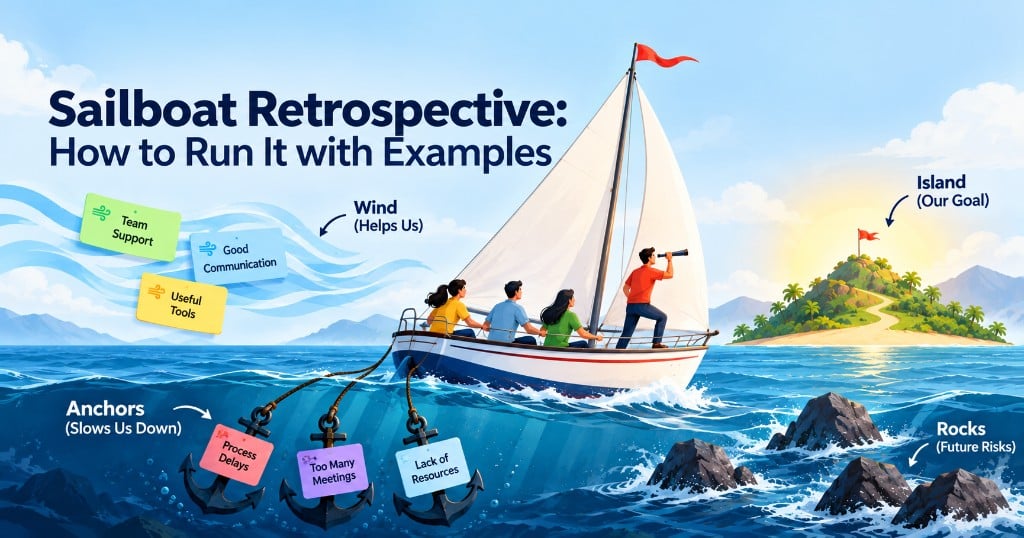
A sailboat retrospective is a visual activity that helps Agile teams discuss their progress, challenges, and future goals. The team imagines itself as a sailboat moving toward an island. The wind represents things helping the team, anchors show what is slowing it down, and rocks represent possible problems ahead.
Scrum Masters can use this activity during a Sprint Retrospective to encourage honest conversations and find ways to improve teamwork. A typical session takes around 45 to 60 minutes and ends with clear action items for the next Sprint.
Key Highlights of Sailboat Retrospective
- A sailboat retrospective uses four main elements: island, wind, anchors, and rocks.
- It helps teams understand what is working, what needs improvement, and which risks require attention.
- The activity is suitable for Scrum teams, Agile projects, and other teams working toward shared goals.
- Scrum Masters can conduct the exercise using a whiteboard, sticky notes, or digital collaboration tools.
- A sailboat retrospective template makes the meeting easier to organise and follow.
- The session should finish with practical improvement actions, assigned owners, and a follow-up plan.
Introduction
Have you ever attended a Sprint Retrospective where everyone gave almost the same answers? Someone says the Sprint went well, another person mentions a delay, and the meeting ends without much discussion.
This happens when teams follow the same meeting format every time. People may stop thinking deeply about their experiences, even when there are important problems to discuss.
A sailboat retrospective offers a different way to look at the team's work.
Instead of asking only what went well or badly, it uses the picture of a boat sailing toward an island. Team members think about what is helping them move forward, what is holding them back, and what difficulties they might face next.
The activity is simple enough for beginners and useful for experienced Scrum teams.
It also fits naturally into the regular Sprint Retrospective, where the team looks for ways to work better together. If you are new to this event, understanding what a Sprint Retrospective is in Agile will help you see where the sailboat activity fits.
.In this guide, we will explain the four elements, the sailboat retrospective steps, practical examples, and ways to conduct the session with remote or in-person teams.
What Is a Sailboat Retrospective?
A sailboat retrospective is a team reflection activity where participants use a sailing picture to describe their work.
The method gives people a simple way to talk about their experiences without turning the meeting into a discussion about individual mistakes.
It is commonly used in Agile teams to review a completed Sprint, but it can also work during project reviews or team improvement meetings.
Definition and the Sailboat Metaphor
Imagine your team is travelling across the sea in a sailboat.
The team has a destination, but reaching it depends on several things. Strong winds help the boat move. Heavy anchors slow it down. There may also be rocks in the water that the crew needs to avoid.
The sailboat retrospective format connects these ideas with everyday work.
The island represents the team's goal. The wind shows positive factors, such as good communication or useful tools. Anchors represent existing problems, while rocks point to future risks.
Every team member adds their observations to the picture.
By the end of the discussion, the team can see what is helping its progress and where changes are needed.
The purpose is not to create a perfect drawing. It is to have a useful conversation that leads to improvement.
When to Use It in the Sprint Cadence
The best time to conduct a sailboat retrospective is during the Sprint Retrospective, near the end of the Sprint.
In Scrum, the Sprint Retrospective takes place after the Sprint Review and before the next Sprint Planning event.
According to the Scrum Guide, the Sprint Retrospective is timeboxed to a maximum of three hours for a one-month Sprint and is usually shorter for shorter Sprints.
This gives the team an opportunity to discuss its working methods before starting another Sprint.
Among the five Scrum events, the Sprint Retrospective focuses on improving how the team works rather than reviewing the product itself.
The sailboat activity is especially helpful when the team faces repeated delays, communication problems, changing requirements, or uncertainty about upcoming work.
It can also be useful after completing a major project milestone.
However, the activity does not have to replace every retrospective. Scrum Masters can use it whenever the team needs a fresh way to discuss its progress.
Why Visual Retrospectives Boost Engagement
A normal retrospective often starts with a few questions written on a board.
That approach works, but some team members may find it difficult to explain their thoughts immediately.
A visual activity makes the conversation more approachable.
For example, someone may hesitate to say that the approval process is causing problems. But when asked to identify an anchor, they can write "slow approval process" on a sticky note.
The meaning is clear without making the discussion personal.
Visual activities also help people connect related issues. When several notes appear around the same anchor, the team can recognise that the problem affects more than one person.
A sailboat retrospective exercise gives quieter team members time to think and contribute before the group discussion begins.
The 4 Elements of the Sailboat
The sailboat retrospective has four main elements. Each one helps the team examine its work from a different angle.
| Element | Meaning | Main Question |
| Island | Team goal or destination | Where are we trying to go? |
| Wind | Positive factors supporting progress | What is helping us move forward? |
| Anchors | Current problems slowing the team | What is holding us back? |
| Rocks | Possible future risks | What could create problems ahead? |
Island: The Goal or Destination
The island represents what the team wants to achieve.
It could be completing a product feature, delivering a stable release, improving customer satisfaction, or meeting an important project deadline.
For example, a software development team may choose "release the new payment feature without critical defects" as its island.
The goal should be clear enough for everyone to understand.
During the activity, the Scrum Master can ask:
- What are we working toward?
- What would success look like?
- Are we all working toward the same goal?
Sometimes the team discovers that different members have different ideas about the destination.
That itself is an important finding. Before discussing obstacles, everyone needs to understand where the team is heading.
Wind: What Propels the Team Forward
Wind represents everything that helps the team make progress.
These are the positive habits, tools, decisions, and working relationships that make everyday tasks easier.
For example, a team might identify regular communication, clear user stories, helpful code reviews, or quick feedback from the Product Owner as positive factors.
The wind section reminds the team to appreciate what is already working.
Without it, retrospectives can become meetings where people only discuss problems.
Useful sailboat retrospective questions for this section include:
- What helped us complete our work?
- Which team habits should we continue?
- What made collaboration easier during the Sprint?
The team should discuss how to protect these positive practices instead of taking them for granted.
Anchors: What Holds the Team Back
Anchors represent problems that are already affecting the team's progress.
They might include unclear requirements, technical debt, too many meetings, slow approvals, or delays caused by dependencies.
For instance, a development team may repeatedly wait for testing environments to become available.
That delay is an anchor because it is already slowing the team's work.
The Scrum Master should encourage participants to describe the problem rather than blame a particular person.
Instead of writing "the testing team is slow," a more useful note would be "testing requests wait two days before being picked up."
This makes it easier to discuss a solution.
The team can then decide which anchors it can remove or reduce during the next Sprint.
Rocks: Risks and Obstacles Ahead
Rocks represent problems that have not happened yet but could affect the team later.
This is what makes the sailboat method different from a retrospective focused only on past events.
For example, the team may know that a key developer will be unavailable during the next Sprint. A planned system upgrade could also create technical problems.
Neither situation may be affecting current work, but both deserve attention.
The Scrum Master can ask:
- What could prevent us from reaching our goal?
- Are there any upcoming dependencies?
- Which risks should we prepare for now?
One important distinction is that anchors are current problems, while rocks are possible future problems.
Keeping them separate helps the team decide whether to fix something immediately or prepare a plan before trouble begins.
How to Run a Sailboat Retrospective Step by Step
Learning how to run a sailboat retrospective does not require special training or expensive software.
You need a shared workspace, enough time for discussion, and a clear way to record improvement actions.
A practical 60-minute agenda can follow these five steps.
Step 1: Set the Stage and Draw the Sailboat
Suggested time: 5–10 minutes
Begin by explaining why the team is meeting and what the activity will cover.
Draw a sailboat in the middle of a whiteboard. Add an island ahead of it, wind behind the sails, an anchor below the boat, and rocks in the water.
Label each element so everyone understands what it represents.
You can also use a prepared sailboat retrospective template to save setup time.
Before starting, remind the team that the discussion is about improving work processes rather than judging people.
Ask everyone to agree on the island or goal.
This is important because the rest of the discussion should connect to the team's shared destination.
Step 2: Brainstorm Each Area With Sticky Notes
Suggested time: 10 minutes
Give team members sticky notes and ask them to think about the last Sprint.
Each person should write down observations for the wind, anchors, and rocks.
Encourage them to write one point per note.
For example, someone might write “clear acceptance criteria” under wind and “late design changes” under anchors.
Allow a few minutes of quiet writing before opening the group discussion.
This prevents the first person who speaks from influencing everyone else's answers.
Scrum.org lists silent writing and dot-voting among its facilitation techniques for the Sprint Retrospective.
If participants are having trouble, use sailboat retrospective questions to guide them.
Ask what helped the team, what slowed progress, and what risks they can already see.
Once everyone finishes, place the notes in their respective sections.
Step 3: Group and Discuss the Themes
Suggested time: 15 minutes
Read the notes together and group similar ideas.
For example, notes mentioning delayed feedback, unclear decisions, and waiting for approvals might all relate to one communication issue.
Ask team members to explain their observations when clarification is needed.
Avoid spending too much time discussing every note separately.
Instead, look for patterns that are affecting the team's work.
The Scrum Master should make sure quieter members have opportunities to speak.
If a discussion becomes personal, bring the focus back to the process.
At this stage, the team should understand the main strengths, current difficulties, and possible risks.
Step 4: Dot-Vote on What Matters Most
Suggested time: 5 minutes
The team may identify many problems, but it probably cannot solve all of them during one Sprint.
Dot-voting helps everyone choose the most important topics.
Give each participant three votes and ask them to place the votes beside the issues they believe need attention.
A person can distribute votes across different topics or place more than one vote on a serious issue, depending on the agreed rules.
Count the votes and identify the top concerns.
Remember that voting is a way to guide priorities, not a reason to ignore serious risks.
The Scrum Master should check whether any urgent issue needs attention even if it receives fewer votes.
Step 5: Agree Action Items and Owners
Suggested time: 20 minutes
This is the most important part of the activity.
A sailboat retrospective only becomes valuable when the discussion leads to actual changes.
Choose one or two important improvements that the team can realistically complete.
For each action, decide what needs to happen, who will take responsibility, and when the team will review the result.
For example, if unclear requirements repeatedly cause delays, the team might agree to review important user stories with the Product Owner before Sprint Planning.
Record the action and identify an owner.
Before closing, ask everyone whether the proposed improvements are practical.
This final step reflects the core purpose of the Sprint Retrospective meeting: helping the team improve its way of working.
A good session ends with decisions the team can actually use.
Running It Remotely vs In Person
The sailboat retrospective works in both physical meeting rooms and virtual workspaces.
The main difference is how participants share their notes and interact with the board.
Whiteboard and Flip-Chart Setup
For an in-person session, use a large whiteboard or flip chart.
Draw the four elements before the meeting starts. Keep enough space around each section for sticky notes.
Provide markers and different coloured notes if available.
Ask participants to write clearly so everyone can read their observations.
During the discussion, move related notes closer together.
A physical board makes it easy for the team to see patterns and discuss them together.
At the end, photograph the board and transfer the action items to the team's task-tracking system.
This prevents useful decisions from being forgotten after the meeting.
Online Tools and Digital Templates
For distributed teams, a sailboat retrospective online session can be conducted using tools such as Miro, Mural, or FigJam.
These tools allow participants to add digital sticky notes, move ideas, and work on the same board from different locations.
Choose a sailboat retrospective template that clearly displays the four elements.
Share the board before the meeting and check that everyone has access.
During brainstorming, ask participants to write their observations silently.
This helps avoid a situation where only a few people dominate the video call.
Use a timer to keep each part of the exercise focused.
For remote teams, it is also helpful to record the final actions in a place everyone can access later.
The tool itself matters less than making sure every participant can contribute comfortably.
Sailboat Retrospective Example (Worked)
Let's look at one of the sailboat retrospective examples to understand how the activity works in a real situation.
Imagine a Scrum team developing an online shopping application.
The team has completed a two-week Sprint. Some planned work was finished, but the checkout feature remains incomplete.
The Scrum Master organises a sailboat retrospective to understand what happened.
The island: Team goal
The team's destination is to release a reliable checkout feature that allows customers to complete purchases without errors.
Everyone agrees that this is the immediate goal.
The wind: What helped
During brainstorming, the team identifies several positive factors.
Developers mention that daily communication helped them resolve technical questions quickly.
Testers explain that early access to completed features gave them more time to find defects.
The Product Owner also provided quick answers to most questions, a good example of the Product Owner’s role in the Sprint Retrospective and in the Sprint itself.
These notes show that collaboration improved during the Sprint.
The anchors: What slowed progress
The team then discusses its difficulties.
Several developers report that changes to payment requirements arrived after development had started.
Testers mention that the test environment was unavailable for almost two days.
Another team member says that some user stories did not have clear acceptance criteria.
After discussion, the team recognises that unclear requirements and testing delays are its biggest current obstacles.
The rocks: Future risks
The team identifies two possible problems for the next Sprint.
First, the external payment service provider has announced an upcoming API change.
Second, one developer who understands the payment integration will be on leave.
Neither issue has caused a failure yet, but both could delay the planned release.
Voting and discussion
Each team member receives three votes.
The results show that unclear requirements receive the most votes, followed by test environment availability.
The Scrum Master asks the team to suggest realistic improvements.
Rather than creating a long list, everyone agrees to focus on two actions and one risk-reduction measure.
Action plan
| Issue | Agreed Action | Owner | When |
| Unclear requirements | Review checkout stories with the Product Owner before Sprint Planning | Product Owner and developers | Before next Sprint |
| Testing delays | Arrange a reliable test environment and check availability daily | DevOps engineer | First three days |
| Upcoming API change | Review integration changes and prepare a backup plan | Technical lead | Next Sprint |
At the next retrospective, the team will check whether these changes helped.
This example shows that the goal of the sailboat retrospective exercise is not simply to collect feedback.
The real value comes from understanding problems, agreeing on priorities, and making small improvements.
Variations of the Sailboat Retrospective
The basic activity works well, but Scrum Masters can change it to suit different team needs.
Here are two sailboat retrospective ideas worth trying.
Adding Sun and Storm Clouds
Some teams add a sun and storm clouds to the original picture.
The sun represents things that make team members feel positive, motivated, or satisfied.
These might include celebrating small achievements, receiving customer appreciation, or helping teammates learn new skills.
Storm clouds represent uncertainty, tension, or issues that are making the team uncomfortable.
For example, frequent priority changes might create uncertainty about future work.
These extra elements can help when team morale and working relationships need more attention.
However, avoid adding too many symbols. The meeting should remain easy to understand.
The Speedboat Variation
The speedboat variation focuses mainly on the anchors that are slowing the team down.
Participants imagine a fast-moving boat that could travel more quickly if certain obstacles were removed.
Instead of exploring several categories, the group concentrates on identifying and reducing barriers.
This works well when the team's goal is already clear and its biggest concern is slow progress.
For example, a team struggling with repeated approval delays might use the speedboat activity to focus entirely on improving that process.
Choose the variation based on what the team needs to discuss, rather than using a different format just for appearance.
Sailboat Retrospective vs Starfish Retrospective
Both methods help Agile teams reflect on their work, but they guide the conversation differently.
The sailboat approach uses a journey to explore goals, strengths, current problems, and future risks.
The starfish retrospective divides feedback into five categories: Start Doing, Stop Doing, Keep Doing, More Of, and Less Of.
Here is a simple comparison.
| Feature | Sailboat Retrospective | Starfish Retrospective |
| Main approach | Visual sailing metaphor | Five feedback categories |
| Main focus | Goals, strengths, blockers, risks | Changes in team behaviour and practices |
| Goal discussion | Represented by the island | Not a separate category |
| Future risks | Covered through rocks | No dedicated risk category |
| Best use | Understanding overall progress | Deciding what to start, stop, or adjust |
| Output | Prioritised improvement actions | Practical changes to working habits |
The sailboat retrospective agile approach is useful when the team needs to understand its direction and prepare for future difficulties.
The Starfish method is better suited to examining specific practices and deciding whether to continue, reduce, increase, start, or stop them.
For example, a team that wants to discuss upcoming project risks may benefit more from the sailboat format.
A team that wants to review meeting habits or development practices might prefer Starfish.
You can read the complete Starfish Retrospective guide to understand that method in detail.
There is no need to choose one format permanently. Both can support regular team improvement when used at the right time.
Common Mistakes to Avoid
Even a simple activity can become unproductive if the meeting is not managed properly.
One common mistake is spending too much time explaining the drawing. The picture is only a tool for conversation. A basic sketch is enough.
Another mistake is allowing a few people to do all the talking. When this happens, quieter team members may avoid sharing important problems. Silent brainstorming can help everyone participate.
Teams also sometimes mix up anchors and rocks. Remember that anchors describe problems affecting work now, while rocks are risks that may appear later.
Another issue is trying to solve every problem raised during the meeting. This often results in too many action items and little progress.
The team should focus on a small number of improvements it can manage.
Finally, avoid ending the meeting without recording decisions.
If the same problems appear in every retrospective and nobody follows up, team members may begin to question the value of the activity.
Best Practices for Scrum Masters
Scrum Masters play an important role in making the sailboat retrospective useful.
Their job is not to provide every answer. As part of their wider Scrum Master roles and responsibilities, it is to create an environment where team members can openly discuss their experiences and agree on improvements.
A good Scrum Master listens carefully, asks clear questions, and keeps discussions respectful.
They also help participants turn broad complaints into specific problems.
For example, if someone writes "communication is poor," the Scrum Master can ask what information was missing and when the problem occurred.
This makes it easier for the team to identify a possible solution.
The following practices can help make retrospectives more productive.
Rotate Formats to Keep Retrospectives Fresh
Using the same activity every Sprint can make discussions repetitive.
Try switching between the sailboat format, Start-Stop-Continue, and other retrospective techniques.
Different formats encourage people to examine their work from different viewpoints.
However, changing the format should serve a purpose.
If a team is struggling with future risks, the sailboat method may be suitable. If the main concern is deciding which practices to change, Starfish may be more helpful.
Scrum Masters who want to develop stronger facilitation skills can also explore SAFe Scrum Master certification to learn more about supporting Agile teams in larger organisations.
Follow Up on Actions Next Sprint
A retrospective should not become a meeting where the same problems are discussed again and again.
At the beginning of the next session, review the previous action items.
Ask whether each action was completed and whether it made any difference.
For example, if the team agreed to improve requirements before development, check whether fewer questions or delays occurred during the following Sprint.
If the action did not help, discuss why and decide what to change.
This follow-up connects retrospective discussions with everyday work.
It also shows team members that their feedback matters.
Understanding the Purpose Of Sprint Retrospective Meeting helps Scrum Masters keep the focus on practical improvement rather than simply completing another meeting.
Conclusion
A sailboat retrospective gives Agile teams a simple way to understand their progress and discuss what should change.
By using the island, wind, anchors, and rocks, the team can look at its goals, recognise what is working, address existing problems, and prepare for future risks.
The format works for both remote and in-person teams. It also gives Scrum Masters a useful alternative when traditional retrospective discussions become repetitive.
The most important part is what happens after the discussion. A good retrospective ends with a few realistic actions, clear ownership, and a plan to review progress.
When teams follow through on those decisions, the sailboat exercise becomes more than an interesting meeting activity. It becomes a practical way to improve teamwork from one Sprint to the next.









 Lowest-Price Challenge











 Personalized Path


.webp)


 USA
USA  Canada
  India
India  UK
UK  Australia
  Singapore


