


 Call Us



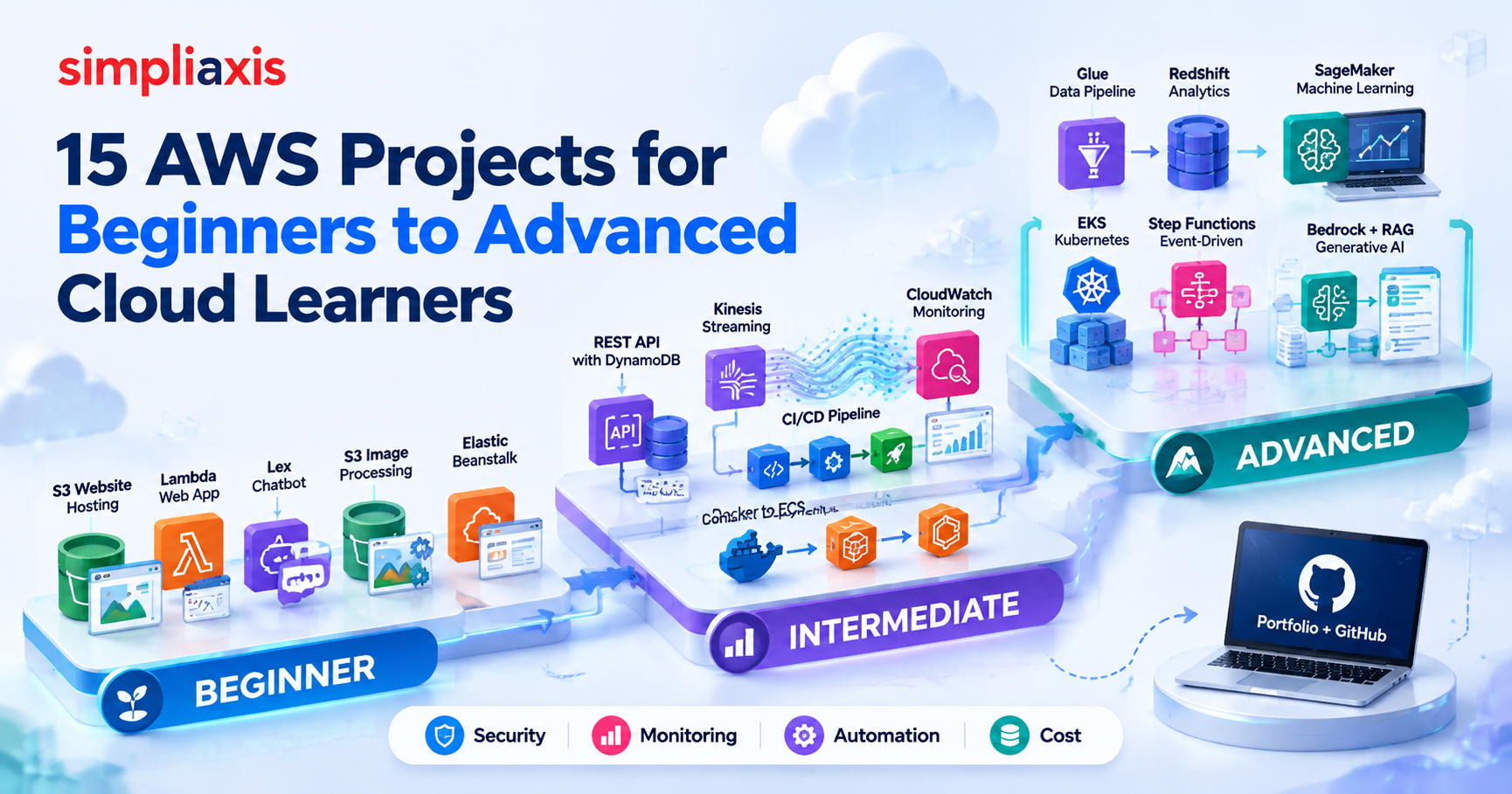
AWS projects are hands-on applications and cloud environments. They help learners to get practical experience with Amazon Web Services. If you are a beginner, you can start with S3 website hosting, Lambda automation, chatbots, and serverless applications. As you progress towards intermediate, you can create REST APIs, CI/CD pipelines, monitoring systems, streaming pipelines, and container deployments. For experienced learners, the focus shifts towards more advanced topics. They can work with Amazon EKS, SageMaker AI, AWS Glue, Step Functions, and Amazon Bedrock.
The best AWS projects are not simply demos of individual services. They demonstrate how storage, compute, networking, security, monitoring, automation, and cost management all fit together in a real cloud architecture.
Key Highlights of AWS Projects
- AWS projects move theory about the cloud into practical experience with actual services and configurations.
- If you are just getting started, we suggest focusing on projects that involve Amazon S3, CloudFront, Lambda, API Gateway, and Amazon Lex.
- Intermediate projects: APIs, DynamoDB, streaming data, CI/CD, monitoring, containers.
- AWS advanced cloud projects include Kubernetes, data engineering, machine learning, event-driven architecture, and generative AI.
- A good GitHub portfolio should include source code, architecture diagrams, instructions for deployment, security considerations, and cleanup steps.
- New eligible AWS customers can receive credits up to $200 in 2026.
- The Free plan lasts up to six months or until available credits are exhausted, whichever happens first.
Introduction
Why should you go beyond simply reading about AWS services? Reading about AWS services teaches you what they do. Building with them teaches you how cloud systems actually behave.
Consider AWS Lambda. You can learn that it runs code without requiring you to manage servers. However, an AWS project pushes you further. What invokes the function? Which IAM permissions does it need? Where does it store data? What happens when execution fails? How will you find the error in CloudWatch? Those questions turn cloud theory into practical knowledge.
For this reason, AWS practice projects help students, developers, certification candidates, DevOps professionals, and people moving into cloud careers through structured AWS cloud computing training. They can also work well as AWS projects for final-year portfolios when students document their architecture and technical decisions properly.
This article covers 15 AWS project ideas across three levels. If you are completely new to the platform, understanding what AWS is will give you a useful foundation before progressing into containers, DevOps, data engineering, Kubernetes, machine learning, and generative AI.
What Are AWS Projects and How Do They Build Cloud Skills?
AWS projects are practical exercises in which you design, deploy, automate, or operate applications using Amazon Web Services.
Unlike isolated exercises, a good project usually connects multiple AWS services around one practical objective. For example, an image-processing application can combine Amazon S3 for file storage, AWS Lambda for processing, IAM for permissions, and Amazon CloudWatch for logging. That integration is where much of the learning happens.
What Is an AWS Project and What Can You Build on AWS?
An AWS project is an application, infrastructure environment, automation workflow, or data system built partly or entirely with AWS services. You can build projects involving static and dynamic websites, serverless applications, REST APIs, chatbots, automated file processing, CI/CD pipelines, monitoring and alerting systems, Docker containers, Kubernetes, real-time data processing, data warehouses and ETL pipelines, Machine Learning, generative AI, and RAG applications.
The project does not need dozens of AWS services to be useful. In fact, a focused AWS project for beginners that combines three services correctly can teach more than a complicated architecture copied from an online tutorial.
How AWS Hands-On Projects Help You Learn Cloud Computing ?
Hands-on cloud projects expose you to decisions that guided AWS tutorials may handle for you. For example, you learn how IAM policies control communication between services. You see what happens when a deployment fails. You inspect CloudWatch logs to diagnose errors. You also discover why unused cloud resources must be removed.
AWS practice helps you to build up several skills at once. They are -
Cloud architecture: You learn how compute, storage, databases, APIs, and networking fit together, the layers described in thecloud computing reference model.
Security: Projects include IAM users, roles, policies, resource permissions, and least privilege access.
Automation: As your skills improve, you can recreate projects with AWS CloudFormation, AWS SAM, AWS CDK, or another infrastructure-as-code approach.
Observability: CloudWatch helps you gain visibility into logs, metrics, dashboards, and alarms.
Cost management: Real deployments teach you to think about usage, lifetimes of resources, and pricing before you choose an architecture.
Hands-on work also complements preparation for an AWS Solutions Architect Associate certification because you apply architectural concepts instead of learning them only in theory.
AWS Projects vs AWS Labs and Tutorials: What Is the Difference?
AWS projects, labs, and tutorials all support learning, but the level of independence differs.
Learning format | Primary purpose | Guidance | Typical result | Best suited for |
| AWS tutorials | Explain a service or procedure | High | Predefined working example | Learning something new |
| AWS labs | Practice a specific technical task | High to medium | Completed guided exercise | Reinforcing cloud concepts |
| AWS mini projects | Combine several skills | Medium | Small functional application | Beginner practice |
| AWS projects | Solve a broader technical problem | Medium to low | Complete application or architecture | Portfolio development |
| Real-world AWS projects | Recreate production-style requirements | Low | More complete cloud system | Career-focused practice |
For example, you could start with a Lambda tutorial. Then do an AWS lab connecting Lambda and API Gateway. Lastly, create your own API with authentication, DynamoDB, monitoring, and infrastructure as code.
This slowly diminishes the instructions you rely on and increases the decisions you make yourself.
AWS Projects for Beginners: 5 Ideas to Start Building Cloud Skills
Good beginner AWS projects have clear results and manageable architectures. They should help you get your head around core services before you start adding complex networking, orchestration, or container infrastructure.
1. Host a Static Website Using Amazon S3 and CloudFront
AWS services: Amazon S3, Amazon CloudFront, IAM, optional Route 53 and AWS Certificate Manager.
Build a portfolio site, landing page, or documentation site with HTML, CSS, JavaScript, and images. Save the files to an S3 bucket and serve them with CloudFront.
For a secure modern implementation, use the S3 bucket as a private CloudFront origin with Origin Access Control (OAC). AWS’s current recommendation for secure static websites is to use OAC so that visitors access the content via CloudFront instead of directly from S3.
This beginner project will teach you: S3 object storage, CloudFront distribution, Caching, IAM and bucket policies, HTTPS, DNS concepts, and basic cloud security.
Make it portfolio-ready: Add a custom domain, HTTPS certificate, caching configuration, access logging, and infrastructure as code.
2. Build a Serverless Web Application Using AWS Lambda and API Gateway
AWS services: AWS Lambda, Amazon API Gateway, IAM, CloudWatch, and optionally DynamoDB.
Create a simple web application, such as a task tracker, feedback form, contact form, or something comparable. API Gateway is called by the frontend. API Gateway triggers Lambda functions to execute the backend logic of your application. If you need persistent data in your application, you can add DynamoDB later.
The project demonstrates the usefulness of serverless computing. Instead of a typical application server, you are working with discrete functions and managed AWS services.
Practice: API routes and HTTP methods, Lambda functions, IAM permissions, Input validation, Error handling, and CloudWatch logs.
Once the basic application works, add authentication or infrastructure as code rather than immediately moving to another project.
3. Create an AWS Chatbot Using Amazon Lex
AWS services: Amazon Lex V2, AWS Lambda, IAM, and CloudWatch.
Develop a chatbot for a specific use case: IT support assistant, appointment assistant, product FAQ bot, campus information assistant, etc.
Identify intents that describe what the user wants to accomplish. Then create sample utterances and slots for information the bot needs. If the conversation needs processing outside a predefined response, Lambda can provide fulfilment logic.
This mini AWS project introduces conversational interfaces but is still accessible to beginners. A more powerful variant can call an API or retrieve data from a database.
4. Build an Image Processing Project Using Amazon S3 and Lambda
AWS services: Amazon S3, AWS Lambda, IAM, and CloudWatch.
This is a simple but valuable event-driven AWS cloud project.
Create one S3 bucket or prefix for incoming images and another location for processed output. Configure an S3 event to invoke a Lambda function whenever an image arrives.
The Lambda function could: Generate a thumbnail, resize the image, convert its format, Extract metadata, and apply another lightweight transformation.
As a standard Lambda learning workflow, AWS documents the S3-to-Lambda event pattern. The function is triggered on an S3 event when an object is created and can work with the uploaded file.
The project teaches triggers, event payloads, permissions, deployment packages, logging, and auto-processing.
Portfolio improvement: Add a dead-letter or failure-handling strategy, plus document what happens when Lambda cannot process an uploaded file.
5. Deploy a Web Application Using AWS Elastic Beanstalk
AWS services: AWS Elastic Beanstalk, EC2, IAM, CloudWatch, and supporting resources.
Build a simple Node.js, Python, Java, PHP, or other supported application and deploy it through Elastic Beanstalk.
This is a useful step after serverless projects because you begin working with an application environment backed by more traditional cloud infrastructure.
Elastic Beanstalk handles much of the provisioning and deployment process, allowing you to focus on your application while still observing the AWS resources supporting it.
Try deploying an initial version, changing the application, reviewing environment health and logs, and deploying the update.
Finally, terminate the environment when you finish practicing. This cleanup habit becomes increasingly important as your AWS projects grow.
Intermediate AWS Projects for Real-World Cloud Practice
Intermediate projects should introduce persistent data, deployment automation, streaming, observability, or containers. These AWS real-time projects for practice require more troubleshooting and architectural decisions than beginner exercises.
6. Build a Serverless REST API Using Lambda, API Gateway, and DynamoDB
AWS services: AWS Lambda, Amazon API Gateway, Amazon DynamoDB, IAM, and CloudWatch.
Build a REST API for tasks, products, notes, inventory, or another simple resource.
Implement CRUD operations:
- Create a record
- Read one or more records
- Update a record
- Delete a record
API Gateway handles HTTP requests. Lambda performs the business logic. DynamoDB provides persistent NoSQL storage.
After completing the basic API, add input validation, pagination, meaningful HTTP status codes, authentication, and structured error handling. This project teaches an important cloud principle: managed services can replace much of the infrastructure required by a conventional backend.
7. Create a Real-Time Data Processing Pipeline Using Amazon Kinesis
AWS services: Amazon Kinesis Data Streams, AWS Lambda, Amazon S3, IAM, and CloudWatch.
Generate a stream of simulated data such as website activity, application events, IoT readings, or transaction records.
Send these records to Kinesis Data Streams. Then create a consumer, such as a Lambda function, that processes incoming records and stores useful output in S3 or another appropriate datastore.
This is one of the more useful AWS real-time projects because the application processes continuously arriving data instead of waiting for a scheduled batch.
You can explore: Producers and consumers, Streaming records, Throughput, Event ordering, Batch sizes, Retry behavior, Failure handling, and Stream monitoring.
For a portfolio version, explain why streaming makes sense for your chosen scenario instead of using batch processing.
8. Build an AWS DevOps Project Using CodePipeline and CodeDeploy
AWS services: AWS CodePipeline, AWS CodeDeploy, GitHub or another supported source, EC2 or ECS, IAM, and CloudWatch.
Build a continuous delivery pipeline that automatically deploys application changes.
A practical DevOps pipeline workflow might look like this:
Git repository → pipeline → deployment → application environment
CodePipeline orchestrates the delivery stages, while CodeDeploy can automate deployment to supported compute environments. AWS also documents blue/green deployment patterns for ECS using CodePipeline and CodeDeploy. This is one of the most useful AWS DevOps projects because it combines cloud infrastructure with software delivery.
Enhance it by adding:
- Automated testing
- Manual approval before production
- Deployment notifications
- Rollback procedures
- Blue/green deployment
- Infrastructure as code
Learners pursuingAWS DevOps Engineer training can use projects like this to connect CI/CD concepts with AWS implementation. ADevOps Foundation certificationcan provide broader context around the practices behind those tools.
9. Create a Cloud Monitoring System Using Amazon CloudWatch
AWS services: Amazon CloudWatch, Amazon SNS, EC2 or Lambda.
Deploy a small workload and build an observability system around it.
Start by identifying metrics that actually indicate the application's health. Then create a CloudWatch dashboard and configure alarms for meaningful thresholds.
Depending on the workload, you could monitor:
- CPU utilization
- Lambda errors
- Invocation count
- Application latency
- Log errors
- Resource utilization
Use Amazon SNS if you want an alarm to send a notification. The key learning objective is not simply creating a dashboard. Instead, learn how monitoring helps identify and investigate operational problems.
Create a controlled failure after your monitoring works. Then see which metrics, logs, and alarms reveal the problem.
This practical approach reinforces DevOps principles and practicesaround observability and fast feedback.
10. Deploy a Docker Application Using Amazon ECS and ECR
AWS services: Amazon ECS, Amazon ECR, IAM, CloudWatch, Docker, and optionally an Application Load Balancer.
Create a small web application and package it as a Docker image.
Push the image into Amazon Elastic Container Registry. Then create an ECS task definition and run the application using ECS.
This project teaches you how several container concepts connect:
Application → Docker image → ECR repository → ECS task → ECS service
You will also encounter IAM roles, container logging, networking, task configuration, and deployment settings.
For a stronger portfolio project, place an Application Load Balancer in front of the service and automate image deployment through CI/CD.
At that point, you have built a more complete DevOps project rather than simply demonstrated that you can run a container. It’s also good preparation for understanding how Docker and Kubernetes work togetherin Project 13.
Advanced AWS Projects for Cloud, DevOps, and AI Skills
Advanced projects require more than connecting services. You should begin considering scalability, resilience, security, automation, observability, and cost.
11. Build an Automated Data Pipeline Using AWS Glue, S3, and Amazon Redshift
AWS services: Amazon S3, AWS Glue, Amazon Redshift, IAM, and CloudWatch.
Choose a public or synthetic dataset and create a simple analytics pipeline.
Store raw files in S3. Use AWS Glue to discover, prepare, or transform the data. Then make the curated data available for analysis through Amazon Redshift.
Organize the project into logical data stages, such as:
Raw data → transformed data → analytics-ready data
Do not stop once a query returns successfully.
Document:
- Data schema
- Transformation rules
- Partitioning decisions
- IAM permissions
- Failed-job handling
- Data-quality checks
- Cost considerations
This makes the project much more relevant to data engineering roles.
12. Create a Machine Learning Project Using Amazon SageMaker
AWS services: Amazon SageMaker AI, Amazon S3, IAM, and CloudWatch.
Choose a manageable machine-learning problem such as classification or regression.
A typical workflow includes:
- Store a dataset in S3.
- Explore and prepare the data.
- Train a model.
- Evaluate its performance.
- Compare results.
- Deploy the model only if an endpoint adds value to the project.
- Remove unused resources after testing.
The most important part is understanding the machine-learning lifecycle (the core of MLOps) rather than treating SageMaker AI as a black box.
Explain why you selected the model and evaluation metric. Record what happened during training and identify limitations in the result.
If AI is a new area for you, first understanding what machine learning is can clarify the underlying concepts. Learners targeting cloud AI careers can also connect these skills to the broader process ofbecoming an AI engineer.
13. Deploy a Kubernetes Application Using Amazon EKS
AWS services: Amazon EKS, Amazon ECR, Kubernetes, IAM, VPC, and CloudWatch.
Containerize an application and push its image to ECR. Then deploy it to an Amazon EKS cluster.
Create Kubernetes manifests for the application and experiment with:
- Deployments
- Services
- Pods
- Rolling updates
- Health checks
- Scaling
- Namespaces
- Application logs
This project requires more infrastructure knowledge than an ECS deployment. If the core objects are new to you, start with this introduction to Kubernetes. It also exposes you to the relationship between Kubernetes concepts and AWS networking, IAM, compute, and monitoring.
For GitHub, include the Kubernetes manifests alongside the application source code. EKS environments can involve multiple billable resources. Therefore, check current pricing before deployment and create a cleanup plan before you start.
14. Build an Event-Driven Workflow Using AWS Step Functions and Lambda
AWS services: AWS Step Functions, Lambda, EventBridge, S3 or DynamoDB, SNS, and CloudWatch.
Choose a multi-step workflow such as document processing, order handling, approval processing, or data validation.
For example:
File uploaded → validate file → process data → make decision → store result → send notification
Step Functions lets you represent this workflow as states. Lambda functions can perform individual processing tasks.
The valuable part of this project is handling situations where everything does not work perfectly.
Add:
- Choice states
- Retries
- Timeouts
- Catch paths
- Failure notifications
Then deliberately make one step fail and observe what happens. That exercise teaches orchestration and fault handling far better than a workflow that always follows a successful path.
15. Build a Generative AI Application Using Amazon Bedrock and RAG
AWS services: Amazon Bedrock, Amazon Bedrock Knowledge Bases, Amazon S3, IAM, Lambda, and suitable retrieval infrastructure.
Build a question-answering application grounded in a controlled set of documents. For example, you could create an assistant that answers questions about technical documentation, course material, company policies, or a public knowledge collection.
A Retrieval-Augmented Generation workflow generally retrieves information relevant to a query and provides that context to a foundation model before generating the response. Amazon Bedrock Knowledge Bases provides managed capabilities for building RAG applications and can return source information alongside generated responses. AWS walks through a full build in its guide to building an end-to-end RAG solution with Bedrock Knowledge Bases and the AWS CDK.
A simplified project flow could be:
Documents → knowledge base → retrieval → foundation model → grounded answer
Do not judge the project only by whether it generates fluent text. Test retrieval quality as well.
Create questions where:
- The answer exists clearly in the documents.
- Relevant information appears across multiple documents.
- The documents contain similar but different information.
- The answer does not exist in the source material.
AWS also provides evaluation capabilities for RAG workloads, making evaluation a worthwhile extension for an advanced project.
This type of project demonstrates much deeper AI engineering knowledge than simply sending prompts to a model. Comparing the architecture with consumer-facing free AI tools can also help clarify the difference between using AI and building AI-enabled systems.
AWS Projects with Source Code: Build a Strong GitHub Portfolio
Finding AWS projects with source code is easy. Turning your own work into a portfolio that demonstrates technical ability requires more effort.
A recruiter or interviewer should be able to open your repository and understand what you built, how it works, and why you made particular decisions.
Essential Elements of an AWS Project GitHub Repository
A strong AWS project's GitHub repository should contain more than application files. Include:
- Application source code
- Infrastructure configuration
- Dependency files
- Example configuration
- Architecture diagram
- Deployment instructions
- Testing instructions
- Cleanup procedure
- Known limitations
- Security notes
Where practical, define the infrastructure with AWS CloudFormation, AWS SAM, AWS CDK, Terraform, or another appropriate infrastructure-as-code tool. Most importantly, never commit AWS access keys, secret keys, passwords, API tokens, or private credentials.
Public cloud computing projects' GitHub repositories are useful learning references, but copying one unchanged provides little evidence of your own skills. Use examples to understand patterns, then create and document your own implementation. For example, the AWS Serverless Patterns collection on GitHubshows hundreds of service integrations, such as S3 to Lambda and API Gateway to DynamoDB, that you can study before building your own version.
README Files, Architecture Diagrams, and Project Documentation
Treat the README as part of the project. Start by explaining the problem and expected outcome. Next, identify the AWS services and show how they interact. A useful README can include:
- Project overview
- Architecture diagram
- AWS services used
- Prerequisites
- Setup and deployment
- Testing procedure
- Security considerations
- Cost considerations
- Cleanup instructions
- Known limitations and future improvements
Your architecture diagram should show how requests, events, and data move through the system. For example, an image-processing diagram could show:
User → S3 → Lambda → processed S3 location
A diagram makes your design much easier to discuss during interviews.
Adding AWS Projects to Your Resume and Technical Portfolio
Avoid resume bullets that simply list AWS services.
Weak: Created an AWS project using Lambda and S3.
Better: Built an event-driven image-processing workflow using Amazon S3 and AWS Lambda, with IAM-based service permissions and CloudWatch logging.
The second version explains what you actually built.
If you have genuine measurements from testing, include them when relevant. However, never invent performance gains, cost reductions, request volumes, or availability numbers.
Projects can also provide practical examples when preparing for interviews as you become a DevOps engineer. Instead of answering only with definitions, you can explain problems you encountered and how you resolved them.
AWS Projects for Solutions Architect, DevOps, Data Engineering, and AI Skills
Choose projects according to the career skills you want your portfolio to demonstrate.
Career direction | Suitable AWS projects | Skills demonstrated |
| Solutions Architect | Static website, serverless API, Step Functions workflow | Architecture, IAM, integration, scalability |
| DevOps | CI/CD pipeline, CloudWatch monitoring, ECS, EKS | Automation, observability, containers, deployment |
| Data Engineering | Kinesis pipeline, Glue/S3/Redshift project | Streaming, ETL, storage, analytics |
| AI/ML | SageMaker AI project, Bedrock RAG application | Model lifecycle, retrieval, generative AI |
| Cloud Developer | Serverless application, REST API, Elastic Beanstalk | APIs, application deployment, managed compute |
Do not choose projects solely because their architectures look complicated. Pick projects that demonstrate skills relevant to the role you actually want.
How Much Do AWS Projects Cost? Free Tier and Billing Guide?
The cost of an AWS cloud project depends on the services, AWS Region, runtime, storage, data transfer, configuration, and account plan. Therefore, never assume that a project described as "beginner-friendly" is automatically free.
AWS Services and Projects Available Within Free Tier Limits
AWS changed its Free Tier model for new customers in 2025, as announced in AWS’s Free Tier update, so older articles describing a universal 12-month introductory Free Tier can be misleading in 2026.
Under the current program, eligible new customers receive $100 in AWS credits when they create an account and can earn up to another $100 by completing qualifying activities. AWS also provides access to more than 30 services with always-free monthly usage limits.
The AWS Free plan lasts until the earlier of:
- Six months after opening the account, or
- Exhaustion of available Free Tier credits.
AWS states that the Free plan prevents charges during that period. Access to some AWS services or features requires upgrading to the Paid plan.
Consequently, the exact services available for a project depend on your account plan and current AWS offers. Then, check the AWS Free Tier and individual service pricing pages before creating resources.
AWS Resources That Can Increase Project Costs
Pay particular attention to resources that remain active even when you are not actively using the application. For example, compute instances, managed Kubernetes infrastructure, NAT gateways, load balancers, databases, provisioned analytical resources, machine-learning endpoints, data transfer, large storage volumes, generative AI model usage.
Advanced projects involving EKS, Redshift, SageMaker AI, or Amazon Bedrock can include several separately priced components. For this reason, include a cleanup phase in every project plan.
After finishing an experiment, check the AWS console for resources that remain active. Deleting only the application code does not necessarily remove the infrastructure supporting it.
Billing Alerts and Cost Controls for AWS Projects
Cost management should begin before you create expensive resources.
Use AWS Billing and Cost Management tools to watch usage and credits. You can also configure AWS Budgets based on the spending thresholds appropriate for your account.
For practice projects:
- Review pricing before deployment.
- Create a budget or appropriate cost notification.
- Tag project resources consistently.
- Check costs during experimentation.
- Remove resources when the project ends.
Do not treat a budget alert as a substitute for monitoring your resources. Cloud billing information is not necessarily an instantaneous hard-stop mechanism. The broader lesson is simple: cost awareness is part of cloud engineering.
How to Choose the Right AWS Project for Your Skill Level and Career Goal?
The right project should stretch your skills without becoming so complicated that you only follow instructions without understanding them.
Your career goal matters as much as your current AWS knowledge.
Best AWS Project Ideas for Complete Beginners
If you are new to AWS, begin with projects that have a clear architecture and a limited number of services. Good choices include:
- S3 and CloudFront static website
- S3 and Lambda image processor
- Amazon Lex chatbot
- Basic serverless application
- Elastic Beanstalk deployment
At this stage, concentrate on core concepts such as AWS Regions, IAM, service permissions, logs, and resource cleanup. Do not rush into Kubernetes simply because EKS sounds more advanced.
AWS Projects for Intermediate Cloud Learners
Intermediate learners should start adding state, automation, monitoring, and deployment workflows.
Useful projects include:
- Lambda/API Gateway/DynamoDB REST API
- Kinesis streaming pipeline
- CodePipeline and CodeDeploy CI/CD project
- CloudWatch monitoring environment
- ECS container deployment
At this level, reduce your dependence on the AWS Management Console. Begin using the AWS CLI and infrastructure as code where appropriate.
Also learn to troubleshoot. A project that fails and forces you to inspect logs, permissions, networking, and configuration can teach more than a tutorial that works perfectly on the first attempt.
Advanced AWS Projects for Experienced Cloud Professionals
Advanced learners should focus less on the number of AWS services and more on architectural quality. Use theAWS Well-Architected Framework as a checklist, and ask questions such as:
- What happens when a component fails?
- Can the environment be recreated automatically?
- Are IAM permissions unnecessarily broad?
- What should be monitored?
- How does the system scale?
- Which resources generate ongoing costs?
- How will a deployment be rolled back?
- How will data be protected?
For example, an EKS project becomes more meaningful when you add deployment automation, monitoring, health checks, and security controls.
Similarly, a Bedrock RAG application becomes stronger when you evaluate retrieval quality instead of only demonstrating that the model generates an answer.
How Many AWS Projects Should You Build for Your Portfolio?
There is no fixed number of AWS projects that every portfolio needs. A few well-documented projects are generally more useful than a long list of copied tutorials you cannot explain. Choose enough projects to demonstrate the skills relevant to your target role.
For example, a DevOps portfolio might include:
- One container deployment
- One CI/CD pipeline
- One monitoring project
- One more advanced infrastructure project
A data engineering portfolio could focus on streaming and ETL pipelines. An AI portfolio could combine a machine-learning workflow with a RAG application.
The important question is not "How many projects have I completed?"
It is "Can I explain the architecture, decisions, failures, security, costs, and improvements behind each project?"
Common AWS Project Mistakes to Avoid
- Cleaning up after practice: Unused clusters, instances, endpoints, load balancers, and databases may continue to consume billable resources. Make cleaning up part of every project.
- Giving services too much IAM permission: Don’t fix every permission error by just giving admin access. Learn how to grant users and services only the permissions they require.
- Copying AWS tutorials word for word: Tutorials are good starting points, but portfolio projects should include your own requirements, improvements, troubleshooting, or architectural decisions.
- Don’t ignore monitoring and failure handling: Add logs, metrics, alarms, retries, or error paths where they make sense. A working happy path is only one part of a real system.
- Publishing credentials in source code: Never push AWS access keys, passwords, tokens, or other secrets to GitHub. Do not store credentials in your repository. Use proper AWS security mechanisms.
Are AWS Projects Enough to Get a Cloud or DevOps Job?
AWS projects can strengthen your portfolio and demonstrate practical skills, but projects alone do not guarantee a cloud or DevOps job. Employers may evaluate a wider technical foundation that includes:
- AWS knowledge
- Linux
- Networking
- Git
- Scripting
- Containers
- CI/CD
- Infrastructure as code
- Monitoring
- Security
- Troubleshooting
The required combination varies by job. Your ability to explain a project also matters. During an interview, you may be asked why you selected Lambda instead of a continuously running compute service, why your S3 bucket is private, how your application recovers from failure, or how you would control costs as usage grows.
A project becomes evidence of skill when you understand those decisions. Certifications can complement hands-on practice by providing structured coverage of cloud concepts. Meanwhile, projects give you opportunities to apply those concepts and encounter the practical problems that exam questions cannot reproduce.
Conclusion
The best AWS projects are not necessarily the largest architectures. They are projects you can build, troubleshoot, secure, monitor, document, and explain.
Start with manageable AWS projects for beginners such as static website hosting, serverless applications, chatbots, image processing, and Elastic Beanstalk deployments. These projects develop familiarity with storage, compute, permissions, APIs, events, and logs. Next, build intermediate projects around DynamoDB, Kinesis, CodePipeline, CodeDeploy, CloudWatch, ECS, and ECR. At this stage, introduce automation, monitoring, containers, and infrastructure as code. Advanced learners can move into AWS Glue, Redshift, SageMaker AI, EKS, Step Functions, and Amazon Bedrock.
However, complexity alone should never be the goal. Advanced work should demonstrate stronger decisions around security, resilience, observability, automation, and cost.
Finally, document what you build. Add source code, architecture diagrams, deployment instructions, security notes, testing procedures, cost considerations, and cleanup steps to GitHub.
Then improve the project beyond the tutorial. Add authentication. Automate deployment. Reduce IAM permissions. Trigger a controlled failure. Add monitoring. Rebuild the infrastructure from code.
That is how an AWS tutorial becomes genuine AWS practice—and how a simple project becomes evidence of real cloud skills.


_1774523451.webp)





 Lowest-Price Challenge












 Personalized Path


.webp)


 USA
USA  Canada
  India
India  UK
UK  Australia
  Singapore


