


 Call Us



Quick Answer
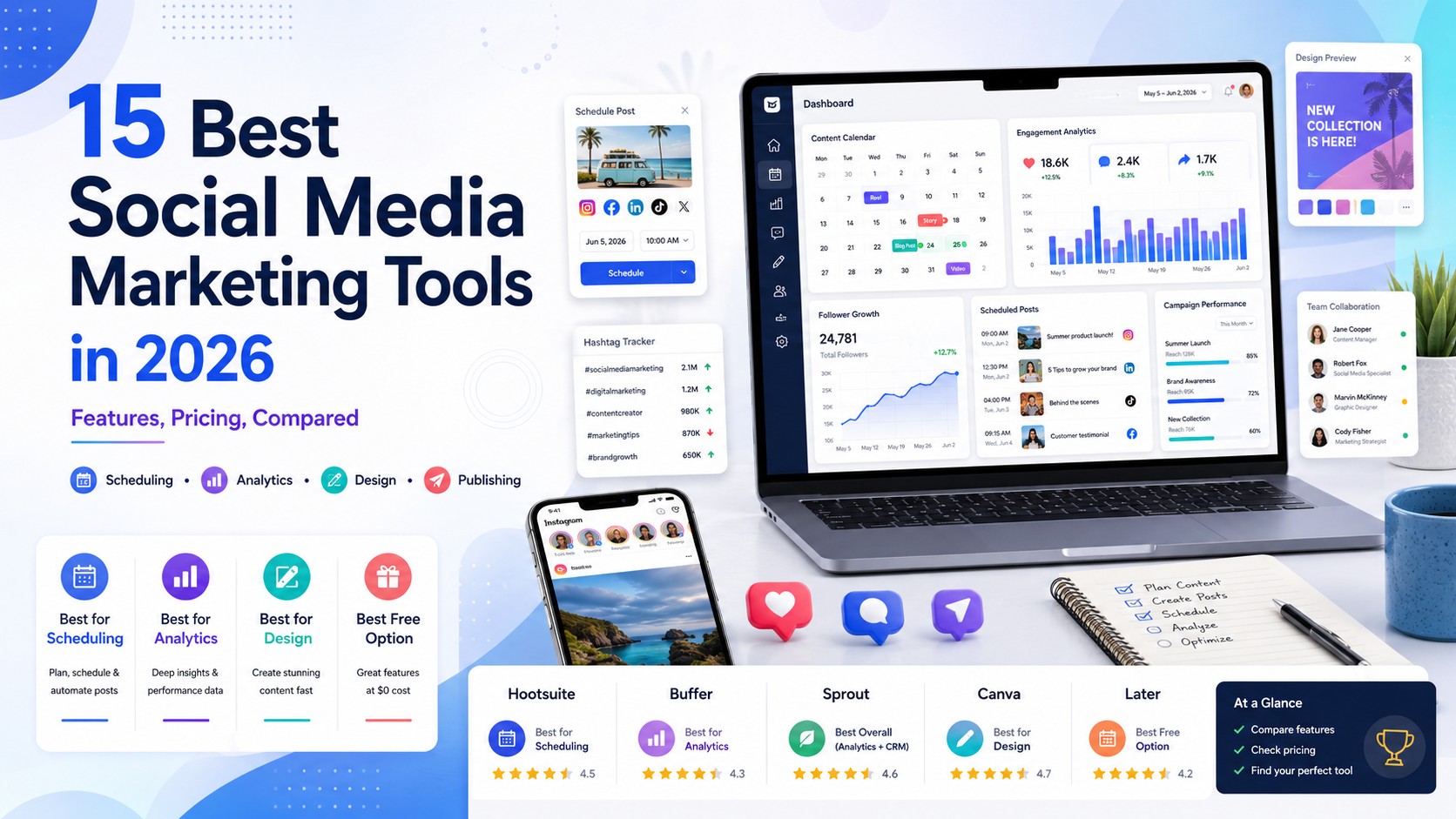
The best social media marketing tools in 2026 fall into a few clear categories: all-in-one management platforms such as Hootsuite, Sprout Social, and Agorapulse for scheduling, publishing, and reporting across multiple channels; budget-friendly schedulers such as Buffer and SocialPilot for small teams and freelancers; visual-content tools such as Canva for design; and platform-native options such as Meta Business Suite for managing Facebook and Instagram at no cost. There is no single "best" tool for every business. The right choice depends on how many channels you manage, whether you need analytics and approval workflows, and your budget, so most teams end up combining two or three tools rather than relying on one.
Key Highlights of Best Social Media Marketing Tools
- Social media management software now spans four core categories: scheduling and publishing, analytics and reporting, social listening, and design or content creation, and most paid platforms now bundle at least two of these.
- Pricing has shifted toward per-seat and per-profile models. Hootsuite and Sprout Social now charge per user seat starting around $99 to $199 per month, while Buffer and SocialPilot charge per connected social channel, which usually works out cheaper for solo marketers and small teams.
- In 2026, Instagram opened native, in-app post and Reel scheduling to all public accounts, not just Business or Creator profiles, narrowing the gap between free platform-native tools and paid third-party schedulers.
- AI features, from caption generation to optimal-time recommendations, are now standard in nearly every major tool, and Social Media Examiner's 2026 industry report found that a majority of marketers now use generative AI tools daily.
- Free or near-free options remain viable for small businesses: Meta Business Suite is free for Facebook and Instagram, Buffer's free plan covers three channels, and Metricool's free tier supports one brand with unlimited publishing.
- Enterprise-grade platforms such as Sprinklr have moved toward custom, sales-led pricing only, so smaller businesses are better served by mid-market tools like Sprout Social, Agorapulse, or SocialPilot.
Why Social Media Marketing Tools Matter in 2026
Manually posting to five or six social networks, tracking engagement in separate dashboards, and replying to comments one platform at a time is no longer realistic for most brands. Social media marketing tools consolidate scheduling, publishing, analytics, and often customer engagement into a single workspace, which is why the category has grown into a multi-billion-dollar software segment with dozens of credible vendors.
The stakes are also higher because the audience is larger than ever. Current estimates put the global social media user base at well over five billion people, with the average user active on close to seven different networks and spending roughly two and a half hours a day on social apps. Facebook remains the largest platform by monthly active users, YouTube and Instagram follow closely behind, and TikTok has passed 1.6 billion monthly active users. Managing a consistent, on-brand presence across that many platforms without a management tool is, in practice, not sustainable for a business of any real size.
At the same time, the tools themselves have changed. Pricing models have shifted (several major vendors moved from flat team plans to per-seat pricing in the past year), native platform features have improved (Instagram's 2026 scheduling update is a good example), and AI is now embedded in almost every workflow, from caption writing to performance forecasting. A tool that was the obvious choice two years ago may no longer be the best fit today, which is why this guide focuses on what each platform actually offers right now, not just its reputation.
How We Evaluated These Tools
Each tool below was assessed against the same practical criteria that a marketing team or training professional would use when choosing software:
- Core function: whether the tool is primarily a scheduler, an analytics and listening platform, a design tool, or a combination.
- Channel and network support: which platforms (Facebook, Instagram, X, LinkedIn, TikTok, YouTube, Pinterest) it publishes to natively.
- Pricing structure and entry cost: whether the tool charges per seat, per social profile, or per brand, and what a small team would actually pay.
- Team and approval features: whether it supports multi-user collaboration, content approval workflows, and client reporting.
- Best-fit use case: the size and type of business or team each tool is genuinely built for, rather than who it is marketed to.
Pricing details below reflect publicly available plan information as of publication in 2026. Vendors update pricing frequently, so always confirm current tiers on the official pricing page before purchasing, which is linked for each tool.
Best Social Media Marketing Tools Compared at a Glance
| Tool | Best For | Starting Price (approx.) | Pricing Basis | Standout Feature
|
| Hootsuite | Agencies and larger teams needing listening plus publishing | ~$99/month | Per seat | Unified social inbox and listening streams |
| Buffer | Solo creators and small businesses | Free; paid from ~$5/channel/month | Per connected channel | Simple, clean scheduling interface |
| Sprout Social | Mid-size to enterprise teams needing deep analytics | ~$199/seat/month | Per seat | Advanced reporting and social CRM |
| SocialPilot | Agencies managing many client accounts affordably | ~$30/month | Per plan tier, with account add-ons | High account-to-price ratio for agencies |
| Agorapulse | Teams wanting inbox management plus reporting | ~$79/user/month (annual) | Per user | Unified social inbox with saved replies |
| Metricool | Freelancers and small teams wanting analytics-first tools | Free; paid from ~$20/month | Per brand | Combines scheduling, analytics, and ad tracking |
| Sprinklr | Large enterprises with dedicated social teams | Custom (enterprise sales only) | Per module/custom | Unified customer experience management suite |
| Later | Visual-first brands and influencers | ~$25/month | Per plan tier | Visual content calendar and link-in-bio |
| Canva | Design plus basic scheduling in one place | Free; Pro ~$15/month | Per user | Templates plus built-in Content Planner |
| Meta Business Suite | Businesses focused only on Facebook and Instagram | Free | N/A | Native scheduling, inbox, and ad management |
1. Hootsuite
Hootsuite is one of the longest-running social media management platforms and remains a common choice for agencies and larger marketing teams that need publishing, a unified social inbox, and social listening in one dashboard. It supports scheduling across Facebook, Instagram, X, LinkedIn, TikTok, YouTube, and Pinterest, and its analytics module can pull cross-network reports into a single view.
Hootsuite moved to per-seat pricing, with plans reported at roughly $99 per seat per month for its entry tier, $199 for its Professional-equivalent tier, and $399 for its Advanced tier aimed at larger teams needing approval workflows; an Enterprise tier is quoted individually. Because pricing is per seat rather than per channel, Hootsuite tends to suit teams with a small number of users managing many accounts, rather than the reverse.
Who Hootsuite Is Best For
- Agencies and enterprise marketing teams that need social listening alongside publishing.
- Organizations managing 10 or more social profiles under a small number of logins.
- Teams that need approval workflows and audit trails for compliance-sensitive industries.
2. Buffer
Buffer is built around simplicity: a clean scheduling interface, straightforward analytics, and no bloated feature set. Its free plan covers three social channels with ten scheduled posts per channel, which is enough for many solo creators to test the platform before paying.
Paid plans are priced per channel rather than per seat, reported at roughly $5 to $6 per channel per month for the Essentials tier (unlimited scheduled posts, basic analytics) and $10 to $12 per channel per month for the Team tier, which adds collaboration features. Additional channels beyond the first several are typically discounted, and Buffer has historically offered a nonprofit discount. This per-channel model makes Buffer inexpensive for a person managing two or three accounts, but costs scale up for agencies managing dozens of client profiles.
Who Buffer Is Best For
- Solo creators, freelancers, and small businesses managing a handful of channels.
- Teams that want a simple, low-learning-curve tool without listening or CRM features.
- Budget-conscious marketers who don't need advanced reporting.
3. Sprout Social
Sprout Social is positioned as a premium, analytics-heavy platform, often chosen by mid-size to enterprise marketing teams that need detailed reporting, a social CRM, and influencer marketing features alongside publishing. Reported 2026 pricing runs from roughly $199 per seat per month for the Standard plan (which includes a limited number of social profiles) up to $299 for Professional and $399 for Advanced, both of which typically remove the profile cap, with an Enterprise tier quoted individually.
Because every plan includes one seat and additional seats bill at the same per-seat rate, Sprout Social's total cost scales directly with team size, which is worth factoring in before committing to an annual contract.
Who Sprout Social Is Best For
- Mid-size and enterprise teams that treat social data as a serious input to strategy.
- Brands running influencer programs alongside organic and paid social.
- Teams willing to pay a premium for polished reporting and customer support.
4. SocialPilot
SocialPilot markets itself directly at agencies and teams managing many client accounts on a limited budget. Reported 2026 pricing starts at roughly $30 a month for an Essentials tier covering seven social accounts for one user, scaling to around $50 for Standard (15 accounts, 3 users), $100 for Premium, and $200 for its Ultimate tier, which covers around 50 accounts. Extra users and accounts can be added incrementally rather than forcing an upgrade to the next full tier.
This structure gives SocialPilot one of the better price-to-account ratios in the category, which is why it shows up frequently in agency recommendations even though it lacks some of the deeper listening features of Hootsuite or Sprout Social.
Who SocialPilot Is Best For
- Agencies and freelancers managing many client social profiles on a tight budget.
- Small teams that need basic approval workflows without enterprise pricing.
5. Agorapulse
Agorapulse is built around a unified social inbox, saved replies, and reporting, and it competes directly with Hootsuite and Sprout Social for mid-market teams. Reported 2026 annual pricing runs from about $79 per user per month for Standard, $119 for Professional, up to $149 for Advanced, each including ten social profiles with extra profiles billed separately; month-to-month rates run higher. Agorapulse previously offered a free plan for very small accounts, but that tier is no longer listed on its public pricing page as of early 2026, which is worth confirming directly if a no-cost option is a requirement.
Who Agorapulse Is Best For
- Teams that spend significant time on community management and inbox replies.
- Marketing teams that want built-in reporting without a large enterprise contract.
6. Metricool
Metricool combines scheduling, analytics, and paid-ad tracking in a single, comparatively affordable dashboard, priced per "brand" (a connected set of accounts) rather than per user or per channel. A free plan supports one brand with unlimited publishing but excludes some analytics; the Starter plan (reported around $20 a month annually) unlocks up to ten brands, unlimited analytics history, and a Canva integration, while the Advanced tier (around $53 a month annually) adds team management, approval workflows, and a Looker Studio connector.
Who Metricool Is Best For
- Freelancers and small agencies that want scheduling and analytics without per-seat pricing.
- Marketers who also want basic ad-performance tracking alongside organic posts.
7. Sprinklr
Sprinklr sits at the enterprise end of the category, bundling social media management with customer service, listening, marketing orchestration, and advertising modules that large organizations license separately. As of 2026, Sprinklr discontinued its self-serve signup path entirely, meaning pricing is only available through an enterprise sales process, with reported annual contract values commonly starting in the tens of thousands of dollars and scaling well beyond that for larger deployments.
Who Sprinklr Is Best For
- Large enterprises that already need customer experience and service tools beyond social.
- Organizations with a dedicated procurement process and multi-year software budgets.
- Not a realistic option for small or mid-size businesses given the enterprise-only pricing model.
8. Later
Later started as an Instagram-first scheduler and remains popular with visual-content brands, influencers, and creators who rely heavily on a content calendar and link-in-bio page. In 2026, Later simplified its pricing structure to three core paid tiers, reported at roughly $25 a month for Starter, $50 for Growth, and $110 for its top Scale tier (with lower rates available on annual billing), each supporting add-ons for extra social sets, users, and AI credits.
Who Later Is Best For
- Visually driven brands on Instagram, Pinterest, and TikTok.
- Creators who want an integrated link-in-bio page alongside scheduling.
9. Canva
Canva is primarily a design tool, but its Content Planner feature lets users schedule and publish designs directly to Facebook, Instagram, X, LinkedIn, and Pinterest from the same dashboard where the graphics are created. Canva Pro is reported at roughly $15 a month (or a discounted annual rate), and includes background removal, Magic Resize, brand kits, expanded cloud storage, and AI-assisted design tools alongside the scheduler. For teams that need social media design far more than they need advanced analytics, Canva can function as a lightweight, all-in-one option.
Who Canva Is Best For
- Small businesses and solo marketers whose main need is fast, on-brand visual content.
- Teams that want basic scheduling bundled with design rather than as a separate purchase.
10. Meta Business Suite
Meta Business Suite is Meta's free, native tool for managing Facebook Pages and Instagram accounts together: scheduling posts, Stories, and Reels; running a shared inbox across Messenger, Instagram Direct, and comments; and managing ad campaigns and audience targeting, all at no cost. In 2026, Instagram also extended native, in-app scheduling (for posts, carousels, and Reels, up to roughly 75 days ahead) to all public accounts, not only Business or Creator profiles, which narrows the gap between what a free, platform-native tool can do and what a paid third-party scheduler offers, at least for single-platform Facebook and Instagram management.
Who Meta Business Suite Is Best For
- Small businesses that only need to manage Facebook and Instagram, not multiple networks.
- Anyone testing whether they need a paid tool at all before committing to one.
Free vs Paid Social Media Marketing Tools
A genuinely useful free tier still exists in this category, but the right choice depends on how many platforms and accounts are involved:
- Single-platform management (Facebook and Instagram only): Meta Business Suite is free and, since Instagram's 2026 update, covers most native scheduling needs for public accounts.
- Two or three channels, no team collaboration: Buffer's free plan (three channels) or Metricool's free plan (one brand) cover basic scheduling without a subscription.
- Multiple channels with team members or client work: paid plans become necessary once approval workflows, multiple users, or more than a handful of accounts are involved; SocialPilot and Agorapulse tend to offer the best value at this stage.
- Deep analytics, listening, or enterprise reporting: this tier (Sprout Social, Hootsuite Advanced, Sprinklr) is priced accordingly and is generally not worth paying for until a business has the reporting requirements to justify it.
What Changed in 2026: Native Scheduling and AI Features
Two shifts are reshaping how businesses think about social media marketing tools this year:
Native Scheduling Expanded
Instagram's move to open native scheduling to all public accounts, not just Business or Creator profiles, is the most consequential platform-side change of the year for smaller creators and businesses that previously needed a third-party tool purely to schedule posts in advance. It does not replace what multi-network schedulers offer (cross-posting to LinkedIn, X, TikTok, and Pinterest still requires a dedicated tool), but it does mean Instagram-only accounts have a genuine free alternative for basic scheduling.
AI Is Now a Baseline Feature, Not a Differentiator
According to Social Media Examiner's 2026 Social Media Marketing Industry Report, a majority of marketers now use generative AI tools daily, and nearly every platform in this article, from Canva's Magic Studio to Later's AI credits to SocialPilot's AI content credits, now bundles some form of caption writing, image generation, or optimal-posting-time recommendation. This means AI support alone is no longer a meaningful way to differentiate between tools; the differentiator is how well a platform's core scheduling, analytics, or inbox features work.
How to Choose the Right Social Media Marketing Tool
Rather than starting from a list of features, it helps to start from three practical questions:
- How many platforms and accounts do you actually manage? A business running only Facebook and Instagram may not need a paid tool at all. A business running five or more networks across multiple accounts almost certainly does.
- Is pricing charged per seat, per channel, or per brand? A solo marketer managing many accounts should look for per-seat pricing (Hootsuite, Sprout Social); an agency managing many client accounts with a small team should look for per-channel or per-brand pricing (Buffer, SocialPilot, Metricool), since it usually costs less at scale.
- Do you need analytics and listening, or just publishing? If reporting and social listening genuinely inform strategy decisions, a premium platform like Sprout Social or Hootsuite Advanced is worth the cost. If the team mainly needs to keep a consistent posting schedule, a simpler and cheaper scheduler is the better spend.
Most established marketing teams do not run on a single tool. A common combination is a scheduler for publishing (Buffer, SocialPilot, or Later), a design tool for creating the content itself (Canva), and, once volume justifies it, a dedicated analytics or listening platform layered on top.
Building the Skills Behind the Tools
Tools only produce results in the hands of a marketer who understands strategy, audience targeting, and how to read the data these platforms generate. Professionals looking to formalize that skill set alongside learning the tools themselves can look at structured training options such as Simpliaxis's Agile Marketing Boot Camp, which covers how marketing teams plan and adapt campaigns using agile workflows, or the shorter Agile for Marketing Microcredentials course for a faster, self-paced introduction.
Because most of the tools above now lean heavily on AI for content generation and optimization, it is also worth building fluency in generative AI itself. Simpliaxis's Mastering Generative AI Tools course and its Generative AI for Marketing and Sales Business Users course both address how to apply AI tools directly to marketing and content workflows, which pairs naturally with the platforms covered in this guide. A broader, curated list of free AI tools relevant to content and marketing work is also available in Simpliaxis's free AI tools resource guide.
Key Takeaways
- There is no universal "best" social media marketing tool. The right pick depends on the number of channels managed, team size, and whether analytics or listening features are genuinely needed.
- Pricing models vary meaningfully: per-seat (Hootsuite, Sprout Social, Agorapulse), per-channel (Buffer), and per-brand (Metricool) structures each favor different team shapes, so compare total cost at your actual scale, not just the advertised starting price.
- Instagram's 2026 move to native scheduling for all public accounts makes free, platform-native tools a viable option for businesses that only manage Facebook and Instagram.
- AI features are now standard across the category rather than a premium differentiator, so evaluate tools on core scheduling, analytics, and inbox quality first.
- Enterprise platforms like Sprinklr are priced for large organizations only, while SocialPilot, Buffer, and Metricool remain the most accessible entry points for small businesses and agencies.
- Most effective marketing teams combine two or three tools (a scheduler, a design tool, and eventually an analytics platform) rather than relying on a single all-in-one product.
- Learning to use these tools well matters as much as choosing them; pairing tool selection with structured training in marketing strategy and AI fluency produces better campaign results than the software alone.







 Lowest-Price Challenge











 Personalized Path


.webp)


 USA
USA  Canada
  India
India  UK
UK  Australia
  Singapore


