


 Call Us



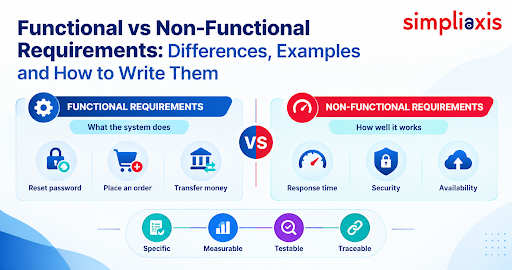
Functional and non-functional requirements define two distinct yet interrelated aspects of a system. The former specifies its functions and features, including the ability to allow a user to reset their password. The latter define the criteria for the functioning of the system, such as its ability to perform the same action within less than a second under a load of 1000 simultaneous users.
The two categories are equally important, as they allow building IT products that have the necessary features and perform reliably.
Key Highlights: Functional vs Non-Functional Requirements
- Functional requirements define the actions (or functions) that a system performs, e.g. allowing a user to reset a password. Non-functional requirements, on the other hand, define system behavior by using conceptual modifiers, e.g. “within a second” (i.e. response time) for 1,000 users.
- Both functional and non-functional requirements are equally important. Features, along with other non-functional requirements such as speed, security and reliability, define the edge for the system against competitors. Conversely, a system that fulfills all the non-functional requirements, but lacks required features is of no business value.
- Compared to functional requirements, non-functional requirements are less discernible. This is due to the nature of requirements. There is usually no measurable way to define “fast enough.” Also, there is no clear owner.
- In practice, requirements are classified as performance and scalability requirements, security and compliance requirements, usability and accessibility requirements, and availability, and maintainability requirements.
- In the context of software systems, requirements are typically stated as conditions and limitations. These can be refined to state the actor, action and acceptable standard/tolerance.
- In general, user stories and acceptance criteria capture functional requirements, and Definition of Done captures other requirements for Quality (shared by the team) for Agile teams. Other practices and the IIBA certifications (ECBA, CCBA and CBAP) help bridge the gaps.
Introduction
Specifying functional and non-functional requirements is the foundation stone of any software development project. It is vital to answer these questions during the requirement analysis stage: What should our system do? and How should it perform? While the former set of requirements typically takes the shape of a feature list, the latter is a collection of constraints and quality standards.
Requirements analysis is a critical step in the development cycle. Its significance stems from the fact that any software product is further built around it. A product with an inadequate set of functions will underperform regardless of a robust system architecture and will incur high maintenance costs during its development cycle. At the same time, a system with poor quality and reliability characteristics will provide end-users with a sub-optimal experience, thus failing in its primary mission.
This article introduces the basic concepts related to both categories of requirements and explores their differences. It also provides a comparison table and an example that can be used as a template when developing similar documents.
What Are Functional Requirements?
Functional requirements define the functions, features, and operations that the system under development must perform. Simply put, they specify what a system should do or should not do. Functional requirements describe the functionalities that the system will perform, the calculations it will make, the information it will process, its logical and syntactic structure, and other features that define its operation.
A simple test for identifying a functional requirement is applying the action/performance criterion. If the requirement mentions an action that the system under development will perform, it falls under the category of functions. For example, “The system shall send an order confirmation email to the user” is a functional requirement.
When developing a product, business requirements are formulated based on the company’s needs, user requirements, and details obtained during process analysis. Business analysts typically formalize these requirements via interviews, workshops, and surveys. Therefore, if one intends to improve one’s ability to document functional requirements, the skill set outlined in this article on requirement elicitation techniques might come in handy.
Characteristics of a Good Functional Requirement
A functional requirement should be easy to read and understand and not allow for misinterpretation. The requirements should be characterized by the following features:
- Clearly stated – use of unambiguous language.
- Specific – clearly state the actor, action and the expected outcome.
- Complete – include all steps of the process, including the exceptions and error handling.
- Consistent – do not contradict other requirements.
- Feasible – should be achievable considering the deadlines, scope, project constraints.
- Traceable – have all the necessary dependencies and be testable.
- Testable – have a test scenario that will verify the function.
The requirements should not bundle multiple tasks into one. Instead, a separate requirement should be written for each action that the system or the user will perform.
For example, if the user needs to register, log in and update their profile, three separate requirements should be developed. Secondly, avoid designing the technical solution in the requirements.
Functional Requirements Examples
Below are some functional requirements examples applicable to different systems.
(A) E-commerce platform
- The system shall enable a customer to add a product to their cart.
- The system shall compute GST depending on the delivery address.
- The system shall send out an order confirmation email upon a successful payment.
(B) Banking application
- The system shall allow a user to transfer money between linked accounts.
- The system shall protect the card from further usage after three failed PIN attempts.
- The system shall provide an option to view a monthly account statement.
© Learning management system
- The system shall enable the instructor to upload course videos.
- The system shall store the results of each learner’s quiz.
- The system shall award a certificate upon completion of all modules.
Each functional requirement example begins with a verb. It is impossible to answer them with a simple yes or no. The examples describe what the system should accomplish but do not state how and when it should do that. That’s where non-functional requirements come in.
What are Non-Functional Requirements?
If you search what are non functional requirements, you will get a short definition. Non-functional requirements define the qualities of a system. They define the constraints and behaviors of the system as well. The essential difference between the two types is that non-functional ones describe how the system does what it does.
The requirements describe quality attributes of a software system. In software engineering, quality attributes software is another term for non-functional requirements. They define speed, security, usability, reliability, and scalability. The requirements also include system response time constraints and other features.
Non-functional requirements usually span the whole system. A single response time constraint can affect all parts of the application. A requirement about data encryption can be relevant to every field in the database. These requirements have the most impact on the system’s architecture, making their reconsideration during development expensive.
One way to remember the difference between functional and non-functional requirements is to think of them as verbs and adverbs. The system processes payments. It is a functional requirement. The system does it quickly, safely, and steadily. These adverbs describe non-functional requirements.
Why Are Non-Functional Requirements Often Missed?
Missed non-functional requirements are common in any project for several reasons.
First, stakeholders identify and prioritize functional requirements. When a business analyst asks what they want from the system, they usually describe functions and features. When they talk about features, they rarely define quality objectives of the system.
Second, it is harder to formulate non-functional requirements. “Fast enough” is not a metric that can be used in software development. To understand what “fast enough” means, one would have to analyze the system’s architecture.
Third, non-functional requirements often emerge too late. One can measure the response time of a web page with ten test users. It may be sufficient during testing, but with ten thousand users, the system may become unusable. The problem is in the system’s architecture, which is already designed.
Finally, stakeholders may not know who is in charge of non-functional requirements. In many companies, engineers can assume that the business defines and documents all requirements. Simultaneously, the business thinks that software developers are responsible for system quality.
A business analyst can close the gap between functional and non-functional requirements. Ask quality-related questions during every elicitation of requirements. How many users are expected to use the system at one time? How long is it acceptable if the system does not respond? What regulations must the system comply with? What devices will users use to access the system?
Examples of Non-Functional Requirements
The following examples of non-functional requirements illustrate how a generic desire becomes a quantifiable requirement.
- Performance Requirement: The search screen will generate search results within 2 seconds in 95 percent cases.
- Scalability Requirement: The system shall cater to 50,000 concurrent users during sale seasons.
- Security Requirement: All data related to individuals will be encrypted in transmission and at rest.
- Availability Requirement: The system will be accessible 99.9 percent of the time each month.
- Usability Requirement: An average user can go through the check-out process in less than three minutes without any assistance.
- Accessibility Requirement: All screens shall comply with WCAG 2.1 AA standard.
- Maintainability Requirement: A developer will deploy a bug fix in one day.
- Portability Requirement: The system shall work on two most recent versions of Chrome, Safari and Edge browsers.
Note the presence of numbers. There is a threshold, condition or standard attached to each statement, making it measurable and testable.
Types of Non-Functional Requirements
There are many types of non functional requirements. Different standards classify them in various ways. ISO/IEC 25010, for instance, develops a product quality model with attributes including performance efficiency, security, usability and maintainability (ISO 25010 update 2023 – arc42 Quality Model).The five categories below typically cover the majority of real-world projects.
1. Performance and Scalability
Performance is the system’s responsiveness and scalability is its ability to handle growth.
Performance requirements are usually defined in terms of response time, throughput, page load time and resource consumption. Scalability requirements usually dictate the expected number of users or transactions or the data size and how the system should scale to handle them. For instance, during peak load, servers can be added horizontally to spread the load.
Example: “The API shall support 1,000 requests per second with an average response time below 300 milliseconds.”
It is important to design for expected growth as opposed to current needs. A system designed to support 5000 users may crash with 50000 simultaneous connections. Specify current and predicted load to help architects select appropriate infrastructure.
2. Security and Compliance
Security ensures the protection of data and restrictions on access. Compliance ensures that the system follows regulations.
There are standard security requirements across industries, such as user authentication, authorisation, encryption, audit trails, and session expiration. Compliance requirements vary depending on the industry. A medical application will have to comply with HIPAA (Health Insurance Portability and Accountability Act), a payment system processes credit card information and thus needs to comply with PCI-DSS (Payment Card Industry Data Security Standard).
Systems that process the personal data of residents of India need to take into account the new Digital Personal Data Protection Act. Many companies also adhere to the GDPR (General Data Protection Regulation) which governs the processing of personal data of residents of member states of the EU.
Example: “User sessions shall expire after 15 minutes of inactivity.”
Compliance often involves close collaboration with legal counsel and security experts. The requirements are usually non-negotiable, and failing to meet them can result in significant penalties or even criminal charges.
3. Usability and Accessibility
Usability is the extent to which a system is easy to use. Accessibility is about supporting users with physical or mental impairments.
Usability requirements can take many forms, such as learning curve, error rate, help needed, depth of navigation and satisfaction metrics. Accessibility requirements are often based on the Web Content Accessibility Guidelines (WCAG) and relate to supporting screen readers, keyboard navigation, sufficient colour contrast and text resizing (W3C WCAG overview).
Example: “Ninety percent of first-time users shall successfully complete the registration process without assistance.”
Usability and accessibility requirements help maximise a product’s audience and avoid expensive lawsuits stemming from the inability to accommodate special needs.
4. Reliability and Availability
Reliability is the likelihood that a system will function correctly. Availability is the proportion of time that the system is functional.
Requirements can specify the targeted uptime, mean time to failure, mean time to recover, and backup schedules. A system is also expected to follow certain procedures for disaster recovery and RTOs (recovery time objectives) and RPOs (recovery point objectives).
Example: “In the event of a server failure, the system shall be recovered within 15 minutes with no more than 5 minutes of data loss.”
This type of requirement is often tied to service-level agreements. A reliability target of 99.9 percent uptime allows for 43 minutes of downtime per month, whereas 99.99 percent allows for 4.3 minutes. Each additional nine is significantly more expensive to achieve but can be vital for enterprises.
5. Maintainability and Portability
Maintainability relates to the ease and speed of making changes to the system. Portability refers to the ability to move software between data centres or between dissimilar systems.
Maintainability requirements could include code reviews, automated tests, modular design, documentation, and deploy time. Requirements related to portability could include the target platforms and browsers, and supported technologies.
Example: “Automated unit tests shall be written for at least 80 percent of new code.”
Many organisations find maintainability requirements dry and uninteresting, but they are essential for controlling long-term costs.

Differences between Functional and Non-Functional Requirements
Functional vs Non-Functional Requirements: Comparison Table
| Aspect | Functional | Non-functional |
| Answers the question | What should the system do? | How well should the system do it? |
| Typical source | Business goals, user needs, process analysis, stakeholders | Quality standards, regulations, architecture needs, operations, user expectations |
| How it is measured | Pass or fail against expected behaviour | Numeric thresholds, service levels or standards |
| How it is tested | Functional testing, system testing, user acceptance testing | Performance, load, security, usability and compliance testing |
| Example | The system shall let a user reset a password by email | The password reset shall complete within two seconds for 1,000 concurrent users |
One System, Both Requirement Types: Worked Example
We will now see how functional and non-functional requirements combine in a product. With that in mind, let’s use the example of an online grocery delivery app again.
Feature: Place an order
Functional requirements:
- Users should be able to add items to the cart, edit quantities, and delete items from the cart.
- Users should be able to select a time slot for order delivery.
- The system should be able to apply discounts.
- Users should be able to pay using UPI, cards, or cash.
- The system should send order confirmation via SMS and email.
Non-functional requirements:
- Performance: The cart page should load within 2 seconds.
- Scalability: The system should be able to support 20,000 simultaneous checkouts.
- Security: Card details should be tokenized.
- Availability: Checkout should be available for 99.9% of the time.
- Usability: A returning user should be able to place an order in 3 taps or less.
- Accessibility: Buttons should have text labels.
- Compatibility: The app should support Android 11 and above, and iOS 15 and above.
Let us consider how they interact. The requirement “pay by UPI” is only valuable if the payment gateway is reliable. The non-functional requirement of 99.9% availability drives the team to have a backup payment gateway. In other words, quality needs drive the design.
Without the non-functional requirement, the app can pass every feature test. It can still crash on the biggest day of the year. This is the main reason we need to capture both requirement types prior to development to validate the product.
How to Write Testable Requirements?
Requirements describe the aspects of a system that are to be implemented. They are expressed in the form of ‘shall’ statements. A requirement is testable only if a test case can be written for it. The following steps illustrate how to frame testable requirements.
- Identify the Actor and the Goal: This step helps to identify the stakeholder and the thing they want/need. One example is: “A registered customer needs to track a delivery.”
- Adhere to a sentence template: A template provides a consistent format and makes review of the sentence faster. A simple format is: “The [system/actor] shall [action] [object] [condition or measure].”
- Replace vague words with numbers: Inserting thresholds make statements clear. The statement “This page should be easy to use,” does not give any indication on the level of ease needed for the statement to be considered true. On the other hand, the statement “This page shall take less than 10 seconds to load” defines easiness with a threshold.
- Include conditions: Numbers without context are of little value. Context answers questions like load conditions (1G, 2G, 3G, 4G, etc.) and available device/network/data resource constraints. The statement “1,000 concurrent users shall be serviced on a 4G connection” is stronger than “quickly.”
- Write one at a time: Multiple requirements joined with “and” or “or” should be split into individual statements.
- Add acceptance criteria: Write examples of when the function/feature works. Describe quality needs using a threshold table.
- Describe how you will test the requirement: Will it be tested using a unit test? Load test? Security scan? Usability test? Manual test?
- Review with stakeholders: Ask members of the user story team to read the acceptance criteria. Rewrite it if it is unclear.
The following example shows the user story acceptance criteria before and after review by stakeholders.
Before
- The system should be secure and easy to use.
After
- The system shall require multi-factor authentication for all admin logins.
- The system shall lock an account after five failed login attempts.
- Eighty-five percent of test users shall complete account setup in under five minutes.
Handling Requirements in Agile Teams
It is a common misconception that Agile teams don’t need detailed requirements. In reality, teams do need detailed requirements; they simply need them in smaller, more frequent doses. One of the biggest challenges in dealing with non-functional requirements in Agile is visibility. A requirement is not in the backlog, or it is not part of the Definition of Done, and so it essentially does not exist.
Again, business analysts play a major role here. Business analysts assist product owners with prioritizing the backlog and refining product backlog items. They assist with identifying and keeping quality goals visible. For a deeper understanding of this role, see the Agile Business Analyst.
User Stories and Acceptance Criteria
Functional requirements are usually documented in the form of user stories. User stories are written in the format, "As a [type of user], I want [goal or feature], so that [reason or benefit]."
An example user story might be, "As a shopper, I want to save items to a wishlist so that I can buy them later."
To determine the completion of a user story, acceptance criteria must be defined. Here are some examples of acceptance criteria:
- The wishlist item is saved if the user is logged in and taps the heart icon.
- The wishlist item is saved if the user is not logged in and is asked to log in first before tapping the heart icon.
- An out of stock item in the wishlist displays an “out of stock” indicator.
Non-functional needs live inside acceptance criteria when they are tied to a specific story. For instance, “The wishlist shall load within one second for lists of up to 200 items.”
Some teams write non-functional stories to illustrate larger work. These include, “As an operations lead, I want automated failover so that checkout stays available during server failure.” Use these when the work is large and requires a separate planning session.
Definition of Done and Quality Constraints
Some qualities must exist in all work. Reiterating them for every story wastes time. The Definition of Done addresses this.
The Definition of Done is a checklist that the work must satisfy in order to be accepted. According to The Scrum Guide, the Definition of Done is a formal description of the state of the Increment when it meets the quality measures required for the product.
Atlassian states that it is the criteria an increment must meet to be ready for customers.
A strong Definition of Done may include:
- Peer code review.
- Unit tests.
- High and critical security vulnerabilities reviewed and remediated.
- Accessibility checks for changed/added screens.
- Performance within agreed thresholds.
- Documentation.
- Product owner acceptance of work.
There are often useful teaching resources that draw a line here. For instance, acceptance criteria describe functional behavior and vary for each story. The Definition of Done outlines quality for all work and is constant.
There are constraints beyond the team. These can be tracking limits, budgets, regulations, and inflexible deadlines. Represent them in the backlog or on team agreements to ensure planning is done within constraints. Review the Definition of Done and tighten it as the team matures.
Documenting and Tracking Requirements
Well-articulated requirements deserve to be documented. Records help teams maintain alignment and help new team members get up to speed. They can also help facilitate audits. The format of documentation depends on the methodology.
Traditionally, a Business Requirements Document describes the business needs and a Software/Functional Requirements specification describes the software/functional requirements. In agile methods, the documentation can take the form of a product backlog, story maps, and/or wikis.
For each requirement, the documentation should include:
- A distinct identifier.
- A title and description.
- The type (i.e. functional, non-functional, etc.).
- Stakeholder/owner.
- Prioritization.
- Acceptance criteria.
- Status.
- Owner.
- Linked test cases.
Traceability is the habit that helps teams connect requirements with design and test artifacts. To help ensure nothing is missed, a requirements traceability matrix can be used. This matrix also aids teams to check that each feature is designed and tested. Requirements evolve, and change should be tracked using a versioning system to alleviate confusion about what is the current statement of a requirement.
Common Mistakes When Writing Requirements
Expect experienced teams to repeat the following mistakes.
- Using vague language: "Fast," "robust," "intuitive," and "scalable" lead to different interpretations for different people. Add a measure.
- Not addressing non-functional requirements: Teams focus on function and features and overlook quality. Include a quality checklist in each requirements elicitation session.
- Mixing requirements and solutions: "Use MongoDB" is a solution. The requirement is to support flexible document storage.
- Writing compound requirements: Splitting these into smaller requirements is crucial.
- Not involving stakeholders: Operations, security, legal and support, to name a few, often have valuable input on the quality of the solution.
- Setting unreasonable goals: 100% uptime is a nice goal to have, but is it reasonable?
- Not prioritizing requirements: Ranks need to understand which requirements should be upheld if trade offs have to be made. Techniques such as MoSCoW prioritization help.
- Not testing requirements: Requirements should always be tested. No test case, no way to verify the requirement.
- Thinking requirements are static: Change is inevitable and continuous. A light weight process for change and review should be in place.
Skills and Certifications
There is a common blend of skills needed to craft great requirements and they include analysis, effective communication and adequate domain knowledge. People in product, project management, QA, and business analysis touch points consistently use these skills.
Achieving a certification at any of the three levels covered by the IIBA helps strengthen and speed up the requirements process.
- ECBA: This program is for those with no experience. The ECBA certification training program covers business analysis concepts and differentiates between solutions and requirements.
- CCBA: This program is for the intermediate practitioner and covers techniques to support analysis and requirements representation. The CCBA certification training requires 3,750 hours of business analysis experience in the last 7 years.
- CBAP: This program focuses on senior practitioners, and the CBAP certification training requires 7,500 hours of business analysis experience in the last 10 years.
All of the above are aligned with the BABOK guide.
There are other areas that you can work on besides certification:
- Learn the basics of testing, security, and architecture.
- Study real specifications and learn to evaluate them.
- Work directly with developers and testers.
Conclusion
In the end, both functional and non-functional requirements are essential. Dependable teams address both sets of requirements in the first workshop and give them equal focus until the final release.
To summarize the practical steps, write each requirement as a single, measurable statement. Use numbers to replace vague words. Capture quality attributes as early as possible, and connect each requirement with a test.
In an Agile environment, describe functional needs as user stories and acceptance criteria, and describe shared quality attributes in the Definition of Done. Maintain traceability, and evaluate requirements as the product evolves.
Turn this knowledge into a career advantage with Simpliaxis. Its instructor-led programs prepare you for the internationally acclaimed IIBA certifications. Start with
ECBA and progress to CCBA once you garner some experience and go after CBAP for leading and managing complex projects. Visit Simpliaxis, and develop your ability to create requirements that teams can build and test.








 Lowest-Price Challenge











 Personalized Path


.webp)


 USA
USA  Canada
  India
India  UK
UK  Australia
  Singapore


