


 Call Us



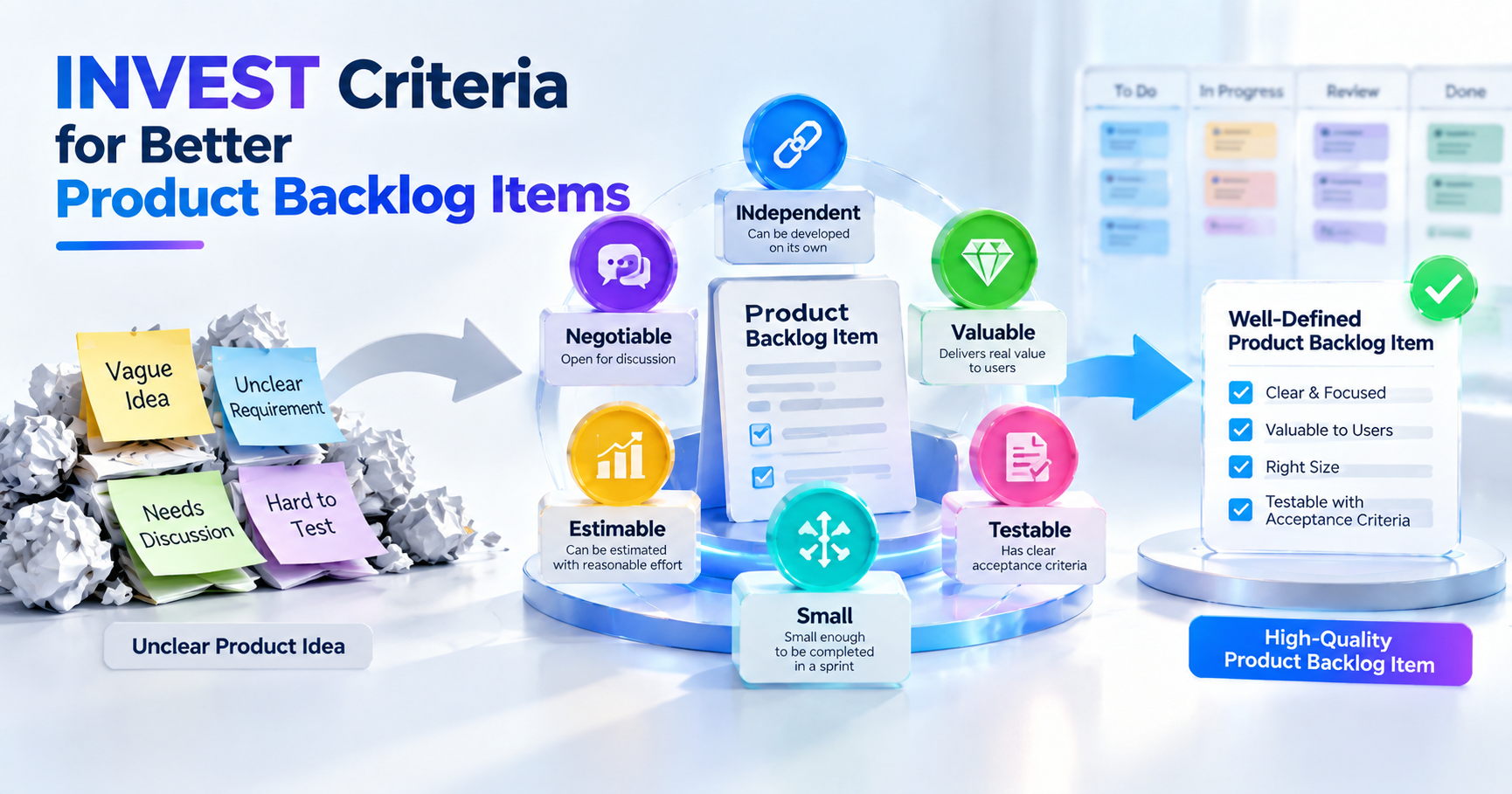
A good Product Backlog Item gives the team a clear understanding of what needs to be done, why it matters, and how to check the outcome. The INVEST criteria help Product Owners, Business Analysts, and development teams review backlog items before they become a source of confusion. The six criteria are independent, negotiable, valuable, estimable, small, and testable. Understanding INVEST can also help develop a greater awareness of Product Backlog management and refinement for professionals preparing for the Certified Scrum Product Owner (CSPO) certification.
Key Highlights
- INVEST is an acronym for Independent, Negotiable, Valuable, Estimable, Small, and Testable.
- It helps teams improve the quality of their Product Backlog Items.
- INVEST is not only for the traditional user story.
- Smaller backlog items are easier to understand, estimate, build, and test.
- INVEST works with backlog refinement and definition of Ready.
- DEEP looks at the quality of the entire Product Backlog.
- INVEST also examines individual backlog items more closely.
- Acceptance criteria make backlog items testable.
- INVEST checks can be done before and during backlog refinement.
- The approach also supports teams working in larger Agile environments.
What Is the INVEST Criteria?
INVEST is a simple checklist to inspect the quality of a Product Backlog Item. Bill Wake coined the term, and it's most often mentioned in relation to writing better user stories and backlog items.
The six letters mean:
- I for Independent
- N for Negotiable
- V for Valuable
- E for Estimable
- S for Small
- T for Testable
The basic idea is simple. Backlog items should be clear enough to talk about, valuable enough to warrant the effort, small enough to handle, and specific enough to check.
INVEST isn’t a one-size-fits-all template that all teams have to use the same way. It is better thought of as a quality control. A team can use it to ask whether an item is ready for more detailed discussion or needs more work first.
This is important because the Product Backlog is not a list of tasks; In Scrum, it is an ordered, emergent list of what is needed to improve the product. Product Backlog refinementis the act of breaking down and further defining Product Backlog items, and adding detail, ordering, and sizing as necessary.
Here’s a backlog item, for example:
"Improve customer dashboard.”
It is hard to say because the scope is not known. There is no obvious outcome, so it is also difficult to test.
Now think about:
As a customer, I want to be able to filter my dashboard by date so that I can find recent activity more easily.
This helps the team get off to a better start. A user. A need. A purpose. Then the team can discuss the exact scope and acceptance criteria. This is where INVEST comes in handy.
Why INVEST Matters for Product Backlog Items (not just user stories)?
The ideas of INVEST can help with other types of Product Backlog Items, but they are often explained in relation to user stories. The nature of work that can be included in a Product Backlog will depend on the product and the team. Items can be features, fixes, improvements, technical work, research, experiments, or other changes required to improve the product. Even if the format changes, the quality questions remain useful.
For example, you might not see a technical backlog item written like this:
As a user, I want ...
Instead, it could be a technical improvement to support a product outcome.
The team can still ask:
- Can we do this item with as little dependency as possible?
- Is there space for the solution?
- What purpose does it serve?
- Can the team guesstimate?
- Is it small enough?
- What will the team use to know when it is complete?
In the currentScrum Guide, Product Backlog refinement is an ongoing process in which items are decomposed and elaborated into smaller and more precise items. Note that attributes of Product Backlog Items may differ based on the type of work and domain.
So, INVEST should not be taken as a rule that every backlog item must be a user story. Instead, it serves as a practical quality lens for the work a team is considering.
This is especially useful for Product Owners. While studying for CSPO certification, it is important to understand the difference between writing an item and managing the quality of a backlog. The Product Owner must ensure the backlog is visible and understood but flexible enough for the team to talk about the work.
What Are the 6 INVEST Criteria?
The six INVEST questions are different ways of examining a Product Backlog Item. No single criterion is sufficient on its own. An item can be valuable, but it can be too big. It could be small but not testable. It may be clear, but so tightly written there is no room for discussion. When the team looks at all six together, it gives a clearer picture.
Independent
An Independent Product Backlog Item does not unnecessarily depend on another item.
That is not to say that everything can be delivered in total isolation. In reality, products have technical, business, legal, or operational dependencies. The idea is to minimize unnecessary dependencies between backlog items.
Take these two things:
- Do the payment screen.
- Add a check for payment.
If the team cannot start the second item until they have fully completed the first item, there may be a dependency that needs to be discussed. The team can inquire about alternative ways to organize the items.
For example, instead of dividing work only by technical layers, the team could divide it by usable customer outcomes. The independent criterion encourages teams to look at the flow of work through development.
Dependencies don’t necessarily mean bad backlog management. Some dependencies are genuine and cannot be removed. The crucial thing is to find them early, before the work has begun.
When you consider an item, ask yourself:
- Is this item highly dependent on another backlog item?
- Reducing dependency?
- Is there another way to cut the item?
- Can the team add some value without waiting for another item?
A clear answer helps the team to plan with fewer surprises.
Negotiable
A Negotiable Product Backlog Item leaves room for discussion.
The item should describe the need or outcome, not a fixed technical contract.
For instance:
As a customer, I want to be informed about an order so that I know when my order is ready.
That doesn’t tell developers how to build the notification, though. It could be an email, an in-app notification, or whatever makes sense based on the product and the conversation.
\We can talk with the team about the exact solution. That’s important because Agile work is about learning. Sometimes a Product Backlog Item is clear when it is written, and new information may arise in refinement or in development.
So, a Product Ownershould not document all the technical decisions in the item unless that level of detail is really needed.
A negotiable item opens the door to questions like:
- What is the real user need?
- Is there a simpler way to fix this?
- What parts are necessary?
- How can you change it?
- Which technical approach makes sense?
Negotiable doesn't mean vague.
An item needs enough information to have a productive conversation. The difference is that the item sets out the need, without trying to preclude all possible discussion.
Valuable
A Valuable Product Backlog Item needs to bring a useful benefit to a customer, user, business, or other interested stakeholder.
This is one of the more important checks, as development effort costs money. A team has to know why the work is important.
Comparison:
“Add a new database field.”
with:
“Save the customer’s preferred delivery choice for future orders to use the saved option.”
The first statement is about the technical work. The second has a better reason for the work.
Technical work is still useful. Improvements in security, reliability, performance, compliance, or maintainability, for example, may enable an important product or business outcome.
The question isn't always:
"‘Will the customer see this?”
Instead ask:
“What's the problem this solves, or what's the initiative going to support as an outcome?”
This helps to prevent the backlog from becoming a set of requests without any clear reason behind them.
This criterion helps the Product Owner to connect backlog items with product goals and customer needs.
Estimable
An Estimable Product Backlog Item is sufficiently well understood that the development team can estimate the work needed to implement it.
Estimating is different from predicting exactly how many hours it will take.
Teams can use relative sizing or other means of estimating. The goal is to achieve a sufficient understanding of the likely size of the work for planning and trade-off discussions.
An item can be non-estimable when:
- What will happen? It is unknown.
- Missing important information.
- The scope is too wide.
- There’s a big unknown.
- The team doesn’t understand the technical or product issue.
Picture a backlog item that says:
"Improve search performance.”
The team may not know what "improves" means.
Is the goal to reduce page load time? Boost search results? Cut server load? More users?
The team may need additional information to provide an estimate.
A research task or spike can sometimes reduce the unknown. The information can then be used to form a better backlog item.
The people doing the work should be able to give a good estimate. The Scrum Guide states that the Developers are the ones who size Product Backlog Items, and the Product Owner can help with understanding trade-offs.
Small
A Small Product Backlog Item can be done in a reasonable time and handled without undue complexity. Small doesn’t mean that everything has to be small. The right size depends on the team’s context, product, sprint length, type of work, and degree of uncertainty. A big thing can mean a lot of different things.
For instance:
“Create a strong platform for managing customer accounts.”
This might include:
- Create an account
- Log in
- Password Change
- Update profile
- Email verification
- Delete account
- Security settings
- Notification Preferences
If you treat all of this as one backlog item, it makes it harder to estimate and deliver. The item can be split into smaller pieces for meaningful results.
The Scrum Guide defines Product Backlog refinement as the act of breaking Product Backlog items into smaller, more precise items. Product Backlog Items that can be completed in a single Sprint are available to be chosen during Sprint Planning.
Small items also help teams learn quicker. Instead of waiting for a large feature to be finished in full, the team can ship smaller pieces and let feedback drive what will be next.
Testable
A Testable Product Backlog Item gives the team a way to know if they got the expected result.
The team should be able to say:
"How do we know that this item is complete?”
Acceptance criteria are frequently used for this purpose.
For instance:
"As a customer, I would like to reset my password so that I can access my account if I forget it.”
Possible acceptance criteria might include:
- The customer can ask for a reset.
- The customer is given the reset instructions.
- The reset link has an expiration time.
- The customer can create a new password.
- The reset doesn't work anymore with the old password.
The criteria will differ depending on the product.
Testable doesn't mean that everything requires a long list of test cases. This means that the expected result can be checked. This distinction is important because acceptance criteria describe what must be true for the item, and test cases describe specific ways the system can be tested.
INVEST vs. DEEP: Story-Level vs. Backlog-Level Quality
INVEST and DEEP are related, but ask different questions.
INVEST focuses on the quality of a single Product Backlog Item.
The word DEEP is used to describe the quality of a Product Backlog as a whole. This means:
- Detailed appropriately
- Estimated
- Emergent
- Prioritized
The DEEP model emphasizes that not all items in a backlog require the same level of detail simultaneously. Items at the top of the backlog tend to be more detailed because the team is more likely to work on them soon. Items lower down can be less detailed since they may change before the team gets to them.
INVEST poses questions like:
- Is this thing of any value?
- Is it tiny?
- Can the team figure it out?
- Can we try it out?
DEEP raises more general questions:
- Is the backlog described at the right level?
- Does it change as new data comes in?
- Are items estimated correctly?
- Does the backlog have an order?
And here’s how to think of it:
- INVEST looks at the quality of the thing.
- DEEP examines the health of the backlog.
Both can help you manage the Product Backlog.
A common mistake is to describe each item in the backlog fully. This can lead to wasted effort, as priorities and requirements may change. Instead, teams can concentrate their refinement efforts on the items most likely to be worked on soon.
How to Rewrite a Bad Backlog Item Using INVEST?

First, observe the item without attempting to rephrase right away.
Think of:
"Streamline the checkout process.”
This is too vague.
Step 1: Know your user or stakeholder.
Ask, “Who needs the improvement?”
“As a customer…”
Step 2: Recognize the need
What does the person have to do? As a customer, I want to save my delivery address...
Step 3: Determine the value
Why does the individual need it?...so I don't have to enter the same address for each order.
Now the item is:
I would like to save my delivery address so that I do not have to enter it each time I place an order. As a customer,
Step 4: Check if it is negotiable
Don't decide every implementation detail immediately.
The item does not have to specify exactly which database structure, API, or interface component is to be used.
Step 5. Is it small?
There can still be a few pieces of work in saving an address.
The team can discuss if the scope is too small or needs to be broken up.
Step 6. Acceptance criteria
What must be true for the item to be accepted?
For example:
A customer may save an address.
You can select the saved address during checkout.
The saved address can be changed by the customer.
The saved address is displayed correctly at checkout.
Step 7: Review dependencies and estimation
Ask if the team needs another backlog item first and if there is enough information to estimate the work.
It turns INVEST into a practical conversation instead of a checklist that is checked mechanically.
Story-Splitting Techniques to Achieve "Small"
It’s common to have big backlog items because teams often start with a large product need.
The goal is not to lose important scope. It's to break down the scope into manageable chunks.
User Workflow Split
You can split a long workflow into stages that produce useful results.
For example, an online booking process could be broken down into:
- Check available options
- Choose one option
- Add customer details
- Confirm reservation
- Check booking status
Each item is concerned with a part of the user journey.
Split by Business Rules
If you have one item with many rules, break them up where it makes sense.
For example, a discount feature can include:
- Discount standard applicable
- Use member discount
- Use seasonal discount
- Manage Expired Discount Codes
This can help make the work more understandable.
Split by data type
Occasionally the same function needs to handle multiple types of data.
For example:
"Import customer records.”
This process can be divided by the data sources or formats that are supported, so long as each division is still useful progress.
Split into create/view/update/delete
Often, a broad management feature can be decomposed into meaningful actions.
The following:
- Create a customer profile.
- View details of a customer
- Refresh customer data
- Delete customer profile
This approach can be useful where there are different rules or risks for each action.
Split into happy path and exceptions
Deal with critical exceptions separately, starting from the primary successful flow.
For example,
- Customer has completed payment.
- Customer fails payment.
- Customer payment interrupted.
This approach can help to keep the main item smaller, but make sure that important cases are not forgotten.
Split by business value
Instead of dividing the work by technical layers, search for separate outcomes.
For example, don’t make:
- Database tier construction
- API Build
If they can't provide value on their own, build the user interface as three separate customer-facing backlog items.
Instead, consider if the functionality can be delivered as a full vertical slice. The best split is not always the smallest piece possible. It’s a piece that can be understood, developed, tested, and reviewed without creating unnecessary overhead.
INVEST and the Definition of Ready
INVEST and Definition of Ready are closely related, but they are not the same.
INVEST offers quality characteristics.
Definition of Ready is an agreement at the team level that a Product Backlog Item is clear enough to be worked on.
For example, a team might agree that an item is:
- A fair description of
- A clear value or reason
- A definition of complete
- Major known dependencies
- A rough idea
- Detail sufficient for the team to understand the work
INVEST can help a team determine whether those conditions are being met.
The current Scrum Guide, however, does not define a formal Definition of Ready as a required Scrum artifact. It reads: “Product Backlog Items that are “Done” when the Sprint Planning Meeting begins are considered “Ready” for selection. This is usually based on increased transparency as a consequence of the refinement process.
This difference matters.
The definition of "ready" should not become a long approval process that slows down delivery for the team.
The goal is to have enough shared understanding to make a reasonable Sprint forecast.
INVEST can help with this process by asking a few simple questions.
For example:
- Independent: Are the key dependencies understood?
- Negotiable: Can the solution be negotiated?
- Valuable: Is the reason for the work obvious?
- Estimable: Is the team knowledgeable enough to size it?
- Small: Is it feasible to complete within the team's working cycle?
- Testable: Is it clear how to test for the expected outcome?
If you answer no to several questions, you may need to further refine the item.
How to Apply INVEST During Backlog Refinement?
INVEST works best when it is part of the team's normal conversation. It need not be a standalone meeting. During refinement, the team may select one item at a time and ask a few simple questions.
Who's Involved (Product Owner, Business Analyst & Development Team)
The Product Owner helps express the need for the product, its value to the customer, its priority, and the expected outcome. In Scrum, the Product Owner is accountable for effective Product Backlog management, which includes creating and clearly communicating Product Backlog Items and ensuring the Product Backlog is transparent and understood.
Where thebusiness analystrole exists, it can help clarify business needs, rules, user needs, workflows, and acceptance conditions.
The Development Team or Developers help identify technical concerns, dependencies, risks, unknowns, and probable effort. They also help you figure out if an item is small and clear enough to work on.
The conversation should be a collaborative one.
The Product Owner shouldn’t write an item and pass it off to developers as a fixed specification.
Similarly, developers should not determine the product value without knowing the customer or business need.
The aim is mutual understanding.
When to Use INVEST Checks (pre- or post-refinement): INVEST can be used at two valuable points.
Before refining
An early check can be done by a Product Owner or Business Analyst.
Question:
- Is the intent clear?
- Is the item overly broad?
- Is the user/stakeholder defined?
- Is the expectation clear?
- Is there enough information for the team to discuss?
This approach prevents obviously weak items from eating up too much of your refinement time.
During Refinement
The entire team can view the item.
It is here that the more profound questions tend to emerge.
The team could learn:
- A Secret Dependency
- A vague business rule
- A technological risk
- Broad range
- Missing acceptance criteria.
- Another solution
Then the item can be rephrased or divided.
This corresponds to the notion of Product Backlog refinement being a continuous activity and not a one-off documentation task.
How to Apply INVEST at Scale (SAFe & Enterprise Agile)?
On a bigger scale, backlog quality becomes more difficult because there can be work at several levels.
For example, SAFe employs a number of backlog levels and work item types. The current SAFe guidance talks about a Portfolio Backlog of business and enabler epics, an ART backlog of features and enablers, and Team Backlogs of stories and other team-level work.
INVEST can still be useful, but the criteria need to be applied at the correct level.
A portfolio epic should not be judged in the same way as a small team story.
Governance/Quality Gate as INVEST
In large organizations, it is often necessary to have some kind of quality check before work moves between levels.
This is where INVEST can help.
For example, a team-level story can be validated against:
- Explicit value
- Reasonably sized
- Estimability
- Testability
- Requirements
- Discussion space
At a higher level, the item may be too big to meet the "Small" criterion in the same way.
Portfolio epics can be big by design. Instead of forcing every epic to be small, the organization can ask whether it is the right size for its level and whether it can be broken into smaller items later.
This keeps INVEST useful, without making it a rigid rule of compliance.
So far, SAFe guidance has described backlog refinement as a collaborative activity in which teams define, discuss, estimate, and set acceptance criteria for upcoming backlog items.
Factors at Portfolio and Program Level
Value becomes a big issue at the portfolio level.
A big effort should have a clear reason for existing. Teams need to be able to understand what the result is expected to support. And dependencies become more important, too.
A team may have a perfectly written story that is dependent on another team, system, supplier, or business decision.
At this level, the criterion “Independent” is less about eliminating all dependencies and more about making them visible and reducing unnecessary ones.
The "small" criterion also moves with scale. A portfolio epic may need to be broken down into capabilities or features. Then features can be broken down into stories for teams to work on.
SAFe defines this sort of hierarchy across portfolio epics, capabilities, features, and stories. It also notes that some work can arise from the local area rather than cascading down from a higher-level item. The trick is to maintain a strong connection between the bigger business outcome and the smaller pieces of work.
What are the Common Mistakes When Applying INVEST?
INVEST is good, but teams can use it incorrectly.
Examining INVEST as a pass-fail test
Not all items will exactly match all criteria at the time they are first created.
Backlog items can get better when they are refined.
The point is not to throw out all that is imperfect. The purpose is to find out what needs to be further discussed.
Every item is made extremely detailed.
Too much detail makes it hard to change that item.
It can also waste time on work that may not be due for weeks or even months.
The level of detail should match the item’s backlog position and how soon it is likely to be worked on. This supports the DEEP idea of being detailed enough.
Confusing small and short
A short sentence does not equal a small backlog item. The sentence “Improve the whole reporting system” is short but suggests a lot of work.
Size is the amount of work, not the number of words you use to describe it.
Artificial breaking of all dependencies
Some dependencies are genuine.
Removing all dependencies may result in unnatural backlog splits.
Instead, find the important dependencies early, and figure out how to deal with them.
Writing technical solutions too soon
A backlog item that tells developers exactly how to build something can kill useful discussion.
The item should resolve the need and the result unless there is a specific technical constraint.
Value for technical work ignored
Not every backlog item changes the user interface directly.
Security, reliability, performance, architecture, compliance, and infrastructure work all have value.
The mistake is not technical labor. The error is not telling us why it is important.”
Writing acceptance criteria around implementation
Acceptance criteria should state expected behavior or results.
They shouldn’t be a list of internal coding instructions.
Without checking with the team, you might not use INVEST effectively.
A checklist cannot substitute for conversation.
The best thing about INVEST is the conversation it sparks between the people who know the product needs and the people who are going to build it.
What are the Tools to Support INVEST Compliance?
There is no way to find out if a Product Backlog Item is really valuable or negotiable for a team. People make these decisions. But backlog management tools can help facilitate the application of INVEST checks.
Jira
Jira is a tool that helps create, organize, prioritize, estimate, and track backlog items. Teams can add fields for description, acceptance criteria, estimates, labels, priorities, and dependencies.
A team can also add a simple INVEST checklist to its issue template.
For example:
- Independent: Yes/Needs to be discussed.
- Negotiable: Yes/To be negotiated.
- Valuable: Yes/Needs discussion.
- Estimable: Yes/Needs debate.
- Small: Yes/Should be broken up.
- Testable: Yes/Needs criteria.
Azure DevOps
Azure DevOps can be used to manage the Product Backlog, track work items, work item acceptance criteria, work item estimates, and work item relationships.
Teams can use these fields to surface critical information without creating a separate document for each story.
Trello
Trello can be useful for simple backlog setups.
Teams can use cards for backlog items and checklists for INVEST questions.
The item is not improved by the tool itself. It's about the process.
Spreadsheets
A simple spreadsheet will do for a small team too.
Possible columns are:
- Backlog Item
- Value
- Estimation
- Required Dependencies
- Acceptance Criteria
- Size
- INVEST State
What matters is not which tool you choose. A good tool should make the conversation easier, not replace it.
INVEST Quick-Reference Checklist
During backlog refinement, ask the following questions:
Independent
- Can I work on this item without a superfluous dependency?
- Can you see the known dependencies?
- Can the item be separated from an item if necessary?
Negotiation
- Does the item justify the need and not prescribe every technical detail?
- Is there any other solution the team can talk about?
- Is it reasonable to change the scope?
Valuable
- Who does this work serve?
- What it solves:
- What does it support?
- Is the worth worth the work?
Estimable
Does the item go to the team?
Is the scope clear enough to estimate?
Do they identify any major unknowns?
First, does the team need more information or a spike?
Small
- Can the item be reasonably completed within the team’s working cycle?
- Does it have a number of different consequences?
- Can it be divided without losing meaningful value?
- Is the scope greater than needed?
Testability
- What happens when the item is complete?
- Is it possible to check the expected result?
- Are acceptance criteria well defined?
- Can the team and Product Owner agree on what success looks like?
The checklist should be used as a guide, not just as paperwork
Conlusion
Writing a good Product Backlog Item is not about the perfect sentence, nor is it about a fixed template. It is about creating enough clarity so that the team can understand the need, discuss the solution, estimate the work, and confirm the result.
The INVEST criteria offer a simple check for quality. Independent, Negotiable, Valuable, Estimable, Small, and Testable can help teams to find weak points before they become delivery problems.
INVEST works well with other backlog practices. DEEP helps teams think about the overall quality of the Product Backlog, whereas refinement helps improve individual items over time. Acceptance criteria help define the expected outcome, and a definition of "ready" can help provide the team with a shared understanding of when an item is clear enough to plan.
These practices are especially helpful for Product Owners, because the quality of the backlog directly impacts the team’s understanding of what needs to be built and why it is important.
If you are preparing for a Product Owner role or working toward the SAFe POPM Certification, knowing how to create, refine, order, and communicate Product Backlog Items can help you strengthen your practical Agile skills. One useful aspect of that wider Product Owner skill set might be a solid grasp of INVEST.
The goal is simple: Backlog items should be clear enough to establish shared understanding, small enough to manage, valuable enough to matter, and testable enough to know when the work has met its purpose.







 Lowest-Price Challenge











 Personalized Path


.webp)


 USA
USA  Canada
  India
India  UK
UK  Australia
  Singapore


