


 Call Us


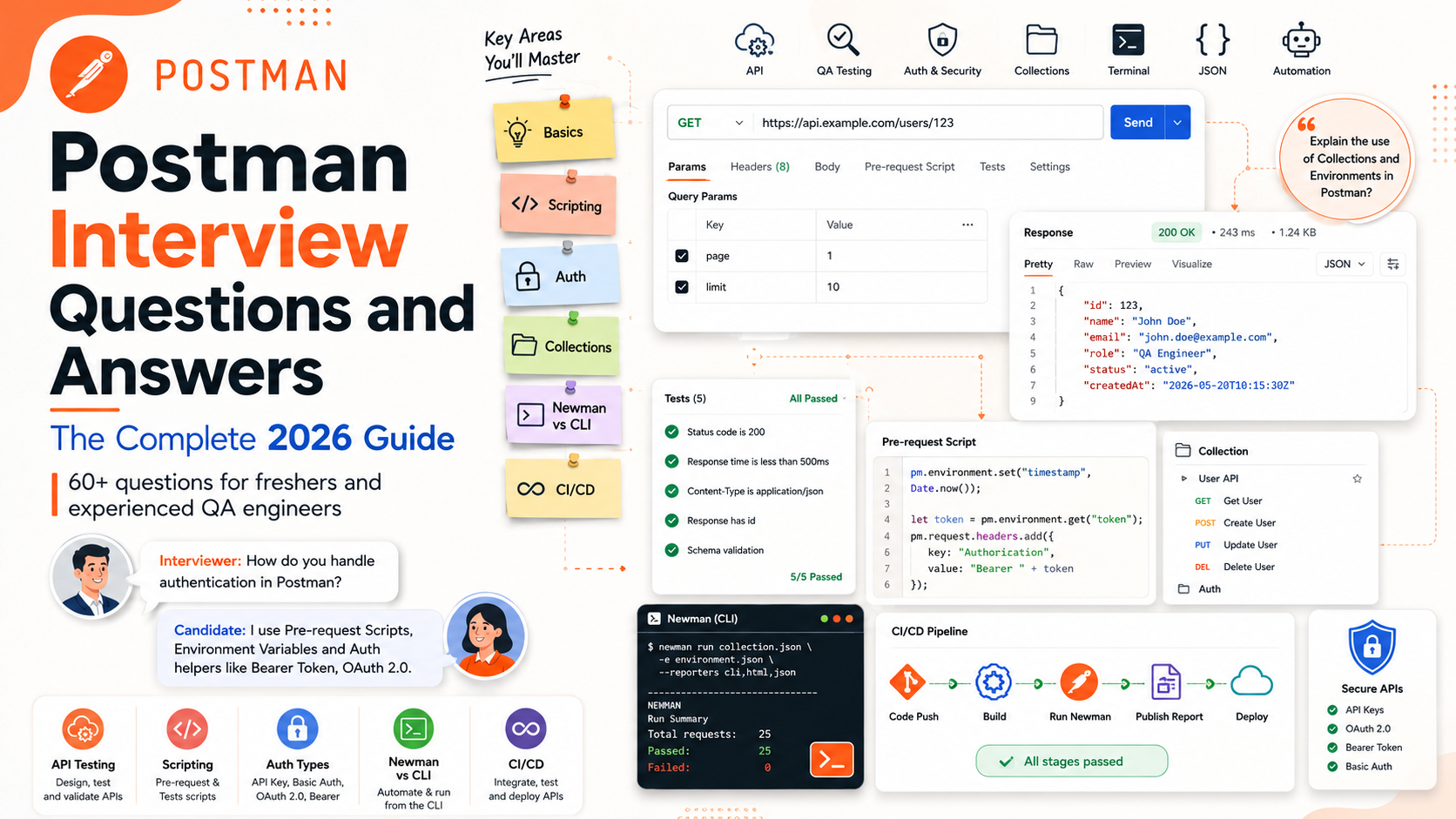
Postman interview questions typically span four areas: core concepts (collections, environments, variables, and the request-response cycle), scripting (pre-request scripts, test scripts, pm.test, and pm.expect assertions built on the Chai library), automation and CI/CD (Collection Runner, Newman, and the newer Postman CLI), and scenario-based problem solving (chaining requests, validating JSON schemas, and handling authentication flows such as OAuth 2.0). Interviewers use these questions to check whether a candidate can actually design, script, and automate API tests, not just click buttons in the Postman app. The strongest answers combine accurate terminology with a working code example.
Key Highlights of Postman Interview Questions
- Questions are grouped into beginner, intermediate, and advanced tiers so you can benchmark your own readiness before an interview.
- Every scripting question below includes a real, runnable pm.test or pm.expect example rather than a one-line definition.
- The guide covers current Postman terminology, including the Postman CLI, Postman Vault for secret variables, and native GraphQL and gRPC support, which many older question lists omit.
- A dedicated comparison table explains exactly when to use Newman and when to use the Postman CLI in a CI/CD pipeline.
- Scenario-based questions mirror what actually gets asked in mid-to-senior QA and SDET interviews: token chaining, schema validation, flaky-test debugging, and secure credential handling.
- A separate FAQ section addresses career and preparation questions, such as how much scripting knowledge is expected and whether Postman certification helps.
Why Postman Interview Questions Matter for QA and API Roles
Postman has grown from a simple REST client into a full API platform that covers design, documentation, mocking, testing, monitoring, and now AI-assisted workflows. Because so many QA, SDET, backend, and DevOps job descriptions list Postman as a required skill, interviewers use it as a fast way to separate candidates who have only sent a few GET requests from those who can build a maintainable automated test suite. A candidate preparing for an AI-driven software testing role or a broader QA automation position should expect Postman questions to move quickly from "what is a collection" to "how would you chain three requests and validate the final response against a schema in CI."
This guide organizes questions the way a real interview panel usually does: foundational concepts first, then scripting and automation, then scenario-based problems that combine several concepts at once. Where a fact could change between Postman releases (for example, exact menu labels or AI feature names), that is noted so you can verify it against the current Postman app before your interview.
Beginner Level Postman Interview Questions and Answers
1. What is Postman and what is it used for?
Postman is an API platform used to design, document, test, mock, monitor, and automate the testing of APIs. Instead of writing custom code to send an HTTP request, a tester or developer can build the request visually, save it, and reuse it across a team. Beyond simple request sending, Postman supports scripted assertions, environment-based configuration, collaborative workspaces, and command-line execution for continuous integration.
2. Why do teams test APIs with Postman instead of only through the UI?
UI testing only exercises the application layer that sits on top of the API, so a bug in the API itself may be masked or hard to isolate through the UI. Testing the API directly with Postman lets a tester verify status codes, response bodies, headers, and timing independently of the UI, which means API-level bugs are caught earlier, tests run faster, and issues are easier to reproduce and report with a single request rather than a full UI workflow.
3. What are the main parts of the Postman interface?
The interface centers on a workspace that contains a sidebar (collections, environments, and history), a request builder (method, URL, headers, body, and authorization tabs), a response viewer (body, headers, cookies, status, size, and time), and a Console for inspecting the raw request and response traffic, including anything logged from scripts.
4. Which HTTP methods does Postman support?
Postman supports all standard HTTP methods, including GET, POST, PUT, PATCH, DELETE, HEAD, OPTIONS, and it also allows a custom method to be typed in when an API uses a non-standard verb. GET retrieves data, POST creates a resource, PUT replaces a resource in full, PATCH updates a resource partially, DELETE removes a resource, HEAD returns headers only with no body, and OPTIONS returns the allowed methods for a resource.
5. What is a Postman Collection?
A collection is a saved, ordered group of requests, typically representing all the endpoints of an API or a related workflow. Collections can be organized into folders, shared with a team, exported as JSON, version-controlled, and run in sequence using the Collection Runner, Newman, or the Postman CLI.
6. What is the difference between a Collection and a Folder?
A collection is the top-level container that can be shared, exported, and run as a whole. A folder is a way to group related requests inside a collection, for example grouping all "User" endpoints separately from all "Order" endpoints. Folders can have their own pre-request and test scripts that run for every request nested inside them, in addition to the collection-level and request-level scripts.
7. What is an Environment in Postman, and how is it different from Global variables?
An environment is a named set of key-value variables scoped to a specific context, such as "Staging" or "Production," so the same collection can be pointed at different base URLs or credentials just by switching the active environment. Global variables, by contrast, are available across every collection and environment in a workspace regardless of which environment is active. Because environment variables are scoped, they are the safer default for anything that changes between contexts, such as a base URL or an API key.
8. What are Postman Variables, and what are the variable scopes?
Variables let you avoid hardcoding values inside a request so a collection can be reused across contexts. Postman resolves the same variable name using a fixed order of precedence, from narrowest to broadest: local, data, environment, collection, and finally global. In other words, if a variable named baseUrl exists at both the local and global scope, the local value wins for that request. Understanding this precedence is one of the most commonly tested concepts in intermediate Postman interviews, because it explains subtle bugs where "the same collection behaves differently" between two runs.
9. What are the most important HTTP status codes to know for API testing?
Interviewers expect familiarity with at least these groups:
- 2xx Success: 200 OK, 201 Created, 202 Accepted, 204 No Content.
- 3xx Redirection: 301 Moved Permanently, 302 Found, 304 Not Modified.
- 4xx Client Error: 400 Bad Request, 401 Unauthorized, 403 Forbidden, 404 Not Found, 405 Method Not Allowed, 409 Conflict, 422 Unprocessable Entity, 429 Too Many Requests.
- 5xx Server Error: 500 Internal Server Error, 502 Bad Gateway, 503 Service Unavailable, 504 Gateway Timeout.
A strong answer explains the difference between 401 (the request lacks valid authentication) and 403 (the request is authenticated but not authorized for that resource), since interviewers frequently probe this specific pair.
10. What is the difference between PUT and PATCH?
PUT is expected to replace the entire resource with the payload sent, so any field omitted from the request body may be reset or removed depending on the API's implementation. PATCH is expected to apply a partial update, changing only the fields included in the request body and leaving the rest untouched. In practice, some APIs do not strictly follow this convention, so it is good practice to confirm the exact behavior in the API's own documentation before assuming either verb is idempotent in the way the HTTP specification intends.
11. What is the Postman Console, and when do you use it?
The Console (opened from the bottom of the app or via View) shows the fully resolved request that was actually sent, including headers Postman added automatically, along with the raw response and any console.log output from pre-request or test scripts. It is the first place to check when a variable is not resolving as expected or when a test assertion fails for an unclear reason.
12. What is a Postman Workspace, and what types exist?
A workspace is a container for collections, environments, APIs, and mock servers that can be shared with specific people. Postman supports personal workspaces (visible only to the creator), team workspaces (shared with an organization), and public workspaces (visible to anyone on the Postman public API network), in addition to partner workspaces used for controlled external collaboration.
13. How do you import and export collections in Postman?
Collections can be exported as a Postman Collection JSON file (currently schema v2.1) and imported the same way, which makes them easy to check into version control alongside application code. Postman can also import an OpenAPI or Swagger specification and generate a collection from it automatically, and it can import a raw cURL command and convert it directly into a request.
14. Why might a request work in a browser but fail in Postman, or vice versa?
The most common causes are CORS restrictions (which apply to browser JavaScript but not to Postman's native app, since Postman is not subject to the same-origin policy the way client-side browser code is), differing default headers (browsers and Postman may send different default Accept or User-Agent headers), and cookie or session handling differences. When testing a request that only works through a browser proxy, the Postman Desktop Agent (or the older Postman Interceptor for Chrome) can be used to capture and replay browser traffic.
15. How do you save an example response in Postman?
After sending a request and receiving a response, clicking "Save Response" and then "Save as Example" attaches that response to the request as a named example. Saved examples are useful for documentation, for powering a mock server without a live backend, and for quickly showing a reviewer what a successful or error response looks like.
Intermediate Level Postman Interview Questions and Answers
16. What is the difference between a pre-request script and a test script?
A pre-request script runs before the request is sent, so it is typically used to set up variables, generate timestamps or signatures, or fetch a fresh token. A test script (called a post-response script for some request types) runs after the response is received, so it is used to make assertions about the response: status code, body content, headers, and timing. Both are written in JavaScript and executed in Postman's sandbox, which exposes the pm API object.
17. How do you write a basic test using pm.test and pm.expect?
The pm.test function wraps an assertion in a named test so Postman can report pass or fail per test rather than per request. pm.expect exposes the Chai "expect" BDD-style assertion syntax, which ships built into the Postman sandbox so nothing needs to be installed separately. A typical example:
pm.test("Status code is 200", function () {
pm.response.to.have.status(200);
});
pm.test("Response time is acceptable", function () {
pm.expect(pm.response.responseTime).to.be.below(400);
});
pm.test("Response body has an id field", function () {
const jsonData = pm.response.json();
pm.expect(jsonData).to.have.property("id");
});
This structure, a status check, a timing check, and a body check, covers the three assertions interviewers most commonly ask a candidate to write on the spot.
18. How do you chain requests, for example using a login token in a later request?
The standard pattern is to add a test script to the login (or authentication) request that extracts the token from the JSON response and stores it as a collection or environment variable, so any later request can reference it with the double-curly-brace syntax.
// Test script on the "Login" request
pm.test("Login succeeded and token was returned", function () {
const jsonData = pm.response.json();
pm.expect(jsonData).to.have.property("access_token");
pm.collectionVariables.set("authToken", jsonData.access_token);
});
The next request in the collection can then set its Authorization header to Bearer {{authToken}}, and because the variable was set at runtime, the same collection keeps working even after the token value changes on every run. This chaining pattern, extract now, reuse later, is the single most common "show me, don't just tell me" question in intermediate Postman interviews.
19. What is the Collection Runner, and how do you do data-driven testing with it?
The Collection Runner executes every request in a collection (or folder) in sequence, optionally multiple times, and can iterate over an external data file in CSV or JSON format. Each row (or object) in the data file is injected as data variables for one iteration, so the same set of requests and assertions can be run against many different input combinations, such as different user IDs or different invalid input values for negative testing, without duplicating requests.
20. What is Newman?
Newman is Postman's original command-line collection runner, distributed as a Node.js package. It takes an exported collection (and optionally an environment file) and runs it headlessly, which is what allows Postman collections to be executed inside a continuous integration pipeline rather than only from the desktop app. A typical Newman command looks like this:
newman run MyCollection.postman_collection.json \
-e Staging.postman_environment.json \
--reporters cli,junit \
--reporter-junit-export results.xml
21. What is the Postman CLI, and is it the same as Newman?
They are related but not identical. Newman has been Postman's CLI runner since its early years and remains widely used, especially in existing pipelines. The Postman CLI is a newer, separately distributed command-line tool, introduced with Postman v10, that runs collections directly against a user's Postman account (so it can reference cloud-hosted collections and environments by ID, not just local files) and surfaces results back inside the Postman app itself. Postman has stated a general direction of encouraging teams to move toward the Postman CLI, while Newman continues to be maintained as an open-source project. See the comparison table below for a side-by-side breakdown.
22. What are dynamic variables in Postman, and how are they generated?
Dynamic variables are built-in variables, prefixed with a dollar sign, that Postman resolves to a freshly generated value each time a request runs, powered by the Faker data-generation library. Common examples include {{$guid}} for a random GUID, {{$timestamp}} for the current Unix timestamp, {{$randomEmail}}, {{$randomFirstName}}, {{$randomInt}}, and {{$randomAlphaNumeric}}. They are typically used to generate unique test data on every run, for example a unique email address so a "create user" test does not fail on a duplicate-record conflict the second time it runs. The full, current list is maintained in Postman's own dynamic variables documentation.
23. How do you validate a JSON response schema in Postman?
Postman exposes a built-in assertion, pm.response.to.have.jsonSchema(), that checks a response body against a JSON Schema definition using the AJV validation library under the hood. An example:
const schema = {
"type": "object",
"required": ["id", "email", "status"],
"properties": {
"id": { "type": "integer" },
"email": { "type": "string" },
"status": { "type": "string", "enum": ["active", "inactive"] }
}
};
pm.test("Response matches the user schema", function () {
pm.response.to.have.jsonSchema(schema);
});
Older tutorials sometimes reference a library called tv4 for schema validation; that approach is outdated and can silently pass invalid data in some edge cases, so AJV-based validation through pm.response.to.have.jsonSchema is the version worth demonstrating in an interview.
24. What authorization types does Postman support?
Postman's Authorization tab provides built-in support for API Key, Bearer Token, Basic Auth, Digest Auth, OAuth 1.0, OAuth 2.0, AWS Signature, and Hawk Authentication, in addition to NTLM, which is available in the Postman native desktop and Mac apps. For API Key auth, the key-value pair can be added either as a header or as a query parameter. Full, current details are in Postman's authorization types documentation.
| Auth Type | Where Credentials Travel | Typical Use Case |
|---|---|---|
| API Key | Header or query parameter | Simple internal or partner APIs |
| Bearer Token | Authorization header | JWT and OAuth-protected APIs |
| Basic Auth | Authorization header, base64-encoded | Legacy systems, internal tools |
| Digest Auth | Authorization header, hashed challenge-response | Systems needing a step up from Basic Auth without full OAuth |
| OAuth 2.0 | Authorization header (typically Bearer) | Modern third-party and enterprise APIs |
| AWS Signature | Signed headers per AWS Signature V4 | Amazon Web Services APIs |
25. How does OAuth 2.0 work inside Postman?
When OAuth 2.0 is selected as the authorization type, Postman prompts for details specific to the grant type in use, such as authorization code, PKCE (an added security step for the authorization code flow), implicit, client credentials, or password credentials. Postman can request a new access token directly from the authorization server, cache it, and automatically attach it to the request, and it can also handle token refresh so an expired token is renewed without manual intervention. Interviewers commonly ask this as a scenario question: "the token expired mid-suite, how do you keep the tests running," and the expected answer references either Postman's automatic OAuth 2.0 token refresh or a pre-request script that programmatically re-authenticates when a token nears expiry.
26. What is a Mock Server in Postman?
A mock server simulates API responses without a real backend, generated from a collection's saved examples or from an API specification. It is useful when the frontend or QA team needs to start integration work before the backend is finished, or when a test needs to reliably reproduce an error condition, like a 500 response, that a real backend would rarely return on demand.
27. What is a Monitor in Postman?
A Monitor runs a collection on a defined schedule from Postman's cloud infrastructure, independent of any local machine, and can alert the team if requests start failing or if response times degrade. It is commonly used for uptime and health checks on production APIs rather than for pre-release functional testing.
28. How does Postman handle cookies?
Postman automatically stores cookies returned by a response and sends them back on subsequent requests to the same domain, similar to a browser, and the current set of cookies for a domain can be inspected and edited from the Cookies link under the response viewer (or via the Cookie Manager). Cross-domain cookie behavior may need to be handled explicitly if an API depends on it, since Postman applies the same general domain-scoping rules a browser would.
29. What is the Postman Visualizer used for?
The Visualizer renders response data as an HTML table, chart, or custom template instead of raw JSON, using a small script written into the "Visualize" tab of a request. It is especially useful for demonstrating API behavior to non-technical stakeholders or for quickly scanning a large or nested response.
30. How do you debug a failing script in Postman?
console.log() statements inside a pre-request or test script are the fastest debugging tool, since their output appears in the Postman Console alongside the raw request and response. Beyond that, checking variable scope and precedence (see question 8), confirming the environment is actually selected in the top-right environment dropdown, and re-reading the exact property names returned by pm.response.json() account for the majority of "my script isn't working" issues asked about in interviews.
Advanced and Scenario Based Postman Interview Questions
31. How would you assert that an API responds within an acceptable time limit?
pm.test("Response time is below 500ms", function () {
pm.expect(pm.response.responseTime).to.be.below(500);
});
A stronger answer notes that a single-run threshold check is a smoke-level assertion, not a substitute for dedicated load or performance testing, and that thresholds should be set based on the API's actual SLA rather than an arbitrary number.
32. How would you wire a Postman collection into a CI/CD pipeline?
The collection and environment are exported (or referenced by ID for the Postman CLI), checked into the repository or fetched at build time, and then run headlessly as a pipeline step, with the exit code determining whether the build fails on a test failure. A GitHub Actions step using Newman, for example:
- name: Run API tests with Newman
run: |
npm install -g newman newman-reporter-htmlextra
newman run collections/orders-api.postman_collection.json \
-e environments/staging.postman_environment.json \
--reporters cli,htmlextra \
--reporter-htmlextra-export newman-report.html
The equivalent with the Postman CLI authenticates with an API key first, then runs the collection by ID directly from the cloud, which avoids keeping a local copy of the collection file in sync with what is edited in the Postman app.
33. How do you test a GraphQL API in Postman?
Postman has native GraphQL request support: instead of manually crafting a POST body, the GraphQL tab lets you write a query or mutation, supply variables in a separate pane, and Postman assembles the correct request automatically (typically a POST to a single /graphql endpoint). Query operations retrieve data and mutation operations create, update, or delete data, and both can still be asserted against with the same pm.test and pm.expect patterns used for REST responses, since the response body is still JSON. Details are in Postman's GraphQL documentation.
34. How do you test a gRPC service in Postman?
Postman supports gRPC as a first-class request type, provided the service's protocol buffer definition (or server reflection) is available so Postman knows the service contract. gRPC supports four interaction patterns, and Postman's client handles all of them: unary (single request, single response), server streaming (one request, a stream of responses), client streaming (a stream of requests, one response), and bidirectional streaming (both sides stream messages concurrently). See Postman's gRPC documentation for setup details.
35. How should secrets and credentials be handled in a shared Postman workspace?
Credentials should never be hardcoded directly into a request URL, header, or body inside a collection that is shared or committed to source control. The safer pattern is to store secrets as environment (or global) variables marked with the "secret" variable type, which masks the value in the UI and in exports, and, for team workspaces, to use Postman's Vault-backed secret variables so the actual secret value is not distributed to every workspace member's machine but resolved securely at run time. Rotating a leaked token immediately and auditing which collections referenced it is the correct follow-up if a secret is ever exposed.
36. Explain variable scope precedence with a concrete example.
Suppose a variable named baseUrl is defined as https://api.example.com at the global scope, but also as https://staging.example.com in the currently active environment. When a request runs, Postman resolves {{baseUrl}} using the narrowest scope that has a value, so the environment's value, https://staging.example.com, is used, and the global value is effectively shadowed for that run. This is why two team members can get different results running "the same" collection: one may have an extra local or data-file override the other does not.
37. What is Postman Flows, and when would you use it instead of scripting?
Postman Flows is a visual, node-based builder for chaining API calls, conditional logic, and data transformations without writing JavaScript, aimed at quickly prototyping multi-step workflows (for example, call an authentication endpoint, branch on the response, then call two dependent endpoints in parallel). It complements, rather than replaces, pre-request and test scripts. Flows is a reasonable choice for a fast, visual prototype of an integration or an internal automation, while a scripted collection with version-controlled JavaScript tests remains the standard choice for a regression suite that needs to run reliably in CI.
38. How would you validate pagination and rate-limiting behavior across a large API?
A thorough test approach checks that the pagination metadata (commonly a next cursor, a page/limit pair, or a Link header, depending on the API's convention) is present and consistent, that requesting past the last page returns an empty set rather than an error, and that rate-limit headers, when present (commonly X-RateLimit-Limit, X-RateLimit-Remaining, and Retry-After), are asserted on rather than ignored, since a suite that hammers an API without respecting these headers can itself trigger false failures from 429 responses.
39. A collection passes in the Postman desktop app but fails when run in CI with Newman. What would you check?
- Whether the correct environment file is being passed to Newman with the -e flag, since the desktop app may have an environment selected that the CI command does not reference.
- Whether any values that were set manually or interactively in the desktop app (for example, a token pasted in by hand) were never actually captured in a script, so they do not exist when Newman starts from a clean state.
- Whether the CI environment can reach the target host at all (firewall, VPN, or DNS differences between a developer machine and the CI runner).
- Whether file paths for data-driven tests (CSV/JSON) are relative to the working directory Newman is invoked from, which can differ from the desktop app's assumptions.
- Whether a self-signed certificate on a staging server requires the --insecure flag in Newman that the desktop app's certificate settings were quietly handling.
40. How would you use Postman's AI features responsibly during test creation?
Postman's AI assistant (branded Postbot, alongside broader AI Agent Builder and Agent Mode capabilities introduced through 2025 and 2026) can suggest test scripts, generate documentation, and help build visualizations from a response, based on the request and response context currently open. Using it well means treating its suggestions as a first draft, not a final answer: a tester should still confirm that generated assertions check the fields that actually matter for the business logic (not just that a response returned 200), confirm no sensitive sample data was pasted into a prompt, and manually verify any generated JSON Schema or script logic before relying on it in a regression suite.
41. How do you test a file upload endpoint in Postman?
File upload endpoints are typically tested by setting the request body type to form-data, adding a key of type "File" instead of "Text," and selecting the file from disk. This produces a multipart/form-data request identical in structure to what a browser file-upload form would send, and the response can then be asserted on normally, checking that the server returns the expected file identifier, size, or content-type confirmation.
Newman vs Postman CLI: A Side by Side Comparison
| Aspect | Newman | Postman CLI |
|---|---|---|
| Introduced | Postman's original CLI runner, in use for many years | Introduced with Postman v10, in late 2022 |
| Distribution | Node.js / npm package, fully open source | Installed separately as a standalone Postman product |
| Collection source | Local exported JSON files (or a URL you fetch yourself) | Can reference collections and environments stored in a Postman account by ID |
| Result visibility | Terminal output and exportable reporters (CLI, JSON, HTML, JUnit) | Terminal output, plus results surfaced back inside the Postman app |
| Best fit | Existing pipelines, teams that prefer file-based, fully offline collections | Teams standardized on cloud Postman workspaces who want tighter integration with the app |
| Postman's guidance | Still maintained and widely used | Recommended path for new CI/CD integrations going forward |
In practice, both tools execute the same underlying test scripts, so the choice is more about workflow fit than about functional coverage. Full details are documented on Postman's Newman CLI reference.
Common Mistakes Candidates Make in Postman Interviews
- Describing Postman only as "a tool to send API requests" without mentioning scripting, automation, or CI/CD, which signals surface-level exposure rather than hands-on testing experience.
- Confusing environment variables with global variables, or being unable to explain variable scope precedence when asked directly.
- Reciting that "Postman supports testing" without being able to write a single working pm.test block from memory.
- Not knowing the difference between a pre-request script and a test script, or when each one executes.
- Treating Newman and the Postman CLI as interchangeable without being able to explain how they differ.
- Overstating AI features as fully autonomous, rather than describing them as an assistant whose output still needs a tester's review.
How to Prepare for a Postman or API Testing Interview
Build a small collection against a free public test API and practice the full loop yourself: send a request, add a test script, chain a variable into a second request, add a JSON schema check, then run the whole collection with Newman from a terminal. Doing this once by hand tends to answer more interview questions than reading a list of definitions, because most scenario-based questions are really asking "have you actually built and automated a test suite, or only used the click-and-send interface." It also helps to read Postman's own test scripts documentation directly rather than relying only on secondhand summaries, since Postman's terminology and available assertions are updated over time. Candidates coming from a manual or exploratory testing background who want to round out their automation skills before interviews may also benefit from a structured course such as a test-driven development training, which reinforces the same "write the check before you assume the behavior" habit that strong API test scripts rely on.
Key Takeaways
- Postman interviews test practical scripting and automation ability, not just familiarity with the request-builder screen.
- Know the exact variable scope precedence order (local, then data, then environment, then collection, then global) and be ready to explain it with an example.
- Be able to write a working pm.test and pm.expect assertion from memory, including a JSON schema validation using pm.response.to.have.jsonSchema.
- Understand the practical difference between Newman and the Postman CLI, since CI/CD questions are common at the intermediate and advanced level.
- Be ready to describe chaining requests (for example, extracting a token in a test script and reusing it via a collection variable) with real code, not just in the abstract.
- Know Postman's authorization types beyond Basic Auth and Bearer Token, including OAuth 2.0 grant types and where AWS Signature or Digest Auth would apply.
- Frame any AI-assisted testing experience (Postbot, Agent Mode) as a productivity aid that still requires manual verification, not as a replacement for scripting knowledge.







 Lowest-Price Challenge











 Personalized Path


.webp)


 USA
USA  Canada
  India
India  UK
UK  Australia
  Singapore


