


 Call Us



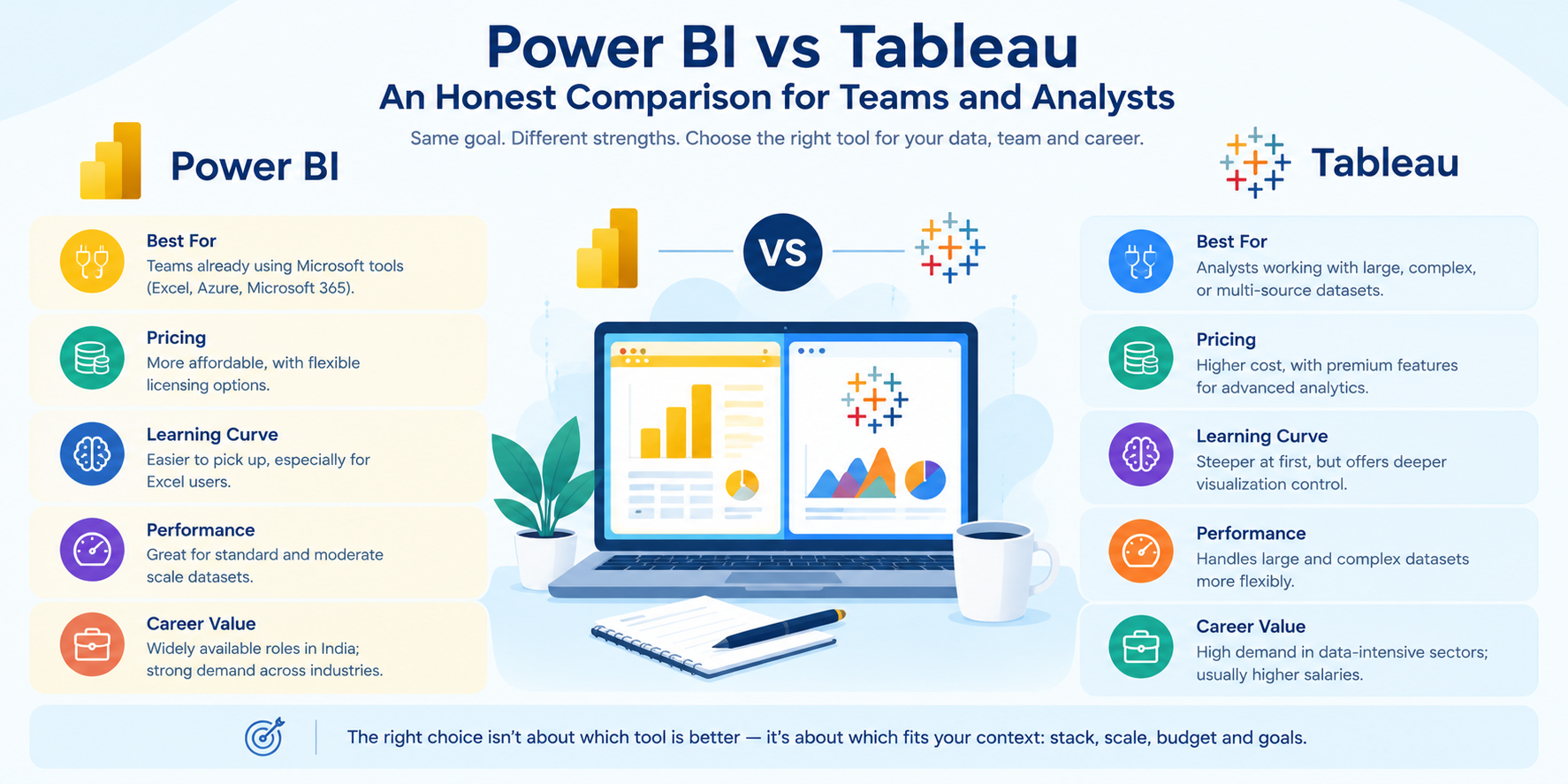
Power BI is a Microsoft-native business analytics tool that works best for teams that are already using Excel, Azure, or the Microsoft 365 ecosystem. Are you struggling to choose between the tech giant's budget-friendly powerhouse and the undisputed king of complex data storytelling? Power BI costs less and connects smoothly to Microsoft data sources. Moreover, in analytics, it is also one of the most widely available certification paths.
Tableau is a data visualization platform. It suits analysts who handle large, complex, or multi-source datasets. It produces richer visuals, handles big data more flexibly, and gives technical users deeper control over how data is explored.
Power BI and Tableau: neither tool is universally better. How do you choose between these tools? Your choice should depend on your budget, your data stack, your team’s skills, and your career direction. The article covers every angle so you can make a confident decision.
Key Highlights of Power BI vs Tableau
- Power BI: It costs significantly less than Tableau and integrates tightly with Microsoft tools, making it a natural fit for organisations already in the Microsoft ecosystem.
- Tableau: This offers richer data visualization capabilities, stronger performance with large and complex datasets, and greater flexibility for enterprise-scale analytics.
- Learning curve: Power BI is generally easier to pick up for users familiar with Excel. Tableau has a steeper initial curve but rewards users with more expressive visualization capabilities.
- Career value: Both tools are in strong demand across Indian job markets. Power BI roles are more widely available; Tableau roles tend to command higher salaries in data-intensive sectors.
- The difference between Power BI and Tableau is less about which is better and more about which fits your context: stack, scale, budget, and goals.
Introduction
Every analytics team hits the same crossroads at some point: Power BI or Tableau?
It feels like a product question. In practice, it is a strategic one. Pick the wrong tool, and you end up paying for features your team ignores, building dashboards that cannot grow with your data, or investing time in a platform that does not match where the jobs are.
The Power BI vs Tableau debate, and the broader question of the difference between Power BI and Tableau, has been active for almost a decade. Both platforms have matured significantly. Microsoft has built Power BI into one of the most widely used business intelligence tools on the planet since its 2015 launch. Tableau, which Salesforce acquired in 2019, has long set the benchmark for interactive data visualization among analysts who need more than a standard bar chart.
This guide gives you a plain, honest comparison. We cover features, pricing, learning difficulty, performance, and career value in India. There is no universal winner here. There is only the right fit for your specific situation.
What Power BI and Tableau Do
It helps to understand what each platform was built to accomplish before you start comparing them. They are both described as business intelligence tools, but they came from different starting points.
Power BI is Microsoft's end-to-end analytics platform. It connects to hundreds of data sources, transforms and models data using Power Query and DAX, and publishes interactive dashboards through the Microsoft 365 ecosystem. For companies already on Excel, Azure, SharePoint, or Teams, Power BI feels like a natural extension of existing tools. It is a full BI stack inside a single product.
Tableau was built around one idea: make data visual quickly and intuitively. It grew from academic research at Stanford on how people understand data. Tableau is not a spreadsheet tool or a database manager. It is a visualization-first platform. It connects to your existing data infrastructure and makes exploration and storytelling its core job. The whole design philosophy is built around drag-and-drop interactivity and visual depth.
Both platforms turn raw data into interactive dashboards. Both are used by analysts, data engineers, and business users. But Power BI treats analytics as a platform, while Tableau treats it as a visual experience. That difference matters when you are choosing between them.
Power BI vs Tableau: Feature Comparison
The two platforms overlap a lot in what they offer. The difference between Power BI and Tableau shows up in the quality and flexibility of specific features, and those differences become more visible as your use cases grow in complexity.
Data Connectivity
Power BI connects to Azure SQL, SharePoint, Excel, Dynamics 365, and other Microsoft sources with almost no setup. It also connects to Salesforce, Google Analytics, and over 150 other sources through certified connectors.
Tableau has equally broad connectivity. Its historical strength is in non-Microsoft enterprise databases. Oracle, Teradata, Snowflake, and Google BigQuery all connect with performance tuning built in. Tableau’s live connection mode queries do not import data; rather, they source data directly and handle complex database environments reliably.
Edge: Power BI for Microsoft-centric stacks. Tableau for cross-platform enterprise database environments.
Data Modelling
Power BI's modelling layer is one of its strongest selling points. Power Query handles data transformation through a visual, step-by-step interface. DAX gives users a formula language for calculated measures, time intelligence, and complex aggregations. Power BI also supports star schema modelling natively, which matters for analysts building serious data models.
Tableau approaches modelling differently. Instead of pre-building a model, Tableau defines relationships at the sheet level through a drag-and-drop interface. This suits exploratory analysis well. It is less structured than Power BI's approach, but more intuitive for one-off investigations. Tableau’s Level of Detail (LOD) expressions are powerful for aggregations that are complex. But they require a shift in thinking for users coming from Excel or SQL.
Edge: Power BI for structured, reusable models. Tableau for flexible, ad hoc exploration.
Data Visualization
Tableau has held a clear lead in visualization quality for years, and the gap remains real despite Power BI's improvements. Tableau's chart library is broader. Its formatting options are more granular. Complex charts, Sankey diagrams, animated scatter plots, and geospatial maps look noticeably more polished in Tableau.
Power BI has improved consistently. It supports a wide native chart library plus a custom visual marketplace through AppSource where third-party visuals can be added. For standard business dashboards, bar charts, line charts, KPIs, and tables, Power BI gives clean and professional results. Furthermore, Tableau still leads for advanced data storytelling.
Edge: Tableau for visual sophistication. Power BI for standard business reporting.
Read more: Data Analysis Methods, Process, and Types: A Complete Guide
AI and Natural Language Features
Both platforms have added AI-driven features in recent years. Power BI also has a Q&A feature for natural language queries, automated insight detection that surfaces anomalies and trends, decomposition trees for root cause analysis, and integration with Azure Machine Learning for custom model outputs.
Ask Data lets you ask questions in natural language. Explain Data gives you automated statistical explanations. Tableau Prep lets you clean your data with AI. Salesforce Einstein AI is gradually being integrated into the Tableau ecosystem, especially for CRM-connected analytics.
Edge: Power BI for Azure ML integration. Both tools are roughly comparable for natural language query features.
Report Sharing and Collaboration
Reports in Power BI can be shared with Teams, SharePoint, Power BI service or email subscriptions. With role-level security, workspace permissions, and apps, it is easier to manage access across a large organisation.
Tableau Server and Tableau Cloud have similar permission structures and enterprise-wide sharing. Tableau: More users will mean more paid licenses, so sharing at scale is more expensive. Tableau Public is free and open sharing, but for public datasets only.
Edge: Collaboratively share Power BI in Microsoft environments.
Full Feature Summary Table
| Feature | Power BI | Tableau |
| Microsoft source connectivity | Excellent | Good |
| Cross-platform DB connectivity | Good | Excellent |
| Data modelling (DAX, star schema) | Strong | Moderate |
| Drag-and-drop exploration | Good | Excellent |
| Visualization depth | Good | Excellent |
| Chart library size | Large | Larger |
| Custom visuals | Yes (AppSource) | Yes (Extensions) |
| Natural language query | Yes (Q&A) | Yes (Ask Data) |
| AI/ML integration | Azure ML | Salesforce Einstein |
| Report sharing | Excellent (M365) | Good (Cloud/Server) |
| Mobile app quality | Very good | Good |
| Row-level security | Yes | Yes |
| Embedded analytics | Yes (Power BI Embedded) | Yes (Tableau Embedded) |
| Python and R support | Yes | Yes (TabPy) |
| Entry-level cost | Low | Medium to High |
Read more: Data Analytics vs Data Science
Integrations and Ecosystem Compatibility
No analytics platform works in isolation. How well Power BI and Tableau connect to the rest of your technology stack affects how much value you actually get from either one.
Power BI Integrations
Power BI connects natively to Azure Synapse Analytics, Azure Data Factory, Azure DevOps, Microsoft Teams, SharePoint, Excel, and Dynamics 365. For organisations running on Azure, Power BI becomes the default analytics layer for the entire stack with minimal setup (new to Azure? Start with Azure fundamentals).
Beyond Microsoft, Power BI connects to Salesforce, SAP, Oracle, Snowflake, Google Analytics, GitHub, and over 150 other sources. The Power BI REST API and Power BI Embedded let organisations push analytics into their own products and applications. Python and R integration supports custom visuals and machine learning model outputs for teams that blend BI with data science work.
Tableau Integrations
Tableau has strong connectors for enterprise data warehouses. Its Snowflake, BigQuery, Redshift, and Databricks connectors include automatic query optimisation and pushdown computation. Tableau CRM, formerly Einstein Analytics, provides combined analytics and Salesforce CRM intelligence for sales-driven organisations.
Tableau supports Python through TabPy and R integration for custom ML outputs inside dashboards. Tableau Embedded Analytics provides developer APIs for embedding analytics in external-facing applications, comparable to Power BI Embedded in capability.
How Power BI and Tableau Handle Collaboration
Collaboration is a day-to-day concern for most analytics teams. The difference between Power BI and Tableau in this area is significant, especially for teams spread across departments or locations.
Collaboration in Power BI
Power BI is built for collaborative work inside Microsoft environments. Reports and dashboards live in shared workspaces. Team members can view, comment on, and subscribe to reports directly from Teams or the Power BI service. Data alerts notify users automatically when a metric crosses a threshold. Row-level security ensures that each viewer sees only the data relevant to their role.
For organisations where business users, managers, and executives all need access to the same dashboard but different slices of the data, Power BI handles this without requiring manual intervention from the analytics team each time.
Deployment pipelines in Power BI Premium give analytics engineers a structured way to move content from development to test to production, reducing the risk of publishing unfinished work to business users.
Collaboration in Tableau
Tableau Server and Tableau Cloud support shared content, permission-based access, and versioning of published workbooks. Teams can comment on dashboards, subscribe to views, and set data-driven alerts, similar to Power BI.
Where Tableau differs is in the cost of sharing at scale. Most users who need more than view-only access require a Creator or Explorer licence, which is significantly more expensive than Power BI Pro. For organisations with large numbers of users who need to interact with or edit dashboards, this cost compounds quickly.
Tableau's collaboration model is well-suited to analyst-driven teams where a smaller group of skilled users creates content and a broader group consumes it. Power BI's model scales more affordably when the creator-to-consumer ratio is low.
Power BI vs Tableau: How Each Tool Handles Data Security
Security is not a glamorous comparison point, but it is a non-negotiable one for organisations in regulated industries.
Both platforms support row-level security, which means users only see the data their role permits. Both integrate with enterprise identity providers. The key difference is in how tightly each platform connects to an organisation's existing security framework.
Power BI plugs into Azure Active Directory, Microsoft Purview, and Microsoft 365 compliance tools. Sensitivity labels, encryption policies, and audit logs are all managed through the same admin console that IT teams already use for the rest of the Microsoft stack. For organisations in finance, healthcare, or the public sector where compliance reporting is mandatory, this integration reduces both effort and risk.
Tableau integrates with Active Directory, LDAP, and SAML-based identity providers. Its security model is comprehensive and flexible, but it operates as a separate governance layer rather than an extension of an existing framework. For organisations that are not primarily on Microsoft, Tableau's flexibility is an advantage. For those that are, Power BI's integrated approach is simpler to maintain.
Governance, Administration, and IT Considerations
For IT teams and analytics leaders, governance and administration often matter as much as features.
Administering Power BI
Power BI's administration sits inside the Microsoft 365 admin centre and the Power BI admin portal. IT teams that already manage Azure Active Directory and Microsoft 365 licensing will find the governance model familiar. Power BI is built into an existing security framework using sensitivity labels from Microsoft Purview, data loss prevention policies, and audit logging through Microsoft 365 compliance tools. Premium allows analytics teams to manage development, test, and production environments day-to-day, without heavy IT involvement, through workspace management, capacity allocation, and deployment pipelines.
Administering Tableau
Tableau Server on-premises requires dedicated administration. Site management, permission structures, content ownership, and user licensing all require ongoing attention from someone who knows the platform well. Operational overhead includes server sizing, upgrades, backups, and performance tuning, which cloud-native Power BI does not require. Tableau Cloud reduces some of that overhead but still needs active site administration. For organisations with a dedicated analytics engineering team, the control Tableau offers is valuable. For smaller teams without dedicated BI administration, Power BI's lighter overhead is a real practical advantage.
Performance With Large Datasets
Performance is where the architectural differences between the two platforms show up most clearly, and it matters a lot for teams working with serious data volumes.
Power BI and Large Data
Power BI imports data into an in-memory engine called VertiPaq. This engine compresses data aggressively and returns query results fast for datasets that fit in memory. For most business intelligence work, datasets up to tens of millions of rows, VertiPaq performance is excellent.
For larger datasets, Power BI offers DirectQuery mode. Instead of importing data, DirectQuery sends queries to the source database each time a report loads. This mode is limited by the speed of the source database responses. Composite models represent a hybrid approach that leverages both imported and DirectQuery tables, but they must be designed carefully to avoid performance degradation.
Power BI Premium provides a performance boost with large dataset storage and query scale-out for enterprise deployments.
Tableau and Large Data
Tableau was designed with large data in mind from the start. Its live connection mode queries source databases directly and includes query optimisation logic specific to each supported database engine. For organisations using Snowflake, Redshift or BigQuery as their data source, live connections in Tableau work best.
Tableau also supports Tableau Data Extracts, which work similarly to Power BI's in-memory model. The engine that does the processing of these extracts is called Hyper, and it is fast and handles complex queries well.
For very large data sets at the billion-row or petabyte scale, Tableau’s native integration with columnar databases and its query pushdown optimisation generally outperforms Power BI’s DirectQuery approach.
Edge: Power BI for datasets that fit comfortably in memory or within Azure infrastructure. Tableau for large-scale, multi-platform data warehouse environments.
Power BI vs Tableau vs Excel: How They Compare
Many analysts start their careers in Excel. The Power BI vs Tableau vs Excel question comes up often, and knowing when to move to either BI platform, and why, is worth addressing directly.
| Factor | Excel | Power BI | Tableau |
| Primary purpose | Spreadsheet analysis | Organisation-wide BI | Advanced data visualization |
| Data volume limit | Up to a few million rows | Tens of millions (in-memory) | Billions (live connection) |
| Data modelling | Basic (pivot tables) | Strong (DAX, star schema) | Moderate (relationship model) |
| Visualization quality | Basic charts | Good dashboards | Excellent, publication-quality |
| Sharing and collaboration | Manual (email files) | Automated (Power BI service) | Automated (Tableau Cloud/Server) |
| Technical skill required | Low | Moderate | Moderate to high |
| Licence cost | Included in Microsoft 365 | From USD 10/user/month | From USD 15/user/month |
| Best for | Ad hoc data work | Scaled business reporting | Advanced analytical storytelling |
Excel is still irreplaceable for quick, owned data work and distributing numbers to non-technical people. Power BI picks up where Excel hits its limits: multi-table data models, shared dashboards, and automatic data refresh. Tableau sits on a parallel track rather than directly above Excel. It connects to structured data sources and focuses on visualization depth and analytical exploration.
Think of it this way. Excel is for personal data work. Power BI is for enterprise reporting. Tableau is for advanced analytical storytelling, when you care most about depth of exploration and visual quality.
Real-World Use Cases
Seeing how each tool fits specific business scenarios makes the Power BI vs. Tableau which is better question much easier to answer than a feature list alone.
Sales dashboards for a mid-sized retailer: The company uses Microsoft 365 and stores sales data in Azure SQL. Power BI is the obvious fit. Microsoft ecosystem integration means minimal setup. Mobile access works well for regional managers. Automatic data refresh keeps reports current without manual work.
Fintech company’s analysis of customer behaviour: The analytics team analyses transaction data in Snowflake. They generate reports for executives and for outside the organisation. Tableau is more suitable. Data volume does not slow live connection to Snowflake. LOD calculations enable sophisticated customer segmentation. The visual depth is suitable for presentation-quality output.
HR Analytics for a large IT services firm: HR business partners require self-service dashboards for headcount and attrition but lack technical skills. They can ask questions in plain language with Power BI’s Q&A natural language feature. Row-level security automatically restricts visibility by business unit. “Sharing through Teams is a natural extension of their current workflow.
Analytics for a consulting firm’s clients: Data is extracted from different client sources - flat files, APIs, and cloud databases. Tableau Embedded Analytics builds professional branded dashboards that can be delivered to the client. Multi-source connectivity takes on the diversity of client environments without forcing everyone into one platform.
Power BI vs Tableau Cost: Pricing and Licensing Compared
Cost is often the deciding factor, and the Power BI vs Tableau cost comparison is more complicated than a simple price-per-seat comparison. Deployment model, user roles, and feature requirements all affect total cost of ownership.
Important: Pricing changes regularly. Always check the official Microsoft Power BI pricing page and Tableau pricing page before making a purchase decision. The figures below reflect publicly available pricing as of mid-2025.
Power BI Pricing Breakdown
Microsoft has published an important update to Power BI pricing, and the Power BI prices below reflect it.
| Plan | Price (per user/month) | What You Get |
| Power BI Desktop | Free | Build and publish reports locally only |
| Power BI Pro | ~USD 10 | Publish, share, and collaborate in the Power BI service |
| Power BI Premium Per User | ~USD 20 | Paginated reports, advanced AI, larger dataset limits |
| Power BI Premium (Capacity) | Starts from ~USD 4,995/month | Dedicated capacity; unlimited free viewers in the org |
For teams on Microsoft 365 E3 or E5, Power BI Pro may already be included. That makes the effective cost zero for many existing Microsoft customers.
Tableau Pricing Breakdown
See Tableau’s official pricing page for current plans and prices.
| Plan | Price (per user/month) | What You Get |
| Tableau Viewer | ~USD 15 | View and interact with published dashboards only |
| Tableau Explorer | ~USD 42 | Explore and edit published content; no new source connections |
| Tableau Creator | ~USD 75 | Full access: Desktop, Prep, and publishing rights |
| Tableau Public | Free | Public publishing only; not for proprietary data |
A team where all members need Creator access pays roughly seven to eight times more per user than an equivalent Power BI Pro setup. At scale, that difference becomes substantial, which is a key reason many mid-sized Indian organisations lean toward Power BI.
Total Cost of Ownership
Licence fees are only part of the picture. Tableau Server on-premises requires dedicated server infrastructure, ongoing upgrades, and IT administration. Teams already on Azure benefit from dramatically reduced overhead thanks to Power BI’s cloud-native model. Training costs, internal support, and time to productivity are also part of the real cost of each platform.
Power BI vs Tableau cost: When comparing Power BI vs Tableau cost, Power BI is the more cost-effective option for most organisations. But Tableau is more expensive, and only worth it if you really need the depth of visualisation and cross-platform flexibility for your job.
Ease of Learning and Skills Needed
One of the major concerns when comparing Power BI vs Tableau is learning difficulty. The truth is that it depends a lot on what the learner already knows.
Power BI Learning Curve
Power BI is built to feel familiar for anyone who has used Excel. Power Query allows you to shape data without writing code through a step-by-step visual interface. For analysts who work in spreadsheets every day, the learning curve is manageable from the start.
DAX is the hard part. A different mindset is needed for writing measures for time intelligence, running totals, or dynamic segmentation. DAX can be tricky at the beginning even for seasoned Excel users. It’s a skill that takes consistent practice to master, but the investment is paid back in much more powerful reporting.
The PL-300 certification from Microsoft, officially known as the Microsoft Certified: Power BI Data Analyst Associate, provides a structured path for learners and is widely recognised by employers in India. Compare costs in this data analyst certification cost guide.
Tableau Learning Curve
Tableau's drag-and-drop interface is genuinely intuitive for creating basic charts quickly. Most users can build a functional dashboard within an hour of opening Tableau for the first time. That accessibility is a real strength.
Depth is where the challenge lies. Tableau's LOD expressions, FIXED, INCLUDE, and EXCLUDE, require a solid understanding of how Tableau aggregates data. That logic differs from how Excel or SQL handles similar problems. It is also important to understand how Tableau’s query engine builds SQL for loading large and complex data and building performant dashboards.
Tableau has the Tableau Desktop Specialist for the basic skills and the Tableau Certified Data Analyst for advanced proficiency. Both are appreciated in analytics hiring.
Learning Curve Comparison Table
| Factor | Power BI | Tableau |
| Starting familiarity for Excel users | High | Moderate |
| Interface intuitiveness | Good | Excellent |
| Advanced formula learning (DAX vs LOD) | Moderate difficulty | Higher difficulty |
| Time to first working dashboard | 1 to 2 hours | Under 1 hour |
| Time to proficiency | 3 to 6 months | 4 to 8 months |
| Best certification path | PL-300 (Microsoft) | Tableau Certified Data Analyst |
| Online learning resources available | Extensive | Extensive |
| Community and forum support | Very strong (Microsoft community) | Strong (Tableau community) |
When people ask Power BI vs. Tableau which is easy to learn, the answer depends on where they start. For someone starting fresh, Power BI has a shallower early curve, especially with Microsoft 365 familiarity. For someone with a strong SQL or statistics background, Tableau's logic often feels more natural. Neither tool should be called universally easier. It depends on where you start.
Tips for Getting Started With Either Tool
Whichever platform you choose, starting well makes a real difference in how quickly you reach useful proficiency.
For Power BI, begin with Power BI Desktop. Build a simple report using a dataset you already know, such as a spreadsheet you use regularly at work. Explore Power Query transformations before you touch DAX. Once your data is clean and structured, start writing simple measures. The Microsoft Learn platform offers free, structured Power BI learning paths that align directly with the PL-300 exam objectives.
For Tableau, download the free Tableau Public version and connect it to a public dataset. Build a few basic charts before exploring table calculations or LOD expressions. The Tableau community forums and Tableau Public gallery are excellent resources. Studying other people's published workbooks is one of the fastest ways to understand what Tableau can do and how it structures complex calculations.
For both tools, building real dashboards on real data, even personal projects, accelerates learning far faster than completing tutorials alone. The goal is not to finish courses. The goal is to reach a point where you can answer a business question using the tool confidently and without help.
Which Tool Should You Choose? A Decision Matrix
If you are asking Power BI vs Tableau, which is better, the honest answer is: it depends on your context. Rather than declaring a universal winner, this maps specific situations to the tool most likely to serve them well.
| Your Situation | Recommended Tool |
| Organisation runs on Microsoft 365 or Azure | Power BI |
| Budget is tight and cost per user matters | Power BI |
| Data lives in Snowflake, Redshift, or BigQuery | Tableau |
| Team needs complex, custom visuals for clients | Tableau |
| Team is primarily made up of Excel users | Power BI |
| Team has strong SQL or data engineering skills | Either (Tableau preferred for live DB connections) |
| Primary need is operational reporting for business users | Power BI |
| Primary need is exploratory analysis for trained analysts | Tableau |
| Scaling dashboards to hundreds of view-only users | Power BI Premium capacity model |
| Industry: financial services, consulting, research | Tableau |
| Industry: retail, manufacturing, SMB, government | Power BI |
| Fastest path to a recognised certification | Power BI (PL-300) |
For teams, if your organisation already uses Microsoft tools and needs BI that business users across departments can share and access, Power BI is the practical choice. It is cheaper to scale, easier to govern, and connects cleanly to what you already have.
For analysts, if your work centres on data exploration, complex multi-source analysis, or presenting findings to audiences that value visual sophistication, Tableau's depth will serve you better over time.
Many organisations end up using both. Power BI handles internal operational dashboards. Tableau covers externally facing or high-complexity analytical work. The tools are not mutually exclusive, and skills in one carry over partially to the other.
Choosing Between Power BI and Tableau for Specific Roles
The right tool also depends on your specific role within an analytics team, not just the team as a whole.
| Role | Better Fit | Reason |
| Business Analyst | Power BI | Familiar interface, self-service reporting, Excel-like feel (see business analyst vs data analyst) |
| Data Analyst | Either | Depends on data complexity and visual requirements |
| Data Engineer | Power BI | DirectQuery, Power Query transformations, Azure integration (a role covered in our data engineer salary in India guide) |
| Visualization Specialist | Tableau | Richer chart library, greater formatting control |
| BI Developer | Power BI | DAX, data modelling, deployment pipelines |
| Analytics Consultant | Tableau | Visual quality, multi-client environments, client-facing output |
| Executive or Decision Maker | Power BI | Simpler interface, lower-cost viewer licences |
| Data Scientist | Either | Both support Python and R; choose based on team's primary BI tool |
This table reflects common patterns, not rigid rules. A Data Analyst at a consulting firm may find Tableau more useful than Power BI, even though Power BI suits most Analyst roles well. Your industry, employer, and day-to-day workflow matter as much as your job title.
Job Demand and Career Value in India
The Power BI vs Tableau question has a career dimension that matters a lot for analysts and data professionals in India.
Power BI Career Opportunities
Power BI roles are widely available across the Indian job market. Demand is healthy for IT services, banking and financial services, healthcare analytics, and enterprise software. The tool is inexpensive, and it’s a must-have in the analytics stack of organisations from startups to big conglomerates.
Job Titles that require Power BI skills (common): Business Intelligence Analyst, Power BI Developer, Data Analyst, Reporting Analyst, MIS Analyst. Power BI is more accessible than similar Tableau roles for entry-level positions and gives analysts a realistic entry point to kick-start their careers.
From the list of Power BI interview questions hiring teams ask, employers look for a combination of DAX skills, data modelling, and dashboard design. Candidates for Power BI certification training can obtain the PL-300 credential to stand out in a competitive market.
Tableau Career Opportunities
Roles in Tableau in India are primarily in industries that require data complexity and analytics, like fintech, management consulting, e-commerce, healthcare analytics, and tech companies that deal with a lot of data. The number of Tableau postings is lower than Power BI postings, but Tableau-specific roles generally pay more because of the more specialised skills involved.
Common job titles include Tableau Developer, Visualisation of Data Engineer, Analytics Consultant, and Senior Data Analyst. Employers expect proficiency in LOD calculations, performance optimisation, and dashboard design to be used for analytical purposes and not just reporting.
Tableau certification adds weight to a candidate’s profile, especially if they are looking for a role in multi-national organisations or analytics consultancies.
Career Comparison Table
| Career Factor | Power BI | Tableau |
| Volume of job postings in India | High | Moderate |
| Entry-level accessibility | High | Moderate |
| Average seniority of roles | Mid-level and above | Mid to senior level |
| Industries with most demand | IT services, BFSI, healthcare, retail | Fintech, consulting, e-commerce |
| Typical job titles | BI Analyst, Power BI Developer, MIS Analyst | Tableau Developer, Viz Engineer, Analytics Consultant |
| Certification recognised by employers | PL-300 | Tableau Desktop Specialist, Tableau Certified Data Analyst |
| Salary premium over non-certified | Yes | Yes (higher premium for Tableau) |
| Skills that complement the tool | DAX, Power Query, Azure | SQL, Python, Tableau Prep |
If you are entering the analytics field and want the broadest job market and the most accessible entry point, Power BI is the stronger choice in the Indian context right now. If you are targeting senior analyst, data visualization specialist, or consulting roles where analytical sophistication is a differentiator, building Tableau skills alongside Power BI proficiency gives you a real edge.
Understanding where data analytics fits relative to data science helps you position your BI skills within a longer-term plan. Pairing BI proficiency with data science training opens roles that combine visualization with predictive modelling.
Common Misconceptions About Power BI and Tableau
A few persistent myths cloud this comparison. Addressing them directly saves you from making a decision based on outdated information.
Tableau is only for large enterprises: This was more accurate five years ago. Tableau now offers tiered licensing and a cloud-hosted option that mid-sized organisations can afford. That said, Power BI's cost structure is still more favourable at smaller scales.
Power BI only works with Microsoft data: Power BI connects to Salesforce, Google Analytics, Snowflake, MySQL, PostgreSQL, Amazon Redshift, and over 150 other sources. Its Microsoft integration is a strength, not a restriction on where data can come from.
You have to pick one and stick with it: Many effective analytics teams use both. Power BI handles organisation-wide reporting for business users. Tableau covers specialist analytical work. Using both is often the most practical approach.
More features mean a better tool: A tool your team uses confidently will always outperform a more powerful tool that sits unused because it is too complex or expensive to maintain. Match the tool to the team, not to the feature checklist.
Conclusion
The Power BI vs Tableau comparison does not have a universal winner. The difference between Power BI and Tableau is ultimately about fit, not quality. Both platforms are mature, well-supported, and genuinely capable.
Power BI wins on cost, Microsoft integration, accessibility for non-technical users, and breadth of job availability in India. Tableau wins on visualization depth, performance with complex datasets, and the sophistication it offers to analysts who need more than standard reporting.
If you are choosing for your organisation, start with your existing technology stack and your budget. If you are choosing for your career, start with the types of roles you want and the industries you are targeting.
Whichever direction you go, the investment is worthwhile. Business intelligence tools remain among the most in-demand skills for data professionals across India, and proficiency in Power BI or Tableau consistently opens doors at every experience level.
Ready to get started? Explore Power BI certification training for a structured path to the PL-300 exam and recognised credentials that Indian employers value.










 Lowest-Price Challenge











 Personalized Path


.webp)


 USA
USA  Canada
  India
India  UK
UK  Australia
  Singapore


