


 Call Us



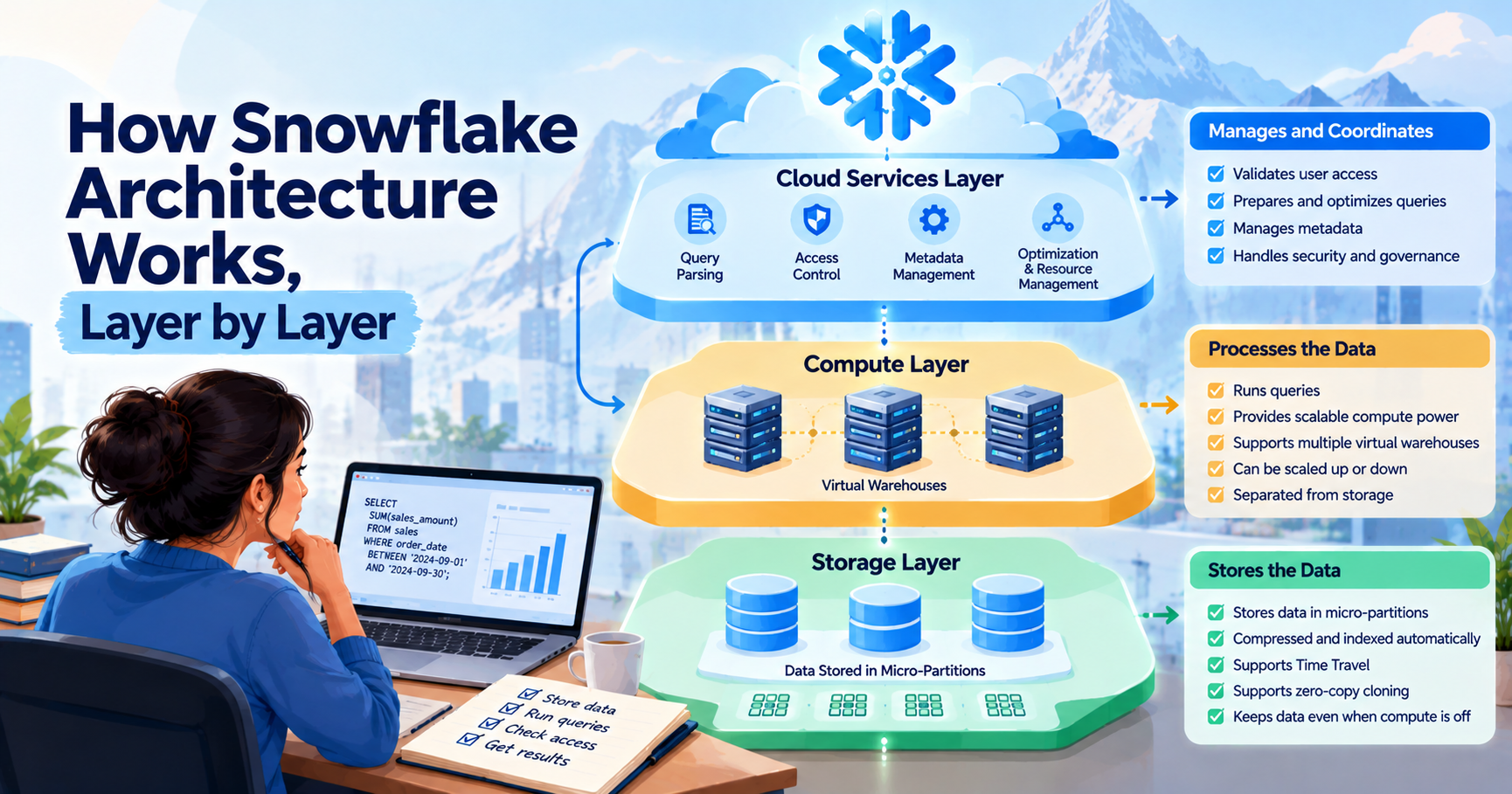
Snowflake architecture has three layers. They are the storage layer, the compute layer, and the cloud services layer.
The storage layer stores data. Someone runs a query, and the compute layer crunches that data. This is the layer of cloud services that does things like preparing queries and checking user access.
Suppose a company wants to look at its sales from last month. The sales records are already in Snowflake. When you ask for a report, Snowflake goes and finds the data, does the math, and gives you the answer.
All three layers help make this happen.
The best part is that Snowflake keeps storage and computing separate. A company can keep its data stored without having to run its computing resources all day.
Key Highlights of Snowflake Architecture
- Snowflake architecture has three layers: storage, compute, and cloud services.
- The storage layer stores data in small units called micro partitions.
- Virtual warehouses provide the ability to run queries.
- The cloud services layer validates access and assists in query preparation.
- Storage and computing can be managed separately.
- Time Travel and zero-copy cloning help with common data tasks.
- The right warehouse settings can help keep costs under control.
Introduction
Imagine you work for an online store. People place orders, they pay for them, and they ship products back - all within one day. The company needs to keep all these records.
Now, say your manager asks how much money the store made last month. You need to find the sales records for that month and add up the amounts.
That sounds simple. But what if the company has millions of records from the last five years? It can take time and computing power to find the right data and work with it.
This is where Snowflake comes in.
Snowflake is a cloud-based data warehouse and data query platform used by businesses. This allows teams to work with large amounts of data without managing all parts of the system themselves.
But how does it crunch so much data?
Snowflake breaks the work into three layers. One has the data. One processes it. The third does the things that make everything work.
You don't have to know all the technical details to get the gist of it. Now let’s look at each layer and see what it does.
What Is Snowflake? Why Architecture Matters
Snowflake is a cloud data platform. It is used by companies to store records, run reports and answer business questions using common data analysis methods.
Depending on the region and deployment, it is hosted on cloud services such as Amazon Web Services (AWS), Microsoft Azure, and Google Cloud Platform.
If you are new to cloud computing, this guide on what AWS is will help you understand the basics.
Snowflake’s uniqueness comes from the way it deals with storage and computing.
Let's say a company keeps five years of sales records. It needs those records to stay available, but it may run large reports only at the end of each month.
The company does not always need the same amount of computing power. Snowflake allows it to house its data and scale its compute when additional work is required.
It’s nice when you have different teams with different needs. The sales team may run reports while the data team adds new records. Each team can use a separate virtual warehouse for its work.
Snowflake is also part of the wider world of data management. If you want to understand how data storage and analysis differ, read about big data vs data analytics.
The 3 Layers of Snowflake Architecture
Snowflake has three main layers Each one handles a different job.
- Storage Layer: Stores the data.
- Compute Layer: Data Processing.
- Cloud services layer: Manages user access, query planning, etc.
1. Database Storage Layer and Micro-Partitions
The storage layer is where Snowflake stores the data loaded into its tables.
An online store may have millions of records of orders. The record could include product name, date of order, quantity, and amount paid.
Snowflake breaks table data down into micro-partitions (tiny units). It creates and manages these units automatically, so users do not have to arrange them by hand.
Each micro-partition holds compressed data and information about what it contains.
Here is why that matters.
Suppose your manager wants to see all orders placed in September. The table contains orders from several years, but the report needs only one month's records.
That said, Snowflake can use this knowledge about its micro-partitions to skip sections that can not hold the dates you want. This is called micro-partition pruning.
Instead of checking every part of the table, Snowflake may be able to read only the parts that matter to the query.
The storage layer also supports features such as Time Travel and zero-copy cloning.
You do not need to create or manage micro-partitions yourself. Snowflake takes care of that work in the background.
Why does this matter?
A company can keep its data stored even when its virtual warehouse is switched off. It does not need to keep computing resources running just to hold its records.
2. Compute Layer and Virtual Warehouses
Once data is stored, people need to do something with it. They may want to find a total, compare figures on sales, or produce a report.
The work is done by the compute layer.
Snowflake uses virtual warehouses to provide the compute power needed for queries, data loading, and other tasks.
A virtual warehouse is a collection of compute resources for processing work. It reads the required data from the storage layer of Snowflake.
Consider a company with two teams. Every morning the sales team reviews their numbers, and throughout the day the data team uploads new records.
For these jobs, the company could use separate virtual warehouses. This way, each team can manage their work without having one warehouse for all of it.
Warehouse size also matters. A small warehouse may be enough for a simple report. A large query may need more computing power.
But a larger warehouse can use more credits while it runs. That is why teams should choose a size that suits the work instead of making every warehouse as large as possible.
If a report is slow, the team can check the query and warehouse settings. Sometimes the warehouse needs more power. At other times, the query itself needs to be improved.
Why does this matter?
The company can change its computing resources without moving its stored data. This means busy periods and changes in workload are easier to manage.
3. Cloud Service Layer
The cloud services layer handles a lot of the behind-the-scenes work that goes on when someone is using Snowflake.
Suppose an employee wants to look at the company’s sales figures. Before Snowflake can return the result, it has to first check to make sure the employee is allowed to see the data.
It also needs to read the query and figure out how to run it.
The cloud services layer assists with these tasks.
It checks user permissions, stores metadata about tables and databases, and helps prepare queries for execution. It also does other work on the platform, like transaction management.
For example, if an employee tries to access a table they do not have permission to see, Snowflake checks their permissions before the request can be made.
The compute layer reads the query, processes it, and then reads the data it needs from storage.
The cloud services layer is like the bit that checks and organizes the request before the work is done.
Why does this matter?
Users do not need to do every step themselves. Snowflake takes care of many of these in the background so people can focus on doing things with their data.
That said, about the three layers, let’s now look at what happens when someone runs a query.
What Happens When You Run a Query?
Imagine a sales manager wants to know which product category made the most money last month. The data is already in Snowflake.
This is how the request is processed.
Step 1: The manager sends the query.
The manager composes an SQL query using a supported reporting tool or interface.
Step 2: Snowflake looks for access.
The cloud services layer determines whether the manager has access to the tables for the report.
Step 3. Snowflake prepares the query.
Snowflake parses the SQL statement and creates an execution plan.
Step 4: Warehouse does the work.
The chosen virtual warehouse executes the query on its computing resources and calculates the results.
Step 5: Load Data into Snowflake.
Snowflake retrieves the needed records from storage. It might skip micro-partitions that do not have the data required for the report.
Step 6. Return the result
Snowflake returns the result to the manager or reporting tool once the query is complete.
That is a simplistic view of the process. Some tasks may overlap, and the layers may interact multiple times.
To summarize, data is stored in the storage layer, data is processed in the compute layer, and the cloud services layer helps in managing the request.
Snowflake vs Traditional Data Warehouses
Snowflake is different from some traditional data warehouses in that storage and compute can be decoupled.
In some older on-premises systems, built on a different cloud computing reference model, these resources are more tightly coupled. Adjusting the computing power can also affect other components of the setup.
Snowflake enables a company to keep its data where it is and scale its computing resources as needed.
There are some other differences to watch out for.
- Storage and computing - Snowflake scales these separately. In other systems, they are probably more tightly coupled.
- Workload management: Each team can operate with its own virtual warehouse.
- System Maintenance: Snowflake takes care of a lot of the back-end infrastructure, but users still have to manage queries and settings.
- Data Storage: Snowflake relies on micro-partitions and managed storage. Other sites may organize their data differently.
- Snowflake’s pricing is largely usage-based, charging for storage and compute consumption. Other systems have different pricing.
Not all traditional data warehouses are created equal. Some have separate controls for scaling and workload too.
The right choice depends on the company’s data, budget, current systems, and the work it has to do. If a company wants to separate storage and computing, Snowflake is an option.
Features Made Possible by Snowflake Architecture
Snowflake has several features that help people work with data. Here are four that are useful to know.
Time Travel
Sometimes, someone changes or deletes data by mistake. Later, the team may need the earlier version.
Time Travel lets users access historical data within the retention period available for the relevant object and account settings.
For example, if someone accidentally changes a table, the team may be able to roll back to a previous version and restore the records it needs.
The retention period offered depends on the Snowflake edition, object type, and settings.
Zero-Copy Cloning
Developers often need a copy of a table to test changes without affecting the original data.
Making a full copy of a large dataset can use extra storage. Zero-copy cloning allows users to create a copy of a supported object without immediately duplicating all its underlying data.
For example, a developer can create a clone of a sales table and test a change there. The original table stays separate.
The current data storage is shared with the clone through Snowflake’s cloning process. As changes create new data, additional storage may be used.
This can make it easier to prepare data for testing.
Secure Data Sharing
A company may need to share sales records with a partner or give another team access to certain information.
Snowflake allows supported data to be shared with other Snowflake accounts without asking the recipient to download a separate copy of the shared dataset.
The owner can control what the recipient is allowed to see.
This is useful when two teams need the same information but should not have access to the whole database.
Multi-Cluster Warehouses
Imagine many employees running reports at the same time. During busy hours, one warehouse may need more capacity to handle all the queries.
Multi-cluster warehouses can add compute clusters to help manage several queries running at once, depending on the warehouse settings.
It is not the same as expanding one warehouse. Resizing adds compute power to a warehouse. Multi-cluster scaling means adding clusters to process more requests.
These features allow teams to be more flexible with their data management, test changes, and handle busy workloads.
Architecture Performance & Cost Tips
Snowflake allows teams to increase their compute resources, but over-provisioning can incur additional costs (Understanding compute cost – Snowflake Docs).
Some things to watch out for.
Choose the Right Warehouse Size
A simple report may not need a large warehouse.
Start with a size that fits the job. If a query is slow, check its execution before you resize the warehouse. A better query may solve the problem without adding more computing power.
Stop Warehouses When They Are Not Needed
A warehouse does not need to keep running when nobody is using it.
Auto-suspend stops a warehouse after the set period of inactivity. Auto-resume starts it again when new work needs to run.
These settings can help reduce unnecessary compute usage. Very short suspension periods may lead to repeated delays for the start-up. Select settings according to the workload.
Read Only the Data You Need
When writing a query, select the columns you need and use suitable filters.
You probably don’t need every customer detail or every order for the last five years to know the total sales for September.
Keep the query as focused as possible so Snowflake works less hard.
Check Micro-Partition Pruning
Snowflake can skip micro-partitions that are not needed for a query.
A query for sales for a month might not need to scan data from several years. Depending on the stored metadata and query conditions, those sections may or may not be skipped.
Check query performance to see how much data is being scanned.
Use Clustering When It Helps
Snowflake manages micro-partitions automatically. Most tables do not need extra clustering work.
Clustering can make it easier to process queries for the records you need in some large tables. But there are costs, so see if it makes a real difference before you use it.
Keep Different Workloads Separate
Reporting, data loading, and development may need different amounts of computing power.
These jobs can be managed by teams in isolation from virtual warehouses themselves. They are also useful to see where the most credits are used by which tasks.
The aim is to give each job enough computing power without paying for resources that sit idle.
Snowflake Architecture Interview Recap
If you’re preparing for a Snowflake or data engineer interview, make sure you are able to explain these points in simple words.
- Three layers: Storage, compute, and cloud services.
- Storage layer: Stores table data in micro-partitions
- Compute Layer: Runs queries via virtual warehouses.
- Cloud services layer: Access, metadata, query planning.
- Separate scaling: Storage and computing can be handled separately.
- Micro-partition pruning: Allows Snowflake to skip data that is not needed by a query.
- Time Travel: Provides older data in the available retention period.
- Zero-copy cloning creates supported copies but does not immediately copy all underlying data.
- Concurrency: Different warehouses and multi-cluster deployments can handle multiple queries.
- Cost management: Proper warehouse sizes and good queries can help to control the credit usage.
Instead of memorizing the definitions, try to explain these points with examples.
Let’s say your boss asks you for sales figures for last month. The computation of the result is performed using a Snowflake virtual warehouse. Snowflake first checks access and then reads the required records.
If you can explain that process clearly, you have a good starting point for a Snowflake architecture interview.
Conclusion
Snowflake architecture comes down to three things: storing data, working on it, and managing the requests that connect the two.
The storage layer keeps the records. The compute layer runs queries. The cloud services layer handles access and helps prepare those queries.
Because storage and computing are separate, a company can keep its data stored and change its computing resources when the amount of work changes.
Features such as time travel, zero-copy cloning, and secure data sharing also help teams handle common data tasks. But in terms of cost and speed, it is the right warehouse settings and good queries that matter.
If you want to build your Snowflake skills, take a look at the available Snowflake certification courses. Select a course that matches your present knowledge and the skills you want to develop.









 Lowest-Price Challenge











 Personalized Path


.webp)


 USA
USA  Canada
  India
India  UK
UK  Australia
  Singapore


