


 Call Us
_1788257081.jpeg)


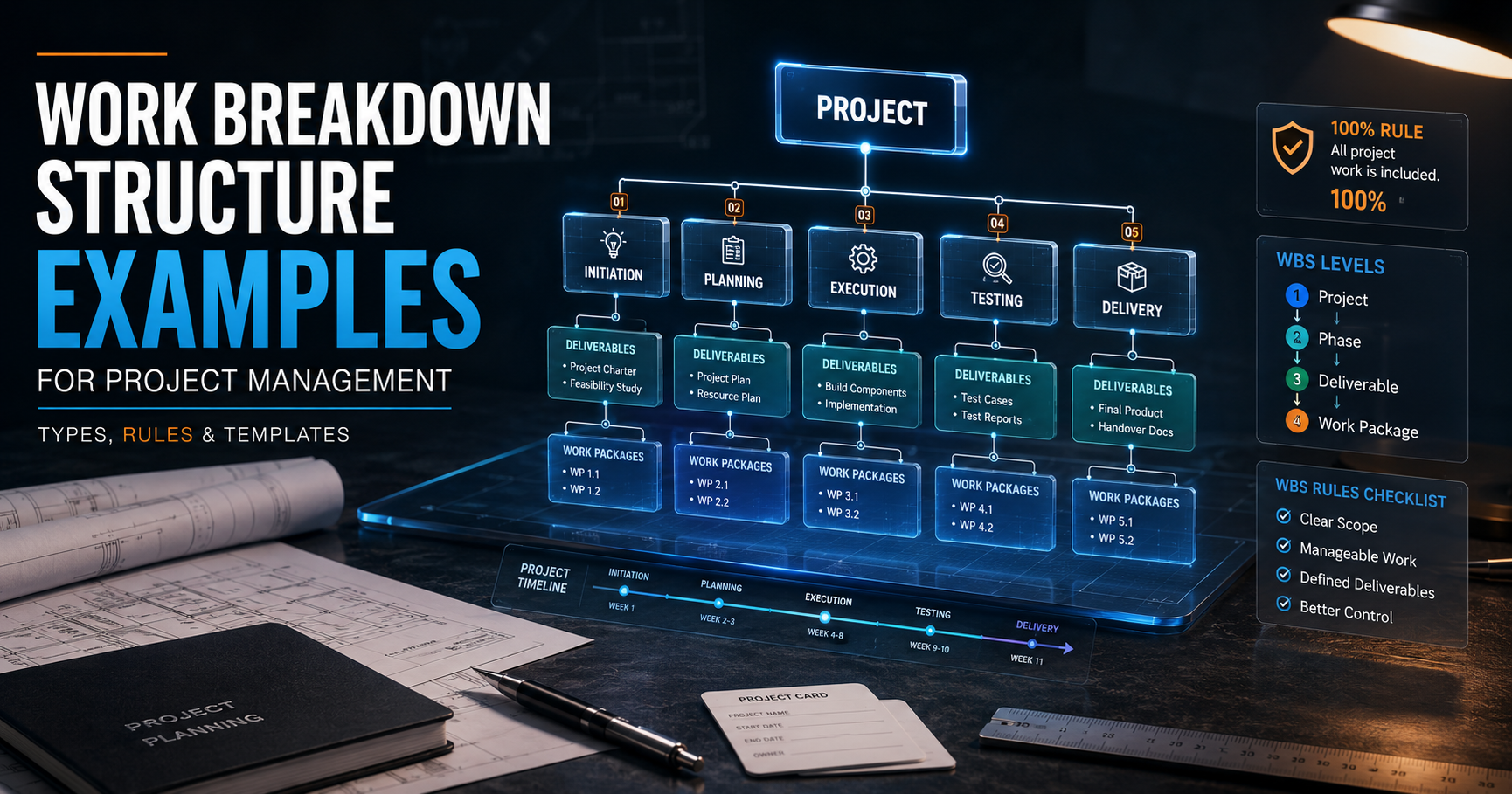
A work breakdown structure (WBS) is a hierarchical breakdown of a project's total scope into smaller, manageable deliverables and work packages. It answers what needs to be delivered, not who does it or when. Every WBS follows the 100% rule, meaning it must capture all the work in a project's scope, no more and no less, and most work packages should follow the 8/80 rule, taking between 8 and 80 hours of effort to complete.
Key Highlights: Work Breakdown Structure Examples for Project Management
- Understand what a WBS is and why it matters: Learn how a Work Breakdown Structure turns project scope into clear, manageable deliverables and work packages.
- Explore real-world WBS examples: See practical WBS structures for software development, construction, cloud migration, and marketing projects.
- Master the key WBS rules: Understand the 100% rule and 8/80 rule, along with the role of the WBS Dictionary and coding system.
- Learn how to build and validate a WBS: Follow a step-by-step approach to identify deliverables, decompose them into work packages, and validate complete scope coverage.
- Use AI effectively for WBS creation: Discover how AI can accelerate the first draft while learning the checks needed for scope completeness, deliverable orientation, work-package sizing, and domain accuracy.
Introduction
Ask any experienced project manager what separates a project that finishes on time from one that spirals into missed deadlines and budget overruns, and scope definition will almost always come up.
According to PMI's Pulse of the Profession research, scope creep affected 52 percent of projects completed in a recent 12 month period, up from 43 percent five years earlier, and organizations lose an average of 9.9 percent of every dollar invested due to poor project performance, including unclear scope. That is not a small leak. On a billion dollar portfolio of projects, it works out to roughly 99 million dollars wasted because scope was not defined clearly enough from the start.
A work breakdown structure exists to close exactly that gap. It is the tool project managers use to convert a vague project goal into a concrete, itemized list of deliverables and the work required to produce them.
Instead of guessing at what needs to happen, a WBS forces the team to name every major deliverable, break it into smaller components, and continue that breakdown until the work is small enough to estimate, assign, and track with confidence.
This guide walks through real-world work breakdown structure examples across software, construction, IT infrastructure, and marketing projects. It also unpacks the rules that govern a properly built WBS, including the 100% rule and the 8/80 rule, explains the difference between deliverable-based and phase-based structures, and shows how to build a WBS step by step, whether you are using a spreadsheet, a ready-made work breakdown structure template, a project management tool, or even a ChatGPT prompt to accelerate the first draft.
Before diving into examples, it helps to have a solid project plan template on hand, since a WBS rarely exists in isolation.
If you want a head start on the surrounding documentation, SimpliAxis offers a set ofproject plan templates that pair well with the WBS structures shown below.
Work Breakdown Structure Examples for Project Management
The following work breakdown structure examples cover four common project types: software development, construction, IT infrastructure and cloud migration, and marketing or event management.
Each example shows how the same deliverable-based logic adapts to very different kinds of work.
Software Development WBS Example
A software project WBS is almost always organized around the major functional deliverables of the product rather than the chronological steps of development, although many teams blend both approaches in practice. Here is a simplified wbs example for software project planning, using a customer-facing web application as the subject:
1.0 Customer Portal Application
- 1.1 Requirements and Design
- 1.1.1 Business requirements document
- 1.1.2 Technical architecture document
- 1.1.3 UI/UX wireframes and prototypes
- 1.2 Frontend Development
- 1.2.1 Authentication and user account module
- 1.2.2 Dashboard and reporting module
- 1.2.3 Responsive design and cross-browser testing
- 1.3 Backend Development
- 1.3.1 API development
- 1.3.2 Database schema and integration
- 1.3.3 Third-party payment gateway integration
- 1.4 Quality Assurance
- 1.4.1 Unit testing
- 1.4.2 Integration testing
- 1.4.3 User acceptance testing
- 1.5 Deployment and Launch
- 1.5.1 Production environment setup
- 1.5.2 Data migration
- 1.5.3 Go-live and post-launch support
Notice that each Level 2 item, such as Frontend Development or Quality Assurance, represents a deliverable rather than a generic activity like "coding" or "testing tasks." That distinction matters. A deliverable-oriented WBS tells you what will exist at the end of the work, while an activity-oriented list only tells you what people will be doing, which makes it harder to verify completion and estimate cost accurately.
Construction Project WBS Example
Construction is one of the industries where work breakdown structures originated in their modern form, largely because large capital projects demand rigorous cost and schedule control. A construction wbs example for a small commercial building might look like this:
1.0 Commercial Building Construction
- 1.1 Pre-Construction
- 1.1.1 Site survey and soil testing
- 1.1.2 Permits and regulatory approvals
- 1.1.3 Architectural and structural drawings
- 1.2 Site Work
- 1.2.1 Site clearing and grading
- 1.2.2 Excavation and foundation work
- 1.2.3 Utility connections
- 1.3 Structural Work
- 1.3.1 Framing
- 1.3.2 Roofing
- 1.3.3 Exterior walls and cladding
- 1.4 Interior Work
- 1.4.1 Electrical installation
- 1.4.2 Plumbing and HVAC
- 1.4.3 Flooring, painting, and finishing
- 1.5 Project Closeout
- 1.5.1 Final inspections
- 1.5.2 Client walkthrough and punch list
- 1.5.3 Handover documentation
Construction WBS structures often go a level deeper than software projects because individual trades, such as electrical or plumbing, need separate cost accounts for budgeting and subcontractor management.
This is also where the 100% rule becomes especially visible: if the sum of the sitework, structural, and interior packages does not equal the total contracted scope, someone on the project will eventually discover a gap, usually the hard way, mid-construction.
IT Infrastructure and Cloud Migration WBS Example
IT infrastructure projects, particularly cloud migrations, involve a mix of technical assessment, execution, and validation work. A typical structure looks like this:
1.0 Cloud Migration Project
- 1.1 Discovery and Assessment
- 1.1.1 Current infrastructure inventory
- 1.1.2 Application dependency mapping
- 1.1.3 Cloud provider and architecture selection
- 1.2 Migration Planning
- 1.2.1 Migration strategy and sequencing plan
- 1.2.2 Security and compliance framework
- 1.2.3 Rollback and contingency plan
- 1.3 Environment Setup
- 1.3.1 Cloud landing zone configuration
- 1.3.2 Network and identity access setup
- 1.3.3 Monitoring and logging tools
- 1.4 Migration Execution
- 1.4.1 Data migration
- 1.4.2 Application migration by wave
- 1.4.3 Integration testing
- 1.5 Post-Migration Validation
- 1.5.1 Performance benchmarking
- 1.5.2 Cost optimization review
- 1.5.3 Knowledge transfer and documentation
Cloud and infrastructure WBS structures often include a dedicated discovery phase as a Level 1 deliverable because so much of the eventual scope depends on findings from the assessment. Skipping this step, or treating it as an activity rather than a deliverable, is a common reason IT projects underestimate the true size of the migration effort.
Marketing and Event Management WBS Examples
Marketing campaigns and events are less technical but no less complex from a coordination standpoint. Here is a wbs example project management professionals in marketing commonly use for a product launch campaign:
1.0 Product Launch Campaign
- 1.1 Strategy and Planning
- 1.1.1 Target audience research
- 1.1.2 Messaging and positioning framework
- 1.1.3 Channel and budget plan
- 1.2 Content Development
- 1.2.1 Website landing page
- 1.2.2 Social media content calendar
- 1.2.3 Email marketing sequence
- 1.2.4 Product demo video
- 1.3 Paid and Organic Promotion
- 1.3.1 Paid social and search campaigns
- 1.3.2 Influencer and partnership outreach
- 1.3.3 PR and media outreach
- 1.4 Launch Event
- 1.4.1 Venue and logistics
- 1.4.2 Speaker and agenda coordination
- 1.4.3 Attendee registration and follow-up
- 1.5 Post-Launch Analysis
- 1.5.1 Performance reporting
- 1.5.2 Customer feedback collection
- 1.5.3 Retrospective and lessons learned
For a standalone event, such as a corporate conference, the same structure holds but the deliverables shift toward venue, program, and attendee experience: Level 1 might include Venue and Vendor Management, Program and Speaker Coordination, Attendee Experience, and Post-Event Reporting.
In both cases, the WBS forces marketing teams to think in terms of concrete outputs, a landing page, a video, a signed venue contract, rather than open-ended activities like "do social media" or "plan the event," which are far harder to estimate or hold anyone accountable for.
What is a Work Breakdown Structure in Project Management?
Now that the examples have shown the pattern in action, it is worth stepping back to define the concept properly.
WBS Definition, Purpose and Structure
According to the Project Management Institute's PMBOK Guide, a work breakdown structure is a deliverable-oriented hierarchical decomposition of the work to be executed by the project team to accomplish the project objectives and create the required deliverables.
In plain terms, a WBS breaks a big, sometimes intimidating project goal into a family tree of smaller, more concrete pieces of work, with each descending level representing a more detailed definition of what needs to be produced.
The purpose of a WBS is threefold.
- First, it defines the total scope of the project so nothing is missed and nothing extra is quietly added.
- Second, it provides the structural backbone for cost estimation, scheduling, and resource assignment, since work packages at the bottom of the hierarchy are the pieces that actually get estimated, budgeted, and scheduled.
- Third, it gives the whole project team, along with sponsors and stakeholders, a shared, visual reference point for what "done" looks like.
Structurally, a WBS looks like an organizational chart turned on its side, or a family tree. At the top sits the project itself, and each level below it represents a finer level of detail, ending in the smallest deliverables the team is willing to track individually.
WBS Levels, Deliverables and Work Packages
A WBS is typically expressed across wbs levels that range from 2 to 6 depending on project size and complexity, though most projects use somewhere between three and four levels.
A common structure looks like this:
- Level 0 or Level 1: The project itself, named as the final deliverable. There is only one item at this level.
- Level 1 or Level 2: Major deliverables or phases, sometimes called summary elements. Most projects have between three and seven of these.
- Level 2 or Level 3: Sub-deliverables, breaking major deliverables into more specific components.
- Level 3 or Level 4: Work packages, the lowest level of the WBS, where cost and duration can be reliably estimated.
A work package definition says it's a sequence of activities that leads to a deliverable. It has a clear scope, an owner, an estimated duration, and a defined output.
Once you reach the work package level, the team stops decomposing scope and starts scheduling individual tasks and activities within that package, which technically fall outside the WBS itself and belong instead to the project schedule.
What is not included in a WBS?
One of the most misunderstood aspects of a WBS is what it deliberately leaves out. A WBS does not include:
- Dates or durations. The WBS answers what needs to be delivered, not when it will happen. Scheduling comes later, once work packages are defined.
- Resource assignments. Who does the work is a resourcing decision, made after the WBS establishes what work exists.
- Dependencies between tasks. Sequencing and logical relationships between activities belong in the project schedule or network diagram, not the WBS.
- Activities and tasks below the work package level. Once a work package is defined, breaking it into day-to-day tasks is scheduling work, not WBS work.
- Risks, quality criteria, or detailed descriptions. These live in the WBS dictionary, a companion document discussed in the next section, not in the WBS chart itself.
Understanding what a WBS leaves out is just as important as understanding what it includes, because a common mistake is trying to cram scheduling and resourcing information into what should be a clean, deliverable-focused chart.
WBS Rules Every Project Manager Should Know
A WBS is only useful if it is built correctly. Two rules in particular govern how a proper WBS is constructed, along with a supporting document and numbering convention that keeps everything organized.
The 100% Rule in Work Breakdown Structures
The 100% rule wbs principle, first articulated by Gregory Haugan in 2002 and now embedded in PMI's Practice Standard for Work Breakdown Structures, states that the WBS must include 100 percent of the work defined by the project scope, capturing all deliverables, internal, external, and interim, in terms of work to be completed, including project management itself
This rule applies at every level of the hierarchy, not just at the top. The sum of the work represented by the child elements under any parent must equal exactly 100 percent of that parent's scope, no gaps, no overlaps, and nothing extra. Consider what this means in practice:
- If you sum the effort or cost of every Level 2 deliverable, it must equal the total project scope defined in Level 1. Nothing outside the approved scope statement can sneak into the WBS, and nothing inside the scope statement can be left out.
- No two elements should cover the same piece of work. Overlapping WBS elements create confusion about ownership and can lead to duplicated cost estimates or duplicated effort.
- The rule also applies at the activity level below work packages: the tasks within a work package must together account for 100 percent of that work package's scope.
The 100% rule is not bureaucratic box-checking. It is the mechanism that prevents the two most expensive scope failures: leaving out work that later shows up as an unplanned, budget-busting surprise, and padding the WBS with activities that were never actually part of the approved scope in the first place.
The 8/80 Rule and WBS Work Packages
Once the 100 percent rule confirms that the WBS captures the right total scope, the 8/80 rule project management guideline governs how finely that scope should be broken down at the work package level. The rule states that a work package should generally require no less than 8 hours and no more than 80 hours of effort to complete
Work packages smaller than 8 hours add administrative overhead that outweighs the benefit of tracking them separately, since status updates, dependency checks, and reporting cost real time.
Work packages larger than 80 hours, roughly two weeks of full-time effort, become difficult to estimate accurately and hide risk, because a team might report "on track" for weeks before a problem becomes visible.
It is worth remembering that the 8/80 rule is a heuristic, not a hard law. A short two-week project might tighten the range to 4 to 40 hours, while a multi-year infrastructure program might stretch it to 40 to 160 hours. The underlying goal stays the same regardless of the exact numbers: keep each work package small enough to assign to a single owner and track reliably within one reporting cycle, but not so small that tracking it costs more than the insight it provides.
WBS Dictionary and Numbering System
A WBS chart on its own only tells you the names of deliverables and how they relate hierarchically. It does not tell you what "done" means for each element, who owns it, or how much it should cost. That is the job of the wbs dictionary, defined by PMI as "a document that provides detailed deliverable, activity, and scheduling information about each component in the work breakdown structure"
A well-built WBS dictionary entry typically includes:
- A detailed description of the work covered by that element
- The responsible person, team, or organization
- Acceptance criteria and quality standards
- Cost and schedule estimates
- Dependencies on other WBS elements
- Assumptions and constraints specific to that piece of work
Alongside the dictionary, every WBS element is usually assigned a unique numeric code, sometimes called a code of accounts, that reveals its position in the hierarchy at a glance. For example, 1.0 might represent the project itself, 1.2 a major deliverable, and 1.2.3 a specific work package within that deliverable. This numbering system is what allows scope, schedule, and cost systems to reference the exact same structure and roll costs or progress up from work packages to the total project.
Together, the WBS chart, the WBS dictionary, and the project scope statement make up what PMI calls the scope baseline, the approved reference point against which all future scope changes are measured and controlled.
Deliverable-Based vs Phase-Based WBS
Not every WBS is organized the same way. The two most common structures are deliverable-based and phase-based, and choosing the right one has a real effect on how usable the WBS turns out to be.
Deliverable-Based WBS
A deliverable based wbs organizes Level 1 and Level 2 elements around the tangible outputs the project will produce, such as "Mobile App," "User Manual," or "Payment Gateway," rather than around chronological stages of work. This is the structure PMI recommends as the default approach, because it keeps the WBS focused on what will exist at the end of the project rather than on the process used to get there.
The advantage of a deliverable-based structure is that it maps naturally to the 100% rule. Since each branch corresponds to something that must exist by project close, it is easier to verify that all deliverables, and only the approved deliverables, are represented. It is also easier for external stakeholders to understand, since a client cares more about what they are receiving than about the internal phases the vendor used to build it.
To understand what should count as a deliverable in the first place, and to avoid the common mistake of listing tasks instead, it helps to review a clear breakdown ofwhat are deliverables for a project before starting the decomposition process.
Phase-Based and Hybrid WBS
A phase-based WBS instead organizes Level 1 around the project's life cycle stages, such as Initiation, Planning, Execution, and Closeout, with deliverables nested underneath each phase. This structure feels intuitive to teams accustomed to thinking in project stages, and it aligns naturally with milestone-based reporting.
The downside is that phase-based structures can blur deliverable ownership, since a single deliverable, like a technical specification document, might genuinely span both the Planning and Execution phases. This creates ambiguity about which branch of the WBS it belongs to, which in turn makes the 100% rule harder to apply cleanly.
Many real projects use a hybrid approach: Level 1 follows major phases or work streams, but Level 2 and below switch to a deliverable orientation within each phase. This is common in construction and IT infrastructure projects, where regulatory or contractual milestones map neatly to project phases, but the detailed scope underneath each phase is still best expressed as concrete deliverables.
Which WBS Structure Should You Choose?
The choice generally comes down to project type and stakeholder expectations. Product-oriented projects, such as software builds, construction, and manufacturing, tend to favor deliverable-based structures because the end product is well defined from the start. Projects with heavy regulatory milestones, phased contracts, or a strong emphasis on stage-gate approvals, such as government infrastructure programs or pharmaceutical development, often favor phase-based or hybrid structures.
As a practical rule of thumb, if you are unsure which to use, start with a deliverable-based structure. It aligns most directly with the 100% rule, translates more easily into a WBS dictionary, and is generally easier for both PMP and CAPM exam candidates to reason about, since PMI's own materials treat deliverable orientation as the default.
How to Create a Work Breakdown Structure Step by Step?
Knowing the rules is one thing. Actually building a WBS from a blank page is another. Here is how to create a work breakdown structure using a repeatable, three-step process.
Define Scope and Identify Major Deliverables
Start by anchoring the WBS to the project's approved scope statement or charter. Everything in the WBS must trace back to this document, and anything in this document must eventually appear somewhere in the WBS.
From there, identify the three to seven major deliverables that, together, represent the entire project. These become your Level 1 or Level 2 elements. A useful test at this stage is to ask: if I completed every one of these major deliverables, would the project be finished? If the answer is no, something is missing. If completing them would produce more than what the client or sponsor asked for, something extra has crept in.
It helps at this stage to involve subject matter experts and team leads rather than building the WBS alone, since people closer to the actual work often catch missing deliverables that a project manager working solo would overlook.
If your team is building foundational scope management skills, a structured course such as SimpliAxisCorporate project management fundamental training is a useful starting point before attempting a full WBS on a live project.
Decompose Deliverables Into Work Packages
Next, break each major deliverable into smaller sub-deliverables, and continue that decomposition until you reach work packages, the smallest units the team is willing to estimate and track independently. Apply the 8/80 rule here as a sizing check: if a candidate work package looks like it will take more than 80 hours, break it down further; if it looks like it will take less than 8 hours, consider merging it with a related piece of work.
At each level, keep the language deliverable-oriented rather than activity-oriented. "Payment gateway integration" is a deliverable. "Write payment gateway code" is an activity, and it belongs in the schedule, not the WBS.
This distinction is subtle but consequential, since activity-oriented WBS elements are notoriously hard to verify as "complete," while deliverable-oriented elements have a clear, binary state: either the deliverable exists and meets acceptance criteria, or it does not.
Validate the WBS Using the 100% Rule
Once the decomposition is complete, walk through every parent-child relationship in the structure and check two things: first, that the children fully account for everything in the parent, with no gaps, and second, that nothing in the children falls outside the parent's actual scope, with no overlaps or additions.
This validation step is where most WBS quality problems get caught. It is common to discover, on this pass, that deliverables that were assumed but never explicitly listed, such as user training materials, documentation handover, or post-launch support, tend to surface here if they were missed earlier.
Once validated, walk the WBS with the project team and key stakeholders before it becomes the baseline, since buy-in at this stage prevents disputes over scope later in the project.
WBS vs Gantt Chart vs Project Schedule
| Aspect | WBS | Gantt Chart | Project Schedule |
| Core question answered | What needs to be delivered? | When will each task happen? | When, in what order, and by whom will work happen? |
| Primary focus | Scope and deliverables | Visual timeline of tasks | Full timing, sequencing, and resourcing of activities |
| Structure | Hierarchical, tree-like breakdown | Horizontal bar chart against a calendar | Structured activity list with dates, durations, and logic |
| Includes dates or durations | No | Yes | Yes |
| Includes task sequencing or dependencies | No | Yes, shown as linked bars | Yes, defines logical dependencies |
| Includes resource assignments | No | Sometimes, if tracked visually | Yes, resources are assigned to activities |
| Level of detail | Deliverables and work packages | Scheduled tasks and milestones | Activities derived from work packages |
| When it is created | Early in planning, before scheduling | After the WBS and activity definition | After the WBS, alongside or just before the Gantt chart |
| Governed by | The 100% rule and the 8/80 rule | Calendar dates and dependency logic | Activity sequencing, resource availability, and critical path |
| Typical owner | Project manager, with team input | Project manager or scheduler | Project manager or scheduler |
| Changes when | Scope baseline changes through change control | Schedule dates shift or tasks are reordered | Activities, durations, or resources change |
How to Use AI to Create a Work Breakdown Structure?
Generative AI tools have become a practical way to accelerate the first draft of a WBS, particularly for project managers who are short on time or working on an unfamiliar project type.
ChatGPT Prompt for Generating a WBS
A well-structured chatgpt work breakdown structure prompt should specify the project type, the major known deliverables if any are already confirmed, the desired number of levels, and the format you want the output in. Here is an example prompt that tends to produce a usable first draft:
"Act as an experienced project manager. Create a work breakdown structure for [project name/type, e.g., a mobile banking app launch]. The project's key deliverables include [list any known deliverables]. Structure the WBS with three levels: Level 1 for major deliverables, Level 2 for sub-deliverables, and Level 3 for work packages sized according to the 8/80 rule, meaning each work package should represent roughly 8 to 80 hours of effort.
Apply the 100% rule so that all child elements under each parent fully account for the parent's scope with no gaps or overlaps. Present the output as a numbered, indented outline using WBS coding, such as 1.0, 1.1, 1.1.1."
Being specific about the 100% rule and the 8/80 rule in the prompt itself noticeably improves output quality, since it nudges the model toward deliverable-oriented language rather than a generic to-do list.
How to Review an AI-Generated WBS?
An AI-generated WBS should never be treated as final. Review it against these checks before using it on a real project:
- Deliverable language check. Scan for activity verbs like "build," "write," or "test" appearing as Level 1 or Level 2 labels. These usually indicate the AI slipped into activity-oriented thinking rather than deliverable-oriented thinking.
- 100% rule check. Manually verify that nothing critical is missing. AI models are prone to producing generic, plausible-sounding structures that miss project-specific deliverables, such as regulatory filings, client training, or handover documentation.
- Sizing check against the 8/80 rule. AI often generates work packages that are too broad or too granular. Adjust manually based on your team's actual capacity and reporting cadence.
- Domain accuracy check. For specialized fields such as construction or pharmaceuticals, verify that industry-specific deliverables and compliance steps are represented, since general-purpose AI models may not know the regulatory nuances of your sector.
Treat the AI output as a strong first draft that saves time on structure and formatting, not as a substitute for domain expertise or stakeholder validation.
Common WBS Mistakes to Avoid
Even experienced project managers fall into a handful of recurring traps when building a WBS. Recognizing these patterns early saves considerable rework later.
Activity-Based WBS, Missing Scope and Incorrect Decomposition
The single most common mistake is building an activity-based WBS instead of a deliverable-based one. Elements labeled "design," "develop," and "test" describe processes, not outputs, and they make it nearly impossible to apply the 100% rule cleanly, since there is no clear, verifiable "done" state for a process.
A closely related mistake is incomplete scope, where deliverables that are easy to overlook, such as documentation, training, warranty support, or project management overhead itself, get left out of the WBS entirely. Because the 100% rule treats project management as part of the total scope, forgetting to include it as its own WBS branch is a frequent and avoidable gap.
Incorrect decomposition, meanwhile, happens when teams either stop too early, leaving work packages too large and vague to estimate reliably, or go too deep, decomposing all the way down to task-level detail that belongs in the schedule rather than the WBS. Both errors distort cost and time estimates in opposite directions.
Confusing WBS With a Schedule or Task List
The second major mistake category involves conflating the WBS with tools that serve a different purpose. Teams sometimes try to embed dates, owners, and dependencies directly into the WBS chart, effectively turning it into a rough schedule. This muddies the document's purpose and makes it harder to maintain, since scope changes and schedule changes now have to be reconciled in the same artifact.
Similarly, some teams treat a simple flat task list as a WBS substitute. A task list has no hierarchy, no deliverable orientation, and no mechanism for verifying that 100 percent of scope is covered, which defeats the core purpose the WBS is meant to serve.
Work Breakdown Structure on the PMP and CAPM Exams
For professionals preparing for certification, the WBS is one of the more heavily tested concepts in the scope management domain, appearing across both situational and definitional questions.
WBS Concepts Tested in the PMP Exam
On the wbs pmp exam content, questions typically fall into the Process domain, which makes up 41 percent of the exam; this is according to PMI's current examination content outline.
Expect situational questions that test whether you can correctly identify:
- The correct sequence of scope management processes: Plan Scope Management, Collect Requirements, Define Scope, Create WBS, Validate Scope, and Control Scope
- The outputs of the Create WBS process, namely the scope baseline, which consists of the project scope statement, the WBS, and the WBS dictionary
- How to apply the 100% rule and the 8/80 rule in scenario-based questions, such as identifying whether a described WBS violates either rule
- The difference between Validate Scope, which formally accepts completed deliverables, and Control Scope, which manages changes to the scope baseline
- How WBS concepts apply in agile and hybrid contexts, since PMI's current PMP exam blends predictive, agile, and hybrid approaches rather than testing only traditional waterfall scenarios
PMP candidates preparing for these questions benefit from formal exam preparation that walks through realistic scope management scenarios rather than relying on definitions alone. SimpliAxisPMP certification training covers this domain in depth alongside the other eleven knowledge areas tested on the exam.
WBS Concepts Tested in the CAPM Exam
The wbs capm exam content tends to stay closer to definitional and foundational knowledge than the PMP exam's situational judgment questions, reflecting CAPM's role as an entry-level certification for those newer to project management.
Typical CAPM questions focus on:
- The correct definition of a WBS and how it differs from a project schedule or task list.
- What a WBS dictionary is and what components it typically contains, including description of work, list of resources, and acceptance criteria
- Which process produces the WBS as an output, and where that process sits in the sequence of scope management activities
- Basic recognition of the 100% rule and the 8/80 rule as governing principles, generally tested through recall rather than complex scenario analysis
- How the WBS relates to other planning documents, such as the scope statement and the requirements documentation
Because CAPM does not require prior project management experience to sit for the exam, candidates often benefit from foundational, structured coursework before attempting practice questions.
SimpliAxisCAPM certification training is built specifically around PMI's current exam content outline and covers the WBS alongside the rest of the scope, schedule, and stakeholder management domains.
Conclusion: How to Build an Effective WBS
A work breakdown structure is deceptively simple in concept: break the project into its parts, and keep breaking until the parts are manageable. The discipline lies in doing this correctly. An effective WBS is deliverable-oriented rather than activity-oriented, follows the 100% rule at every level of the hierarchy, sizes work packages according to the 8/80 rule wherever practical, and is documented in a WBS dictionary that gives every element a clear owner, scope, and acceptance criteria.
Whether you are managing a software launch, a construction build, a cloud migration, or a marketing campaign, the same underlying logic applies. Start with the scope statement, identify the major deliverables, decompose them methodically, validate the result against the 100% rule, and resist the temptation to turn the WBS into a schedule or a task list.
Get this right, and nearly every downstream planning activity, cost estimation, scheduling, resource assignment, and risk identification, becomes noticeably easier because it is built on a scope foundation that is complete, unambiguous, and shared across the entire project team.








 Lowest-Price Challenge











 Personalized Path


.webp)


 USA
USA  Canada
  India
India  UK
UK  Australia
  Singapore


