


 Call Us



Quick Answer
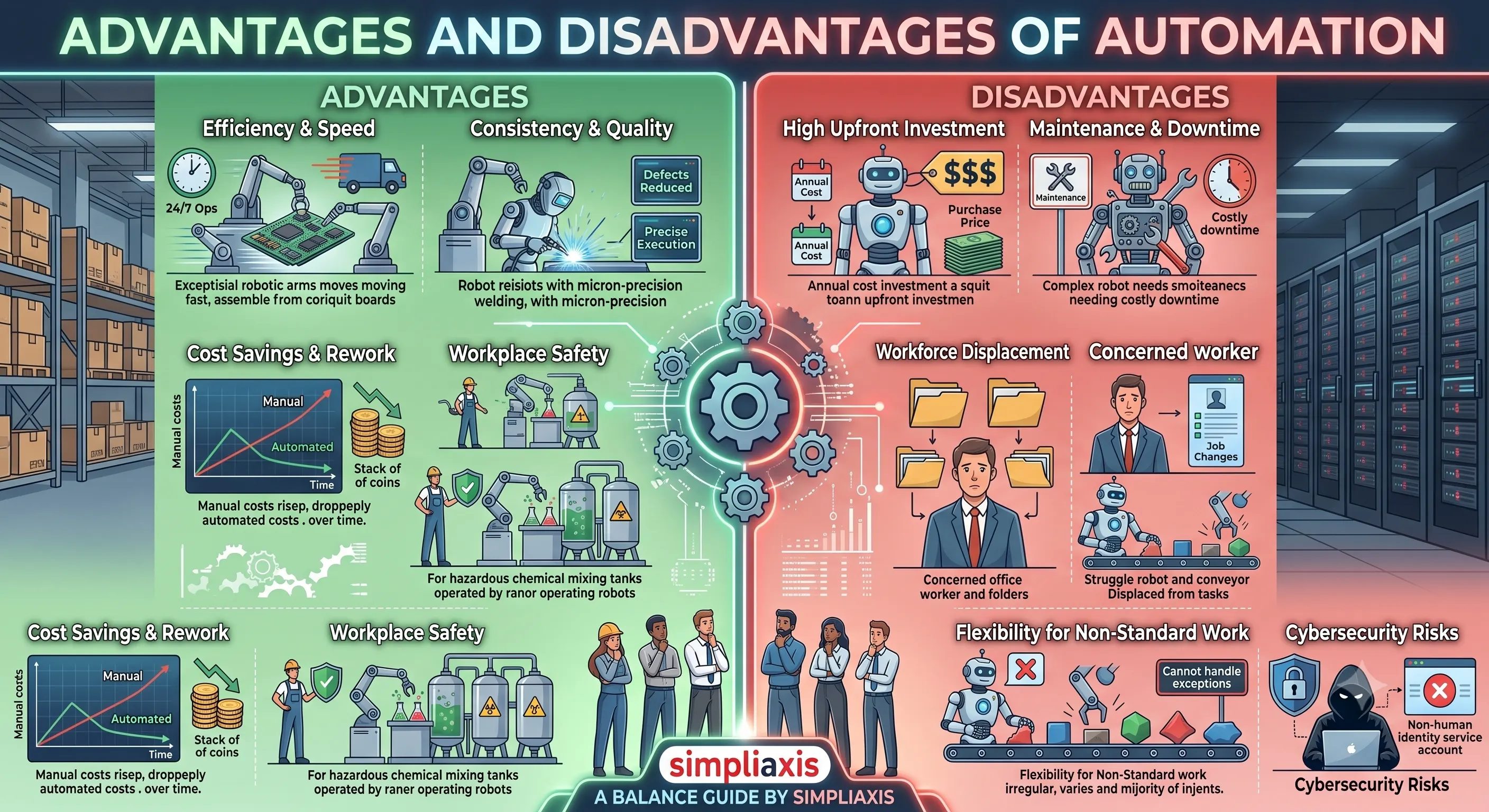
Automation offers real, measurable advantages, including higher efficiency, more consistent quality, long-term cost savings, better workplace safety, and the ability to run operations continuously at scale. It also carries genuine disadvantages, including high upfront investment, ongoing maintenance costs, workforce displacement in routine roles, reduced operational flexibility, and new cybersecurity risks. The right approach for most organizations is not "automate everything" but a deliberate mix of automated systems and human judgment, chosen task by task based on cost, risk, and complexity.
Key Highlights of Advantages and Disadvantages of Automation
- Automation spans four broad categories: fixed, programmable, flexible, and AI-augmented automation, each suited to different volumes and levels of task variability.
- Well-implemented automation reduces cycle times, cuts manual errors, and can lower long-term operating costs, but it rarely pays for itself immediately.
- Industrial robots and RPA software typically require annual maintenance budgets equal to roughly 5 to 15 percent of the original purchase price, a cost many buyers underestimate.
- Recent workforce research estimates that around 1 in 8 U.S. workers face high or very high automation risk, concentrated in routine clerical, service, and administrative roles.
- Automation introduces new cyber risk because every bot, script, or connected system becomes a "non-human identity" that needs its own access controls and credential management.
- The organizations that benefit most from automation pair it with human oversight and reskilling, rather than treating it as a pure headcount replacement strategy.
What Is Automation?
Automation is the use of technology, machinery, software, or control systems to perform tasks with minimal ongoing human intervention. It is a broader concept than artificial intelligence: automation can be as simple as a thermostat that switches on a furnace at a set temperature, or as complex as a fully robotic assembly line that welds, paints, and inspects a car body without a person touching it. Simpliaxis has already covered the narrower question of how artificial intelligence's advantages and disadvantages play out in decision-making and cognitive work. This guide looks at the wider picture, business process automation, industrial and manufacturing automation, and robotic process automation (RPA), because most organizations use several of these forms side by side, often long before they adopt any AI at all.
Automation generally falls into three operational domains that matter for this discussion:
- Industrial and manufacturing automation, where machines and robots perform physical tasks such as welding, assembly, packaging, and quality inspection.
- Business process automation (BPA), where software orchestrates multi-step office workflows such as invoice approval, employee onboarding, or order fulfillment.
- Robotic process automation (RPA), a specific software technique within BPA where "bots" mimic human clicks and keystrokes to move data between systems, often without needing a new API or system integration.
Each domain shares the same underlying trade-off: automation exchanges flexibility and low upfront cost for speed, consistency, and scale. Understanding where that trade-off works in your favor, and where it does not, is the point of the rest of this article.
Types of Automation
Not all automation is built the same way, and the type an organization chooses determines both its advantages and its limitations. Engineering and operations literature generally groups automation into four categories.
Fixed Automation (Hard Automation)
Fixed automation uses equipment whose sequence of operations is built into the machine itself. It is extremely efficient for producing one product, or a narrow family of products, at very high volume, but it is expensive and slow to reconfigure if the product changes. Classic examples include mechanized transfer lines, high-speed bottling and capping equipment, and automated welding lines in automotive assembly. Fixed automation delivers the lowest per-unit cost at scale, which is exactly why it dominates industries like beverage bottling and high-volume component manufacturing, but it offers almost no flexibility if demand shifts or a product is redesigned.
Programmable Automation
Programmable automation can be reprogrammed to handle different product variants or task sequences, which makes it suitable for medium-volume, batch-style production. Numerically controlled (CNC) machine tools and many industrial robots fall into this category. The tradeoff is downtime: switching a programmable system from one batch to another requires reprogramming and setup time, so it is not efficient for tasks that change constantly.
Flexible Automation (Soft Automation) and RPA
Flexible automation extends programmable automation with near-zero changeover time, allowing a system to shift between tasks with minimal manual intervention. In manufacturing, this looks like multipurpose CNC cells and adaptable robotic work zones. In the office, the software equivalent is robotic process automation. RPA bots replicate the clicks, keystrokes, and navigation a human would use to move data between systems, reconcile spreadsheets, or process routine transactions, without requiring a full system integration project. This is why RPA has become popular for finance, HR, and back-office teams that need quick wins on repetitive digital work.
AI-Augmented Automation
The newest category layers machine learning, natural language processing, or agentic AI on top of traditional automation so systems can handle unstructured inputs, exceptions, and judgment calls that rule-based automation cannot. This includes intelligent document processing, AI-assisted quality inspection on production lines, and agentic workflows that decide which of several next steps to take. AI-augmented automation closes some of the flexibility gap left by fixed and programmable systems, but it introduces its own governance, accuracy, and oversight requirements, which is why organizations increasingly train staff specifically on applying AI within structured project and process management rather than deploying it informally.
Advantages of Automation
The case for automation is strongest when a task is repetitive, high-volume, rule-based, or physically risky. The following advantages show up consistently across manufacturing, RPA, and business process automation deployments.
1. Higher Efficiency and Throughput
Automated systems can run continuously, without breaks, shift changes, or fatigue-related slowdowns. In manufacturing, this means 24/7 operation that increases output and shortens lead times. In RPA deployments, tasks that take a human employee hours can often be completed by a bot in minutes, because the bot is not limited by typing speed, screen-reading speed, or the need to double-check its own work at a human pace. This speed advantage compounds across high-volume, repetitive workloads, which is exactly where automation delivers the fastest payback.
2. Greater Consistency and Quality
Machines and software do not get tired, distracted, or inconsistent from one repetition to the next. Automated systems perform the same steps the same way every time, which reduces the variation that causes defects. In manufacturing, pairing automation with data analytics produces more precise, more reliable output. In back-office processing, automation guarantees that every transaction follows the same rules and leaves the same audit trail, which is valuable for compliance-heavy functions like finance and healthcare claims processing. Organizations that already use structured quality methodologies, such as Lean Six Sigma process improvement approaches, often find automation is the natural next step after they have mapped and standardized a process, since automating an unstable process simply locks in its existing defects at higher speed.
3. Long-Term Cost Savings
Automation reduces operational costs over time by minimizing manual labor hours, decreasing rework caused by errors, and making better use of materials and machine time. This is a long-term advantage rather than an immediate one: the savings usually accrue gradually, as the system pays down its upfront cost through lower per-unit labor and error costs. Organizations that model this correctly treat automation as a multi-year investment decision, not a one-time expense, and budget for the maintenance costs discussed later in this guide.
4. Improved Workplace Safety
Automation removes people from the most repetitive, physically demanding, or hazardous tasks, such as heavy lifting, exposure to extreme heat, or work near dangerous machinery. In manufacturing, deploying robots for these tasks is a direct response to safety concerns as much as it is a productivity move. In back-office contexts, "safety" translates to reduced repetitive-strain risk from manual data entry and fewer human errors in safety-critical documentation, such as regulatory filings or clinical records.
5. Scalability on Demand
Once built, an automated system can usually scale output up or down far more easily than a comparably sized human workforce. Adding capacity to a bottling line or an RPA bot fleet typically means adding more machine time or licenses, not recruiting, training, and onboarding new staff on a tight timeline. This makes automation attractive for seasonal demand spikes, such as retail order surges, or for organizations expanding into new markets without proportionally expanding headcount.
6. Capability for Complex or High-Precision Work
Some tasks are simply beyond reliable human precision at scale, such as micron-level component placement in electronics manufacturing or sub-second transaction reconciliation across thousands of records. Automation, especially when combined with sensors, vision systems, and AI-assisted quality control, can perform this work at a level of accuracy and repeatability that manual methods cannot match economically. This is also where automation and human skill genuinely complement each other: automation handles the repeatable precision, while people handle the exceptions, judgment calls, and process redesign.
Disadvantages of Automation
None of the advantages above are free. Automation projects fail or underperform most often because organizations underestimate one of the following six risks.
1. High Upfront Investment
Automated equipment and enterprise-grade software are expensive to acquire and deploy. Industrial equipment can range from thousands to millions of dollars depending on the industry and scale, and even a modest collaborative robot ("cobot") typically starts somewhere between $10,000 and $100,000 before full system integration, which commonly adds another 10 to 30 percent on top of the equipment price. RPA and BPA software carry lower entry costs than industrial robotics, but licensing, process redesign, and change management can still make the first year expensive relative to the labor cost it replaces.
2. Ongoing Maintenance and Downtime Costs
Automation is not a one-time purchase. Industrial robots typically require annual maintenance budgeted at roughly 5 to 15 percent of their original purchase price, and that percentage tends to rise over the equipment's life, starting lower in the first year or two under warranty and climbing as components like motors and gearboxes need major overhaul. When an automated line does break down, the cost is not just repair, it is lost production, since every minute of downtime on a dependent production line has a direct financial impact. Software automation has an equivalent cost in the form of ongoing bot maintenance, since even small changes to an underlying application's interface can break an RPA script that was not designed to handle them.
3. Workforce Displacement
Automation replaces the need for manual labor in the specific tasks it takes over, and that has real consequences for the people who did that work. Independent labor-market research estimates that roughly 1 in 8 U.S. workers, concentrated in blue-collar, service, and administrative support roles, face high or very high displacement risk from automation in the near term. Separately, McKinsey Global Institute research has found that current AI and robotics technology could technically automate a majority of U.S. work hours, though the firm is careful to note this reflects technical potential for task-level change, not a forecast that half of all jobs will disappear. The responsible response for employers is workforce transition planning, reskilling, and redeployment into roles that automation cannot easily replace, not simply headcount reduction.
4. Reduced Flexibility for Non-Standard Work
The more rigidly a process is automated, the harder it becomes to change quickly. Fixed and programmable automation systems, in particular, are built around a specific sequence of steps, and reconfiguring them for a new product or exception case can be slow and costly. Robots and RPA bots also struggle with unstructured tasks: irregular shapes, unpredictable inputs, or nuanced decisions still require human judgment, and pushing automation into tasks it is not suited for tends to produce brittle, error-prone systems rather than efficiency gains. Over-automating a business process can also make it more rigid and harder to adapt when business rules change.
5. Security and Cyber Risk
Every automated system, particularly software bots, effectively becomes a "non-human identity" with its own credentials and system access, and each one expands the organization's attack surface. RPA bots in particular often require privileged access to multiple systems, and poor practices such as hard-coded passwords, shared service accounts, and infrequent credential rotation are common failure points. If a bot is over-provisioned with access it does not need, a single compromised credential can give an attacker a foothold across connected systems. Securing automation at scale requires the same identity and access management discipline organizations apply to human employees, which is an ongoing operational cost many teams underbudget.
6. Over-Reliance and Skill Erosion
When a process is fully automated for long enough, the institutional knowledge of how to do it manually can quietly disappear. This becomes a real problem during outages, edge cases, or vendor transitions, when staff no longer know how to step in and run the process by hand. Over-reliance on automation without adequate human oversight also means errors or biased logic embedded in a system can run unnoticed for far longer than a human-run process would allow, since nobody is regularly reviewing routine, "already automated" work.
Automation Pros and Cons at a Glance
The table below summarizes the tradeoffs covered above, side by side, for a quick reference.
| Dimension | Advantage | Disadvantage |
| Speed and output | Continuous, 24/7 operation increases throughput and shortens cycle times | High upfront investment is required before any output gains are realized |
| Quality | Consistent, repeatable execution reduces defects and variation | Automating an unstable or poorly mapped process locks in its existing flaws at higher speed |
| Cost | Lower long-term labor and error costs improve unit economics over time | Annual maintenance often runs 5 to 15 percent of purchase price, and downtime is costly |
| Workforce | Frees employees from repetitive tasks for higher-value, strategic work | Displaces routine roles and requires deliberate reskilling and change management |
| Adaptability | Flexible and AI-augmented systems can scale output up or down quickly | Fixed and programmable systems are rigid and costly to reconfigure for new tasks |
| Safety | Removes people from hazardous, repetitive, or physically demanding tasks | Introduces new operational and cybersecurity risks that require active management |
| Precision | Enables complex, high-precision work beyond reliable manual accuracy | Struggles with unstructured, irregular, or judgment-based exceptions |
How Automation Plays Out Across Industries
The same advantages and disadvantages weigh differently depending on the setting.
Manufacturing and Industrial Automation
Manufacturers adopt automation primarily to address labor pool tightness, global competitiveness, and safety, using robots for welding, material handling, packaging, and increasingly, quality inspection paired with vision systems and data analytics. The disadvantages that matter most here are high capital expenditure, maintenance and downtime risk, and the retraining burden on a workforce whose roles shift from manual operation to machine oversight and troubleshooting.
Business Process Automation in the Office
In finance, HR, procurement, and customer service, business process automation focuses on multi-step workflows such as invoice matching, employee onboarding, and order-to-cash cycles. The biggest advantage here is compliance and auditability, since automated workflows enforce the same rules every time and leave a clear audit trail. The biggest risk is over-automating a process before it has been properly reviewed and standardized, which tends to produce brittle systems that break whenever an exception occurs.
Robotic Process Automation (RPA)
RPA sits inside business process automation as a specific technique: software bots that operate existing application interfaces the way a human would, without requiring a new system integration. It delivers fast wins on well-defined, repetitive digital tasks, such as data entry, reconciliation, and report generation, and can also help flag transactions that fall outside normal risk thresholds for compliance review. Its limitations are equally specific: RPA is restricted to structured, repeatable tasks, and it requires process reengineering before automation, or the automation will simply encode existing inefficiencies. It also carries the identity and credential security risks described earlier, since each bot needs its own access to the systems it touches.
What Automation Really Costs Over Time
Organizations evaluating automation should budget for more than the purchase price. A realistic total cost of ownership includes the following components.
- Acquisition and integration: equipment or software licensing, plus integration work that industry estimates put at an additional 10 to 30 percent on top of a machine's base price for full system integration.
- Annual maintenance: typically 5 to 15 percent of the original purchase price per year for industrial robots, often starting lower during the warranty period and rising as components age and need replacement.
- Downtime risk: the cost of production stoppages when automated equipment fails, which is highest for systems positioned as bottlenecks in a production line.
- Change management and training: the cost of retraining staff to operate, monitor, and troubleshoot automated systems rather than perform the original manual task.
- Security and governance: identity and access management for every bot or automated system, plus ongoing monitoring for credential misuse.
Adoption is accelerating regardless of these costs. Deloitte's RPA research has found a large majority of surveyed companies have already implemented or planned to implement RPA, and separate industry surveys point to continued acceleration in automation adoption over the next few years. That trend makes it more important, not less, for organizations to plan for the full cost curve rather than only the sticker price.
How to Decide If Automation Is Right for Your Team
Given the tradeoffs above, a practical decision framework asks four questions before committing to any automation project.
- Is the task repetitive, high-volume, and rule-based? These are the conditions where automation's efficiency and consistency advantages outweigh its rigidity.
- Has the process already been mapped and stabilized? Automating a process that is still changing or poorly understood tends to produce brittle systems rather than reliable gains, which is why many organizations run a Lean Six Sigma or similar process improvement pass before automating.
- What is the realistic multi-year cost, not just the purchase price? Factor in integration, maintenance running at roughly 5 to 15 percent of purchase price annually, and downtime risk before comparing automation to the labor cost it would replace.
- Who will own security, oversight, and exceptions? Every automated system needs a human owner responsible for its credentials, its error handling, and the edge cases it cannot resolve on its own.
Answering these honestly usually points toward automating the most repetitive 60 to 80 percent of a workflow while keeping human judgment in the loop for exceptions, approvals, and anything involving nuanced context, rather than attempting to remove people from the process entirely.
Skills and Certifications That Help You Navigate an Automated Workplace
Because automation reshapes roles rather than simply eliminating them, the professionals who benefit most tend to be the ones who can design, manage, or improve automated processes, not just operate the systems that came before them. A few adjacent skill areas are particularly relevant.
- Process improvement: Standardizing and stabilizing a process before automating it is a core skill taught in Lean Six Sigma certification programs, which cover the DMAIC methodology, process mapping, and root cause analysis that determine whether an automation project succeeds or simply speeds up an existing problem.
- AI-augmented workflow design: As automation increasingly incorporates machine learning and agentic AI rather than pure rule-based logic, understanding how to apply AI within structured project management practices helps teams introduce automation without losing governance over decisions.
- DevOps and infrastructure automation: For technical teams automating deployment pipelines and cloud operations rather than office workflows, training such as AWS DevOps engineering certification covers how to design automated solutions securely at scale.
- Agentic and enterprise AI skills: For organizations moving beyond rule-based RPA toward AI agents that can handle exceptions and make routing decisions, foundational training in agentic AI engineering builds the skills needed to design, govern, and troubleshoot these more autonomous systems.
None of these replace the fundamentals in this guide. They simply determine whether an organization automates a task well, with the process reviewed, the risks managed, and the people affected reskilled, or automates it poorly and inherits all six disadvantages above without capturing the advantages.
Key Takeaways
- Automation covers a spectrum from fixed hard automation to flexible RPA and AI-augmented systems, and the right type depends on task volume, variability, and complexity.
- Real advantages include efficiency, consistency, long-term cost savings, safety, scalability, and the ability to handle precision work beyond manual capability.
- Real disadvantages include high upfront cost, ongoing maintenance often equal to 5 to 15 percent of purchase price annually, workforce displacement, reduced flexibility, cybersecurity exposure, and over-reliance risk.
- Industrial automation, business process automation, and RPA each carry the same core tradeoffs but weigh them differently depending on the setting.
- Successful automation projects standardize the underlying process first, budget for total cost of ownership rather than just purchase price, and keep human oversight in place for exceptions and security.
- Building process improvement, AI governance, and automation-adjacent technical skills helps professionals and organizations capture automation's benefits while managing its risks.
Recommended Schema Markup
This article is suited to a combination of Article schema (for the overall page, headline, author, publisher, and date) and FAQPage schema (for the eight question-and-answer pairs in the Frequently Asked Questions section). Implementing both allows search engines to surface the FAQ content directly in rich results while still crediting the full article as the source.
Unverified or Approximate Facts to Flag
- The Deloitte figures citing "78% of companies have implemented or planned to implement RPA" and "53% of businesses have implemented RPA" come from secondary aggregation of Deloitte's Global RPA Survey research and could not be confirmed against a single, dated primary Deloitte report in this research pass; treat these as directionally indicative rather than precisely current.
- The claim that "automation adoption is projected to hit 80% within two years" was found only in a secondary summary and could not be traced to a specific, named primary study; treat it as an industry estimate, not a confirmed statistic.
- Robot and RPA maintenance cost ranges (5 to 15 percent of purchase price annually for industrial robots, 10 to 20 percent for service robots) are consistent across multiple industry and vendor sources but are estimates rather than figures from a single audited dataset, and actual costs vary significantly by equipment type, usage intensity, and maintenance strategy.
- Collaborative robot ("cobot") price ranges ($10,000 to $100,000) and integration cost add-ons (10 to 30 percent) are market estimates from industry commentary, not a standardized pricing benchmark, and will vary by vendor, region, and application.
- The McKinsey Global Institute figures (up to 57% of U.S. work hours technically automatable, roughly 40% of jobs in highly automatable roles, 30% of hours automated by 2030 under accelerated AI adoption) are from recent McKinsey research reports, but as with any forward-looking projection, actual outcomes may differ from technical potential estimates.
- The statistic that approximately 1 in 8 U.S. workers (about 19.2 million) face high or very high automation displacement risk, with about 3.2 million in the very high risk group, comes from third-party workforce research referencing Bureau of Labor Statistics employment data, not from a BLS report itself, and should be attributed as independent research rather than an official government forecast.









 Lowest-Price Challenge











 Personalized Path


.webp)


 USA
USA  Canada
  India
India  UK
UK  Australia
  Singapore


