


 Call Us



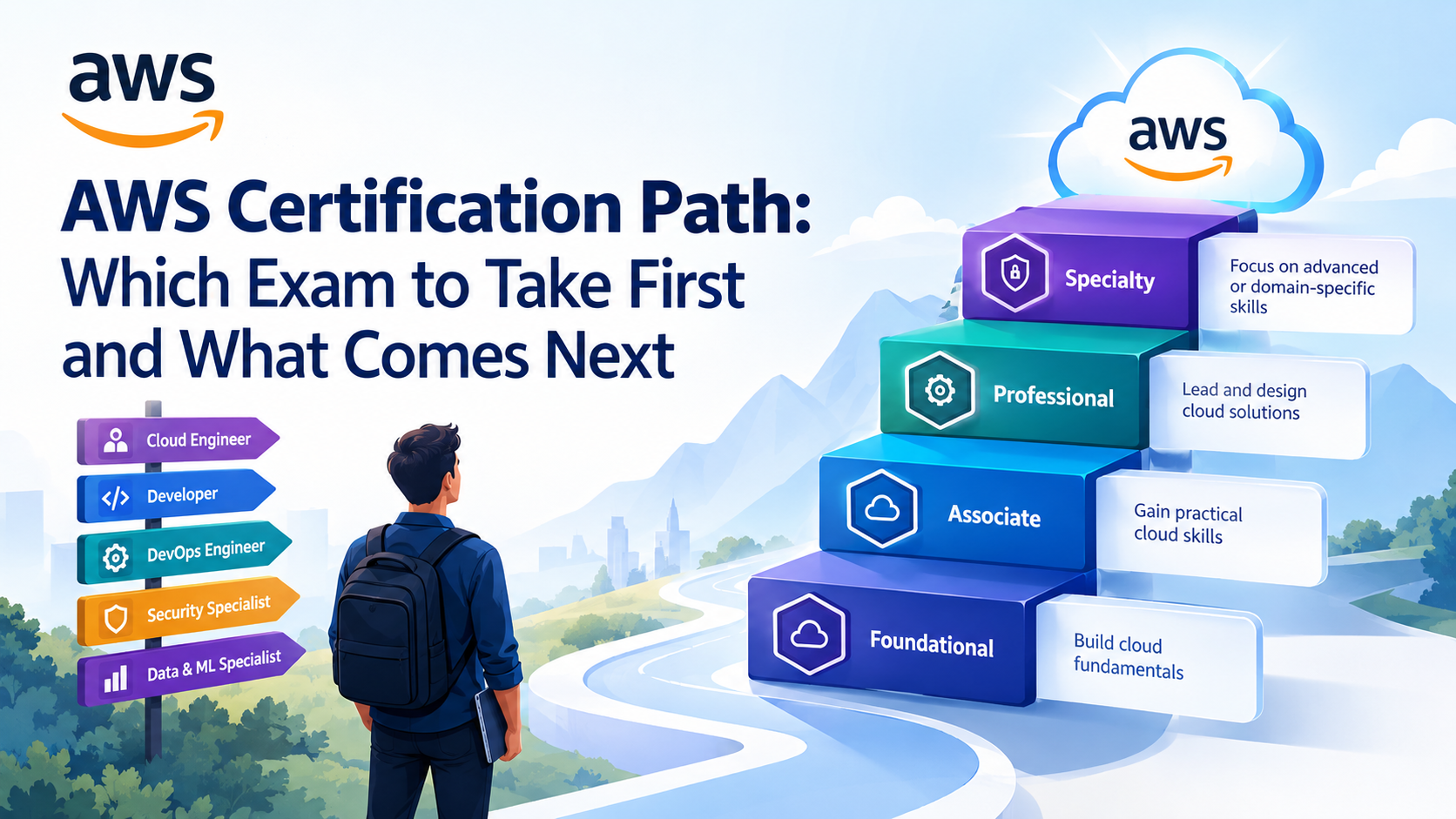
The ideal AWS certification path depends on your experience and career goals. Beginners can start with the AWS Certified Cloud Practitioner, while experienced professionals can directly pursue associate-level certifications. Cloud administrators can advance to the AWS Certified CloudOps Engineer Associate certification.
Developers can progress from the AWS Certified Developer Associate certification to the AWS Certified DevOps Engineer Professional certification. Those interested in cloud architecture can move from the AWS Certified Solutions Architect Associate certification to the AWS Certified Solutions Architect Professional certification.
Likewise, security, data, and machine learning professionals can pursue relevant specialized certifications. This guide covers certification levels, role-based pathways, exam order, study plans, costs, renewal requirements, and career opportunities to help you choose the right AWS certification.
Key Highlights of AWS Certification Path
- AWS certifications are divided into four levels: foundational, associate, professional, and specialty, as well as a collection of business certifications.
- No prescribed order of examinations. Cloud Practitioner is not a prerequisite for an associate, professional, or specialty certification.
- Associate certifications help you develop technical skills for specific roles in architecture, development, operations, data, and machine learning.
- Professional certifications are aimed at more advanced technical duties. Specialty certifications demonstrate deeper knowledge of particular areas such as security and networking.
- Typically, the price of an AWS exam varies between $100 (for foundational exams) and $300 (professional and specialty exams), with applicable taxes and regional pricing.
- AWS certifications typically last for three years, subject to renewal rules for that certification.
- You should supplement your study materials with hands-on projects, practice exams, and official exam guides.
Introduction
An AWS certification can help you to prove your knowledge of the cloud, prepare for technical interviews, and have a structured way to learn. But passing an exam does not prove you can design, deploy, secure, and maintain a production environment. Employers also want practical experience, problem-solving skills, and an understanding of how cloud services fit together.
That is why planning your AWS certification path is important. A cloud administrator needs to know how to operate, a solutions architect needs to understand system design and trade-offs, and a developer needs to know how applications interact with AWS services.
And the starting point for you should be what you know now. If you are comfortable with networking, Linux, databases, programming, or managing infrastructure, a technical certification may be right for you. If you are new to these topics, start with cloud fundamentals and build your skills gradually.
For a broader introduction to the platform, read What is AWS?. You can then use the certification roadmap in this article to identify the exams and practical projects that best match your goals.
How AWS Certifications Are Structured
AWS certification levels indicate the depth and scope of knowledge an exam is designed to validate. Foundational certifications cover broad concepts, associate certifications focus on technical job responsibilities, professional certifications assess advanced capabilities, and specialty certifications target specific technical domains.
AWS also offers business-focused certifications for professionals who evaluate cloud and AI opportunities, guide adoption, and connect technology decisions with business outcomes.
Foundational Level
Foundational certifications are intended for people who want to understand AWS concepts without necessarily implementing cloud solutions themselves.
Relevant options include:
- AWS Certified Cloud Practitioner: Covers core cloud concepts, AWS services, security fundamentals, pricing, and the shared responsibility model.
- AWS Certified AI Practitioner: Covers foundational AI, machine learning, generative AI, and related AWS use cases.
These certifications can suit students, career switchers, business analysts, project managers, sales professionals, and technical beginners. For example, a project manager overseeing an application migration may need to understand cloud costs, availability, security responsibilities, and service options without personally configuring infrastructure.
Beginners can explore AWS Cloud Practitioner certification training to build a foundation before moving to more technical exams
Associate Level
Associate certifications validate practical knowledge associated with specific technical responsibilities. They are often the most useful starting point for people who already have some IT experience or want to develop a technical AWS specialization.
The main options include:
- AWS Certified Solutions Architect – Associate
- AWS Certified Developer – Associate
- AWS Certified CloudOps Engineer – Associate
- AWS Certified Data Engineer – Associate
- AWS Certified Machine Learning Engineer – Associate
The certifications each focus on different skills. Solutions architects focus on building reliable, secure, and cost-effective systems. Application development, deployment, and troubleshooting. Developers work with the cloud operations world, where we are all about infrastructure, monitoring, and operational reliability.
Machine-learning engineers work on the implementation and operationalization of machine learning workloads. Data engineers work on data pipelines and data stores.
Developer – Associate could be a natural starting point for a software developer who understands programming and APIs. CloudOps Engineer – Associate might be more applicable for an IT administrator who has experience with servers, monitoring, and networking.
If you want to learn more about architecture, the AWS Solutions Architect Associate certification guide is a good next step.
Professional Level
Professional certifications assess advanced technical knowledge and the ability to handle complex cloud environments.
The principal technical options include:
- AWS Certified Solutions Architect – Professional: Focuses on complex architecture, migration, multi-account environments, resilience, security, and cost optimization.
- AWS Certified DevOps Engineer – Professional: Focuses on continuous delivery, automation, monitoring, infrastructure as code, reliability, and operational practices.
- AWS Certified Generative AI Developer – Professional: Focuses on developing and deploying generative AI applications using AWS technologies.
These exams are generally better suited to people with substantial hands-on exposure than to absolute beginners.
For example, a cloud engineer who has deployed applications across multiple AWS accounts and worked with identity policies, load balancing, monitoring, and disaster recovery may be ready to prepare for a professional certification.
Candidates pursuing an architecture career can explore AWS Solutions Architect Professional training. Developers interested in automation and delivery pipelines can consider AWS DevOps Engineer certification training.
Specialty Level
The specialty certifications are more about deeper knowledge in a specific technical area than a general increase through all the certification levels.
AWS Certified Security – Specialty is important for anyone working with cloud security, identity and access management, data protection, logging, incident response, and security controls.
The AWS Certified Advanced Networking – Specialty certification is aimed at those professionals who design and manage complex cloud and hybrid network environments.
For example, after gaining hands-on experience with AWS, a security engineer who works with access policies, encryption, centralized logging, and incident investigation may find value in Security – Specialty.
Candidates should consult the latest AWS exam catalog when selecting a specialty exam as the certification landscape continues to evolve.
In particular, AWS Certified Machine Learning – Specialty retired on March 31, 2026. Professionals planning a machine learning pathway should investigate AWS Certified Machine Learning Engineer – Associate and other currently available AI certifications instead.
Do You Have to Take AWS Exams in Order?
No. AWS does not require candidates to earn certifications in a fixed sequence before taking a higher-level or specialty exam.
You can pursue Solutions Architect – Associate without Cloud Practitioner, for example, or work toward a professional certification if your experience supports the exam objectives.
However, a recommended sequence can still make preparation easier. Foundational knowledge helps beginners understand cloud terminology, while associate-level learning provides a stronger base for more complex technical scenarios.
A sensible approach is to treat certification levels as a learning framework rather than a compulsory ladder. Skip an exam when you already understand its subject matter, but do not skip the underlying knowledge.
AWS Certification Path by Level
The following table summarizes the main certification levels, their intended audiences, and the type of experience that can help candidates prepare.
| Level | Exams to verify on AWS | Best for | Experience expected |
| Foundational | Cloud Practitioner; AI Practitioner | Beginners, business professionals, career switchers | No prior AWS experience required; basic IT knowledge helps. |
| Associate | Solutions Architect, Developer, CloudOps Engineer, Data Engineer, Machine Learning Engineer | Technical professionals building role-specific cloud skills | Prior IT or relevant technical experience is recommended |
| Professional | Solutions Architect Professional, DevOps Engineer Professional, Generative AI Developer | Experienced cloud architects, DevOps engineers, AI application developers | Substantial practical experience is beneficial. |
| Specialty | Security, Advanced Networking | Security and networking specialists | Strong domain knowledge and hands-on AWS experience are beneficial. |
Always confirm the current exam name, availability, and exam guide on the official AWS Certification Exam Guides page.
Foundational certifications are useful for establishing shared terminology. Associate certifications help show technical capability, and professional and specialty certifications can support more advanced career goals. None of these credentials guarantees a job or a promotion, but their value depends on how well they match your experience with the employer’s needs.
AWS Certification Path by Job Role
Choosing a certification by job role is often more effective than pursuing exams simply from easiest to hardest. Use the following pathways as starting points and adjust them to your existing skills.
Cloud Engineer and Cloud Administrator Path
A cloud engineer or administrator needs to deploy, manage, monitor, and troubleshoot cloud resources. Networking, identity management, compute, storage, backup, logging, and cost control are important areas of knowledge.
A practical path is
Cloud Practitioner (optional) → CloudOps Engineer – Associate → DevOps Engineer – Professional, where relevant.
The CloudOps Engineer – Associate certification is the current operationally focused option to investigate. Candidates familiar with older AWS SysOps Administrator material should verify the current exam guide rather than assume the older exam title remains the applicable route.
For example, an administrator could build a project that launches an application on EC2, configures monitoring, creates alarms, applies least-privilege IAM policies, and documents a recovery procedure.
The AWS SysOps Administrator course may be useful as a learning resource for operational concepts, but verify that its curriculum aligns with the current CloudOps exam objectives before enrolling.
Solutions Architect Path
Solutions architects design cloud environments that meet business requirements for security, availability, performance, and cost.
A common path is:
Cloud Practitioner (optional) → Solutions Architect – Associate → Solutions Architect – Professional.
Begin with associate certification to learn how to choose services, network, store data, databases, access control, and resilient architecture. Be professional when you can reason about complex systems and trade-offs across multiple services.
Example: Create a three-tier application with a load balancer, application servers, a managed database, private subnets, monitoring, backups, and a documented disaster recovery plan.
Developer Path
Developers who want to build applications on AWS can follow this route:
Cloud Practitioner (optional) → Developer – Associate → DevOps Engineer – Professional or Generative AI Developer – Professional, depending on career goals.
Concentrate on application integration, APIs, serverless computing, deployment, debugging, permissions, and monitoring. Build a project using AWS Lambda, API Gateway, and a managed database, and add authentication and auto-deployment.
The next certification should depend on whether you want to specialize in delivery automation and reliability or application development with generative AI.If you prefer a structured learning path, you can also check out a structured cloud computing with AWS course
DevOps Engineer Path
DevOps engineers connect software development with infrastructure automation, release management, monitoring, and operational reliability.
A suitable route is:
Developer – Associate and/or CloudOps Engineer – Associate → DevOps Engineer – Professional.
The order of the associate exams depends on your background. Developers may start with Developer – Associate, while operations professionals may prefer CloudOps Engineer – Associate.
Practice with infrastructure as code, automated testing, CI/CD pipelines, logging, deployment strategies, and incident response. You can also compare your roadmap with these best DevOps certifications.
Data and Machine Learning Path
Data professionals should choose between data engineering and machine learning based on their daily responsibilities.
A data engineer can consider:
Cloud Practitioner (optional) → Data Engineer – Associate → advanced data architecture and analytics learning.
A machine learning engineer can consider:
AI Practitioner (optional) → Machine Learning Engineer – Associate → deeper ML, MLOps, or generative AI specialization.
The AWS Certified Machine Learning Engineer – Associate credential is particularly relevant to implementing, deploying, and maintaining machine learning workloads. Check the latest exam guide and version details before booking, because the exam is being updated.
For practical experience, build a data pipeline that ingests records, transforms them, stores the results, and produces a report. Machine learning candidates can extend this by training a model, deploying an endpoint, monitoring its performance, and documenting operational risks.
Security Path
Cloud security professionals need to understand identity, permissions, encryption, network controls, logging, compliance, and incident response.
A practical route is
Cloud Practitioner (optional) → a relevant associate certification or equivalent hands-on experience → Security – Speciality.
Solutions Architect – Associate can provide useful broad cloud knowledge, while CloudOps Engineer – Associate can help operations-focused professionals understand the infrastructure they need to secure.
Build a portfolio project that uses least-privilege IAM, encryption, centralized audit logs, security alerts, and a documented incident response workflow. Security credentials are most valuable when supported by the ability to explain why particular controls are appropriate.
Which AWS Certification Should You Take First?
The best first exam depends on your background, current skills, and intended role.
| Your background | Suggested first exam | Why | Likely next step |
| Non-technical or career switcher | Cloud Practitioner | Establishes cloud, service, security, and pricing fundamentals | Solutions Architect – Associate or another role-aligned associate exam |
| IT support or systems administrator | CloudOps Engineer – Associate; Cloud Practitioner if needed | Builds on operational and infrastructure knowledge | DevOps Engineer – Professional or architecture-focused study |
| Software developer | Developer – Associate | Focuses on building, deploying, and debugging AWS applications | DevOps Engineer – Professional or Generative AI Developer – Professional |
| Data or analytics professional | Data Engineer – Associate or Machine Learning Engineer – Associate | Aligns with data pipelines or production ML responsibilities | Deeper data, ML, or AI specialization |
What if you are completely new to cloud computing?
Start with Cloud Practitioner if you need an introduction to regions, availability zones, core services, cloud economics, and shared responsibility. You can also take a beginner-friendly course and create a small project before deciding whether to sit the exam.
What if you already work in IT?
You may be able to skip Cloud Practitioner and move directly to an associate certification. Review the official exam guide and try representative practice questions. If the technical concepts are familiar, focus on the gaps rather than studying every introductory topic again.
What if you are unsure which AWS certification is best?
Compare job descriptions for roles you would realistically apply for. If they emphasize system design and resilience, consider Solutions Architect. If they emphasize application deployment, look at Developer. If they emphasize monitoring and infrastructure management, consider CloudOps. The best certification is the one that helps close a specific skills gap.
Sample Study Plans for 3, 6, and 12 Months
Your preparation timeline depends on your existing knowledge, weekly study hours, and the difficulty of your target exam. The following plans are illustrative rather than guaranteed pass timelines. A candidate with practical AWS experience may progress faster than someone learning networking, Linux, and cloud concepts for the first time.
Aim for consistent practice instead of relying on the number of hours alone.
A 3-Month Plan for One Associate Exam
A three-month plan can work for candidates who already understand basic IT concepts and can dedicate approximately 8–12 hours per week to preparation.
| Period | Focus | Practical activity |
| Weeks 1–2 | Review the exam guide and identify knowledge gaps | Create a topic checklist |
| Weeks 3–5 | Study core AWS services and architecture concepts | Deploy a small application |
| Weeks 6–8 | Cover remaining domains and security concepts | Configure IAM, networking, and monitoring |
| Weeks 9–10 | Solve practice questions and review weak areas | Repeat missed questions and explain the answers |
| Weeks 11–12 | Take timed practice exams and revise | Complete a final project review and sit the exam when ready |
For Solutions Architect – Associate, concentrate on networking, compute, storage, databases, resilience, security, and cost optimization. For Developer – Associate, prioritize application integration, deployment, debugging, and permissions.
A 6-Month Plan From Foundational to Associate
Six months gives beginners more time to learn cloud concepts before tackling a technical certification.
- Month 1: Learn cloud computing fundamentals, the AWS global infrastructure, pricing, and shared responsibility.
- Month 2: Study for Cloud Practitioner and take practice exams.
- Month 3: Sit the foundational exam if ready, or spend additional time strengthening weak areas.
- Months 4–5: Prepare for a role-specific associate certification and build practical projects.
- Month 6: Complete timed practice tests, revise difficult topics, and schedule the associate exam when your results are consistent.
This plan is particularly suitable for career switchers who need both conceptual knowledge and practical exposure. It is not necessary to pass Cloud Practitioner before beginning associate-level preparation.
A 12-Month Plan to Reach Professional or Specialty Level
A 12-month plan is more appropriate for candidates who want to build deeper skills across multiple areas. It can also suit working professionals who study part-time.
| Months | Learning objective |
| 1–2 | Establish cloud fundamentals and networking knowledge |
| 3–5 | Prepare for an associate certification and complete a practical project |
| 6–8 | Gain hands-on experience with deployment, monitoring, security, or architecture |
| 9–10 | Study the advanced concepts relevant to the intended professional or specialty exam |
| 11–12 | Complete advanced labs, review the exam guide, and take the exam when prepared |
For example, an aspiring DevOps engineer could start with Developer – Associate, build a CI/CD pipeline, learn infrastructure as code, and then prepare for DevOps Engineer – Professional.
Do not treat the calendar as a deadline. Professional and specialty exams require the ability to reason through complex scenarios, so extend the plan if your practical experience or mock-exam results indicate that you need more time.
AWS Certification Cost, Validity and Renewal
The total cost of an AWS certification includes more than the exam fee. Training, practice tests, books, cloud resources, and a possible retake can increase the budget.
AWS certification exam fees
AWS publishes exam pricing by certification category. The standard US dollar fees listed in its exam policies are
| Exam category | Standard fee (USD) |
| Foundational | $100 |
| Associate | $150 |
| Professional | $300 |
| Specialty | $300 |
Business-category exams are also generally priced at $100. Regional prices, applicable taxes, beta pricing, and payment arrangements can differ. Check the official AWS exam pricing and testing policies before registering.
For candidates in India, AWS's published pricing page lists Indian-rupee voucher prices of ₹8,553 for foundational exams, ₹12,829.50 for associate exams, and ₹25,659 for professional and specialty exams. The page notes that INR is accepted through the Pearson Mindhub voucher store for exam voucher purchases. Confirm the current price and applicable taxes at checkout.
A practical budget should also account for preparation expenses. For example, someone pursuing Cloud Practitioner and Solutions Architect – Associate would pay $250 in standard US-dollar exam fees before taxes, training, and other costs.
AWS certification accounts may provide a 50% discount voucher after a qualifying certification achievement. Check the terms in your account before assuming the discount applies to a particular purchase.
How long is an AWS certification valid?
AWS certifications generally remain valid for three years. You must renew or maintain an active certification according to the options AWS provides for that credential.
Depending on the certification, renewal may involve passing the latest version of the relevant exam or using an approved maintenance option. AWS also offers a Cloud Quest-based recertification option for Cloud Practitioner and maintenance pathways for certain credentials through AWS Skill Builder.
Review the AWS recertification rules for your specific certification. Renewal options are not identical across every exam.
How can you manage certification costs?
- Choose one certification that aligns with your immediate career goal.
- Use official exam guides and free documentation before purchasing multiple courses.
- Set a cloud lab budget and clean up resources when you finish testing.
- Take practice exams to identify gaps before paying for the real exam.
- Check employer reimbursement policies and available exam vouchers.
A targeted plan is usually more economical than paying for several certifications that do not contribute directly to your intended role.
How to Prepare: Labs, Practice Exams, and Documentation
A reliable preparation strategy combines structured study, hands-on work, and repeated assessment. Memorizing service definitions alone is unlikely to prepare you for scenario-based questions that ask you to choose the most appropriate solution under technical or business constraints.
1. Start with the official exam guide
Download the current exam guide from AWS and review its domains, objectives, and recommended knowledge areas. Use it to create a checklist and track your progress.
Exam guides are particularly important when certification names, exam codes, or service coverage change. A course built around an older exam version may not cover every current objective.
2. Build practical labs
Build small projects that simulate common cloud tasks. For example:
- Deploy a web application with compute, storage, and networking services.
- Configure IAM roles and policies using least privilege principles.
- Configure monitoring and alarms to identify application failures.
- Establish a backup and recovery process.
- Create an automated pipeline to automate application deployments.
- Store and process sample data using the appropriate AWS services.
The exercises help you learn not only how a service works but also when to use it.
If you are a learner with an interest in operations, Start with an AWS practice test to set a baseline, and use the results to guide your revision.
3. Use practice exams to identify weaknesses
Start with an AWS practice test to set a baseline, and use the results to guide your revision. Keep a record of wrong answers for each domain and explain why the right one is better than others.
If you continually select an overly complex database architecture, for instance, revisit managed database alternatives, availability requirements, and cost trade-offs.
"Don't rely on one mock-exam mark as a predictor of success. Take some representative tests. Review your errors. Make sure you know why you are wrong.
4. Read AWS documentation
Official documentation is helpful to understand service limitations, configuration decisions, security recommendations, and current capabilities. Don’t waste your time trying to memorize all the AWS services. Just focus on the topics covered in your exam guide.
If you prefer a structured learning path, you can also check out a structured cloud computing with AWS course with guided instructions and a planned learning sequence.
5. Learn to manage costs and security
Cloud skills are about making smart security and cost decisions. Set budgets or alerts where appropriate. Know permissions before deploying resources and remove unnecessary services after the lab.
These practices help strengthen the concepts useful for real projects and also certification exams.
Jobs Each Certification Level Prepares You For
AWS certifications can help your career, but there is no certification that can guarantee you a job. Experience, technical ability, communication, project work, and what the employer is looking for all influence the outcome of a job.
| Certification level | Potential roles | Skills to demonstrate |
| Foundational | Cloud support trainee, junior cloud learner, cloud-aware business analyst | Cloud concepts, service awareness, pricing, shared responsibility |
| Associate | Cloud engineer, junior solutions architect, AWS developer, cloud operations engineer, data engineer, ML engineer | Deployment, architecture, troubleshooting, monitoring, and application or data workflows |
| Professional | Senior cloud engineer, solutions architect, DevOps engineer, cloud platform engineer | Complex design, automation, resilience, migration, operational optimization |
| Specialty | Cloud security engineer, security consultant, advanced networking specialist | Domain-specific design, controls, troubleshooting, risk management |
Basic credentials can help demonstrate you’re aware, particularly for non-technical or entry-level jobs. Associate certifications can assist candidates in establishing a technical specialization, while professional and specialty credentials are most applicable when supported with prior experience.
For example, an associate-certified candidate who has built and documented a working cloud application may have a stronger interview story than someone who has earned several credentials but cannot explain how they would deploy a secure workload.
The best strategy is to pair each certification with a project that demonstrates the skills it covers.
Common Mistakes When Planning an AWS Certification Path
Even a well-motivated learner can waste time and money by choosing exams without considering their career goals. Avoid these common mistakes when building your AWS certification roadmap.
- Taking every exam in sequence: You do not need to earn every foundational and associate credential before pursuing a relevant advanced certification. Choose exams based on your experience and goals.
- Choosing a certification only because it is popular: A widely recognized certification may not match your intended role. Review job descriptions before committing.
- Ignoring practical experience: Passing an exam is not the same as knowing how to troubleshoot a production workload. Build projects alongside your studies.
- Using outdated preparation material: AWS exam codes, certification names, and exam objectives can change. Verify the current syllabus before purchasing a course.
- Underestimating the total cost: Account for training, exam fees, potential retakes, and cloud resource usage.
- Rushing into professional-level exams: Advanced credentials require more than memorized facts. Make sure you understand architecture trade-offs, automation, reliability, or the relevant specialty domain.
The most effective AWS certification path is focused, practical, and flexible enough to change as your career develops.
Building a Portfolio Alongside Your Certifications
A portfolio helps prove that you can do what you learn. This can be particularly useful when applying for entry-level cloud jobs or transitioning to cloud from another technical discipline.
Select a project that is relevant to the certification you are working toward. Document the problem, architecture, implementation, security controls, and lessons learned.
For instance, a Solutions Architect candidate might create a small web application with a load balancer, private networking, a managed database, monitoring, and a backup plan. A DevOps candidate could use a CI/CD pipeline and infrastructure as code to automate the deployment. A security candidate could show least-privilege access, centralized logging, encryption, and alerting.
Put relevant project documentation in a Git repo, such as architecture diagrams, setup instructions, cost considerations, and troubleshooting notes. Do not publish credentials, access keys, confidential information, or sensitive configuration details.
A small, well-documented project is usually more useful than several projects that are unfinished. This gives interviewers something concrete to talk about, and it allows you to spot gaps that practice questions alone might not reveal.
Conclusion
Where you start and where you want to go determines the right AWS certification path for you. Cloud Practitioner is a good place to start if you are a beginner, while seasoned IT professionals are able to jump right into an associate-level exam. From here on, the tracks' architecture, development, operations, data, machine learning, and security offer different opportunities to specialize.
Before you register for an exam, explore the current AWS certification catalog, determine the skills needed for your target role, and develop a realistic preparation plan. Use official documentation, practice tests, and hands-on labs to gain knowledge that can be applied beyond the exam.
Most importantly, think of certifications as a milestone and not the end of the road. A thoughtful blend of relevant credentials, practical projects, and lifelong learning offers a better foundation for long-term growth in the cloud career.








 Lowest-Price Challenge











 Personalized Path


.webp)


 USA
USA  Canada
  India
India  UK
UK  Australia
  Singapore


