


 Call Us



Pair Programming_How Two Devlopers Write Better Code Together.png
Pair Programming: How Two Developers Write Better Code Together
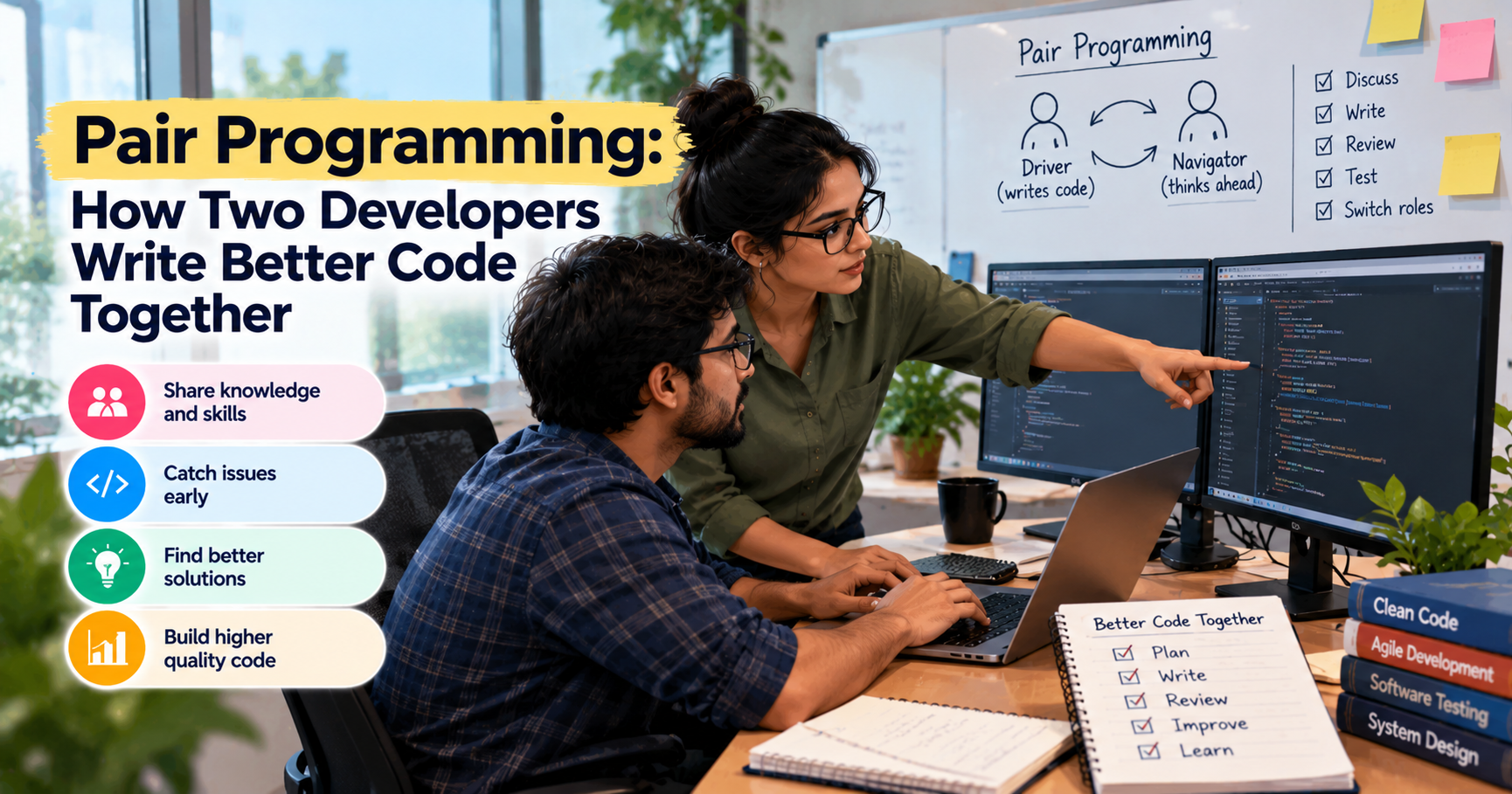
Pair programming means two developers working on the same coding task. One person writes the code, the other person checks the work, asks questions, and thinks about what to do next. In the session, they take turns.
At first, this may seem like an odd way to work. Why should two people spend time on something one developer could finish alone? The answer depends on the task. If a problem is tricky or the code is hard to read, the second person can see things that the first person doesn't. They can also communicate their decisions rather than waiting for the problem to appear in testing or review.
Pair programming works well for squashing gnarly bugs, crafting features that require a lot of thought, and getting developers up to speed on an existing project. It does not have to be part of every task. The aim is to bring two people together when doing so is likely to make the work better.
Key Highlights of Pair Programming
- Pair programming brings two developers together to work on the same task.
- The driver writes the code, and the navigator thinks about the next step.
- The “itching roles” allow both devs to get a chance to write code and review code.
- Pairing can help you find errors, share knowledge, and make it easier for new team members to begin their careers.
- Ping-pong, strong-style, and expert-novice pairing offer different ways to work together.
- Remote pair programming is possible with shared editors, screen sharing, and regular conversation.
- Pairing is not needed for every task. It works best when both developers have something useful to contribute.
Introduction
A bug can look obvious to the person who finds it. The developer opens the code, makes a change, runs a test, and thinks the problem is fixed. Then the same error appears again.
Or a developer may spend half a day trying to understand a section of code that a teammate could explain in ten minutes.
These situations are common in software development. They do not always mean someone lacks skill. Sometimes a problem is hard to see when you have been working on it for hours. Sometimes the code has a history that is not written down anywhere.
Having another developer beside you can make a difference. They may notice a missed condition, ask a question that changes the direction of the work, or remember a similar issue from another part of the project.
This is where pair programming comes in.
Two developers work on the same task together instead of working separately and reviewing the code later. They discuss the problem, try things, test things, and decide as they go.
It doesn't mean one person types code and the other one just sits there and watches. Both developers should be involved. One handles the keyboard, but the other needs to follow the code, question decisions, and help plan the next move.
Pair programming in agile teams can be especially useful for hard features, recurring bugs, or when someone needs to work on an unknown part of the application. It can also allow the team to share knowledge that might have otherwise remained solely with one developer.
Of course, two people working together does not automatically mean better results. If one person controls the whole session or the pair has no clear goal, the work can drag on. The practice is useful when both people contribute and have a reason to be there.
What Is Pair Programming?
Pair programming is a software development methodology in which two developers work together on one piece of code. They share the job of solving the problem, checking the solution, and making sure that the code does what it is supposed to do.
Most pair programming sessions use two roles: the driver and the navigator.
The driver writes the code. The navigator tracks the work, verifies the logic, and thinks about potential problems or the next step. They change roles during the session, so both get hands-on experience.
Take a simple example. A team is building a form that enables users to change account information. The form should have correct information and show an error when a required field is empty and an unsuccessful request.
The driver might begin by writing the code that saves the changes. While following the work, the navigator may ask what happens if the user leaves a field blank or the server does not respond. They can test those cases together rather than leaving them until the end.
One developer could certainly handle this task alone. Pair programming is not based on the idea that people cannot write good code by themselves. It gives two people a chance to think through the problem at the same time.
They may disagree about how to handle a particular case. That is not necessarily a bad thing. Just a little talk can help them sort out the options and come to a sensible decision.
This practice fits naturally within Agile frameworks such as Scrum and Extreme Programming, where teams work in small iterations.
The pair should agree before they start what they are trying to finish. Maybe it's fixing a bug, writing a test, or even getting a small feature to work. Having a clear goal keeps them focused and makes it easier to know when the session has been useful.
Driver and Navigator Roles
The two roles have different responsibilities, but both developers are responsible for the outcome. The driver is not the boss, and the navigator is not just there to point out mistakes.
The Driver
The driver is the one who uses the keyboard. They write the code, they make changes, they run tests, they try to get the task to work.
They’re supposed to concentrate on the step in front of them. They don't have to solve every imaginable problem all at once, but they should listen when the navigator raises an issue.
Let's say the driver is writing a function to check a user's login details. They may start with the primary requirement that enables a user to log in. Then the navigator might ask: What if the password field is empty? What if the server returns an error?
The driver can stop, talk about the question, and decide what to change.
It helps when the driver explains their thinking now and then. They do not need to describe every line of code, but a little explanation can help the navigator follow the decisions being made.
Problems can arise when the driver becomes too attached to their own approach. If they dismiss every suggestion or refuse to hand over the keyboard, the session becomes little more than one person working with an audience.
The driver should be ready to listen, ask questions, and switch roles when it is time.
The Navigator
The navigator keeps an eye on the code while thinking about the bigger picture. They verify that the solution meets the requirement, look for missing cases and help to decide what to try next.
They might ask:
- What happens if the user leaves this field empty?
- Will this change impact another part of the application?
- Is there a simpler way to write this?
- Have we checked what happens when the request fails?
- Will someone else understand this code when they need to change it?
The navigator should raise useful concerns while the code is being written, not save every comment for the end. It is often easier to fix a problem before more code depends on it.
How they communicate matters, though. Constantly correcting the driver can make the session stressful. A question such as, "Should we check what happens when this value is missing?" gives the driver a chance to think. Saying, "You're doing it wrong," is less helpful.
The navigator also needs to stay involved. If they start checking emails or stop following the code, the driver loses the benefit of having another person there.
Both developers should feel comfortable sharing an idea, changing their minds, and admitting when they do not know something. That kind of psychological safety makes it easier to solve the actual problem instead of spending the session trying to prove who is right.
Benefits of Pair Programming
Pair programming takes time from two people, so teams should have a clear reason for using it. The benefits are most noticeable when the work involves uncertainty, a risk of mistakes, or knowledge that another developer can share.
Better Code Quality
It is easy to miss a small detail when you are focused on making something work. A second developer may notice it before the code goes any further.
Suppose a developer is writing a function that calculates a discount. The calculation works for a normal purchase, but what happens when the order total is zero? What if the discount is higher than the allowed limit?
The driver may be concentrating on the main calculation. The navigator can ask about these other cases and help test them.
Finding a problem at this stage can save time. If the team catches it while the code is being written, the fix may be small. If the issue reaches production, it could take longer to find and may affect users.
Pairing can also encourage developers to write code that is easier to read. If the navigator struggles to understand what a function is doing, the pair can stop and work out whether the logic needs to be simplified.
This does not mean two developers will catch every mistake. They may miss the same issue, and a rushed session can introduce new ones. Testing remains important, even when code is written together. See how Agile testing differs from traditional testing
Knowledge Sharing
Every developer has areas they know well and areas they have barely touched. In a busy team, that knowledge can end up sitting with one person for months.
Pair programming gives colleagues a chance to share what they know while working on a real task.
For example, one developer may have worked on a payment feature for a long time. They understand why certain checks exist and know which parts of the system depend on them. When another developer pairs with them on a change, they can explain these details as they come up.
The second developer gets more than a quick overview. They see how the feature works, how the code is tested, and what the team needs to be careful about.
The experienced developer may also benefit. Explaining an old decision can bring up questions about whether it is still needed. Sometimes, talking through a piece of code makes its weaknesses easier to see.
This is one reason pairing can help teams become less dependent on individual developers. If only one person understands a feature, even a small change can become a delay when that person is unavailable.
Pairing can also help with code refactoring techniques. Two developers can discuss which parts of the code are hard to maintain and decide what can be improved without changing how the feature works.
Faster Onboarding
Joining an existing software project can be confusing. A new developer may have to understand the codebase, find the right files, set up the tools, and figure out why certain decisions were made.
Documentation helps, but it cannot always explain everything.
Pair programming gives a new team member someone to ask while they work on a real task. Instead of spending hours trying to work out where to start, they can follow the code with a colleague and ask questions as they come up.
For example, a new developer might be asked to fix a small issue in an existing feature. A teammate who knows that part of the application can show them how the files fit together, where the tests are, and which areas need extra care.
The new developer still does the job. The teammate is there to help when something is unclear, not to take over the task.
This can make the first few weeks less frustrating and get the new person up to speed with the project quicker.
It is not necessary to pair all day, every day. A few focused sessions on important parts of the system may be more useful than hours spent together without a clear goal.
Pairing Styles
Teams do not have to follow one fixed method for every session. The right approach depends on the task, the developers’ experience, and how they like to work.
Ping-Pong Pairing
Ping-pong pairing is often used with test-driven development. The developers take turns writing a test and then writing the code needed to pass it.
One developer writes a test that fails because the required behavior has not been added yet. The other just writes enough code to make the test pass. Then they take turns for the next trial.
Say, for example, the team is writing a function that checks if a number is even.
The first developer writes a test for an even number. The second adds the code for passing that test. They swap, and the first developer writes a test for an odd number. The second one updates the code as needed.
Rather than trying to write the whole function and then checking whether it works, they keep going in small steps.
This way of working provides clear work for developers and keeps things moving. It can also help teams get comfortable with testing early rather than seeing tests as something to bolt on after the code is done.
Teams that want more background can read about test driven development.
Ping-pong pairing may feel slow at first, particularly for developers who prefer to write a lot of code before testing it. With practice, the small steps can make it easier to spot problems and understand why a change is needed.
Strong-Style Pairing
In strong-style pairing, the person at the keyboard follows the direction of the other developer. The aim is to make sure the person guiding the work contributes ideas without taking over the task.
For example, a senior developer may act as the navigator while a junior developer drives. The senior developer can suggest the next step, but the junior developer will write the code and learn through practice.
This works well when one person is comfortable with a problem, and the other is still getting used to it.
It takes patience. The navigator needs to explain their thinking, and the driver needs room to ask questions. If the navigator simply gives orders without explaining why, the session can become frustrating.
The point is not to make one developer obey the other. Both should understand the solution and be able to discuss it.
Pairing Expert-Novice
The expert-novice pairing is a developer who has some knowledge of a particular area and a person who is less familiar with it.
It can be helpful when a new team member is working on a new feature or when someone is learning a new tool.
“Imagine a junior developer needs to make a change to an API integration for the first time. A more experienced teammate can explain how the requests work, where the errors are handled and how to test the change. The junior developer can then write the code and try the tests with support nearby.
The session should involve more than watching someone experienced work. The less experienced developer needs time to try things, make decisions, and ask questions.
It is also worth changing pairs from time to time. One person does not need to become the permanent source of help for the whole team. Working with different colleagues gives developers a chance to see different ways of solving problems.
Pair Programming vs Mob Programming
Pair programming and mob programming both involve people working together on code. The main difference is the number of people involved.
In pair programming, two developers work on the same task. In mob programming, a larger group works together on one problem and shares ideas as a team.
| Factor | Pair Programming | Mob Programming |
| People involved | Two developers | A group of developers, usually three or more |
| Best for | Focused tasks, debugging, and sharing knowledge between two people | Difficult problems that need input from several people |
| Cost | Uses two people's time | Uses several people's time |
| Risk | One person may dominate the session | A few people may dominate, or discussion may take too long |
If a developer is stuck on a bug, asking one colleague to pair may be enough. If a change affects several parts of the system and the team is unsure about the design, a group session may be more useful.
The team should think about the time involved. Bringing five people together for a small change may not make sense. On the other hand, discussing a major technical decision as a group could prevent several developers from making different assumptions.
A team can also begin with a pair and bring in more people if the problem turns out to be bigger than expected.
Remote Pair Programming Tools and Habits
Pair programming can work even when developers are in different cities or working from home. Remote pair programming follows the same basic idea, but the team uses online tools to share the code and talk through the work.
The tools do not need to be complicated. A shared code editor, screen sharing, and a voice call may be enough. Some teams use a development environment that both people can access, while others work through a shared editor.
Before the session starts, make sure both developers can open the project and run the tests. It is frustrating to spend the first half of a pairing session fixing access issues.
A few habits can make remote sessions easier.
Agree on the task first. "Fix the bug" may not be clear enough. Decide what the bug looks like, what the pair needs to check, and what a successful result would be.
Keep the conversation going. When two people share a screen, silence can make it hard to know whether the other person is following. Explain important decisions, ask questions, and speak up when something is unclear.
Share control of the work. Both developers should get a chance to drive. If one person always controls the keyboard, the session can start to feel like a demonstration instead of a shared task.
Take breaks. Remote work can be tiring, especially when both people are focused on a small section of code for a long time. A short break can help them return with a clearer head.
End with a brief summary. Before you put the phone down, see what's changed, what tests have passed, and what remains to be done. If the work is not finished, leave a short note so the next session can pick up where this one ended.
Remote pairing may feel awkward at first. People have different ways of thinking, and some need more time to explain their ideas. The process usually becomes easier when both developers are patient and agree on how they want to work.Writing down a few team norms for pairing, such as when to switch and when to break, helps remote sessions run smoothly.
Pair Programming Examples in Agile Teams
Pair programming can be useful in several everyday situations. The examples below show where it may help and why a team might choose to use it.
When a bug will not go away
A developer has tried a few fixes, but the same error keeps returning. A teammate joins the session, and they work through the problem from the beginning. They reproduce the error, they look at recent changes, they look at the conditions under which it happens.
The second developer discovered that the problem only occurs when a specific value is missing. They add a test for that case and work on a fix together.
The benefit is not simply having another person look at the code. The two can question their assumptions and avoid repeating the same failed attempts.
When a feature has several conditions
A team is adding a feature that allows users to update their account details. The feature should be able to handle valid input, missing fields and failed requests.
One developer writes the core of the feature, the other checks how it behaves in these different situations. They test each case and fix problems as they pop up.
This may help the pair agree what the feature should do before getting on with other work.
When someone is new to the project
A new developer has been given a small task in a codebase they have never worked on. They pair with a teammate who knows the area.
The teammate shows where the relevant code is and how to run the tests. The new developer will make the change, ask questions, and get a better sense of how the application works.
It is a practical way to get started without expecting someone to understand the whole project on their own.
When old code needs attention
A team needs to change a feature, but the existing code is difficult to follow. Two developers look at it together and figure out what can be simplified.
They make a few changes, run the tests, and confirm the feature still works as expected. Working in small, tested steps is a core idea in how to become a Certified Scrum Developer.
These examples are not reasons to pair on every task. A small, familiar change may be quicker to handle alone. Pairing is useful when you think someone else’s input might help you solve the problem or save you from doing unnecessary work.
When Pair Programming Does Not Work
Pair programming is useful in the right situation, but it can become a waste of time when the session is not handled well.
One problem is starting without a clear goal. The developers may spend most of their time discussing different approaches without deciding what to try. Before starting, they should agree on the problem and what they want to achieve.
Another problem is when one person takes over. This is often when one developer is more experienced or confident. They can shut down ideas, grab the keyboard, or make every decision. The other person eventually stops contributing.
If that happens, the pair will have to change their working relationship. Changing roles, asking more questions and making space for both opinions can assist.
Long sessions can be tiring as well. Concentration drops, small disagreements become frustrating, and the work starts to feel slower. It is better to take a break or stop when the pair is no longer making useful progress.
Some tasks simply do not need two people. A single developer may be able to change a label, update a small value, or perform a familiar routine task more quickly by working alone.
There is also the risk of using pairing as a replacement for other development practices. It does not remove the need for testing, documentation, or code reviews where they are appropriate.
The goal is not to keep two people busy with the same work. It is to bring them together when doing so is likely to help.
How to Introduce Pairing Without Pushback
Not every developer will be excited about pair programming. Some people enjoy discussing their work as they go. Others need quiet time to concentrate and may worry that pairing will interrupt their routine.
Those concerns should not be ignored. Making everyone pair for the whole day is unlikely to work well.
Start with one task where working together has a clear purpose. A hard bug, a dangerous change, an unknown part of the codebase can work fine.
Make the first session brief. Agree on what needs to be done, pick who will drive first, and give both developers a chance to contribute. A quick retrospective at the end, covering what went well and what to change, turns each session into feedback.
Perhaps the pair caught an error early. Perhaps they spent too long discussing a task that was actually quite simple. Both outcomes offer useful feedback about when pairing is worth the time.
Managers should avoid measuring success by counting pairing hours. More hours do not automatically mean better code or a stronger team. It is more useful to look at the quality of the result, the problems the pair solved, and whether both developers gained something from the session.
Pairing can also be introduced gradually. A team might use it for difficult bugs or new features before deciding whether to make it part of other work. Developers can then see the value for themselves instead of feeling that a new process has been forced on them.
For developers who want to build their practical development skills, Certified Scrum Developer training may provide useful background on development practices used in Scrum teams. Those interested in Extreme Programming can also read about Extreme Programming certification, which covers an approach to software development associated with practices such as pair programming.
The important thing is to give pairing a fair try, listen to the people taking part, and use it where it helps. It should make the work easier to handle, not become another process that people follow just because they have been told to.
Conclusion
Pair programming gives two developers a chance to work through a coding problem together. One writes the code, the other checks the work and thinks about what comes next, and they switch roles as the session continues.
It can discover bugs, share knowledge, and help new developers learn a project. It can also be handy if a bug is difficult to follow or a feature has a lot of conditions you need to carefully think through.
But matching isn't the answer to all problems. Some things are easier alone; not every session will give you a better result. Most important is selecting the right task, making sure both people have input, and being honest as to whether the time was well spent.
Start with one task that could benefit from a second opinion. Keep the session focused, talk through the decisions, and see what changes. That will tell you more about whether pair programming suits your team than making it compulsory from day one.







 Lowest-Price Challenge











 Personalized Path


.webp)


 USA
USA  Canada
  India
India  UK
UK  Australia
  Singapore


