


 Call Us



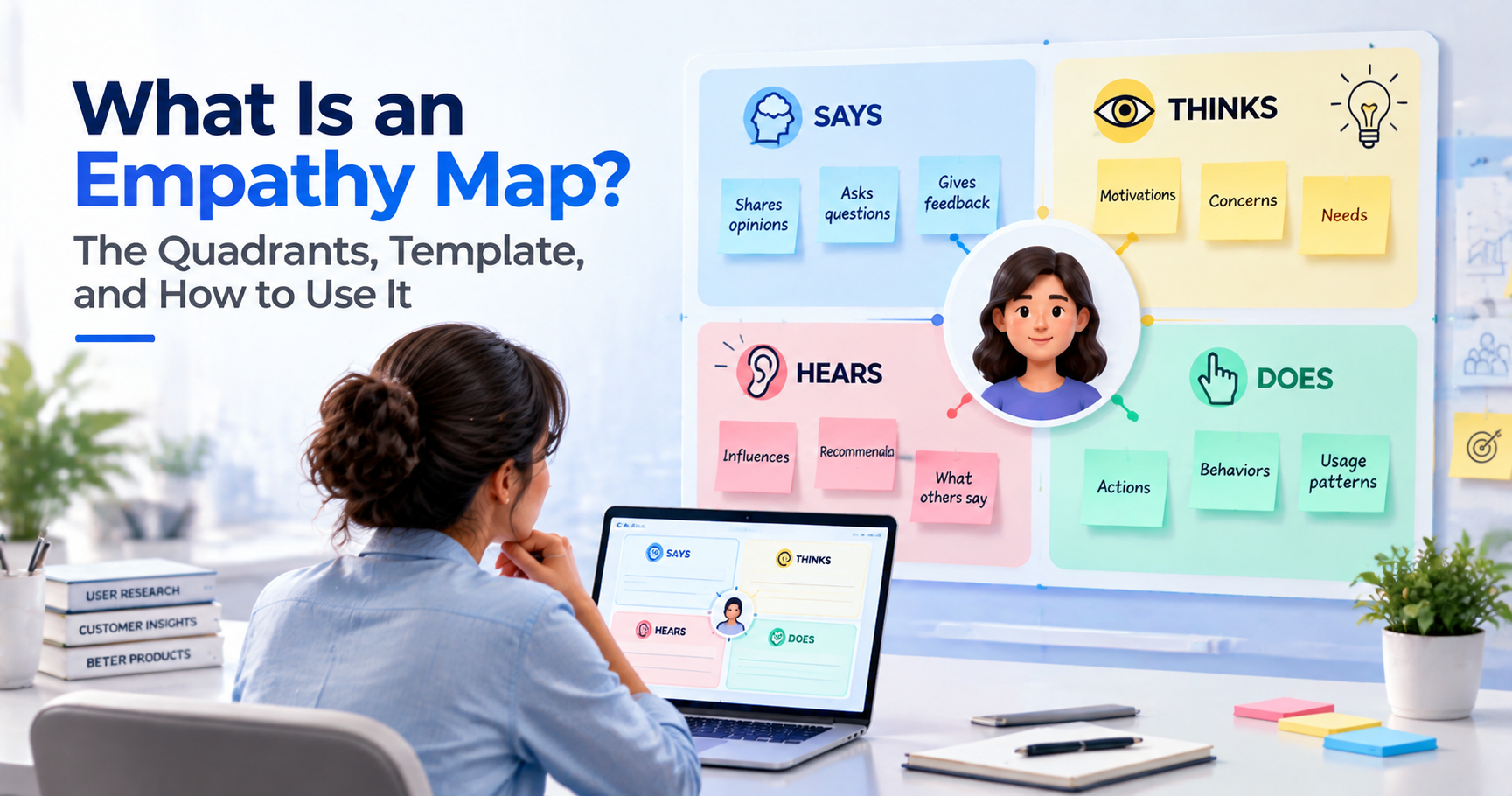
An empathy map is a straightforward visual tool used to understand a user experience from their perspective. Normally, it covers four areas: Says, Thinks, Does, and Feels.
Teams create an empathy map to consolidate user research. The team can collect interview notes, observations, and feedback for a single user or user group in one place rather than in separate documents.
Empathy maps are a useful tool in UX design, product discovery, design thinking, Agile product work, and customer research. It can also be combined with a user persona or customer journey map to better understand the people the product is being built for.
The idea itself is very simple. Before you even decide what to build, understand what your users are experiencing.
Key Highlights of the Empathy Map
- The empathy map reveals what users say, think, do, and feel.
- It makes user research visual and simple.
- The four main quadrants of the empathy map are Says, Thinks, Does & Feels.
- A longer version can have Sees, Hears, Pains, and Gains.
- An empathy map has to be based on real research, not just assumptions.
- Product discovery and design thinking teams can use an empathy map.
- An empathy map is a good companion to a user persona and a customer journey map.
- An empathy mapping workshop helps teams to build a common understanding of the user.
- An empathy map template helps to structure the exercise easily.
- The map can help product teams to surface user needs, problems, and opportunities.
Introduction
It's deceptively simple for product teams to say they know their users. The hard part is actually understanding what those users experience.
A team may know the age, job, location, or general needs of the user. Maybe it even has survey results and feedback from customers. But these details do not always reveal what happens when a person is trying to solve a real problem.
For example, consider a person using the mobile banking service. They might say they want a quicker method to move money. But they will check the amount a couple of times before confirming the transfer, as you might see in an interview. They may also be afraid of doing something wrong.
This difference is important. The user says they want speed, but their actions show that they need confidence and clarity too. That’s where an empathy map comes in.
Empathy mapping is a straightforward way for teams to piece these different elements together. It helps them to see the user as a person and not just as a group of numbers or a name on a customer list.
It also comes in handy during product discovery, when teams are trying to understand a problem before they settle on a solution.
What Is an Empathy Map?
An empathy map is a visual tool that helps a team organize what they know about a particular user. The most common version divides it into four parts: Says, Thinks, Does, and Feels. Other versions have sections such as Sees, Hears, Pains, and Gains.
An empathy map is a page that answers one simple question:
What does it feel like to be this user in this situation?
The aim is not to give a perfect description of a person. Instead, the aim is to collect useful information and make patterns easier to see.
For example, a group developing an online learning platform might find:
- Says: “I do not have much time for long lessons.”
- Thinks: "I might start this course and not complete it.”
- Does: Watches short videos in between breaks.
- Feels: Guilty about not having accomplished enough.
These four points tell the team more than a simple statement like "the user wants flexible learning.”
Empathy Map Definition
An empathy map is a visual tool that helps a team organize observations, statements, thoughts, actions, and feelings about a particular user.
It is usually based on research such as interviews, observations, support conversations, surveys, or other forms of qualitative research. Then the map helps the team make sense of that information and talk about it.
One thing to keep in mind is that an empathy map is not a substitute for user research.
If you fill it with things your team just assumes about customers, you might end up with a map of your team’s beliefs rather than a map of the user’s experience.
Where It Comes From: Design Thinking and Dave Gray
At XPLANE, the Empathy Map was developed as part of a human-centered design toolkit. Dave Gray, founder of XPLANE, then refined the idea, and the book Gamestorming from 2010 helped the tool gain wide acclaim.
Gray also released an updated Empathy Map Canvas in 2017. That version had a goals section and sorted areas like See, Hear, Say, and Do, as well as Think and Feel, Pains, and Gains.
That’s why you will find slightly different versions of an empathy map online. Others use four quadrants. Some use a bigger canvas that is divided into six or seven sections. Both can be useful, as long as the team knows what information they are trying to capture.
Why Empathy Mapping Matters?
Empathy mapping is important because often different team members have different ideas of the same user.
Maybe the designer thinks the user wants simplicity. A product manager may think that the user needs more features. A dev might see a technical issue. Customer support might be receiving complaints about other things.
An empathy mapping session provides a place for everyone to bring their research together.
It can help teams:
- Identify common user needs.
- Identify gaps in the research.
- Differentiate observations from assumptions.
- Understand the emotions that drive users to act.
- Pinpoint pain points.
- Identify possible product opportunities.
- Create a shared view for the user.
It can also assist in product discovery, as it gives the team a better understanding of the problem before selecting solutions.
The Quadrants of an Empathy Map
The basic empathy map quadrants are Says, Thinks, Does, and Feels. These four areas focus on different aspects of the experience for users.
Says
The Says section records what the user actually says.
Direct quotes are useful here because they retain the user’s own words on the map.
For instance:
- "I don't know where to begin.”
- The checkout is too long.
- “I want to compare the options.”
- ”I fear I will choose the wrong plan.”
Don't turn every statement into business language.
If a user says, “I have to check this three times before I click,” write it down. The exact wording may tell us something important.
Thinks
The Thinks section reflects on what the user might be thinking.
This can include concerns, questions, expectations, and thoughts that the person may not express out loud.
For example:
- "Am I doing the right thing?”
- “Is this data trustworthy?”
- “What if I have second thoughts?”
- “This is more complicated than it has to be.”
This section needs care.
You shouldn't state assumptions as facts. If the thought is not explicitly stated, label it as an assumption or something that needs further research.
Does
The "Does" section is where you can see what they do.
Ask what the person does, not what you think they do.
For instance:
- Read reviews of a product before buying.
- Opens some tabs in the browser.
- Drops a form in the middle of the way.
- Asks a friend for help.
- Utilizes a feature only after seeing the tutorial.
This is particularly helpful when a user’s actions don’t match their words.
For instance, a user might say price is the most important factor but spend much more time checking reviews and return policies.
It is worth talking about this difference.
Feels
The Feels section captures emotions.
Users might feel:
- Confused
- Nervous
- Thrilled
- Frustrating
- Relieved
- Overwhelming
- Confident
Feelings can influence how people use a product and how they react to problems.
For instance, a complex payment screen can do more than just slow a user down. Maybe it can make them unsure if the payment went through.
That emotional reaction can become a key product insight.
The Extended Version: Sees, Hears, Pains, and Gains
The extended empathy map gives more details about the user's situation.
“Sees” looks at what the user sees around them. This could be products, adverts, websites, people, or information.
"Hears" refers to what the user hears from friends, colleagues, family members, experts, or other sources.
“Pains” are the frustrations, fears, barriers, and issues
“Gains” describe what the user wants to achieve and the criteria of success.
Dave Gray’s revised canvas also incorporates a goal and positions Think and Feel in the middle area. At the same time, Sees, Says, Does, and Hears focus on more observable elements of the user’s experience
This extended approach can be helpful when a team wants to go beyond the basic four empathy map quadrants.
Empathy Map vs User Persona
An empathy map and a user personaare related but not the same thing.
In general, a user persona will give you a fuller picture of the target user. It may describe the individual's role, background, goals, behaviors, problems, and other relevant details.
The empathy map zooms in more on the user and the specific situation.
For instance, a persona could describe:
32-year-old Riya is a working professional who uses online learning platforms to upskill.
The empathy map can be pushed further:
- Says: "I need something I can fit around work.”
- Thinks: I don't want to take another course that I can’t finish.
- Does: Studies 20 minutes at night.
- Feels: Motivated at first, but can get frustrated with long lessons.
You can use a User persona in conjunction with an empathy map.
The persona provides context for the team. The empathy map provides the team with a more detailed view of what the user thinks, does, and feels.
An empathy map can be combined with a customer journey map, too. A customer journey map takes a broader view of the journey and the various stages of interaction, whereas an empathy map zooms in on the user’s perspective.
How to Create an Empathy Map Step by Step?
Creating an empathy map doesn’t need to be complicated. The important thing is that you use real information.
Step 1: Identify User and Goal
Begin with who you want to understand. Don’t choose “all customers.” Choose a group or situation.
For instance:
"People using the app for the first time."
Then describe the situation.
What are they doing?
What issue are they trying to address?
What do they want to decide?
The updated Empathy Map Canvas also begins by stating who the team is empathizing with and what that person needs to do.
Step 2: Collect Research and Interview Information
Then find out about it.
You can utilize:
- User Interviews
- Customer service chat
- User reviews
- Research
- User testing
- Field observation
- Diary Studies
- Feedback forms
Real user statements are especially valuable. Many of these methods overlap with the requirement elicitation techniques business analysts use
If 10 users are saying there’s a problem, that trend is a lot more valuable than one person on the team saying, “I think customers might have this issue.”
A good empathy mapping process is evidence-based. You can do qualitative research, such as interviews, field studies, diary studies, listening sessions, and qualitative surveys.
Step 3: Conduct the Empathy Mapping Session
It is best if people in an empathy mapping workshop have different views of the user. You can include product, design, development, research, marketing, or customer-facing team members.
Before you start, give everyone the same research. Then ask participants to add observations in the appropriate sections.
One popular way is to write down one idea on a sticky note. Don't argue each note right away. First, gather the information. Place similar ideas together.
This makes the empathy mapping exercise more useful, as the team can see patterns before rushing to solutions.
Step 4: Fill Each Quadrant
Now fill the empathy map. Begin with information you know.
For instance, if a customer said, "I can't find the cancellation option," that belongs in "Says."
If you saw the person opening several pages to find the option, that would go in the “Does” section.
If they said they were worried about being charged again, that can assist with “Feels” or “Thinks” depending on the research. Separate facts from assumptions.
This is one of the most important aspects of the empathy mapping exercise.
Step 5: Integrate Insights and Needs
If the map is full, search for patterns.
Ask:
- Which problems are reappearing?
- What emotions are associated with these problems?
- What is so amazing about the actions?
- Difference between "Says" and "Does"?
- What needs are unfulfilled?
- What do we still lack?
- What assumptions require more research?
It's not about completing all the blanks. The aim is to discover valuable insights.
These insights can then be used to inform product discovery, user stories, design decisions, and further research. Anopportunity solution tree is one way to link these needs to outcomes and experiments.
Empathy Map Examples
To understand this concept better, it might be easier to look at empathy map examples.
Suppose a team is working on an online grocery service.
The user wants to order after work.
Says
"I want to get my order done fast.”
“The delivery slots are confusing.”
“I don't want to make another account.”
Thinks
"Are my items really going to be available?”
"Can I change the time of delivery later?"
“Why do I have to enter so much information?”
Does
- Searches for products.
- Compares prices.
- Removes unavailable items.
- Checks delivery timeframes.
- Leaves the app before finishing payment.
Feels
- Frustrated with missing products.
- Concerned about when the delivery will be.
- Confirmed order; now breathe easy.
- Annoyed at the continual requests for information.
Now the team can see that the problem isn’t just “make checkout faster.”
There can also be problems with delivery details, stock visibility, and account requirements.
This is why an empathy map is valuable. It brings together a few pieces of experience for users.
Other empathy map examples might focus on healthcare, education, banking, travel, software, or internal workplace tools. The questions might be different based on the user and situation, but the format can be the same.
Empathy Map Template and Tools
An empathy map template provides a prebuilt structure for the team. The team can build on the main areas and layer in the research findings, rather than drawing the sections from scratch.
A basic empathy map template usually contains four quadrants:
Says | Thinks | Does | Feels
A longer empathy mapping template could have:
Sees | Hears | Says | Does | Thinks and Feels | Pains | Gains
The right format depends on what your team needs.
A 4-quadrant empathy map may be enough for a short workshop.
The longer format might give the team more room to probe the user’s environment and problems for deeper product discovery.
Digital whiteboard tools can also ease the process of an empathy mapping workshop, especially when people are working remotely. Teams exploring AI-assisted research synthesis can look at theICAgile AI for Product Discovery micro-credential.
You can take a ready empathy map template and edit it based on your research. Templates often have sections for Says, Thinks, Does, and Feels.
If the team prefers a more detailed format, an empathy map canvas could also be used. Dave Gray’s updated canvas has goals: See, Hear, Say, Do, Think, and Feel, Pains, and Gains.
The tool is not the important thing. It’s what you put into it that counts. A pretty canvas full of guesses is less useful than a plain page full of real user evidence.
Using Empathy Maps in Agile and SAFe Product Work
Empathy maps are a good fit for Agile product work, as Agile teams need to know what the users need before and during product development.
They can be especially useful when teams are working on new products, changing an existing feature, or trying to understand why users aren’t using something as expected. Product owners new to this work can start with a self-paced Scrum Product Owner training course.
For those practicing the Scaled Agile Framework, having an understanding of the customer can also help with product decisions and prioritization. The SAFe POPM Certification Training is for teams that are interested in the product ownership side of SAFe.
For a more detailed understanding of the role, see Who is a SAFe Product Owner.
From Empathy Map to Backlog and Personas
An empathy map does not become a backlog directly. Instead, it provides useful context. Turning that context into well-ordered backlog items is a core skill covered in Certified Scrum Product Owner (CSPO) training.
If an empathy map reveals that users frequently exit a form because they’re unsure of the information required.
The product team can take a more profound look into the issue.
It can cause:
- A new user story
- A design modification
- A usability study
- An experiment of the product
- A more accurate acceptance test
- A new addition to the backlog
When several of these items compete for attention, MoSCoW prioritizationhelps the team decide what comes first.
The map can also give context to a user persona.
A persona can tell the team who the user is. The empathy map can be used to help show what that person is experiencing while trying to complete a task.
And the same research can also help Product discovery, especially when the team is still trying to understand the problem before going for a solution.
Enablement of Customer Centricity
Customer centricity is not asking customers what features they want. It’s about understanding what problems they have behind their requests.
For example, a customer may ask for a new feature because they are having a problem with a current process.
An empathy map can help the team ask:
"What is the real problem this person is trying to solve?”
Here is where jobs to be done can also be useful.
A user may not care about a feature at all. They may just want to get something done with less effort, risk, or confusion.
For example, the job to be done could be:
“Help me quickly weigh these alternatives so I can decide.”
The empathy map can bring the human side to that statement by showing what the user thinks, feels, and does while trying to do that job. Product managers who want to apply this across a release train can exploreSAFe Agile Product Management (APM) training.
Common Empathy Mapping Mistakes
Simple though it is, teams can misuse an empathy map.
Filling It With Assumptions
This is probably the worst mistake.
If no one spoke to users or observed how they behaved, then the team should not present guesses as facts.
Make assumptions explicit and test them later.
Making One Map for Everyone
Users have very different requirements.
The same product can confuse a novice and constrain an experienced user.
If the experiences are quite different, make separate maps.
Confusing “Says” With “Thinks”
Users don’t always say what they mean.
The Says section should contain what they actually communicate.
The Thinks section can contain research-backed interpretations, but be wary of these.
Problem-Focused Perspective
Pain points are important, but so are users’ goals, hopes, and positive experiences.
Seek the gains and the pains.
A full empathy map canvas would help the team understand the two sides.
Turning the Map into a List of Solutions
An empathy map is not a feature backlog.
Do not immediately write "build a new button" or "add a dashboard.
First, comprehend the problem.
Then decide what needs to be tested and constructed.
Trying to Make the Map Look Good
The map is a work tool.
It does not have to be a perfect design.
The value is in the quality of the research and the discussion it generates.
Conclusion
An empathy map is a simple way to consolidate user research into one clear picture.
The basic empathy map quadrants concentrate on what users Say, Think, Do, and Feel. An extended version can add Sees, Hears, Pains, and Gains.
The tool is useful because it helps teams to move beyond basic user descriptions. It can reveal the gap between people’s words and their actions. It can also highlight emotions and issues that may not be obvious from surveys or basic demographic data.
A good empathy map is grounded in actual research. Interviews, observations, reviews, support conversations, and usability testing are all ways to collect useful information.
Teams can run a structured session using an empathy map template or empathy mapping template. If they want a more detailed view, they can also use an empathy map canvas.
Regardless of whether it’s part of design thinking, Agile product work, SAFe product development, or product discovery, the core idea is the same:
Before you decide what to build, you need to know the user.







 Lowest-Price Challenge











 Personalized Path


.webp)


 USA
USA  Canada
  India
India  UK
UK  Australia
  Singapore


