


 Call Us



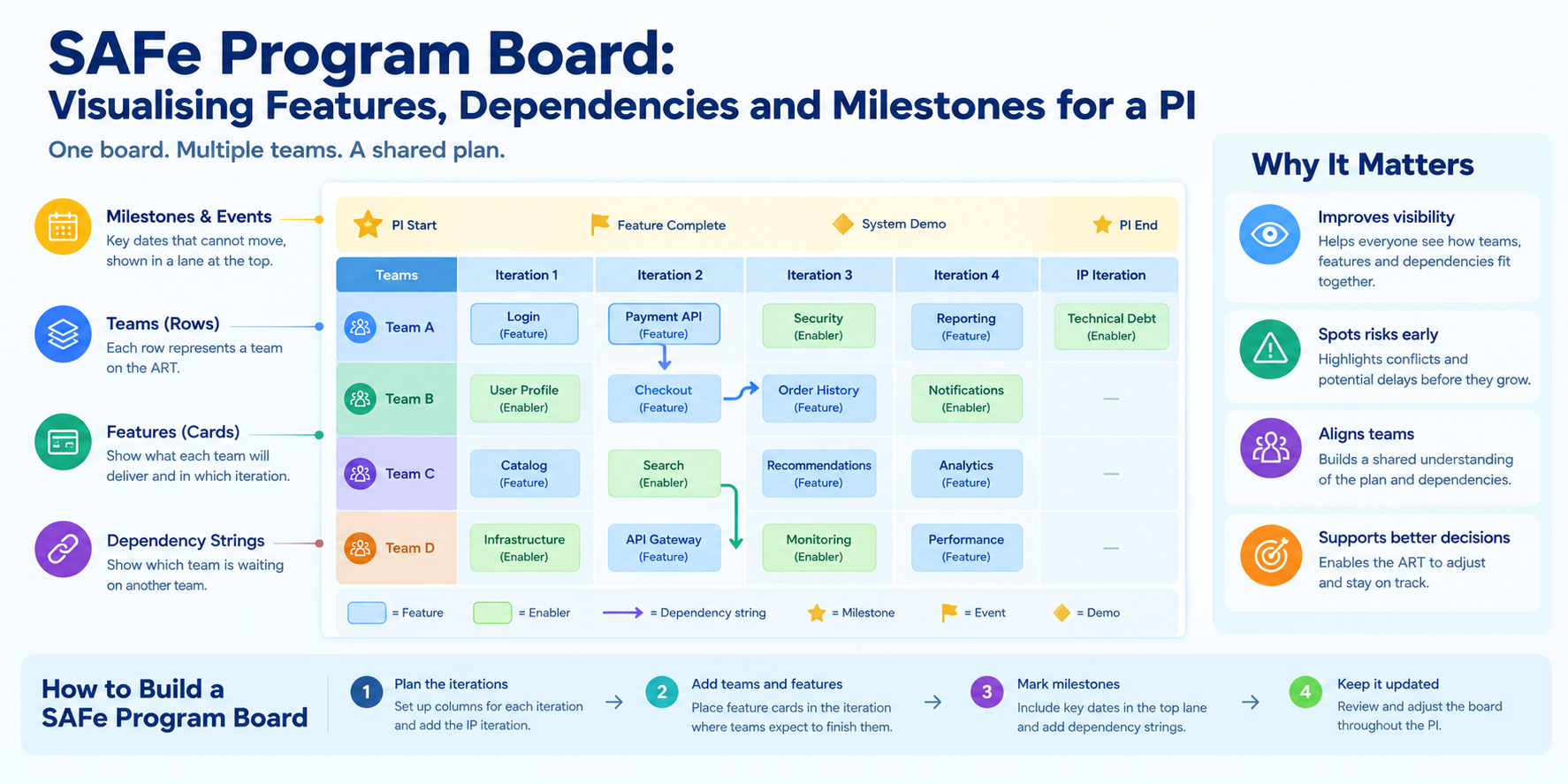
The SAFe program board is a visual planning artifact that teams build during PI Planning. It plots each team's features against the iterations of a Program Increment, marks milestones, and uses dependency strings to show which teams rely on each other. Teams use it to spot conflicts early and agree on a deliverable plan.
Key Highlights of SAFe Program Board
- The SAFe program board shows features, iterations, milestones, and cross-team dependencies on one page.
- Columns represent iterations, and rows represent teams. It is not a Kanban board.
- A feature's position shows when its team expects to finish it, not when it starts.
- Dependency strings connect the team that provides work to the team that needs it, and both teams must agree on each one.
- Strings that converge on one team, or that sit within the same iteration, point to delivery risk.
- The board only works if someone updates it after PI Planning ends.
- The Release Train Engineer (RTE) usually facilitates the board, but every team owns its own cards.
Introduction
Imagine Team A plans to deliver a payments API in iteration 2. Team B plans to launch a checkout feature that uses that API, also in iteration 2. Both plans look reasonable on their own. Together, they leave no time to integrate, and nobody notices until the work is already late.
The SAFe program board exists to catch exactly this kind of gap. Teams on an Agile Release Train (ART) build it during PI Planning, and they use it to see how separate team plans fit together. This guide explains what the board contains, how to build it, how to handle dependencies, and how to keep it accurate for the whole Program Increment (PI). It also includes a ready-to-use template with a worked example.
What Is the SAFe Program Board?
The SAFe program board is a grid that displays the features an Agile Release Train plans to deliver in a PI, the iteration in which each team expects to finish them, the milestones that matter, and the dependencies between teams. Many practitioners also call it the program dependency board or the ART planning board.
It is one of the main outputs of PI Planning. According to Scaled Agile, PI Planning is a cadence-based event, typically two days long, that takes place every 8 to 12 weeks. The RTE leads the event, and its outputs include committed PI objectives from each team and an ART planning board that reflects feature delivery dates and dependencies.
The board is also a visual management tool. Instead of reading a long backlog, anyone can glance at the wall and see who delivers what, and when. Scaled Agile describes the board as a tool teams use to align, anticipate risks, and adapt the plan, as explained in its program dependency board retrospective.
Two clarifications help avoid confusion:
- It is not a Kanban board: Columns represent time (iterations), and rows represent teams. Work does not "flow" from column to column.
- It is not a roadmap: A roadmap shows intent across several quarters. The program board shows what teams have committed to deliver in a single PI.
Elements of a SAFe Program Board
Every program board contains four building blocks. Each answers a different planning question.
| Element | Question it answers | Where it sits |
| Iterations | When will work finish? | Columns |
| Features | What will each team deliver? | Cards inside team rows |
| Milestones and events | Which dates cannot move? | A lane at the top |
| Dependency strings | Who is waiting on whom? | Lines between cards |
Infographic:1 - Elements of a SAFe Program Board
Iterations and the Innovation and Planning Iteration
The columns of the board represent the iterations in the PI. A typical PI has four development iterations followed by one Innovation and Planning (IP) iteration, which gives you five columns.
The IP iteration works differently from the others. Teams use it for innovation, planning and Inspect and Adapt activities, covered in our guide to SAFe events. In practice, it also acts as a buffer. If a feature slips, the IP iteration gives the ART a little room to recover without disturbing the next PI.
Some teams add one more column for work they expect to move into the next PI. That column makes deferred items visible instead of leaving them out of the conversation.
Features
Cards on the board represent features and enablers from each team's backlog. Place each card in the iteration where the team expects to complete it.
This point trips up many new teams. A card in iteration 3 means the team plans to finish the feature in iteration 3. It does not mean the team starts then. Reading the column as a start date creates false slack and hides real risk.
Keep cards short. A feature name and, if needed, a team initial are enough. Many teams also colour-code cards, using one colour for features and another for enablers. Perforce recommends colour coding because it makes cards easier to find than scanning for names on a crowded board.
Milestones and Events
Milestones usually sit in a lane across the top of the board, because they apply to the whole train rather than to one team. Typical examples include:
- A regulatory compliance date
- A product launch or trade show
- A third-party system cutover
- A contractual delivery deadline
External groups, such as a shared UX or security team, often get their own lane at the bottom. Their cards show when other teams can expect help from them.
Placing milestones early matters. When teams know a fixed date up front, they plan backwards from it instead of discovering the conflict in the final review.
Dependency Strings
Dependency strings are the lines that connect one card to another. A string runs from the team that provides something to the team that needs it. The provider might deliver an API, a shared component, a data set, or an environment.
Two habits keep strings useful:
- Both teams agree: A string is a commitment between two teams. One team drawing it alone only records an assumption.
- Colour signals severity: Many ARTs use a distinct colour, often red, for hard dependencies that block delivery.
Perforce warns against letting the board turn into a "spider web," and that advice is sound. Removing a dependency during planning costs far less than stopping work to solve it halfway through the PI. Scaled Agile makes a related point: too many strings on the board may indicate that teams or the ART are not structured well for the work.
How to Build a SAFe Program Board During PI Planning
Teams build the board across the two days of PI Planning. The sequence below follows the standard agenda.
- Prepare the empty grid: Before the event, the RTE sets up iteration columns, one row per team, a milestone lane, and any external lanes. Preparing the grid is part of readiness, so a good ART readiness checklist should include it.
- Draft team plans on day one: Teams review the vision and backlog, estimate their capacity, and place features in the iterations where they expect to finish them.
- Flag dependencies as they appear: While drafting, teams note anything they need from another team. Flagging early keeps assumptions from staying hidden.
- Convert flags into strings at the draft plan review: Teams present their draft plans. Providers and consumers meet, agree on an iteration, and draw the string together.
- Adjust after the management review: Leaders resolve capacity gaps and conflicts. If a feature moves to a different iteration, its strings must move with it.
- Revise and present the final plan on day two: Teams update their cards, confirm dependencies, and present the final plan. The ART then holds a confidence vote.
- Freeze and store the board: After the vote, the board becomes the committed picture for the PI. Capture it in a digital format so everyone can use it afterwards.
The PI planning details explain the full agenda, but the board follows a simple pattern: draft, connect, adjust, commit.
Physical or digital? Either works. A physical wall creates strong in-room energy, but it disappears when the event ends and excludes remote participants. A digital board survives the event and supports distributed teams, which is why Perforce notes that many organisations move to a digital tool. Compare options in our roundup of SAFe tools. Some trains use both, with a scribe copying the wall into a digital board during the event.
How to Mark and Negotiate Dependencies on the Program Board
SAFe dependencies fall into a few common groups. Knowing the type helps teams decide how to handle it.
| Dependency type | Example | Typical handling |
| Feature to feature | Checkout needs a payments API | Provider finishes at least one iteration earlier |
| Shared resource | Two teams need the same specialist | Stagger the work across iterations |
| External | A vendor must deliver a licence | Add to the milestone or external lane |
| Cross-ART | Another train owns a shared service | Agree dates with that train's RTE |
A Simple Negotiation Process
Use the same conversation each time:
- Identify: The consuming team states what it needs and by when.
- Name both ends: The string shows the provider card and the consumer card.
- Negotiate the iteration: The provider confirms whether it can deliver early enough. If not, teams look at moving one card.
- Agree and draw: Both teams confirm the date, and one of them draws the string.
- Escalate if stuck: If two teams cannot agree, the issue goes to the management review, where leaders can change priorities or capacity. Involving the right people early matters, which is why the role of business owners in PI planning is worth understanding.
Here is a short example. Team B needs a payments API from Team A for its checkout feature. Team A planned the API for iteration 2, and Team B planned checkout for iteration 2 as well. During the draft plan review, both teams see the problem. Team A agrees to deliver a basic version in iteration 1, and Team B keeps checkout in iteration 2. They draw a string from Team A's iteration 1 card to Team B's iteration 2 card. The extra iteration of slack now protects the plan.
Handling Dependencies You Cannot Remove
Some dependencies stay. When that happens, teams should discuss the risk openly. SAFe uses the ROAM approach, in which each risk is Resolved, Owned, Accepted, or Mitigated. Recording that decision next to the string keeps the reason for the dependency visible later.
For dependencies on another ART, add the other train's name to the string and agree on dates with its RTE. Cross-train work is the area most likely to slip unnoticed.
SAFe Program Board Template and Example
You can build a SAFe program board template in any spreadsheet, whiteboard tool, or on a physical wall. The table below is a starting grid with a milestone lane and a note describing what belongs in each cell.
| Team | Iteration 1 | Iteration 2 | Iteration 3 | Iteration 4 | Iteration 5 (IP) |
| Milestones | Fixed dates and events | Fixed dates and events | Fixed dates and events | Fixed dates and events | Fixed dates and events |
| Team A | Features and enablers that finish this iteration | Features and enablers | Features and enablers | Features and enablers | No committed features; planning and innovation |
| Team B | Features and enablers | Features and enablers | Features and enablers | Features and enablers | No committed features |
| Team C | Features and enablers | Features and enablers | Features and enablers | Features and enablers | No committed features |
To use it, follow three rules. Write each feature once, in the iteration where it finishes. Draw a string between any two cards that depend on each other. Add milestones before teams start placing features.
Worked Example
The following example is hypothetical. It shows how a filled board might look for a retail ART with three teams.
| Team | Iteration 1 | Iteration 2 | Iteration 3 | Iteration 4 | Iteration 5 (IP) |
| Milestones | Holiday campaign freeze | Inspect and Adapt | |||
| Team A (Payments) | Basic payments API | Refund service | Fraud checks | ||
| Team B (Checkout) | One-page checkout | Saved cards | |||
| Team C (Mobile) | Mobile checkout | App store release |
The dependencies on this board are:
| String | Provider | Consumer | Slack | Note |
| 1 | Basic payments API (It. 1) | One-page checkout (It. 2) | 1 iteration | Healthy buffer |
| 2 | One-page checkout (It. 2) | Mobile checkout (It. 3) | 1 iteration | Healthy buffer |
| 3 | Fraud checks (It. 4) | Holiday campaign freeze (It. 3) | Negative | Conflict; move fraud checks earlier |
String 3 shows why the board matters. The fraud checks land after the freeze date, so the plan needs a change before anyone commits to it.
How to Read the Program Board for Risks
A finished board tells you where the PI is most likely to struggle. Look for these patterns.
| Pattern on the board | What it signals | Suggested response |
| Many strings ending on one team's row | That team is a bottleneck | Rebalance work or add capacity |
| Strings where both ends sit in the same iteration | No slack if the provider slips | Move the provider earlier or ROAM the risk |
| Heavy loading in the last iterations before a milestone | Deadline pressure | Pull features forward or reduce scope |
| Very few strings | Dependencies may be hidden | Ask teams what each feature assumes is available |
| Many strings overall | Teams may be too coupled | Review team structure in the retrospective |
Infographic 2: How to Read the Program Board for Risks
The fourth row surprises many people. A clean board is not always a good sign. When several teams work on related products, some coupling almost always exists. If nobody has drawn a string, teams probably have not talked enough.
Risk mitigation starts with this conversation. Each risk should have an owner and a decision, so the board links to action rather than just worry.
How to Keep the SAFe Program Board Updated During the PI
Teams build the board in two days but use it for the next 8 to 12 weeks. Its value fades quickly if nobody maintains it.
Three habits keep it current:
- Review it at regular ART coordination meetings: A short weekly check works well. Ask which strings were resolved, which moved, and which now look risky.
- Update the cards and strings together: When a feature moves to a new iteration, move its strings too. A string pointing to the old position misleads everyone.
- Keep the board where people can see it: A digital board that every team can open is easier to maintain than a photograph of a wall. A photo records the plan, but it cannot be updated.
This is continuous planning in practice, and it ties directly to pre- and post-PI Planning activities. At the end of the PI, compare the original plan with what actually happened. The gaps become useful input for Inspect and Adapt.
The RTE's Role With the Board
The Release Train Engineer is a servant leader and coach who facilitates ART events and helps teams deliver value, according to Scaled Agile's RTE guidance. That role naturally covers the program board.
In practice, the RTE:
- Prepares the grid and agrees the milestone lane before PI Planning
- Facilitates draft plan reviews and makes sure both teams agree on every string
- Scans the board for bottlenecks and same-iteration dependencies
- Leads the regular check on strings and risks during the PI
- Coordinates with other RTEs when a dependency crosses trains
The RTE does not own every card. Each team owns its own features and updates them. The RTE acts as the steward who keeps the whole board honest and visible. People who want to build this skill can explore the SAFe Release Train Engineer certification, which covers facilitation of PI Planning and ART execution.
Common Program Board Mistakes
- Reading a column as a start date: The position shows when a feature finishes. Misreading it creates false slack.
- Drawing strings without the other team: One-sided strings are assumptions, not commitments.
- Letting the board go stale: Teams make decisions against a plan that no longer exists.
- Storing only a photo: A photo cannot show which strings have resolved or moved.
- Skipping milestones: Without fixed dates, conflicts appear late.
- Cramming too many teams on one board: Once a board has more than about ten teams, it becomes hard to read. Use filtered views or separate boards instead.
- Ignoring the string count: A heavy web of strings often points to a structural issue that the ART should discuss.
Conclusion
The SAFe program board gives an ART one shared view of what it plans to deliver, when, and what each team needs from the others. Its real value does not come from the grid itself. It comes from the conversations teams have while building it, such as who needs what, which dates conflict, and what leadership must decide.
To get the most from it, prepare the grid before PI Planning, draw strings only with both teams present, read the board for risk patterns, and update it throughout the PI. Professionals who want to understand the wider framework behind these practices can start with Leading SAFe training.

Explainedforproductmanagers_1786351461.jpg)




 Lowest-Price Challenge











 Personalized Path


.webp)


 USA
USA  Canada
  India
India  UK
UK  Australia
  Singapore


