


 Call Us



Types of Cloud computing explained.png
Types of Cloud Computing Explained: IaaS, PaaS, SaaS and Deployment Models
You probably use cloud computing more often than you realise. When you open Gmail, save a file online, or join a video meeting, there is a good chance a cloud service is doing part of the work behind the scenes.
Cloud computing allows people to use computing resources via the internet. These resources can include storage, servers, software, databases, and application runtime tools. Instead of buying and maintaining each piece of equipment, a business can get many of those resources from a cloud vendor.
There are different types of cloud computing, and they all work differently.
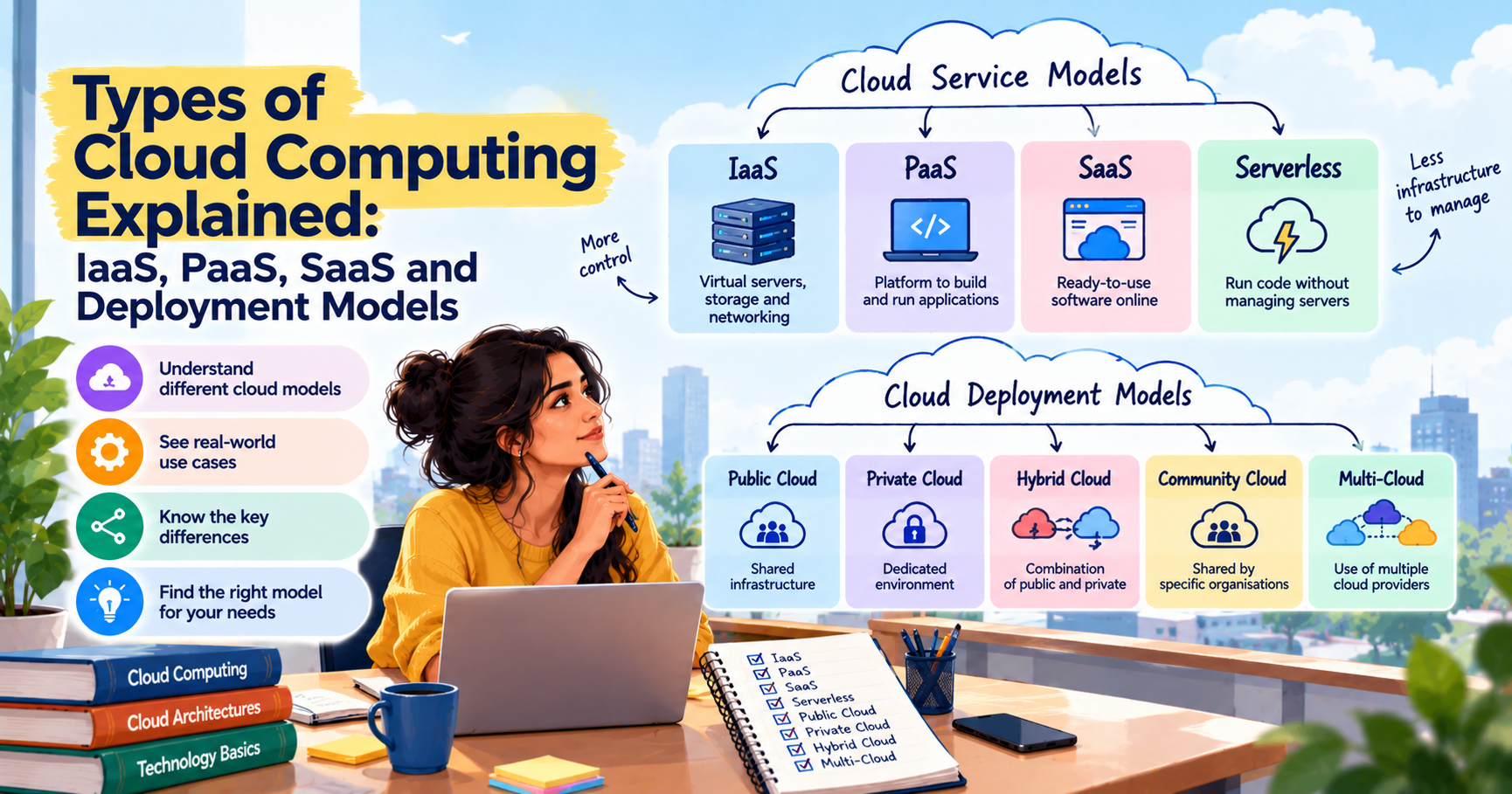
The primary cloud service models are IaaS, PaaS, SaaS, and serverless computing. The main cloud deployment models are public cloud, private cloud, hybrid cloud, community cloud, and multi-cloud.
The difference is fairly simple. Service models tell you what the provider offers and what you need to manage. Deployment models tell you how the cloud environment is set up and used.
Key Highlights About Types of Cloud Computing
- Cloud computing allows people to access computing resources via the Internet.
- IaaS offers virtual servers, storage, and networking.
- PaaS provides developers with a place to build and run applications.
- SaaS allows users to access ready-made software online.
- Public, private, hybrid, community, and multi-cloud are common deployment models.
- A business can use more than one cloud model if its needs call for it.
- Cost, security, data rules, and staff skills should all be considered before choosing a model.
Introduction
Imagine a small business that wants to launch a website. A few years ago, the team might have needed to buy a server, find somewhere to keep it, set up the software, and handle regular maintenance. That would take money, time, and people with the right technical skills.
Cloud computing gives the business another option. It can rent the resources it needs from a cloud provider and get the website running without buying all the physical equipment itself.
This does not mean the business has no work to do. Someone still needs to manage the website, protect its data, and keep an eye on costs. The amount of technical work depends on the cloud service it chooses.
That is where the different types of cloud computing come in.
Some services give you more control over the system. Others take care of most of the technical setup, leaving you to focus on your work. A business that wants to build its own application may need a different service from a team that only wants email and file-sharing tools.
The same applies to cloud deployment. Some organizations use public cloud services, others need a private setup or a hybrid of the two. Some use services from several cloud providers.
It will be easier to pick a setup that suits the job you have to do if you understand these options. It also helps clear things up, like IaaS vs PaaS vs SaaS, hybrid cloud, multi-cloud, etc.
Two Ways to Classify Cloud Computing
Cloud computing is usually divided into two groups: service models and deployment models.
These terms might sound similar, but they address different questions.
A service model is the type of service you are using. For example, are you renting virtual servers, developing an application on a managed platform, or using preconfigured software?
Deployment model is the way the cloud environment is set up. Is it a public service shared by different customers, a private environment for one organisation, or a combination of different setups?
Here is a quick comparison.
| Type | What it explains | Examples |
| Cloud service models | The service you use and how much you manage | IaaS, PaaS, SaaS, serverless |
| Cloud deployment models | How the cloud environment is set up | Public, private, hybrid, community, multi-cloud |
For a layer-by-layer view of how these fit together, see the cloud computing reference model.
A business can use these models together. For instance, it may use SaaS for email and a public cloud service to host its website. It might also keep certain records in a private environment.
There is no rule that says an organisation must choose only one service model or one deployment model.
Cloud Service Models: IaaS, PaaS, SaaS and Serverless
The three main cloud service models are Infrastructure as a Service (IaaS), Platform as a Service (PaaS), and Software as a Service (SaaS). Each gives users a different level of control.
Another choice is serverless computing, which is primarily employed to execute code without directly managing the underlying servers.
Infrastructure as a Service (IaaS)
IaaS is Infrastructure as a Service. In simple terms, it lets you rent computing resources instead of buying the physical equipment yourself.
Such resources can be storage, networking, and virtual machines. The physical servers and data center are managed by the cloud provider. The customer is responsible for the operating system, applications, data, and many of the security settings.
Imagine a business that wants to run a website but doesn't want to purchase a server. It can rent a virtual machine from a cloud provider, install the software it needs, and then run the website from there.
More visitors to the website means more resources can be added to the business. When traffic drops, it may be able to reduce them. This can be more practical than buying equipment based on the busiest day of the year.
What is IaaS used for?
IaaS is often used for:
- Hosting websites and business applications.
- Testing new software.
- Running systems that need more computing power at certain times.
- Creating backup and recovery environments.
- Moving applications from physical servers to the cloud.
Services such as Amazon EC2, Azure Virtual Machines, and Google Compute Engine are examples of IaaS.
The biggest advantage is control. Many of the settings for your environment you can choose and set it up around your needs. The trade-off is that your team must have the skills to manage the operating system, applications, access, and other technical details.
For a business that needs flexibility and has the staff to manage its systems, IaaS might be the best fit. If the team does not want to do much infrastructure work, then maybe another service model is a better fit.
Platform as a Service (PaaS)
Platform as a Service (PaaS) is a platform for application development. It gives developers a ready-made environment for building and running applications.
Say a team is building an online booking system. Developers write the code, test it, and make sure the application works as people use it. They also need an environment to run the application.
It takes time to create and maintain all aspects of that environment. PaaS handles a lot of the underlying setup and allows the team to spend more time working on the application itself.
The provider takes care of the infrastructure and many of the components of the platform. The development team still has to look after its code, application logic, data, and settings.
What is PaaS used for?
Teams often use PaaS to:
- Build and test web applications.
- Create APIs.
- Develop applications that need to handle changing demand.
- Work with supported databases and development tools.
- Release new application features without managing every server detail.
For instance, a team working on a booking website might use a PaaS service to push out updates. The provider takes care of most of the platform, and the developers ensure that the new features are working as they should.
PaaS can save time, especially for teams that want to build software but don’t want to do all the infrastructure work. But there may be restrictions on what tools, programming languages, or environments the platform allows.
Before choosing PaaS, check that the service fits the application you want to build.
Software as a Service (SaaS)
SaaS stands for Software as a Service. You may already use it without thinking about the term.
What is SaaS? It is software that you access online, usually through a web browser or an app. The provider takes care of the software and the systems to run it. You normally don’t have to install and maintain the entire application yourself.
Gmail is a basic example. You sign in, check your emails, send off replies, and deal with your inbox. You don't even have to install the software that runs Google's service or set up an email server.
Other examples include online meeting tools, office applications, project management software, and customer management systems.
SaaS is commonly used for:
- Email and team communication.
- Online meetings.
- Creating and sharing documents.
- Tracking sales and customer details.
- Managing projects and everyday business tasks.
One reason companies use SaaS is that it’s often quick to set up. The user logs in and gets to work, and the provider takes care of software updates and much of the maintenance.
A couple of things to check yet. Companies need to control their user accounts, restrict access to their information, examine their subscription pricing, and discover how their data is stored.
For a team that needs software that is ready to use, SaaS is often a practical option. It is less suitable when the business needs deep control over how the underlying application works.
Serverless Computing and Function as a Service (FaaS)
The term “serverless” is actually a bit of a misnomer, since you’re still using servers. The difference is that developers don’t have to manage these servers themselves.
Function as a Service, or FaaS, allows developers to write small code snippets that are executed when an event occurs. This could be a customer uploading a file, a form being submitted, or a new record being created in a system.
For example, a website might need to resize each image a user uploads. When an image comes in, a serverless function can run, process the image, and finish the job. The team doesn't have to have a server sitting there just doing that one job.AWS Lambda is one of the most widely used FaaS services for this kind of event-driven task
Serverless computing can be useful for event-based features and some application workloads that are sporadic.
It can cut down the time spent on infrastructure management. But that’s not the right answer in all situations. Developers still need to consider pricing, execution limits, performance, and how the service behaves when a function starts running.
IaaS vs PaaS vs SaaS Compared
The main difference between IaaS, PaaS, and SaaS is how much of the system you need to manage yourself.
| Factor | IaaS | PaaS | SaaS |
| What you manage | Operating system, applications, data, and settings | Application code, data, and relevant settings | User accounts, access, and how you use the software |
| What the provider manages | Physical infrastructure and virtualisation | Infrastructure and much of the platform | Software, infrastructure, and updates |
| Typical users | IT teams and system administrators | Developers and software teams | Individuals and businesses |
| Flexibility | More control over the environment | Control within the platform's limits | Less control over the software itself |
| Examples | Amazon EC2, Azure Virtual Machines, Google Compute Engine | AWS Elastic Beanstalk, Azure App Service, Google App Engine | Gmail, Microsoft 365, Salesforce |
These are general examples. The exact division of responsibilities depends on the service and how it is configured.
So, which one should you choose?
If you need to control the operating system and configure the environment, IaaS may work well. If you want to build an application but avoid managing as much infrastructure, consider PaaS. If you need ready-made software for everyday work, SaaS may be the simplest option.
The best choice depends on the job you need to get done, not on which model has the most features.
Cloud Deployment Models
Cloud deployment models describe how cloud resources are organised and who can use them. The main options are public cloud, private cloud, hybrid cloud, community cloud, and multi-cloud.
Public Cloud
A public cloud is run by a third-party provider that makes computing services available to customers over the internet. Different customers can share the provider’s infrastructure, but the provider’s controls keeps their workloads and data separate.
A business can use public cloud services without having to build its own data center. It can select the resources it needs, and scale capacity up or down as its workload changes.
An online store might need more computing power during a big sale. It can add resources without buying new physical servers with the help of public cloud services.
Public cloud is commonly used for websites, applications, data storage, software testing, and workloads that require scalability.
It’s usually easier to start with a public cloud than to build a private environment. But businesses still have to watch spending and get security set up right. The provider provides the services but the customers have to use them responsibly.
AWS, Microsoft Azure and Google Cloud are the most well-known of the public cloud providers.
Private Cloud
A private cloud is for a single organization, not a range of customers. It can be hosted on the organisation’s own data center or managed by a third-party provider.
Businesses sometimes choose private cloud because it offers them more control over their systems, access rules, and data environment.
For instance, an organization with sensitive records may have internal regulations on the storage and access of information. When designed and managed properly, a private cloud can help it address those needs.
There’s a trade-off. A private cloud may take more money, technical staff, and ongoing maintenance. The organisation may have to take care of more of the environment itself.
Something else that bears remembering is that private cloud is not automatically better security. The team still needs to put the right controls in place, watch what happens, and fix issues as they crop up.
Hybrid Cloud
A hybrid cloud is a mix of a public cloud and a private cloud or on-premises system. It allows a business to use different environments for different workloads.
For example, a company could run some of its internal systems on its own infrastructure but host its public website in the cloud. It may also use public cloud resources when demand increases.
This can be useful for organizations that are not ready to move all systems at the same time. They can keep some workloads where they are and move others when it makes sense.
The hard part is getting the environments to work together. Teams need to think about network connections, user access, security, monitoring, and moving data between systems.
Without a clear plan, a hybrid setup can become hard to manage. It works best when the organisation knows why it needs both environments and how they will be connected.
Community Cloud
A community cloud is shared by organisations with similar needs. They may work in the same sector or have common rules for security, data handling, or compliance.
For example, a consortium of public sector organizations may require to share an environment with the same policies. A community cloud can give them a way to share resources while working within agreed rules.
The environment could be managed by the organizations themselves, or by a third party, or both. The group needs to agree on who pays for what, who manages the system, and how access is controlled.
Community cloud can be useful where organizations have a similar requirement, but do not want to manage separate environments. However, shared ownership and responsibilities need to be clear from the start.
Multi-Cloud
Multi-cloud means using cloud services from more than one provider.
A business might have one provider to run an application and another to analyze data, and a third service to serve a specific business need. It can choose this arrangement because different suppliers provide different tools or capabilities.
Having more than one provider can give a business more options. It might also lessen its dependence on a single provider for each workload.
But there is more work to be done. Staff will have to learn different systems, deal with multiple bills, enforce security rules on different platforms and track all of it from one place.
Multi-cloud needs to be intentional. More providers doesn’t automatically mean a business is more flexible or secure. The benefit has to justify the added complexity.
Hybrid cloud is not the same thing either. Hybrid cloud is a combination of public cloud and private cloud or on-premises. Multi-cloud means using more than one cloud provider. An organisation can have a setup that is both hybrid and multi-cloud.
Public vs Private vs Hybrid Cloud Compared
Public, private, and hybrid cloud each suit different needs. The choice usually comes down to control, cost, compliance, and how much flexibility the business requires.
| Factor | Public Cloud | Private Cloud | Hybrid Cloud |
| Control | The provider manages the infrastructure, while the customer manages its own use and settings | The organisation has more direct control over its dedicated environment | Control is shared across the connected environments |
| Cost model | Often based on usage or subscription | Can include equipment, setup, staff, and maintenance | Combines public cloud costs with private or on-premises costs |
| Compliance fit | Depends on the service, provider, and configuration | Can support specific needs when properly designed | Lets organisations place workloads in suitable environments |
| Scalability | Resources can often be added quickly | Growth depends on available capacity and setup | Public cloud can add capacity while some systems stay private |
There is no single winner here. A business that needs to get started quickly may prefer public cloud. An organisation that needs more control may consider a private cloud. A company that needs both may choose hybrid cloud.
The important thing is to understand the actual workload and the rules that apply to it before making a decision.
Cloud Computing Examples From AWS, Azure and Google Cloud
Cloud providers offer services for different tasks. Some give you virtual machines, others help you build applications, and some provide software that is ready to use.
Here are a few examples.
| Model | AWS Example | Azure Example | Google Cloud Example |
| IaaS | Amazon EC2 | Azure Virtual Machines | Google Compute Engine |
| PaaS | AWS Elastic Beanstalk | Azure App Service | Google App Engine |
| SaaS | Amazon QuickSight | Microsoft 365 | Google Workspace |
| Serverless | AWS Lambda | Azure Functions | Google Cloud Run functions |
These products have different features, pricing rules, and limits. Check the provider's documentation to make sure a service fits your needs.
If you are new to Amazon Web Services, this guide to what is AWS can help you understand the platform.Weighing two of the biggest platforms? Our AWS vs Azure comparison covers differences, pricing and which to learn.
Managers who make technology decisions may find cloud fundamentals for managers useful for understanding the business side of cloud adoption. For those starting with Azure, the Azure Fundamentals AZ-900 course covers the basics of Microsoft's cloud platform.
The Shared Responsibility Model
Choosing a cloud service does not mean that the provider is responsible for everything. The provider and the customer each have a role to play in keeping the system secure. This is called the shared responsibility model.
The split changes depending on the service.
In IaaS, the provider usually manages the physical equipment and the underlying infrastructure. The customer is typically responsible for the operating system, applications, data, and access settings.
With PaaS, much more of the platform is taken care of by the provider. The customer still has to secure the application, manage data, and control who gets to access it.
The SaaS provider manages the software and the systems that run it. The customer is still responsible for things like account security, user permissions, and use of the service.
The details vary between providers and products, so it's important to check the documentation for each one.
Here are some simple habits to help prevent common security problems:
- Only give users what they need.
- Remove access when it is no longer needed.
- Review security settings and permissions regularly.
- Keep backups of important data and test recovery plans.
- Pay attention to alerts and unusual activity.
Cloud security is not a business’s “set it and forget it” type of security. Regular audits are needed, clear responsibilities are required, and people who understand the system.
How to Choose the Right Cloud Model
Choosing a cloud model does not have to start with a long list of technical features. Start with what you need the system to do, then look at which model can support it.
Control and Customisation
First, decide how much control your team needs.
If you want to configure operating systems, networks, and other technical settings, IaaS can be a good fit. If you are primarily building apps, PaaS can take some of the infrastructure work off your plate. If you need software for everyday tasks, SaaS may be all you need.
The deployment model matters too. With public cloud, you may have enough control of your workload. If you have special requirements for your environment, then a private or hybrid setup may be more suitable.
Data locality and compliance
Certain organizations have requirements on where their data can be stored and who can access it. Others must adhere to industry regulations or internal security policies.
Check the rules of your organization before selecting a cloud model. Review the provider’s security features, where they store data, and their controls over access, and compliance details.
Don’t assume private cloud is always the only safe option or that public cloud can’t handle sensitive workloads. It’s not about the label; it’s about the actual service, the setup and the rules that matter.
Cost and Team Ability
A cloud provider’s website tells only part of the story. Final costs might also include storage, data transfer, software licences, support and staff time.
It is also easy to overspend if resources are left running when they are not needed by anyone. Regular reviews can help teams find unused resources and avoid unnecessary charges.
Your team’s skills are also important. IaaS offers you more control but usually needs more technical hands-on work. PaaS takes care of some of that work, while SaaS is usually simpler to set up.
If you are still getting familiar with cloud computing, a cloud computing reference model can help you understand how the different parts fit together.
Risks and Limits of Cloud Computing
Cloud computing can make many tasks easier, but it does not solve every problem. Before moving systems to the cloud, it helps to know what can go wrong.
Costs can get out of hand. A team may forget to turn off resources it no longer uses. The bill also includes storage and data transfer. Checking usage regularly can help avoid surprises.
Security remains a concern. Cloud providers do have security tools, but it is up to the customers to properly set them up. Weak passwords, open access settings, and unnecessary permissions can put information at risk.
Internet access is important. If the team can’t connect to the Internet, some cloud apps or files might not be accessible. Businesses should consider how they will work during a connection problem.
Switching among providers can be hard. Applications and data may depend on a provider’s tools or configuration. Moving them somewhere else can take time and money.
A team needs the right skills. Someone has to manage access, understand the bills, watch performance, and react if something goes wrong. Training and clear processes can make this work easier.
Sometimes the services are down. Cloud platforms can go down. Businesses should plan how they will handle interruptions and recover important systems.
These risks do not mean cloud computing is a bad choice. They mean that choosing a provider is only one part of the job. Planning, security, and regular checks matter too.
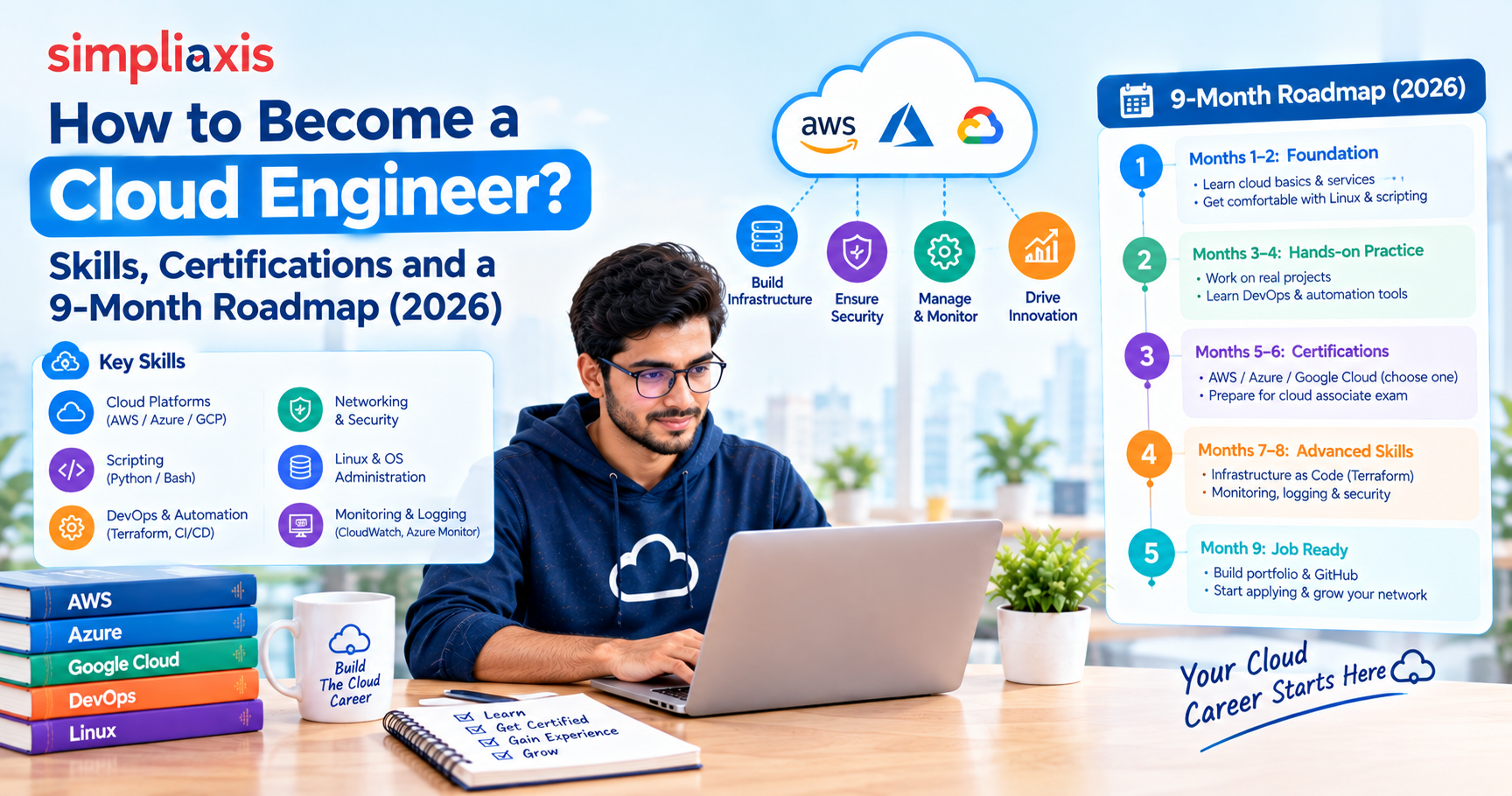
Cloud Skills & Certifications
If you are interested in working with cloud technology, then learn the basics first, instead of trying to understand all the services at once.A good starting point is a free Microsoft Azure Fundamentals (AZ-900) course, which covers service and deployment models.
Get comfortable with the difference between IaaS, PaaS, and SaaS. Then look at how public, private, hybrid, and multi-cloud environments work. When you understand those ideas, it is easier to understand specific platforms and what they offer.
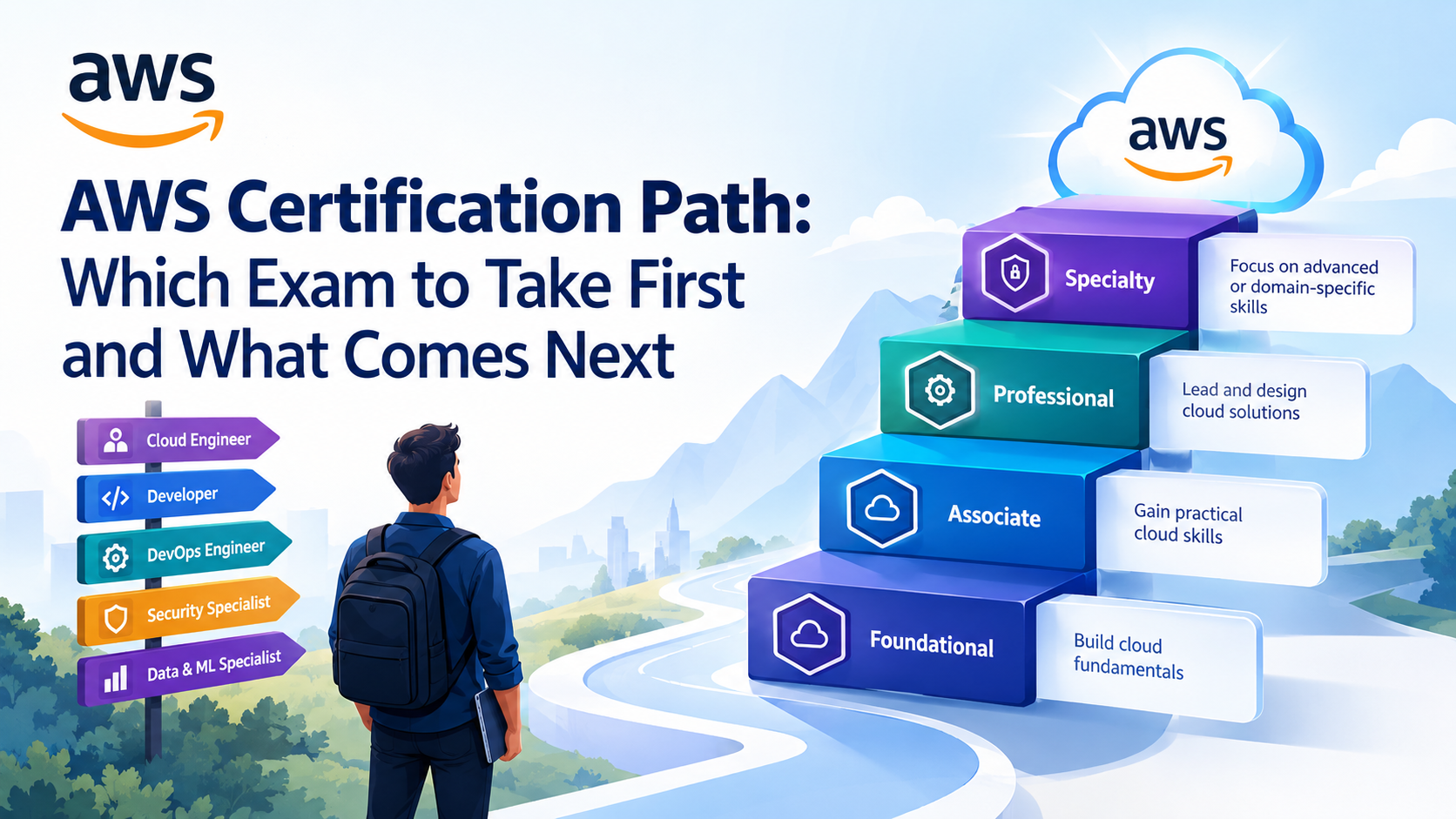
What you do next depends on the kind of work you want to do. Someone who works on infrastructure might care about virtual machines, storage, networking, and security.Infrastructure professionals often build towards the AWS Solutions Architect Associate certification. A developer may spend more time on application deployment, databases, and platform tools. The manager might have to know about the costs and risks and how cloud services can help business objectives.
Certifications can provide a clear direction for your study. Browse the main cloud computing certifications to find a path that fits your role.They can also help demonstrate that you understand the fundamentals of a platform. But a certificate doesn’t take the place of hands-on experience. Developing cloud skills is not only about doing real work, but also learning how to troubleshoot.
Cloud computing also connects with other areas of technology. For example, AI and cloud computing often go together because AI workloads can need significant computing power and storage. Businesses are also paying more attention to green cloud computing when thinking about energy use and the environmental impact of their systems.
You do not need to master every area at once. Choose a starting point that fits your role and build your skills from there.
Conclusion
Cloud computing gives people and businesses different ways to use technology without having to manage every piece of equipment themselves.
IaaS provides users with computing infrastructure. PaaS gives you a place to develop and run applications.SaaS is software that’s ready to use, and serverless computing lets developers run code without dealing with servers themselves.
Deployment models answer a different question. A public cloud provides services through a cloud provider. A private cloud is designed for one organisation. A hybrid cloud is a mix of public cloud and private or on-prem technology. A community cloud is for organizations with shared needs, and multi-cloud is using services from more than one provider.
It all depends on what you need, how much you can spend, how much control you want, and what skills your team has. A small business might only need a few SaaS tools. A development team may need PaaS or IaaS. A larger organisation may use several models for different workloads.
You do not have to use every option. Start with the work you need to do, compare the models, and choose the one that makes sense for your situation.








 Lowest-Price Challenge











 Personalized Path


.webp)


 USA
USA  Canada
  India
India  UK
UK  Australia
  Singapore


