


 Call Us



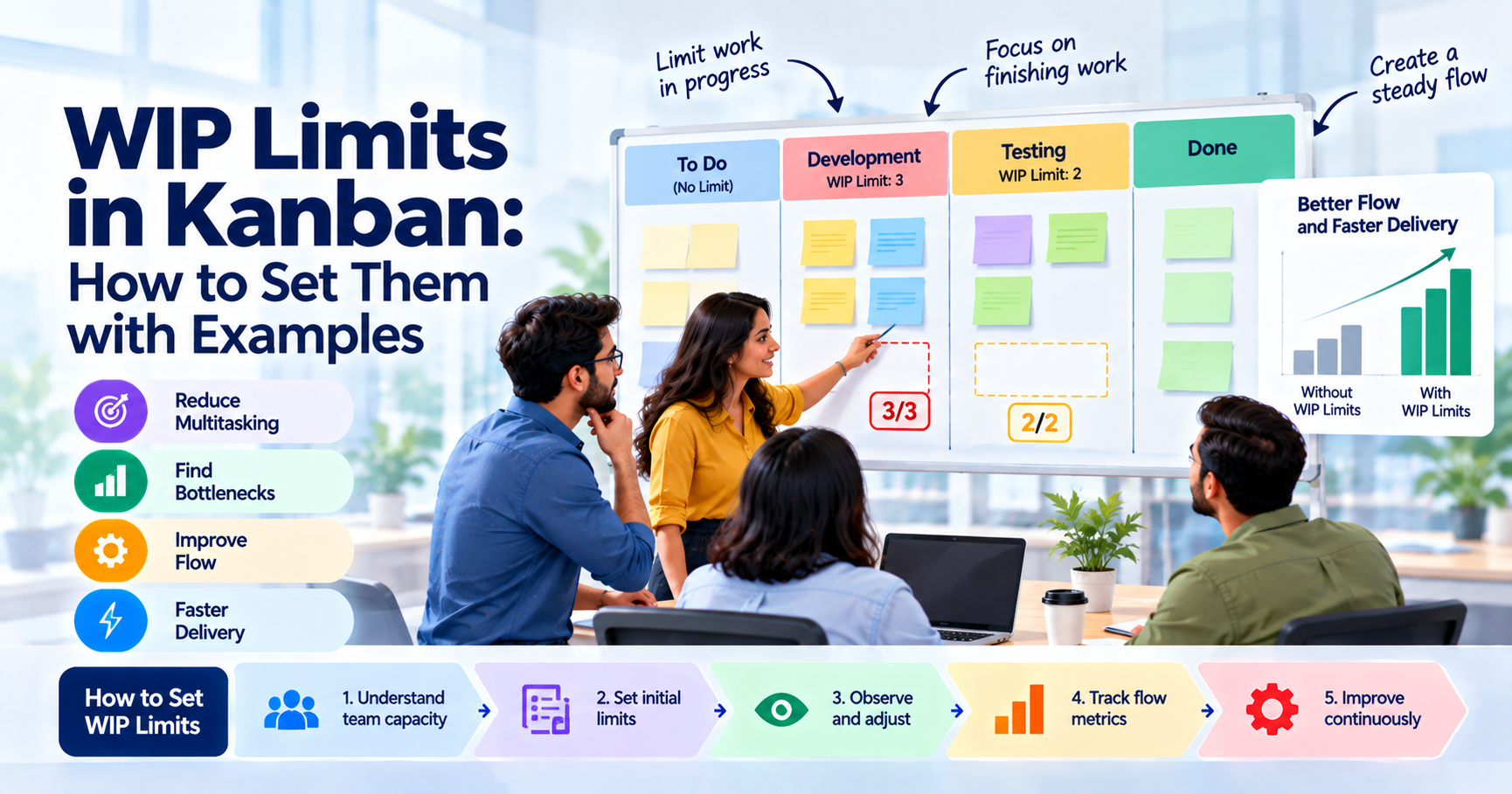
Kanban WIP limits are simple rules about how many work items can be active at one time. A team does not start new work just because someone has free time. They finish existing work before bringing in new work. It cuts down on multitasking, reveals bottlenecks, and helps work flow faster.
No WIP number is universal. A good start is to think about the size of the team, the current workload, and workflow & delivery data. The team can then adjust the limit based on what happens in real work.
WIP limits are an essential part of a Kanban pull system. They help teams focus on finishing work, rather than keeping everyone busy with several tasks at once.
Key Highlights of WIP Limits in Kanban
- WIP stands for work in progress.
- WIP limits control the amount of work in progress at a time.
- Kanban WIP limits minimize multitasking and waiting.
- Limits can be set for columns, people, swimlanes, or the whole board.
- The WIP limit should be a function of the true capacity of the team.
- Teams need to view limits and change them, not just see them as a number.
- Little’s Law relates WIP, throughput, and lead time.
- A WIP limit should uncover bottlenecks, not cover them up.
- The goal is better flow and faster delivery, not keeping every person busy.
Introduction
Suppose a team has 10 tasks on its board. Five people are working on them, but almost every person has two tasks open. One task is waiting for review. Another is waiting for testing. Someone is waiting for information from a client. A developer has started something new while an older task is still blocked.
The board looks busy.
The team looks busy.
But very little is actually getting finished.
This is one of the problems that WIP limits in Kanban are designed to address.
Kanban focuses on the movement of work through a system. The idea is not to start as much work as possible. It is to create a steady flow where work gets completed and delivered. The official Kanban guidance describes limiting WIP as one of the practices used to create a pull system and improve flow.
If you want a basic introduction to Kanban boards first, seeWhat Is Kanban Board And How To Use It. It explains how work is visualized and moved across a workflow.
In this guide, we will look closely at WIP limits in Kanban, how they work, how to choose a starting number, and what a team should do when a limit is reached.
What Are WIP Limits?
Definition and the Idea of Limiting Work in Progress
WIP stands for Work in Progress. It refers to work that has entered a workflow but has not yet been completed.
A WIP limit is simply a maximum number of work items allowed in a particular part of that workflow.
For example, imagine a board with these columns:
To Do → Development → Testing → Done
A team might set a limit of:
- Development: 3
- Testing: 2
If three items are already in development, the team should not pull a fourth item into that column until one of the existing items moves forward.
That is the basic idea behind Kanban WIP limits.
The limit does not mean the team can never work on another item. It means the team first looks at the work already in progress and asks what is stopping it from moving.
This changes the team's behaviour.
Instead of asking, "What can I start next?" the team starts asking, "What can I finish?"
That small change can have a big effect on flow.
Why Kanban Limits WIP
Too much work in progress creates queues. When several tasks are started at the same time, they often spend more time waiting than being worked on.
For example, a software team may have:
- 4 stories being developed
- 3 stories waiting for review
- 2 stories waiting for testing
- 5 new stories ready to start
The team may feel productive because there is always something to do. But the customer does not receive value simply because many items have been started.
The value comes when work is completed.
This is why WIP limits in Kanban are closely connected to the idea of a pull system. New work is pulled only when there is available capacity.
ThePrinciples of Kanbanalso provide useful background on practices such as visualizing work, limiting WIP, managing flow, and improving the process.
The Cost of Too Much Work in Progress
High WIP can create several problems.
The first is context switching. A person moves between tasks instead of staying focused on one piece of work.
The second is waiting. A completed development task may sit in a queue because the testing stage is full.
The third is hidden bottlenecks. Without WIP limits, a team can keep feeding work into a slow stage until the queue becomes very large.
The fourth is a longer lead time. A task may take only a few hours of actual work but remain in the system for several days because it spends most of its time waiting.
This is why reducing WIP does not simply mean "making people work less." It is about reducing the amount of unfinished work competing for attention.
How WIP Limits Improve Flow
Less Context Switching, Faster Delivery
Context switching sounds harmless, but it can make work harder.
Suppose a content team has five writers and 15 active assignments. A writer may start a blog, stop to work on a landing page, return to the blog, answer review comments, and then switch to another urgent task.
Every switch requires the person to remember where they stopped and what needs to happen next.
With a smaller WIP limit, the team has fewer open items. People are able to get their work done faster rather than multitasking.
This is one of the main reasons WIP limits in Kanban can improve flow.
The goal is not to make every person busy every minute. A little spare capacity can actually help the whole system deal with blockers, reviews, urgent issues, and collaboration.
The Little's Law Connection
Little’s Law is often cited in discussions of WIP limits because it shows how three important things relate to each other:
WIP = Lead Time * Throughput
For example, if a team delivers 10 items each week and has an average WIP of 20 items, the average lead time is:
20 / 10 = 2 weeks
This is a simple example, and Little's Law holds when the system is reasonably stable over the period of time being measured.
The important point is that WIP, throughput, and lead time are connected.
If throughput stays the same and WIP increases, lead time tends to increase.
That is why theKanban Metricsused by a team should not be looked at separately. WIP, lead time, cycle time, and throughput tell a clearer story when viewed together.
Little's Law does not give you a magic WIP number. It helps you understand the effect of the number you choose.
Surfacing Bottlenecks and Blockers
One of the best things about WIP limits is that they make problems harder to ignore.
Suppose the Development column has a limit of five. It is full. Testing has a limit of two, and both spaces are occupied.
A developer finishes a story.
There is nowhere for it to go.
That situation creates a useful question: why is testing not moving?
Maybe the tester is overloaded. Maybe the test environment is unavailable. Maybe the requirements are unclear. Maybe the team needs to swarm around testing.
Without a WIP limit, the team might simply start another development task.
With a limit, the problem becomes visible.
This is an important part of the value of WIP limits in Kanban. The limit is not there to punish the team. It is there to expose problems in the workflow.
Types of WIP Limits
Per-Column Limits
This is one of the most common approaches.
A team puts a number on a specific column.
For example:
- Analysis: 3
- Development: 4
- Review: 2
- Testing: 2
These are WIP limits per column.
The numbers do not have to be equal. In fact, they often should not be.
Different stages have different capacities and different types of work. A testing stage with two testers may need a different limit from a development stage with five developers.
Per-Person Limits
A team can also use a limit for each person.
For example, each developer may have a maximum of one active item.
This can work well when people tend to take ownership of too many tasks at once.
However, per-person limits can sometimes encourage individual optimization instead of team collaboration. Someone may say, "I already have my one task, so I cannot help."
The purpose of WIP limits should be better team flow, not creating rigid personal boundaries.
Whole-Board and Swimlane Limits
A WIP limit can also apply to a larger part of the board.
For example, a team may allow only eight active work items across all delivery stages.
Swimlanes can also have limits. A team may have separate lanes for standard work, urgent work, and improvement work.
The right approach depends on the workflow.
No rule says a Kanban board can only use one kind of WIP limit.
How to Set WIP Limits Step by Step?
Step 1: Start From Current WIP and Team Size
Before deciding on a number, look at what is happening now.
Ask:
- How many people are on the team?
- How many items are normally active?
- Where does work wait?
- Which column fills up first?
- How long does work normally take?
- How much work is blocked?
- How many items are usually completed each week?
Do not immediately choose a very low limit just because low WIP sounds better.
Start with your current workflow.
Kanban is designed around evolutionary improvement. The team can introduce a limit, observe the result, and change it based on evidence.
Step 2: Apply a Starting Rule of Thumb
There are several simple rules teams use when first introducing WIP limits.
A common starting point is to set a limit near the number of people working at that stage. Or you can allow a little extra work beyond the number of people, especially if there is collaboration or review.
For example, if four developers work together, a development WIP limit of four or five could be a reasonable experiment.
But this is only a starting point.
There is no universal WIP limit formula that works for every team.
Historical data is usually more useful than a generic formula.
For example, if a team normally completes 12 items a week and the average lead time is one week, then Little’s Law says the average WIP is about 12 items.
The WIP limit itself can be higher or lower depending on the workflow and the variation of the work.
Thus, setting WIP limits in Kanban is more an experimental process than a one-time mathematical exercise.
Step 3: Visualize Limits on the Board
The limit needs to be easy to see.
If the Development column has a limit of four, write 4 at the top of the column.
When four cards are already there, everyone should immediately understand that the column is full.
A visual limit is much more useful than a rule hidden in a document.
It also helps during team discussions. When the limit is reached, the team can quickly see where attention is needed.
Step 4: Observe, Tune, and Repeat
Do not assume the first number is constant.
And see what happens in a couple of weeks.
Look at:
- Lead time
- Cycle time
- Throughput
- WIP
- Blocked items
- Flow efficiency
- Aging work
- Delivery predictability
If the limit is always full and work keeps waiting downstream, a bottleneck might exist; acumulative flow diagram will show this as a widening band.
If the limit is seldom reached and things are going well, the number may be reasonable.
If people are waiting all the time because the limit is too restrictive, then the team may need to increase it or change the workflow.
The important thing is to use data and team feedback rather than guessing.
WIP Limits Example (Worked)
Consider a software team with six people:
- 3 developers
- 1 business analyst
- 1 tester
- 1 product owner
The board has these stages:

The team starts with these WIP limits:
- Development: 3
- Review: 2
- Testing: 2
Now imagine the board looks like this:
Development: 3 items
Review: 2 items
Testing: 2 items
Every limited column is full.
A developer finishes a story. But the Review column is already full.
The developer cannot simply pull another item into development because the team is already at the development limit.
So what happens?
The team looks at the review and testing stages.
The tester has an item that cannot be tested because a test environment is unavailable. Another item needs clarification.
Instead of starting a sixth development task, the team works together to remove those blockers.
The environment is fixed. The unclear requirement is discussed. One review item moves forward. Testing gets capacity.
Now the developer can pull the next item.
This is what a WIP limit is supposed to encourage.
It changes the team's focus from starting more work to improving the movement of existing work.
What to Do When a WIP Limit Is Hit
Swarming to Unblock Work
When a limit is reached, the team should look for work that can be finished.
Suppose Testing has reached its WIP limit.
Instead of starting another development story, a developer could help reproduce a bug, prepare test data, clarify acceptance criteria, or pair with the tester.
This is called swarming.
The exact activity depends on the team's skills and workflow.
The basic idea is simple: several people help move one item toward completion instead of each person starting something separate.
The Stop Starting, Start Finishing Mindset
This is one of the simplest ways to understand WIP limits in Kanban.
When a column is full, stop adding work.
Look to the right.
Can something be reviewed?
Can something be tested?
Can a blocker be removed?
Can someone help another team member?
Can an old item finally be completed?
This "stop starting, start finishing" mindset is central to limiting parallel work and creating a pull system.
Common Mistakes to Avoid
Setting Limits Too High to Feel Comfortable
A WIP limit of 10 may feel safe for a team of five people.
There is plenty to do.
But if the real goal is better flow, the limit may be too high.
A high limit can simply make the board look busy while queues continue to grow.
Start with a sensible number and observe the effect.
Never Adjusting Limits
A WIP limit is a policy, not a permanent law.
Teams change.
Skills change.
Work types change.
Customer demand changes.
The workflow may also change.
If the limit was set six months ago and nobody has reviewed it since, it may no longer make sense.
Good Kanban WIP limits should be reviewed using actual delivery data.
Bypassing Limits Under Pressure
This is probably one of the most common problems.
A manager says, "This is urgent. Just start it."
The team adds another card even though the column is already full.
If this happens regularly, the WIP limit stops being useful.
Urgent work can require a different policy, such as an expedite lane, but that policy should be clear to everyone.
If every new request is treated as urgent, the problem is not the WIP limit. The problem is prioritization.
WIP Limits in Scrum and SAFe
WIP Limits Beyond Kanban Boards
WIP limits are not limited to teams that call themselves "Kanban teams", and theKanban vs Scrumdebate is less of an either-or than it seems.
Scrum teams can use Kanban practices to visualize workflow and manage work within and around their Sprint, an approach covered inProfessional Scrum with Kanbantraining.
For example, a Scrum team may limit the number of stories in development or testing.
This can be especially useful when a team regularly starts many stories but finishes only a few.
WIP limits in Agile are generally about improving the flow of work. They do not require a team to stop using Scrum.
If you work with scaled Agile environments, it is also useful to understand how Kanban supports flow across larger systems.
Managing Flow Load at the ART
In SAFe, Kanban is used at different levels to visualize and manage work. Team Kanban helps teams visualize workflow, set WIP limits, measure throughput, and improve their process, a core topic inSAFe for Teams training.
At a larger level, the same thinking can help teams understand where work is building up across a value stream.
For example, if many features are waiting for a later stage, adding more features at the front will not solve the problem.
The bottleneck needs attention.
This is where WIP thinking becomes useful beyond a single team's board.
Teams and leaders can use the same basic questions:
Where is work building up?
Why is it waiting?
What can we finish before starting more?
SAFe Scrum Master Certification Training can add context to professionals working in scaled environments on flow, Agile practices, and the Scrum Master's responsibilities in SAFe.
The Scrum Master's Role With WIP Limits
A Scrum Master does not need to act as the person who assigns WIP numbers to everyone.
The more useful role is to help the team understand why the limits exist and use them to improve the workflow.
A Scrum Master can help the team:
- Identify where work is getting stuck.
- Discuss whether a limit is working.
- Encourage collaboration when a column is full.
- Make blocked work visible.
- Use metrics to understand flow.
- Stop the team from constantly starting new work.
- Facilitate conversations about bottlenecks.
- Help remove process-level impediments.
- Encourage experiments with different limits.
The Scrum Master should also avoid turning WIP limits into performance targets.
For example, "Everyone must always have one task" misses the point.
A person being temporarily idle may be a good thing if they are helping finish another item or waiting for the right work.
The real measure is how well valuable work moves through the system.
Best Practices for WIP Limits
Good WIP limit Kanban practices are simple, but they require discipline.
Start with real data.
Look at existing WIP, throughput, cycle time, and lead time before choosing a number.
Keep limits visible.
Everyone should be able to see the current limit without asking.
Make the limit a team policy.
Making policies explicit is one of thecore practices of Kanban, and people are more likely to follow a limit when they understand why it exists.
Focus on finishing.
When a limit is reached, look for ways to move existing work forward.
Do not use one number everywhere.
Different workflow stages may need different limits.
Review the limits.
Treat them as experiments that can change as the system changes.
Watch flow efficiency.
If work spends most of its time waiting, lowering WIP may help, but the underlying source of delay still needs attention.
Use kanban metrics together.
WIP alone cannot tell you whether the system is healthy. Look at lead time, throughput, cycle time, aging work, and other useful measures.
Make exceptions clear.
If urgent work can bypass a normal limit, define when and how that can happen.
Do not optimize for utilization.
A team where every person is constantly busy can still deliver slowly.
These are some of the most useful Kanban WIP limit best practices because they keep the focus on flow rather than individual busyness.
Conclusion
WIP limits in Kanban are not complicated. They are simply a way to control how much work is happening at the same time.
The real challenge is using them well.
A team should not set a limit and forget about it. It should watch what happens when the limit is reached. If work is stuck, the team should investigate why. If one stage is always full, there could be a bottleneck. If people keep creating new work, the team may need to tighten its pull system.
The best WIP limits in Kanban help teams to get more work done without creating unnecessary queues.
There is also no perfect number.
Maybe three works for one team, and five works better for another team. The final decision is whether this limit leads to a smoother flow of work, less wait time, and more predictable delivery of work for the team.
Start with the current workflow. Make the limit visible. Measure the results. Then adjust. Teams that want hands-on practice can explore theApplying Professional Kanban course.
That is the practical way to use WIP limits in Kanban.


_1793341353.png)






 Lowest-Price Challenge











 Personalized Path


.webp)


 USA
USA  Canada
  India
India  UK
UK  Australia
  Singapore


