


 Call Us



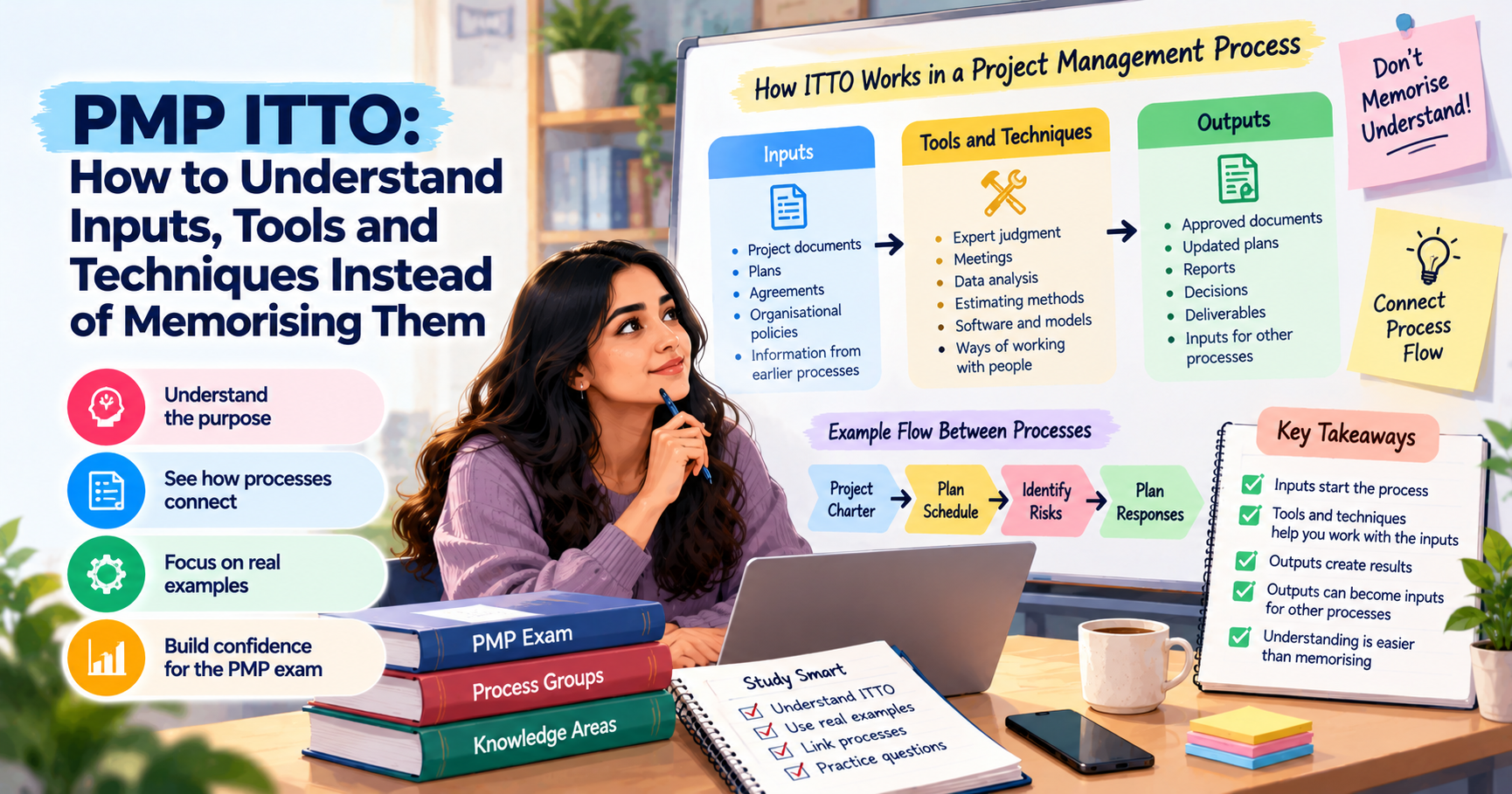
PMP ITTO stands for Inputs, Tools and Techniques, and Outputs. These are the main parts of a project management process. Inputs are the information or documents needed to start a process. Tools and techniques help the project manager work with that information. Outputs are the results produced after the work is done.
For the PMP exam, you do not need to memorise every ITTO combination without understanding its purpose. A better way is to see how one process connects to another, what information it needs, and what it produces. This makes it easier to answer scenario-based questions and recall important ITTO concepts during the exam.
Key Highlights of PMP ITTO
- ITTO stands for Inputs, Tools and Techniques, and Outputs.
- Inputs provide the information needed to carry out a process.
- Tools and techniques help turn inputs into useful results.
- Outputs may become inputs for other project management processes.
- Understanding the flow between processes is more useful than memorising long lists.
- An ITTO cheat sheet can help with revision, but it should not replace practical understanding.
- PMP candidates should study ITTO in line with the current exam content and their chosen reference materials.
Introduction
Preparing for the Project Management Professional (PMP) exam can feel difficult when you reach ITTO. There are many project management processes, and each one has its own inputs, tools and techniques, and outputs. Looking at these lists for the first time can make it seem like you have to memorise hundreds of terms.
This is where many candidates get stuck. They try to remember which document belongs to which process, which technique is used at a particular stage, and what output comes next. After a few days, the lists begin to overlap. Revising them takes time, and a small change in the question can make the answer less obvious.
There is another way to approach PMP ITTO.
Instead of treating every process as a separate list, look at the reason behind it. Ask yourself what the project manager needs to do, what information is available, which method can help, and what result should come out of the process.
For example, a project manager cannot prepare a useful risk response plan without knowing the risks that may affect the project. The team must first identify and assess those risks. It can then decide how to respond to them. When you understand this sequence, the related ITTO concepts become easier to connect.
This guide explains ITTO in project management, shows how the different parts work together, and shares practical ways to study them for the PMP exam.
What Does ITTO Stand For?
ITTO is short for Inputs, Tools and Techniques, and Outputs. These three parts help explain how project management processes work.
Inputs
Inputs are the information, documents, plans or other resources required to carry out a process. They give the project manager a starting point.
For example, a project manager preparing a schedule needs information about project activities, their duration, dependencies and available resources. Without this information, creating a realistic schedule would be difficult.
Common examples of inputs include project documents, project management plans, agreements, organisational policies and information from earlier processes. The exact inputs depend on the process being performed.
Tools and Techniques
Tools and techniques are the methods used to work with the inputs and produce a result.
A project manager may use expert judgment, meetings, data analysis, estimating methods or specialised software, depending on the task. These methods help the team review information, compare options and make decisions.
For example, a team estimating the time needed for project activities may use expert judgment or an estimating technique. The choice depends on the available information and the nature of the work.
Remember that tools and techniques are not always physical tools or software. They can also include ways of thinking, analysing information and working with people.
Outputs
Outputs are the results produced by a process. They may include an approved document, an updated plan, a report, a decision or another project deliverable.
For instance, a project scheduling process can produce a project schedule. That schedule may then be used by the team to monitor progress and identify delays.
This connection is important because one process does not always work alone. Its output may become an input for another process.
When you study PMP ITTO, focus on these three questions:
- What information does the process need?
- How will the project manager use that information?
- What should the process produce?
These questions provide a simple starting point for understanding each process.
How a Process Works: Inputs, Tools and Techniques, Outputs
Think of a project management process as a series of connected actions. The project manager starts with the information available, applies a suitable method and produces a result.
Consider a project in which a company plans to launch a new mobile application.
Before development begins, the project manager needs to understand the project's purpose, expected benefits, major requirements and key stakeholders. The project charter helps formally authorise the project and gives it a clear direction.
Once the project is authorised, the team can plan the work in greater detail. It may define activities, estimate durations, prepare a schedule and identify possible risks. Each of these activities depends on information from earlier work.
The process can be understood in three stages.
First, the inputs provide the starting point. The team uses existing information, documents and decisions to understand what needs to be done.
Next, tools and techniques help the team do the work. These could include analysis, estimating, expert judgment, discussions or other suitable methods.
Finally, the outputs show the result. The team may produce a project charter, a schedule, a risk register or another document, depending on the process.
However, ITTO is not always a simple one-way sequence. A process may have several inputs, use multiple tools and techniques, and produce more than one output. Some outputs may also need review or approval before they can be used elsewhere.
The same idea applies across the processes of PMP. Each process has a purpose, and understanding that purpose helps explain why certain inputs and outputs are connected.
For PMP candidates, the main lesson is simple. Do not study an ITTO list without asking what the process is trying to achieve.
Do You Still Need to Memorise ITTO for the PMP Exam?
Memorising every input, tool, technique and output is not the best starting point for PMP preparation. Understanding how they work is more useful, especially when a question describes a project situation and asks what the project manager should do next.
The PMP exam focuses on applying project management knowledge to situations. The exact balance of topics and question styles can change, so candidates should check the current PMP exam content outline before deciding how to divide their study time.
This does not mean memorisation has no value. You still need to recognise important terms, understand the purpose of common documents and remember how major processes connect. The difference is that you should build this knowledge through understanding rather than trying to remember isolated lists.
For example, imagine a question about a project that is running behind schedule. The project manager wants to understand the difference between planned progress and actual progress.
If you know the purpose of schedule control, you can identify why schedule information, performance data and suitable analysis methods matter. You can then think about the result the process should produce, such as schedule forecasts or updates, depending on the situation.
You may still need to revise specific ITTO details, but you will have a reason to remember them.
Use your study time in this order:
- Understand the purpose of each process.
- Identify its most important inputs and outputs.
- Learn the tools and techniques used to complete the work.
- Connect the process to related processes.
- Practise scenario-based questions and review your mistakes.
A reliable PMBOK guide can help you understand the concepts and their relationships. Use the edition and reference material relevant to your preparation, and check the latest official exam information rather than assuming that every older ITTO list reflects current exam expectations.
How to Learn ITTO by Understanding Flow
You can make ITTO easier to study by looking at the way information moves through a project. Three approaches can help.
Follow the Outputs Forward
One useful study method is to start with the output of a process and ask where it may be used next.
For example, a project charter formally authorises a project. It also gives the project manager and team an initial understanding of the project's purpose, objectives and major requirements. This information supports more detailed planning.
Similarly, a risk register records identified risks and related information.The team can use this information when analysing risks and deciding how to respond to them.
When you revise an output, ask yourself:
- Why is this output needed?
- Which later activity might use it?
- What decision or action can it support?
You do not need to trace every document through every process in one sitting. Start with familiar examples and gradually build the connections.
This method also helps you spot relationships between processes. If a question refers to information produced earlier in the project, you can think about how that information supports the current task.
Group Tools by Purpose
Another way to study ITTO is to group tools and techniques according to what they help the project manager do.
For example, some techniques help estimate time or cost. Others help identify risks, analyse performance, communicate with stakeholders or make decisions.
This is easier to remember than treating every technique as an unrelated term.
Consider expert judgment. It may be useful when a project manager needs advice from someone with relevant knowledge or experience. The context may differ from one process to another, but the basic reason for using it remains similar.
Data analysis is another example. Depending on the method, it can help the team compare information, identify patterns, assess performance or understand possible outcomes.
While studying, create small groups such as:
- Estimating and forecasting
- Risk identification and analysis
- Performance measurement
- Communication and stakeholder engagement
- Decision-making and problem-solving
These groups are for revision, not a replacement for the formal ITTO structure. Always check which tools and techniques apply to the process you are studying.
Link to Real Project Work
ITTO becomes easier to understand when you connect it to work that a project manager might actually perform.
Imagine a team building a website for a retail business. The project manager needs to plan the work, track progress and deal with possible delays.
To prepare a schedule, the team needs activity information, estimates and details about dependencies. It can use scheduling techniques and suitable software to organise the work.The resulting schedule gives the team a reference point for planning and monitoring.
Later, if the development team misses a milestone, the project manager reviews progress information and compares actual results with the plan. The project manager can then investigate the reason for the delay and determine the appropriate response.
Think about what changes at each stage. The purpose of the work changes, so the information needed, methods used and outputs may change too.
You can use the same approach for risk management, cost management, stakeholder engagement and quality management.
When studying, choose a simple project you understand and use it to explain each process in your own words. You do not need to create a detailed case study for every ITTO. A short example is enough to make the concept clearer.
ITTO Examples
The following examples show how inputs, tools and techniques, and outputs relate to three common project management processes. They are simplified for revision, not complete official ITTO lists. Refer to your chosen PMBOK edition and current study materials for the full details.
| Process | Key Inputs | Key Tools and Techniques | Key Outputs |
| Develop project charter | Business documents, agreements, organisational policies and existing project information | Expert judgment, data gathering, interpersonal and team skills, meetings | Project charter, assumptions log |
| Plan risk responses | Risk register, risk report, project management plan and relevant project documents | Threat and opportunity response strategies, contingency planning, expert judgment | Change requests, updates to project documents |
| Control schedule | Project management plan, project documents, work performance data | Data analysis, critical path method, project management information system | Work performance information, schedule forecasts, change requests and updates |
Example 1: Develop Project Charter
A project needs formal authorisation before the team can move into detailed planning.
The project manager reviews the business need, available agreements and relevant organisational information. Expert judgment and meetings may help clarify the project's purpose and expectations.
The main result is the project charter. It formally authorises the project and provides an initial direction for the work. Develop Project Charter sits within project integration management, which ties the project’s processes together.
To remember this process, think of it as the point where an idea receives formal approval to move forward.
Example 2: Plan Risk Responses
Suppose the team has identified a risk that a key supplier may deliver materials late.
The project manager reviews the risk information and evaluates suitable response strategies, a core part of the project risk management process The team may decide to identify another supplier or prepare a backup arrangement, depending on the situation.
The response planning work may result in updates to project documents or change requests.
The main point is that the team needs risk information before it can decide how to respond. This connection makes the process easier to understand than memorising a list of terms.
Example 3: Control Schedule
Suppose a software project is falling behind its planned dates.
The project manager reviews schedule information and actual performance, the heart of project schedule management. Data analysis and scheduling methods can help identify delays and assess their impact on the project.
The process may produce work performance information, schedule forecasts and change requests, depending on what the analysis shows.
To remember this process, connect it with a practical question: Is the project progressing as planned, and what needs attention?
These examples show why the purpose of a process matters. When you know what the project manager is trying to achieve, the related ITTO becomes easier to recall.
ITTO Cheat Sheet Approach
An ITTO cheat sheet can be useful when you want to revise several processes quickly. However, it should be a short summary that supports your understanding, not a large document that you try to memorise word for word.
A good ITTO PMP cheat sheet can include the process name, its purpose, key inputs, important tools and techniques, and main outputs. You can also add one short line explaining how the output may support later work.
For example, your note for Develop Project Charter could say:
Purpose: Formally authorise the project.
Inputs: Business need, relevant agreements and organisational information.
Tools and techniques: Expert judgment, data gathering and meetings.
Output: Project charter.
Connection: The charter supports further project planning.
This format gives you more context than a list of terms alone.
Keep your notes easy to scan. You can use different colours for inputs, tools and techniques, and outputs if that helps you. You can also use arrows to show how information moves between processes.
When creating an ITTO cheat sheet, follow these guidelines:
- Include the main concepts before adding minor details.
- Use short descriptions rather than long definitions.
- Add practical examples for difficult processes.
- Review related processes together.
- Correct your notes when you find a mistake during practice.
- Check the source and edition used for your ITTO information.
You can also use flashcards to test individual concepts. For example, one side can ask what a process is meant to achieve, while the other side gives its purpose and a few important ITTO details.
The goal is to make revision faster. If your cheat sheet becomes so long that you need another cheat sheet to study it, simplify it.
ITTO in Predictive vs Agile Approaches
ITTO is often discussed in connection with predictive project management, where work is planned in a structured way. However, inputs, methods and outputs also make sense in agile environments.
In a predictive approach, the team usually plans a larger part of the project before carrying out the work. Documents such as the project schedule, scope baseline and risk register may support planning and control, depending on the project and its management approach.
The team uses the relevant information to perform activities, monitor progress and manage changes. The outputs help the project manager understand whether the work is progressing as expected.
In an agile approach, planning and delivery happen in shorter cycles. The team may use a product backlog, sprint backlog, feedback from users and information about completed work to decide what to do next.
For example, an agile team may review feedback after a sprint and adjust the backlog. The feedback acts as useful information, the team discusses and prioritises the work, and the updated backlog supports the next cycle.
The documents and techniques may differ, but the basic idea remains the same. The team uses available information, applies a suitable method and produces a result that supports the next decision or activity.
Do not assume that every predictive document or process must appear in exactly the same form in an agile project. The approach should fit the project's needs, delivery method and working environment.
For PMP preparation, focus on understanding how the project manager adapts to the situation. The current exam covers predictive, agile and hybrid ways of working, so candidates should practise applying the right approach to the scenario described in each question.
Common ITTO Study Mistakes
A few common habits can make ITTO harder to understand than it needs to be.
Memorising Every List at Once
Trying to learn every ITTO combination in one sitting can lead to confusion. Many processes use similar inputs or techniques, so the terms may begin to look the same.
What to do instead: Study a small group of related processes. Understand their purpose and compare their differences before moving on.
Ignoring the Purpose of a Process
Remembering a process name without knowing what it achieves makes it difficult to apply the concept in a scenario.
What to do instead: Write one sentence explaining the process in your own words. Then connect that purpose to its main inputs and outputs.
Treating Every Tool as Unique
Some tools and techniques appear across several processes. Trying to memorise each appearance separately adds unnecessary work.
What to do instead: Group similar techniques by purpose, then learn how their use changes with the process.
Using an Outdated ITTO List
Study notes based on an older reference may not match the material you are using or the current exam requirements.
What to do instead: Check your source, edition and the latest official PMP exam information. Use one main reference set to keep your preparation consistent.
Skipping Practice Questions
Reading ITTO lists can create a sense of familiarity, but that does not always mean you can apply the knowledge.
What to do instead: Answer PMP practice exam questions, explain why the correct option fits the scenario and review why the other options do not. Use your mistakes to decide which processes need more revision.
If you need a broader study plan, this guide on how to prepare for the PMP exam can help you organise your preparation. You can also consider PMP certification training or a PMP prep online course if you prefer structured lessons and guided practice.
Conclusion
PMP ITTO can look difficult when you first see the number of processes and the details attached to each one. However, you do not need to approach every list as a separate memory task.
Start by understanding what each process is meant to achieve. Then identify the information it needs, the tools and techniques that help complete the work, and the results it produces. Follow those outputs into related processes and use simple project examples to make the connections clear.
An ITTO cheat sheet can support quick revision, while flashcards and practice questions can help you check what you remember. Keep your notes focused and use reliable study material that matches your PMP preparation.
The aim is not to recall a long list without context. It is to understand why a project manager needs certain information, how that information is used and what should happen next. Once you can explain that flow in your own words, ITTO becomes much easier to revise and apply.






 Lowest-Price Challenge











 Personalized Path


.webp)


 USA
USA  Canada
  India
India  UK
UK  Australia
  Singapore


