


 Call Us



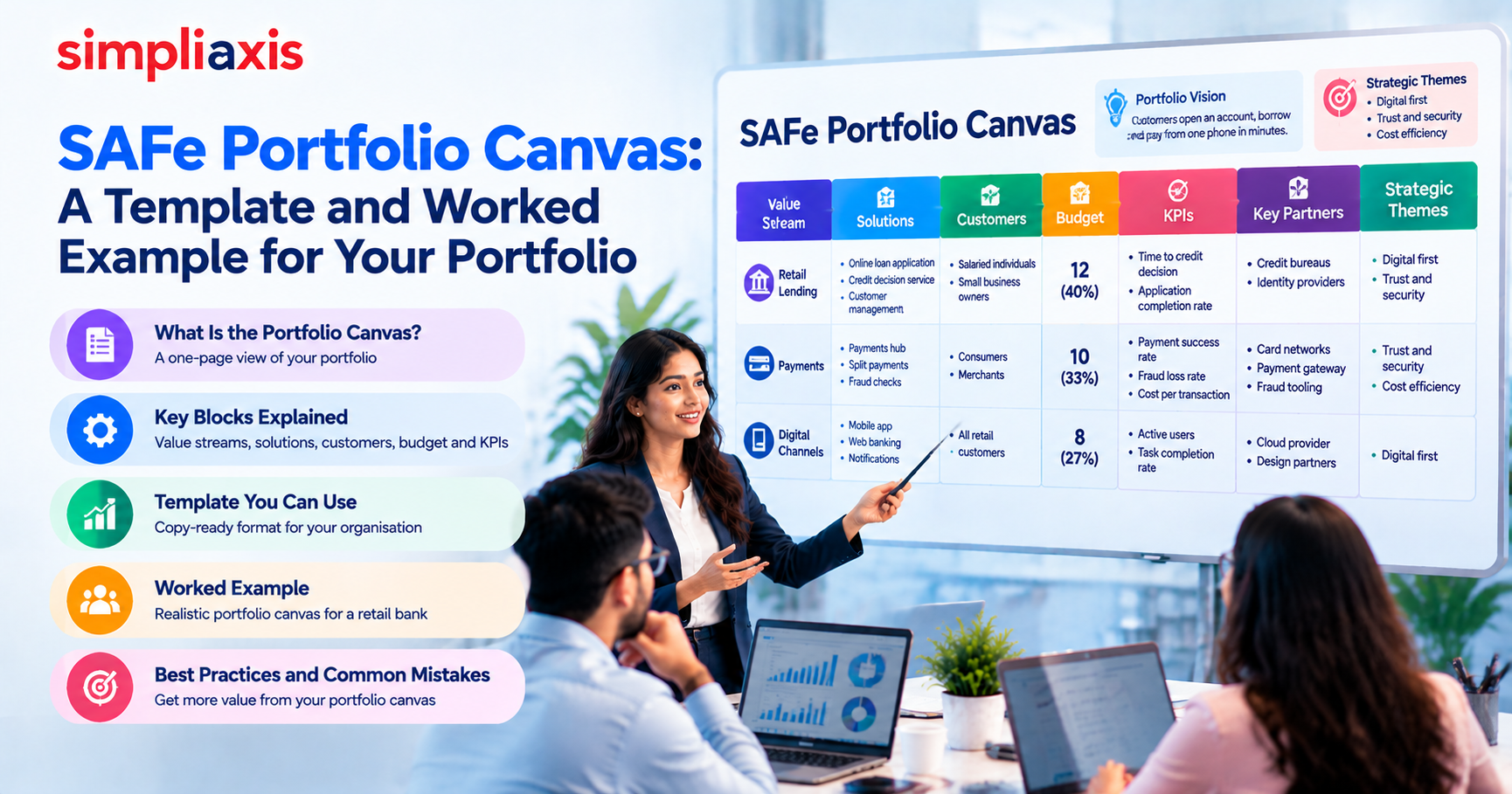
Ask five leaders in a large organisation what their portfolio actually consists of and you will probably get five different answers. Some will list products, some will list departments and some will list projects. The SAFe Portfolio Canvas exists to replace that fog with a single page that shows what the portfolio builds, for whom, with how much money and how success is measured.
This guide explains what the Portfolio Canvas is, how it relates to the Business Model Canvas, what each block means, and how to fill it in. It includes a copy-ready template and a completed example for a fictional retail bank, so you can build your own canvas in a workshop and avoid the usual mistakes.
Key Highlights of SAFe Portfolio Canvas
- The Portfolio Canvas is a one-page view of a SAFe portfolio, adapted from Alexander Osterwalder's Business Model Canvas, with one row for each development value stream.
- Its core purpose is to show, for every value stream, the solutions it builds, the customers it serves, the budget it receives and the measures of success.
- It supports Portfolio Vision and Lean budgeting by making it visible where money goes and whether that spending lines up with the Strategic Themes.
- Teams commonly extend the core blocks with partners, key activities, resources and cost structure, depending on what the portfolio needs to discuss.
- It works best as a living artifact with an owner and a review rhythm, not as a poster created once in a workshop.
What Is the SAFe Portfolio Canvas?
The SAFe Portfolio Canvas is a one-page tool that maps each development value stream in a portfolio to its solutions, customers, budget and measures of success, so that leaders can see and discuss the portfolio as a whole. The SAFe Knowledge Base explains it as part of its guidance on Portfolio Vision, where it is described as based on the Business Model Canvas.
A SAFe portfolio is a set of development value streams that deliver solutions to customers. If you are not yet familiar with how the portfolio level fits into the framework, our overview of the four levels of the Scaled Agile Framework is a good starting point, and our overview of what SAFe is covers the basics.
How it differs from the Business Model Canvas
Osterwalder's Business Model Canvas describes one business or one product on a single page. The Portfolio Canvas applies the same thinking to many value streams at once.
| Aspect | Business Model Canvas | SAFe Portfolio Canvas |
| Scope | One business or product | A whole portfolio of value streams |
| Layout | One set of blocks | One row for each value stream |
| Main question | How does this business create and capture value? | Where does the portfolio invest, for whom and with what expected return? |
| Budget | Appears as cost structure | Linked to Lean budgets for each value stream |
| Measures | Not a core block | KPIs for each value stream |
| Strategy link | Implicit | Linked to Portfolio Vision and Strategic Themes |
The two can work together. A row in the Portfolio Canvas can point to a more detailed Business Model Canvas for a single solution if the team needs that detail.
Portfolio Canvas Template You Can Copy
Copy this layout into a spreadsheet or a whiteboard tool. The first five blocks are the core of the canvas as the framework describes it. The last four are common extensions that many teams add.
| Block | Question it answers | Core or extension |
| Value stream | Which value stream is this row about? | Core |
| Solutions | What does this value stream build and operate? | Core |
| Customers | Who uses or pays for these solutions? | Core |
| Budget | How much funding does it receive? | Core |
| KPIs | How do we know it is succeeding? | Core |
| Key activities and resources | Which trains, teams and shared resources are needed? | Extension |
| Key partners | Which external suppliers or ecosystem partners does it depend on? | Extension |
| Cost structure | What are the main cost elements? | Extension |
| Strategic Themes | Which themes does the stream support? | Extension |
Put the portfolio name, the Portfolio Vision and the current Strategic Themes at the top of the page, so every row can be read against them.
How to Fill Each Block, One Value Stream per Row
Fill the canvas row by row, not block by block, so each row tells a complete story about one value stream.
- Value stream. Name it for the value it delivers, such as Retail Lending or Payments, not for a team or system.
- Solutions. List the products, platforms or services the stream builds and runs. Keep it to what the customer or an internal user would recognise.
- Customers. Describe the segments, internal or external, that depend on the stream.
- Budget. State the Lean budget for the stream and, if you can, the split between keeping existing solutions running and funding new initiatives. Our article on Lean Portfolio Management implementation explains how budgets connect to value streams.
- KPIs. Choose a small number of outcome measures, such as time to complete a task or the success rate of a transaction. Avoid listing activity measures.
- Extensions. Add partners, activities and cost structure only if they help the conversation. A canvas with too many blocks becomes a spreadsheet nobody reads.
If you are unsure how many rows to create, start with the value streams that carry the most budget and the most customer impact. A row for every small team defeats the purpose.
Worked Example: Portfolio Canvas for a Fictional Retail Bank
This example is fictional. The numbers and names are invented to show how a completed canvas reads.
Portfolio: Retail Banking
Portfolio Vision: Customers open an account, borrow and pay from one phone in minutes.
Strategic Themes: Digital first; Trust and security; Cost efficiency.
| Value stream | Solutions | Customers | Budget (units of 30) | KPIs | Strategic Themes |
| Retail Lending | Online loan application, credit decision service | Salaried individuals, small business owners | 12 (40 percent) | Time to credit decision, application completion rate | Digital first, Trust and security |
| Payments | Payments hub, split payments, fraud checks | Consumers and merchants | 10 (33 percent) | Payment success rate, fraud loss rate, cost per transaction | Trust and security, Cost efficiency |
| Digital Channels | Mobile app, web banking, notifications | All retail customers | 8 (27 percent) | Active users, task completion rate | Digital first |
Extension blocks for the same rows:
| Value stream | Key activities and resources | Key partners | Main cost elements |
| Retail Lending | Lending Agile Release Train, risk specialists | Credit bureaus | Platform running costs, data services, development |
| Payments | Payments Agile Release Train, security team | Card networks | Processing fees, fraud tooling, development |
| Digital Channels | Digital Agile Release Train, design team | Cloud provider | Cloud hosting, design, development |
Reading the canvas gives leaders fast, specific answers. Lending and payments take the largest share of the budget, each is linked to two themes, and Digital Channels is the only stream tied to a single theme. If leadership believes Digital first is the most important theme, they might ask whether 27 percent is enough for the stream that serves every customer. The canvas does not answer that question, but it makes it easy to ask.
Good and weak entries side by side
The quality of a canvas depends on how specific each entry is. This comparison shows the difference for three blocks.
| Block | Weak entry | Stronger entry |
| Solutions | Core banking | Online loan application and credit decision service |
| Customers | Everyone | Salaried individuals and small business owners applying for credit |
| KPIs | Number of releases | Time to credit decision and application completion rate |
| Budget | Large | 12 of 30 units, split between running costs and new initiatives |
| Strategic Themes | Digital | Digital first, with the measure that links the stream to it |
The pattern is consistent: a strong entry names something a customer or leader could recognise and a measure someone could check.
Keeping the Canvas Alive: A Quarterly Review Routine
A canvas is only as useful as its last update. A short, regular review keeps it honest. Use these questions at each refresh.
- Have any value streams been added, merged or retired since the last review?
- Have budgets moved, and do the new numbers still match the Strategic Themes?
- Are the KPIs still the right ones, and what did they show over the last period?
- Did any epic approved this period change what a stream builds or whom it serves?
- Which rows have unclear owners or customers, and who will fix them?
- What should we stop funding, and what should we start?
Keep the review to a couple of hours, assign someone to update the page straight away and share the new version with Business Owners and teams. A canvas that changes visibly after each review shows people that the exercise leads to decisions.
Linking the Canvas to Strategic Themes and Portfolio Vision
The Portfolio Vision describes the future state of the portfolio's value streams and solutions, and Strategic Themes are the business objectives that connect the portfolio to the enterprise strategy. The canvas is where the two meet the budget. For every row, ask whether the solutions and KPIs support at least one theme and whether the budget reflects the theme's importance.
A simple check is to count how many rows connect to each theme and how much of the budget they carry. If a theme has no rows, it is not being funded. If a row has no theme, either the theme list is incomplete or the stream does not belong in the portfolio. Our guide to business value in SAFe explains why strategy and delivery need this explicit connection, and the SAFe Big Picture shows where the portfolio level sits among the others.
Using the Canvas in Lean Budgeting and Epic Decisions
Once the canvas exists, it becomes useful in three recurring conversations.
First, it is an input to funding decisions. The canvas shows where money goes today, and the Strategic Investment Planning event can then decide where it should go next. Our article on LPM tips for large portfolios covers how to keep that process manageable. Second, it frames epic decisions. When an epic is proposed, you can ask which row it belongs to, which KPI it should move and how it affects the budget.
Our guide to portfolio Kanban shows how epics move from idea to approval. Third, it supports communication. Business Owners and leaders can present the canvas at planning events, so teams see how their work fits the wider picture, a theme covered in our article on what Business Owners do in PI Planning.
Running a Portfolio Canvas Workshop
A short facilitated workshop is the usual way to build the first version.
1. Prepare. Collect the Portfolio Vision, any value stream map and the current Strategic Themes.
2. Invite the right people. Include Lean Portfolio Management, Business Owners, enterprise architects and representatives of the value streams.
3. Map the current state. List the value streams and what they deliver today before talking about the future.
4. Fill the rows. Work through the blocks for each value stream, using silent writing first so that quieter participants contribute.
5. Check against strategy. Compare the rows with the Strategic Themes and mark gaps.
6. Agree owners and a review date. Someone has to keep the canvas current, or it will be out of date within a quarter. The canvas also supports the wider SAFe dual operating system, where portfolio leaders set direction and the teams deliver.
Treat the output as a validated draft for review by portfolio leadership, not as a final artifact. Many organisations refresh the canvas on a regular cadence and after major strategy changes.
Portfolio Canvas vs Portfolio Kanban vs Roadmap: Which Artifact Answers Which Question?
New portfolio practitioners often mix these artifacts up. Each one answers a different question, and you usually need all three.
| Artifact | Main question | Time view | Typical owner |
| Portfolio Canvas | What does the portfolio build, for whom, with what budget and measures? | Current picture, refreshed regularly | Lean Portfolio Management |
| Portfolio Kanban | Which epics are being analysed, approved and implemented? | Flow of work through states | Epic Owners and portfolio leaders |
| Roadmap | When do we expect to deliver major capabilities? | Future timeline | Product and Solution Management |
| Portfolio Vision | Where do we want the portfolio to be in the future? | Long-term direction | Business Owners and executives |
The practical advice is to keep the canvas short and the other artifacts separate. If the canvas starts to include delivery dates, it turns into a roadmap. If it lists every epic, it turns into a backlog. Keep it to the shape of the portfolio and let the other tools do their jobs.
Portfolio Canvas and the SAFe LPM Exam
Portfolio vision, strategy and funding are central to Lean Portfolio Management. The Scaled Agile study guide for the Lean Portfolio Manager 6.0 exam describes 45 questions in 90 minutes, a 77 percent pass mark and seven domains, with Establishing Portfolio Strategy and Vision weighted at 14 to 16 percent. Confirm the details in the current official guide before you register.
To see how the canvas fits a study plan, read our LPM syllabus overview and the guide to passing the SAFe LPM exam. You can test your understanding with the SAFe LPM practice test.
Common Mistakes When Building a Portfolio Canvas
- Making it a one-off poster. A canvas that is never updated stops being used.
- Creating too many rows. Dozens of tiny value streams hide the picture.
- Listing activities as KPIs. Measures should show outcomes for customers or the business.
- Leaving rows unlinked to themes. If a row supports no theme, the portfolio has a question to answer.
- Having no owner. Name one person responsible for keeping it current.
- Confusing it with a roadmap or charter. The canvas shows the shape of the portfolio, not a delivery schedule.
- Skipping the current state. Starting from the desired future produces a canvas that describes wishes, not reality.
Conclusion
The Portfolio Canvas gives a SAFe portfolio a single, readable view of what it builds, for whom, with what budget and how it measures success. Build it row by row, link every row to the Strategic Themes, keep the extensions only when they help, and review it on a regular rhythm. Used this way it becomes the shared reference for funding, epic and planning conversations.
Learn how portfolios plan, fund and govern: Build your skills with the Lean Portfolio Management certification training.
Understand scaled Agile from the top down: Explore the Leading SAFe certification training.

HowtoEstablishOne_1788350087.png)
_1788349430.jpeg)




 Lowest-Price Challenge











 Personalized Path


.webp)


 USA
USA  Canada
  India
India  UK
UK  Australia
  Singapore


