


 Call Us



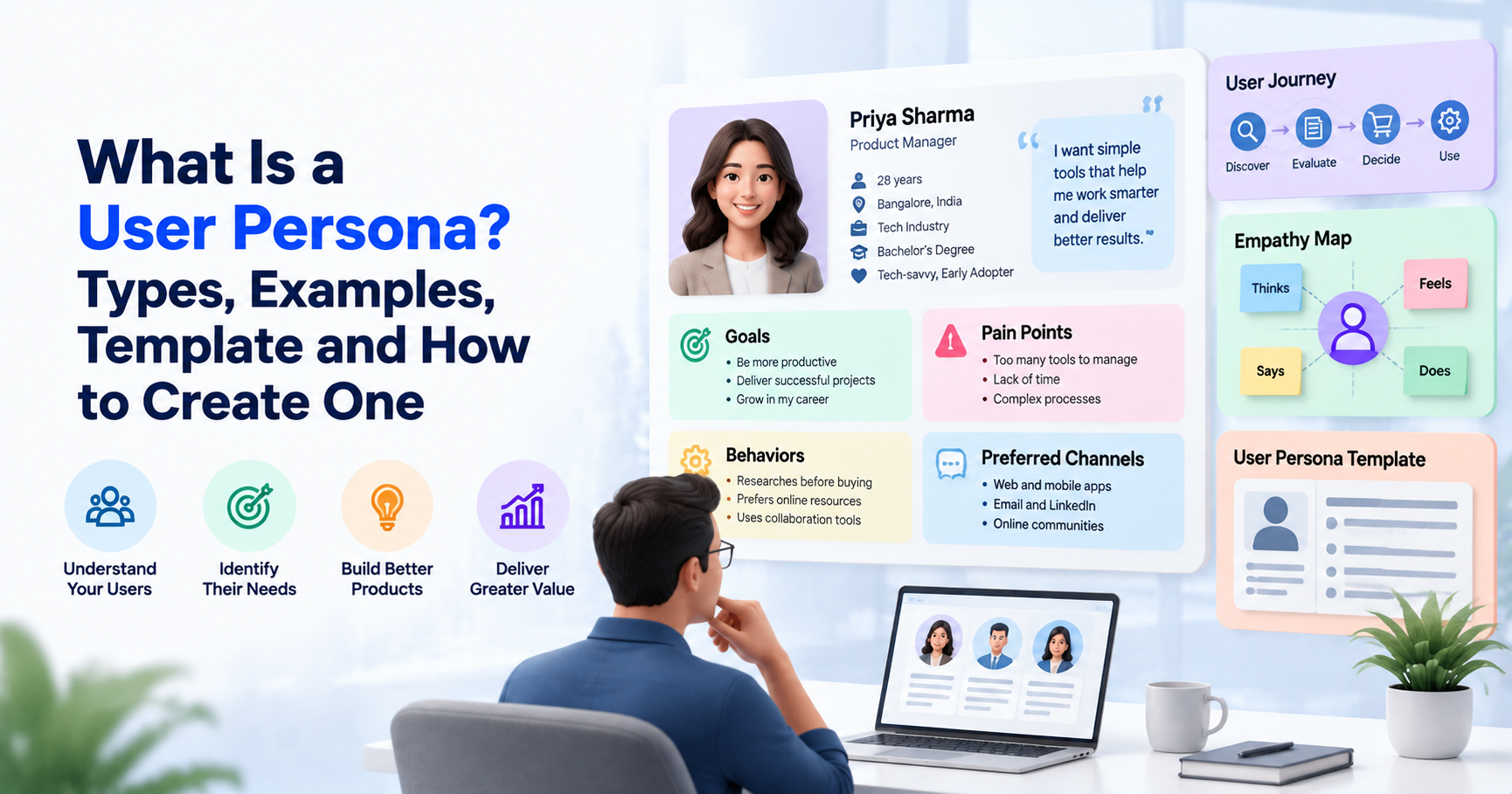
A user persona is a fictional, research-based representation of users’ goals, behaviors, needs, and challenges. It helps product teams to understand their audience, prioritize features, and improve user experience (UX). A typical persona includes background, motivations, pain points, and usage habits. To make one, you need to collect data from users, find patterns in it, and verify your findings. For example, one persona could be a Project Manager; then the product should support tracking deadlines, coordinating teams and tracking project progress all in one place.
Key Highlights: What Is a User Persona?
- A user persona is a description of a distinct group of users based on evidence from research, not assumptions.
- The most useful personas are not just demographic-focused, but user-goal-, behavior-, motivation-, and frustration-focused.
- Common user persona types are proto-personas, qualitative personas, statistical personas, marketing personas and UX personas.
- A practical user persona can be developed in five steps: setting goals, collecting research, identifying patterns, creating the profile, and keeping it updated.
- User persona examples and templates help teams translate research into actionable product requirements.
- Personas are used with empathy maps, customer journey maps, and the jobs-to-be-done framework.
- The use of Personas in Agile and SAFe helps teams to connect the dots between user needs and product backlogs, user stories, and feature prioritization.
Introduction
To be successful, a digital product must start with knowledge of its users. Some, such as mobile banking customers, want fast transfers. Others want budgeting tools and alerts on spending. User personas help teams understand these needs, behaviors and frustrations and therefore make better product and UX decisions.
Personas are useful for designers, product managers, marketers and development teams. But their value is in how they mirror real user research and impact day-to-day decisions. This guide covers user persona types, examples, steps and templates to create them to help you build user-centric products.
What Is a User Persona?
User personas are a way of describing the characteristics, needs, motivations and behavior of a given group of users. This allows teams to understand who they're designing for and why these people would use a product or service.
A persona doesn’t have to be a real person. Instead, it combines repeating patterns across many users in a fictional but realistic simulation.
For example, think of a learning platform that can identify a group of working professionals who like short lessons, study outside of work hours, and need a flexible learning schedule. Building a persona for this group will help the product team focus on mobile access, tracking progress, and bite-sized learning modules.
User Persona Definition
A user persona is a research-based archetype of a target user created to characterize a meaningful set of shared needs, behaviors, goals, and challenges.
“Personas help users to be more memorable and help product teams to remain user-centered throughout design and development,” says Nielsen Norman Group.
A good persona answers five basic questions:
- Who’s the user? Their relevant background, role and context.
- What are they trying to do? What they are doing and what they want.
- What do they do? Their habits, preferences and typical workflows.
- What are their problems? Their frustrations, barriers and unmet needs.
- How can the product help you? The experiences or capabilities that meet those needs.
Based on data collected from interviews, surveys, usability testing, analytics, client feedback, or other relevant research.
Why User Personas Matter
User personas help teams make better decisions by connecting the product features with the people who will use them.
Their major advantages are:
- Better user experience: Designers can evaluate whether the interface meets the real needs and capabilities of users.
- Improved feature prioritization: Product managers can use Agile prioritization techniques to focus on features that solve critical user problems.
- Improved Team Alignment: Designers, developers, marketers and stakeholders have a shared understanding of the target audience.
- Targeted messaging: Marketers can customize messages to user motivations and favored channels.
- Informed product discovery: Teams can test unmet needs before investing resources in solutions.
- More detailed product requirements: User stories and acceptance criteria are tied to specific user goals and contexts.
For instance, if research shows that first-time users drop off because of asking for too much information during the registration process, the team might consider shorter forms, social login, or progressive onboarding.
Personas alone, however, won’t make a product better. The value of insights depends on the quality of the research and how much teams use those findings to make decisions.
User Persona vs User Profile vs Buyer Persona
These terms are related, but they serve different purposes.
| Aspect | User persona | User profile | Buyer persona |
| Primary purpose | Understand user needs and behavior | Describe an individual or account | Understand purchasing motivations |
| Main focus | Goals, habits, pain points, context | Attributes, history, preferences | Buying triggers, budget, objections |
| Typical users | UX and product teams | Customer support and account teams | Marketing and sales teams |
| Example | A learner who needs flexible lessons | A registered learner's account details | An HR manager evaluating training vendors |
A user persona helps explain how someone interacts with a product and what they want to accomplish. A user profile usually describes a particular person using recorded attributes or account information.
A buyer persona is a person who is interested in purchasing a product or service. In a B2B organization, the end user and the buyer may not be the same person.
User persona vs buyer persona: A software admin may buy a project management platform, but employees and team leaders are the ones who can use it on a daily basis. The administrator may be worried about cost, security and integration, whereas end users may be more concerned with ease of use and visibility of tasks.
What Goes Into a User Persona
A useful user persona profile contains enough detail to guide decisions without becoming a lengthy biography. Each element should explain something relevant about the user's needs or product experience.
Name, Photo and Demographics
Give the persona a fictional name and, if useful, a representative photo or illustration. Include demographic or professional information only when it influences the product experience.
Relevant details might include:
- Age range, when meaningful to the use case
- Occupation, role, or level of experience
- Location or working environment
- Technical proficiency
- Accessibility needs or device constraints
For example, a persona for an online learning platform might be a 32-year-old operations manager who works full-time and studies during evenings.
Avoid stereotypes. Age, gender, income, or location should not be used as substitutes for actual evidence about behavior.
Goals and Motivations
Goals are about what users want to do; motivations are why those outcomes are important. For example, a freelance designer might want to send invoices faster because slow administration reduces the time they have available for paid work. A student might want clear progress indicators because they need to balance learning with examinations and other responsibilities. Look for both functional and emotional drivers. Functional goals are what users want to accomplish and emotional motivations are the ways they want to feel, i.e., confident, independent, or in control.
Behaviors and Scenarios
Describe typical user interactions with a product, including the context of the interaction.
Thinking:
How often they use the product
- The fewest tasks they do
- Whether mobile or desktop
- What drives product usage
- Whether they work alone or with others
- What alternatives or workarounds they currently use
A concrete situation helps to understand these behaviors. A sales representative may update customer records between meetings using a mobile phone, so a quick and accessible interface is especially important.
Pain Points and Frustrations
Pain points are obstacles that prevent users from achieving their goals in an efficient or confident manner.
Examples are complicated navigation, re-entering the same data, unclear instructions, long load times, inaccessible interfaces, and badly integrated tools.
Document these problems with research findings, not assumptions. A good pain point describes the problem and its impact.
For example: “I have to put the same customer data into three different systems, which adds a lot of admin work and the opportunity for errors.
Preferred Channels and Tools
Capture the channels and tools users prefer when discovering, learning about, or interacting with a product.
These may include mobile applications, email, online communities, help centers, video tutorials, or collaboration platforms.
A small business owner might want a WhatsApp notification for urgent updates but use a desktop dashboard for financial reporting. Knowing this difference can help teams design communication and product experiences that are in line with actual working habits.
Types of User Personas
There is no single classification that applies to every organization. The following user persona types describe common approaches based on research depth and intended use.Nielsen Norman Group describes three persona types: lightweight (proto), qualitative and statistical.
Proto-Personas
Proto-personas are early versions built from what a team already knows, sees, and assumes—often before doing much new research.
They are useful when a team is trying to make fast alignments in an early discovery workshop, or when research resources are limited.
For instance, a startup building a meal-planning app might begin by assuming busy professionals want fast recipes and automated shopping lists.
However, proto-personas should be considered as hypotheses, not facts. Teams should clearly tag their assumptions and validate them via interviews, surveys, behavioral analytics or usability testing.
Qualitative and Research-Based Personas
Qualitative personas are derived from user interviews, field studies, contextual inquiry, and usability testing. Statistical personas rely on large data sets and quantitative analysis to identify useful user segments.
Qualitative personas are a pragmatic approach for many teams, says Nielsen Norman Group, because they expose the reasoning, attitudes, and context behind user behavior. It recommends starting with a small to medium-sized sample of interviews, from 5 to 30 participants, and then expanding the research as new insights become apparent.
This is a planning window, not a universal sample size law. The right number depends on the diversity of the audience, the goals of the research and the rate of new findings.
Research-based personas are particularly useful when teams want to understand not only what users do but also why they do it.
Marketing vs Product (UX) Personas
Marketing personas help teams understand how to reach and talk to potential customers. They are often on reasons to buy, awareness, content, and objections.
Product and UX personas are about how people use a product, what they’re trying to do, and where they get stuck.
For example, a fitness app marketing persona might be a customer who is comparing subscription plans. For example, a UX persona might be a beginner needing simple workout instructions, feedback on their progress and easy ways to modify exercises.
The two approaches can be complementary, but marketing insights should not replace product-specific user research.
How to Create a User Persona Step by Step
Learning how to create a user persona involves more than filling in a template. The process starts with a clear research objective and ends with a profile that informs real product decisions.
Step 1: Set Your Persona Goals
Explain why you need personas and what decisions they should inform.
Are you building a new app, redesigning an existing website, improving the onboarding process, or discovering a new product?
For instance, a subscription-based learning platform might wonder why users stop attending lessons after the first week.
A well-defined goal helps determine which users to research and what questions to ask. This also stops the team from getting any personal information they don’t want.
Step 2: Collect User Research and Data
Gather information from a variety of product discovery techniques, including:
- User interviews: Learn about their motivation, goals, expectations and frustrations.
- Surveys: Identify recurring preferences and compare responses in a larger group.
- Product analytics: Review engagement, navigation paths, drop-off points, and feature usage using sound data analysis methods.
- Customer support logs: Note recurring complaints and frequently asked-for improvements.
- Usability testing: Watch how people do the tasks, and where they got stuck.
- Market and customer research: Understand the larger context in which the product is used
During the interview, ask open-ended questions. For example, “Tell me about the last time you tried to complete this task,” instead of leading questions like, “Would you use a faster dashboard?”
For smaller projects, a few exploratory interviews can be used to identify a few initial themes. Additional research and quantitative validation may be required for broader or more diverse audiences.
Step 3: Find Patterns and Segments
Interpret your results to find significant differences or similarities between users.
Look for repeating goals, behaviors, motivations, frustrations, and contexts of use. Instead of just demographic characteristics, group people by these patterns.
For example, research for a budgeting app could find three repeating groups:
- Users who want to view their daily spending in a snap.
- Users who want to manage the finances of a household.
- Users who need detailed reports to track irregular income.
These groups may need different product experiences, even if they are similar ages and similar income levels.
Don’t go crazy with personas. Each persona should be a unique archetype that drives design, marketing or product decisions.
Step 4: Build the Persona Profile
Transform research patterns into a concise and understandable profile.
Include a fictional name, relevant background, primary goals, motivations, behaviors, pain points, preferred tools, and a representative scenario. I didn't know that they would do that. I didn't know that they would do that.
For example, a persona might say “I want to know what tasks are overdue but I don’t want to have to go into each project to find out.”
This statement can help a team explore things like dashboard summaries, overdue task alerts, and better filtering.
Distinguish between confirmed findings and hypotheses. If you have not tested a behavior, assume it and don’t treat it as a fact.
Step 5: Share and Keep Personas Alive
The people with personas should be the ones making the product decisions. Post them in team docs, design files, product planning sessions, or research repositories.
Write up requirements and evaluate user journeys when prioritizing features, looking at prototypes.
Adapt a persona when new research, product analytics or evolving customer needs challenge its assumptions. A persona is a working research artifact, not a static description of an audience.
For example, if analytics and interviews show that users are increasingly completing important tasks on mobile devices, a persona created for a desktop-first product may need to be updated.
User Persona Examples
The following user persona examples are illustrative. They demonstrate how a research-informed profile might be structured; the fictional details are not claims about actual research participants.
Example 1: User Persona for an Online Learning Platform
Persona name: Priya Sharma
Role: Working professional pursuing career development
Background: Balances a full-time job with online learning and has limited uninterrupted study time.
Goals
- Gain hands-on experience to advance your career.
- Complete courses without interfering with work responsibilities.
- Monitor learning progress & track incomplete modules.
Pain points:
- It’s difficult to finish long lessons during short breaks.
- The course structure is not clear and it is difficult to plan your study time.
- Not seeing much progress decreases motivation.
Behaviors: Using a cell phone on the commute, using a laptop at home. We like short lessons and practical work.
What I like best: Downloadable lessons, progress tracking, reminders, and flexible learning paths.
Product implication: The team can consider bite-sized lessons, cross-device progress sync, and clearer course completion indicators.
Example 2: User Persona for Project Management Software
Persona name: Rahul Mehta
Role: Project manager at a growing technology company
Background: Coordinates a distributed team working on several projects simultaneously.
Goals:
- Track deadlines and ownership.
- Identify risks before they delay delivery.
- Share progress with stakeholders without creating duplicate reports.
Pain points:
- Project updates are spread across multiple tools.
- Team members sometimes overlook task changes.
- Preparing status reports consumes valuable time.
Behaviors: Reviews dashboards each morning, checks notifications throughout the day, and prepares weekly stakeholder updates.
Preferred features: Task dependencies, automated reports, integrations, and clear project status indicators.
Product implication: Prioritize research into consolidated dashboards, useful alerts, and reporting automation.
Example 3: User Persona for an E-Commerce Application
Persona name: Ananya Rao
Role: Value-conscious online shopper
Background: Shops online when convenient but wants confidence that products match their expectations.
Goals:
- Compare products efficiently.
- Understand delivery dates and return conditions.
- Make purchases without unexpected costs.
Pain points:
- Hidden charges appear late in checkout.
- Product descriptions lack important details.
- Return policies are difficult to locate.
Behaviors: Compares product reviews, checks delivery estimates, and saves items before purchasing.
Preferred features: Transparent pricing, detailed product information, trustworthy reviews, and clear return instructions.
Product implication: Improve product comparison, surface delivery costs earlier, and make return information easier to find.
Together, these examples show how user persona examples with templates can connect user needs to specific product improvements. The goal is not to describe an imaginary person in detail; it is to make research actionable.
User Persona Templates and Tools
A user persona template provides a consistent structure for documenting research findings. It also makes it easier for different teams to compare personas and use them during planning.
Free User Persona Template
You can copy the following user persona template free of charge and adapt it to your project.
1. Persona overview
- Persona name:
- Fictional image or avatar:
- User segment:
- Role or relevant background:
2. Goals and motivations
- Primary goal:
- Secondary goals:
- Desired outcomes:
- Key motivations:
3. Behaviors and context
- Typical tasks:
- Usage frequency:
- Preferred devices and channels:
- Relevant environment or constraints:
4. Pain points
- Main frustrations:
- Current workarounds:
- Unmet needs:
- Consequences of existing problems:
5. Product opportunities
- Features or improvements to investigate:
- Accessibility considerations:
- Relevant user story:
- Evidence supporting the persona:
6. Research and validation
- Research methods:
- Number and type of participants:
- Confirmed findings:
- Unvalidated assumptions:
- Last reviewed:
Tools for Building User Personas
Your workflow, collaboration and research maturity is your best tool.
- Miro: Excellent for sticky note clustering, collaborative persona workshops, and mapping user insights.
- FigJam: Great for design teams to organize research findings and make visual persona boards.
- Figma: Good for presentation of persona profiles + prototypes + design docs.
- Google Docs or Sheets – good for simple, editable templates and research summaries.
- Dovetail: Qualitative research, interview notes, and recurring themes organization.
Survey platforms & analytics instruments: Help validate assumptions and uncover behavioral patterns at scale.
Some tools offer free plans or limited free features, while others require paid subscriptions. Before choosing a tool, make sure to check current pricing and functionality.
A spreadsheet or document is fine if you have a small team. More sophisticated research platforms are useful for managing multiple projects, participants and research studies together.
User Personas in Agile and SAFe Product Work
In Agile product development, the team needs to have a common understanding of who will benefit from a feature and what problem it solves. User personas are a tool for linking customer needs to product strategy, backlog prioritization and iterative delivery.
In SAFe, personas are one of the Design Thinking tools used to understand customers before defining solutions.“Personas aren’t a substitute for direct feedback from clients, but they do give teams a shared context for making decisions.
Personas help Product Owners and Product Managers align business priorities to customer outcomes. If you want to learn more about these responsibilities, see Who is a SAFe Product Owner and SAFe POPM Certification Training.
Writing User Stories From Personas
User personas can make user stories more specific by clarifying the person who needs a capability and the reason it matters.
A common user story format is:
"As a [type of user], I want [a capability], so that [a desired benefit]."
For example, consider Rahul, the project manager introduced earlier.
User story: "I'm a project manager managing multiple teams, and I want to see overdue tasks in one dashboard so I can identify delivery risks before they impact project deadlines.
The story describes a user, a need, and a desired outcome. The team can then establish acceptance criteria: for example, show overdue tasks, identify task owners, and let users filter by project.
The persona is context, but you should always validate the story against real user needs. Teams should not assume all people who are represented by a persona will need the same feature.
Personas, Empathy Maps and Customer Centricity
Personas are most useful when used in combination with other research and product discovery methods.
An empathy map is a tool that helps teams organize what a user says, thinks, does, and feels. It may expose emotional barriers or unmet needs that a demographic description might not.
A customer journey map is a visual diagram of a process, or experience, including user actions, touchpoints, questions and points of friction. For instance, an e-commerce team could follow the customer journey from product discovery to checkout and pinpoint where shoppers are unsure of shipping costs.
The jobs-to-be-done framework provides an alternative, where the problem is the progress the user needs to make in a given situation.“NN/g compares the two approaches in Personas vs. Jobs-to-Be-Done
Think of a customer using a budgeting app:
A working professional wants more control over their personal finances
- Empathy Map: Stress is indicated by surprise costs and no clarity on spending habits.
- Customer journey map: Calls out pain points in linking bank accounts and categorization of transactions.
- Jobs to be done: Helps define the desired outcome, for example, is current spending on track to meet a savings goal?
These techniques work in concert, alongside practices like user story mapping, to help teams move from understanding users to discovering, prioritizing, and testing solutions.
Common User Persona Mistakes
A persona that is well designed is useless if it is based on weak assumptions or disconnected from real product decisions. Don’t make these common mistakes:
- Do not build your personas on assumptions: Team opinions are a good starting point, but validate them via user persona research.
- Over-reliance on demographics: Age, job title and location rarely tell the whole story of a user’s needs. Introduce meaningful actions and motivations.
- Too many personas: Over-segmentation can make the profiles difficult to remember and use. Ensure the personas are different and relevant to the decisions you’re making.
- Too much profile detail: Unnecessary personal info can prevent the user from focusing on the main needs. Informs product and design strategy.
- Users’ expectations and behavior are changing: Treating personas as static. Review personas when there is new research or product evidence to update.
- Buyer vs user personas confusion: The person who buys the product may not have the same needs as the person who uses it. Show both where it is important to distinguish.
- Ignoring accessibility: Take into account different abilities, assistive technologies, language needs and usage constraints where appropriate.
- Not shared personas:Personas that aren’t shared: a persona sitting in a presentation folder won’t drive decisions. Use it in research reviews, design critiques and backlog refinement.
- Treating personas as a substitute for usability testing: A persona helps frame design decisions, but actual users must still test whether the resulting experience works.
The central principle is simple: a persona should help a team make a decision. If a detail does not improve understanding, prioritization, or the user experience, it may not need to be included.
Conclusion
A user persona distills research insights into a concrete representation of the people a product serves. Teams can make better-informed decisions about product design, feature prioritization and communication by documenting users’ goals, motivations, behaviors, and pain points.
A good persona starts with a clear goal, continues with user research and pattern identification, and ends with a profile that the team can use for real work. The process does not end with the creation of the template. “Personas need to be shared, validated with evidence, and iterated as user needs change.”
If you're building a website, designing a digital product or managing an Agile delivery team, start with a few meaningful personas. Tie each one back to real research. Use it to evaluate product decisions. Personas as working research tools, not static documents, can help teams create experiences that better represent what users actually need.






 Lowest-Price Challenge











 Personalized Path


.webp)


 USA
USA  Canada
  India
India  UK
UK  Australia
  Singapore


