


 Call Us



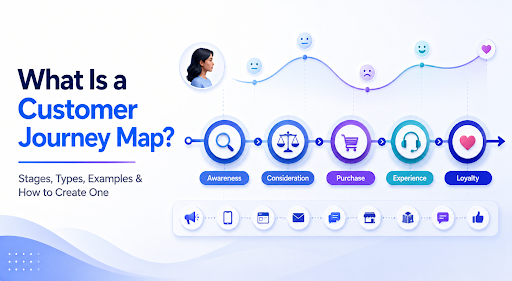
A customer journey map visualises their experience with a product or service. From initial awareness to ongoing engagement, every touchpoint shapes how customers will perceive your company, influencing their decision to stay or leave.
Key Highlights of Customer Journey Map
- A customer journey map is a visual timeline of the steps and touchpoints a customer goes through with a brand. It shows what they do, think and feel from first awareness to ongoing engagement.
- A journey map has four core components: persona and scenario, stages and touchpoints, actions, thoughts and emotions, and pain points and opportunities. The four main types are current-state, future-state, day-in-the-life and service blueprint.
- The five customer journey stages are awareness, consideration, decision, retention and advocacy. Each stage needs a different approach, from educational content early on to onboarding and referral programs later.
- You can build a map in six steps: set a goal and persona, define stages and touchpoints, gather research, map emotions and pain points, assign owners to opportunities, and keep the map updated. Tools such as Miro, Mural, Lucidchart and UXPressia, plus free templates, make this easier.
Introduction
Customer journey mapping draws on the power of storytelling, helping to engage and providing organisations with actionable insights into ways they can serve their customers. As per a report by Salesforce, 80% of customersnow look at the experience an organisation provides with respect to its products and services.
According to Aberdeen Group Research, organisations that offer journey management programs have 54% greater return on marketing investment and on the other hand, you have 56% in up-sell and cross-sell revenue.
In this blog, we will talk about the stages of customer journey, its core components, types, and customer journey map examples. We will also throw light on how product owners use journey maps in Agile and SAFe and ways to create a customer journey map.
What is a customer journey map?
A customer journey map is a visual representation of key steps taken by a customer while interacting with a brand. In simple terms, it is a timeline of touchpoints. Here, the goal is to design experiences, understand customer interactions, and improve outcomes.
According to Sunil Gupta, a professor at Harvard Business School, “Acquiring customers is all about influencing people at various stages of their decision journey”.
Let’s look at how a journey map helps different personas
- Marketing teams: A journey map shows which messages connect and when.
- Sales: The journey map reveals barriers to conversion.
- For customer success: The journey map highlights the opportunities to build loyalty and deliver support.
Why does customer journey mapping matter?
A good customer journey map improves the future state of your business and promotes a customer-centric approach.
- Remove and identify roadblocks: A customer journey map will highlight problem areas and ways you can fix them.
- Helps understand customers: The customer journey map gives clarity on customer behavior and lets you experience the customer's mindset during the decision-making process.
- Improve customer retention: As you learn about your customers’ needs, you become well-equipped with what’s your customer’s next move is, helping your brand reduce customer churn.
- Provide competitive differentiation: A customer journey map helps you in leveraging strategic customer insights whereby you can stand out from your competitors, attracting new customers at scale.
- Make better decisions: With a well-researched and reliable customer journey map, you’ll be in a position to make better decisions and ensure stronger business goals are being set.
- Quality business outcomes: Brands who are using customer journey maps will attract good customer acquisitions, improve overall ROI, create stronger customer retention, and better strategy formulation.
Customer journey map vs Experience map vs Service Blueprint
A customer journey map covers one customer's path with your brand. An experience map covers a general human experience, with no brand attached. A service blueprint adds the behind-the-scenes operations that deliver a journey. The table below compares them.
The Stages of the Customer Journey
The five stages are awareness, consideration, decision (or purchase), retention, and advocacy (or loyalty). They run from first noticing a need or brand to recommending it to others, and most sources split them into pre-sale, sale, and post-sale phases. The names vary by source, but the pattern stays the same.
Pre-Purchase: Awareness and Consideration
(A) Awareness
The customer has a problem or need and may not know your brand exists. They might meet you passively through an ad or actively by searching for a solution. They want education rather than a hard sell, so useful content works best: how-to blogs, guides, short videos, webinars, and visibility in search. A common mistake is pitching product features before the customer understands why the problem matters.
(B) Consideration
The customer now knows the options and compares them. They read reviews, ask friends, study your site and pricing, and weigh alternatives, sometimes including doing nothing. Peer opinion carries more weight than brand claims, so testimonials, case studies, comparison guides, product demos, and email nurturing do the most work here. Responding to negative reviews also builds trust at this point.
The Decision Stage
The customer has chosen and wants buying to be easy. This is the highest-intent moment, so friction costs the most here. The main work is removing barriers.
- Hidden costs such as shipping or taxes are cited as the most common reason for cart abandonment.
- Forced account creation and overly complex checkouts also drive people away.
- Baymard Institute data shows 39% abandon over unexpectedly high shipping costs or fees, and 19% over being asked to create an account.
- Useful tools at this stage include free trials, demos, limited-time offers, clear pricing and returns policies, and references from existing customers.
In B2B, this stage may involve procurement reviews, contracts, and several approvers instead of a simple checkout.
Post-Purchase: Retention
Retention. The question changes from "why should I buy?" to "why should I stay?" The first few weeks after purchase often decide whether a customer becomes loyal or drifts away. Tactics include:
- onboarding
- easy-to-reach support
- personalized follow-ups
- loyalty rewards
- FAQs and knowledge bases
- proactive check-ins
Two figures from the sources show why this matters. Semrush data puts the chance of selling to an existing customer at60–70%, against 5–20% for a new one. Another source says acquiring a customer can cost five times as much as keeping one.
Advocacy and loyalty.
Satisfied customers recommend you through reviews, referrals, and word of mouth. Advocacy comes after a strong experience and is not automatic. Even happy customers need an easy way to share and sometimes an incentive. Referral programs, review requests, user communities, and NPS surveys help identify and encourage promoters. Advocacy also feeds the journey: a referred friend enters at awareness, so the journey becomes a loop.
The Core Components of a Customer Journey Map
Most journey maps look different on the surface. Underneath, they share the same building blocks. Knowing these parts helps you read any map and build your own.
1. Persona and Scenario
Every journey map starts with a person. The persona is a research-based profile of a typical customer. It includes goals, needs, habits and frustrations. A strong persona is built from interviews and data, not guesswork.
The scenario sets the context. It answers a simple question: what is this person trying to do? For example, "a small business owner wants to switch accounting software before the tax deadline." The scenario keeps the map focused. Without it, the map tries to cover everything and ends up useful for nothing.
If you need help building the first piece, read this guide on creating auser persona. Keep the persona and scenario tied to one clear goal.
2. Stages and Touchpoints
Stages are the big phases of the journey. They form the horizontal axis of most maps. Common stages include awareness, consideration, purchase, onboarding, usage and advocacy. You can rename them to fit your business.
Touchpoints are the places where the customer meets your brand. These include your website, ads, emails, app screens, support chats, stores and even word of mouth. List every touchpoint under the stage where it happens.
Be honest about channels you do not own. A customer may read a review on a forum before visiting your site. That moment shapes their view, so it belongs on the map.
3. Actions, Thoughts and Emotions
Actions are what the customer actually does at each stage. They search, compare, sign up, ask a question or cancel. Keep these as short, observable verbs.
Thoughts capture what the customer is asking themselves. "Is this worth the price?" or "Will this work with my current tool?" These come from interviews, support tickets and survey comments.
Emotions show how the customer feels. Many teams plot this as a line that rises and falls across the stages. The dips reveal frustration. The peaks reveal delight. This emotional curve is often the most persuasive part of the map, because it makes problems easy to see.
4. Pain Points and Opportunities
Pain points are the moments of friction. A confusing form, a slow response, a hidden fee or a missing feature can all qualify. Mark each one near the stage where it occurs.
Opportunities are the improvements you can make in response. Each pain point should lead to at least one idea. Some will be quick fixes, such as clearer copy. Others will need new features or process changes.
This section turns the map from a description into a plan. Without it, you have a nice picture. With it, you have a list of priorities.
Types of Customer Journey Maps
Not every project needs the same kind of map. The right choice depends on your goal, your data and your timeline. These four types cover most situations. They also work as customer journey map types you can mix as your needs change.
1. Current-State Map
A current-state map shows how customers experience your product today. It is based on real research and honest observation. This is the most common starting point.
Use it when you want to find problems in an existing experience. It is also useful when teams disagree about what customers go through. The map gives everyone one shared version of the truth.
2. Future-State Map
A future-state map shows the experience you want to create. It is often built after a current-state map. The team takes known pain points and imagines a better path.
This type works well for new products and redesigns. It acts as a vision that guides roadmap decisions. Just remember to test the vision with customers. A future-state map based only on internal opinion can drift away from real needs.
3. Day-in-the-Life Map
A day-in-the-life map zooms out. Instead of focusing on your product, it follows the customer through an entire day or routine. You see where your product fits, and where it does not.
This view is powerful for early exploration. A fitness app team might learn that users have the most free time late at night, when they are too tired to work out. That insight can change the product direction. It pairs well withproduct discovery work.
4. Service Blueprint
A service blueprint adds a behind-the-scenes layer to the journey map. It shows the front-stage actions the customer sees. It also shows the back-stage people, systems and processes that support them.
Use a blueprint when the customer problem is caused by internal handoffs. For example, a delayed refund may come from a gap between support and finance. The blueprint exposes that gap and shows who owns the fix.
| Type | Best for | Main focus |
| Current-state | Finding problems today | Real customer experience |
| Future-state | Designing improvements | Ideal experience |
| Day-in-the-life | Early exploration | Customer routine beyond your product |
| Service blueprint | Fixing internal gaps | Front-stage and back-stage work |
How to Create a Customer Journey Map Step by Step?
Here is a practical customer journey mapping process you can follow. It works for small teams and large organizations. If you are wondering how to create a customer journey map from scratch, start here and adjust as you learn.
Step 1: Set a Clear Goal and Choose a Persona
Start with the question you want the map to answer. "Why do trial users not convert?" is a strong goal. "Understand everything about our customers" is too broad.
Next, pick one persona and one scenario. Resist the urge to cover all segments in one map. Different customers have different journeys. Build separate maps when needed.
Write the goal at the top of your workspace. Share it with every participant. It keeps the group focused when the discussion drifts.
Step 2: Define the Stages and Touchpoints
Draft the stages of the journey for your chosen persona. Use the five-stage model if you need a quick start. Then list the touchpoints for each stage.
Walk through the experience as if you were the customer. Visit your website. Sign up. Open a support ticket. Note each point of contact. You will often find touchpoints that nobody on the team knew existed.
Include both digital and offline channels. Include the ones you do not control, such as review sites and social media.
Step 3: Gather Research and Customer Data
This is the step that separates a useful map from a guess. Collect both qualitative and quantitative data. Many of the same methods appear in the requirement elicitation techniques business analysts use.
Good sources include:
- Customer interviews and usability sessions
- Surveys and Net Promoter Score comments
- Support tickets and chat transcripts
- Website and product analytics
- Sales call notes
- Online reviews and social mentions
Look for patterns, not single stories. If five customers mention the same confusing step, it deserves a place on the map. Anempathy map can help you organize what customers say, think, do and feel before you place it on the journey.
Step 4: Map Actions, Emotions and Pain Points
Now fill in the grid. For each stage, record what the customer does, what they think and how they feel. Then mark the friction points.
Plot the emotional curve across the stages. Keep it simple: positive, neutral or negative is often enough. Use real quotes where you can. A direct customer comment hits harder than a summary.
Check your map for gaps. If a stage feels empty, you probably lack data there. Go back to research rather than filling the space with assumptions.
Step 5: Identify Opportunities and Owners
Review the pain points one by one. For each, write down an improvement idea. Then rate the ideas by impact and effort. Focus first on high-impact, low-effort changes.
Assign an owner to every opportunity. This step is often skipped, and it is why many maps never lead to action. An idea without an owner is just a wish.
Connect the opportunities to your roadmap. Some may become experiments. Others may become full features or process changes. Framing each change as a measurable goal, as explained in OKR vs KPI, makes progress easier to track.
Step 6: Share, Validate and Keep It Updated
Present the map to stakeholders and customers. Ask the customers if it feels accurate. Ask the stakeholders what surprised them.
Store the map where people can find it. A map in a private folder will be forgotten within a month. Put it on a shared board and refer to it in planning sessions.
Plan regular reviews. Customers need to change, and so do your products. A stale map can mislead a team as badly as having no map at all.
Customer Journey Map Examples
Examples make the idea concrete. Here are three simple customer journey mapping examples. Each shows how the same structure adapts to a different context.
Example 1: SaaS Free Trial
Persona: Priya, an operations manager at a mid-size company, looking for project tracking software.
| Stage | Actions | Emotion | Pain point | Opportunity |
| Awareness | Reads a blog post, sees a LinkedIn ad | Curious | Unclear what the tool does | Add a short product video |
| Consideration | Compares three tools, reads reviews | Cautious | Pricing is hard to find | Show pricing on the main menu |
| Decision | Starts a free trial | Hopeful | Long sign-up form | Cut form fields to three |
| Retention | Invites team, sets up first project | Frustrated | No guidance after sign-up | Add an onboarding checklist |
| Advocacy | Recommends the tool to a peer | Satisfied | No referral option | Launch a referral program |
The main insight here is that the biggest emotional dip happens right after sign-up. The team can focus on onboarding first, which is often cheaper than buying more traffic.
Example 2: Online Grocery Shopper
Persona: Rahul, a busy professional who orders groceries after work.
He discovers the app through a friend. He browses, adds items and checks out. On delivery day, two items are missing. He contacts support and waits for a refund.
The emotional curve dips sharply at the missing items and stays low during the refund wait. The opportunities are clear. Improve stock accuracy, send proactive updates and refund instantly for small issues. A fast, friendly recovery can turn a bad moment into a loyalty moment.
Example 3: Hotel Guest Experience
Persona: Meera, a traveler booking a weekend stay.
She finds the hotel through a travel site and books on its own page. Check-in is slow, but the room is lovely. The breakfast is a highlight. At checkout, she finds an unexpected charge.
This journey has both highs and lows. The map shows where to invest. A faster check-in and a clear pricing message could lift the whole experience without touching the room or the food. It also shows the value of a service blueprint, since billing issues often start behind the scenes.
Customer Journey Mapping Tools and Templates
You do not need expensive software to start. A whiteboard and sticky notes work well in a workshop. Digital tools help when teams are remote or when you want to share and update maps over time.
Popular Tools
Customer journey map tools generally fall into three groups.
- Whiteboard tools: Miro, Mural and FigJam suit collaborative workshops and offer ready-made canvases
- Diagram tools: Lucidchart and Microsoft Visio work for structured, polished maps.
- Specialist platforms: UXPressia, Smaply and similar products add persona linking, analytics and sharing features.
Many teams also use simple spreadsheets or slide decks. The best tool is the one your team will actually open and update. Teams exploring AI-assisted research synthesis can look at the ICAgile AI for Product Discovery micro-credential.
What a Good Template Includes?
A customer journey map template saves time and keeps your structure consistent. Whether you pick a paid option or a customer journey map template free from a whiteboard library, check that it covers these rows:
- Persona and scenario
- Stages across the top
- Touchpoints and channels
- Actions and thoughts
- Emotions curve
- Pain points
- Opportunities and owners
Free templates are plenty for a first map. You can start with a basic grid and add rows as your needs grow. Some teams also pair the map with a value proposition canvas to check that their offer matches the jobs, pains and gains customers describe.
Choosing a Customer Journey Mapping Framework
A customer journey mapping framework gives structure to the work. A simple one looks like this: define the goal, build the persona, outline the stages, add research, map the experience, and act on the findings. The step-by-step process above follows this pattern.
Larger organizations may add governance. They decide who owns each map, how often it is reviewed and how insights reach the roadmap. Keep the framework light. A heavy process can slow teams down and kill the habit.
How Product Owners Use Journey Maps in Agile and SAFe?
Journey maps are not only for marketers and designers. They are a strong tool for product owners and product managers. In Agile and SAFe environments, they connect customer insight to everyday delivery. Product managers working at the train level can build these skills further through SAFe Agile Product Management (APM) training.
If you want to understand the role better, read aboutwho a SAFe Product Owner is. The role centers on translating customer needs into work the team can build.
Turning Pain Points Into Backlog Items and Features
Each pain point on the map can become a backlog item. Take the "long sign-up form" issue. It can become a user story: "As a new visitor, I want a short sign-up form so that I can start my trial quickly."
Group related stories into epics or features. For example, several onboarding issues can form one "Improve first-week experience" feature. This keeps the team focused on a customer outcome, not a list of disconnected tasks.
Use the map to prioritize. Pain points at high-emotion moments or at drop-off stages usually deserve higher priority. Pair this with data on impact and effort, and you will have a clear case for each decision. Methods such as MoSCoW prioritizationhelp turn that case into a clear order of work.
Product owners can also bring the map into refinement and planning sessions. It reminds the team why a story matters. It also helps resolve debates, since everyone can point to the same customer evidence.
Customer Centricity and Continuous Exploration
Customer centricity is a core SAFe principle. Teams are expected to understand the customer and design solutions around real needs. Journey maps support this by keeping the customer view visible and shared.
They also fit into continuous exploration. In this phase, teams research the market, talk to customers and shape what to build next. A journey map gives that work a structure. It shows where the unknowns are and where to run experiments. It also connects naturally withproduct discoverypractices such as interviews, prototypes and testing. An opportunity solution tree is one way to link those pain points to outcomes and experiments.
As the team ships improvements, they can go back to the map. Did the emotional dip at onboarding shrink? Did drop-off fall? This closes the loop between insight, delivery and results.
If you plan to build these skills formally, theSAFe POPM Certification Training covers how product owners and product managers work with customer needs, backlogs and value delivery in a SAFe setting.
Common Customer Journey Mapping Mistakes
Even experienced teams slip up. Watch for these common problems.
- Mapping without research: A map built on opinions reflects the team, not the customer. Always ground it in data.
- Trying to cover everyone: One map for every persona becomes vague. Build focused maps instead.
- Ignoring emotions: Actions alone miss the real story. Feelings explain why people stay or leave.
- Skipping the post-purchase stages: Retention and advocacy often drive the most revenue. Do not stop at the sale.
- Making it too complex: A map with 40 rows is hard to read. Keep it clear enough to understand in a few minutes.
- No owners or follow-up: Without action, the map is only a poster. Assign owners and track progress.
- Never updating it: Customer behavior changes. Review the map on a regular schedule.
- Working in a silo: If only one department builds the map, others will not trust or use it. Involve sales, support, marketing and product from the start.
A simple fix for many of these is to treat the map as a living document. Review it, test it and improve it as you learn.
Conclusion
A customer journey map gives your team a shared, honest view of what customers experience. It reveals the moments that frustrate, the moments that delight and the gaps in between. When built on solid research and tied to clear owners, it turns insight into action.
Start small. Choose one persona, one scenario and one goal. Follow the steps in this guide, test the result with real customers and keep refining. Over time, journey mapping becomes a habit that shapes better products and better decisions.
If you work in product ownership, product management or Agile delivery, these skills matter even more. Simpliaxis offers hands-on training that helps professionals bring customer-centric thinking into their daily work.
Explore the SAFe POPM Certification Training to learn how to connect customer needs to backlogs, features and measurable value. Take the next step in your product career with Simpliaxis today.








 Lowest-Price Challenge











 Personalized Path


.webp)


 USA
USA  Canada
  India
India  UK
UK  Australia
  Singapore


