


 Call Us



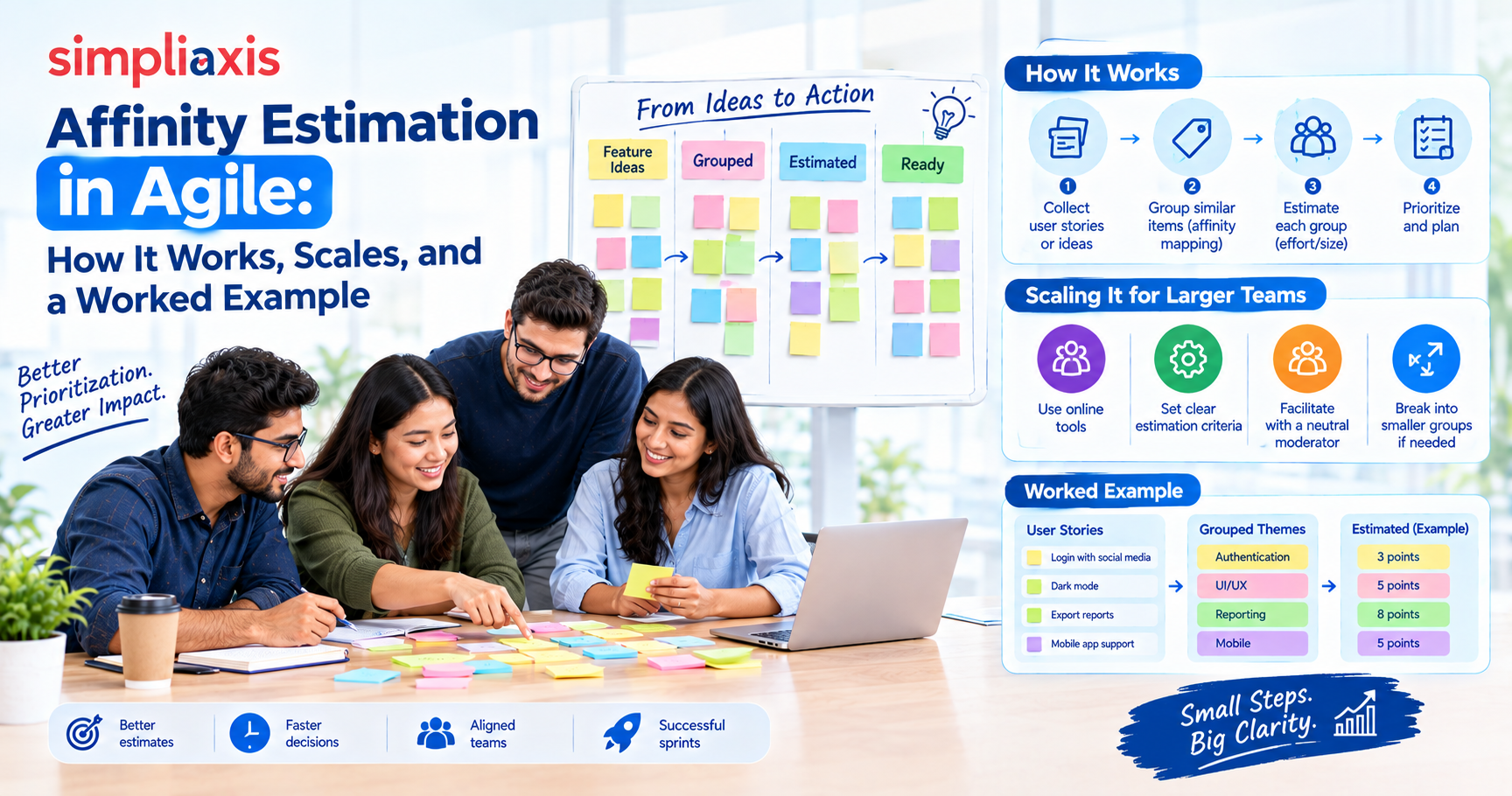
Affinity estimation is an agile technique that sizes many backlog items quickly by grouping them by relative size. Team members silently place items on a scale from small to large, move them once if they disagree, and set aside any item that causes a dispute for a short discussion. Teams use it to size dozens of items in one meeting, and Planning Poker for the items that need depth.
Key Highlights of Affinity Estimation
- Affinity estimation measures relative size, rather than hours or days.
- It works best for large backlogs, early release planning, and pre-PI preparation.
- The core rule is simple: place an item once, move it once, and discuss it if anyone wants a second move.
- Teams usually map the finished groups to Fibonacci numbers or T-shirt sizes.
- It trades depth for speed, so it pairs well with Planning Poker.
- Estimates are forecasts, never commitments.
Introduction
A Product Owner walks into a planning meeting with 70 backlog items. Someone suggests Planning Poker, and everyone quietly does the math. Even at a brisk pace, that is a long afternoon, and the team will be tired of estimating long before the list ends.
Affinity estimation solves that problem. It lets a team build a rough picture of a whole backlog in a single session, then spend discussion time on the items that deserve it.
This guide covers what affinity estimation is, when to use it, how to run it step by step, which scales to choose, and a worked example. It also compares the technique with Planning Poker and T-shirt sizing, explains how it fits in Scrum and SAFe, and covers the Scrum Master's role.
What Is Affinity Estimation?
Affinity estimation is a relative estimating technique for quickly assigning size estimates to a group of backlog items. Team members compare items with each other and group similar ones together, rather than debating each item in isolation. Mountain Goat Software describes it as a fast way for a team to estimate many product backlog items with story points.
Definition and Core Idea
The core idea comes from the word "affinity": items that feel alike in size belong together. A team lays out cards or sticky notes, groups them by similar effort, and then labels each group with an estimate.
Nobody asks "how many hours will this take?" The question is "is this bigger or smaller than that one?" That question is much easier to answer, and people tend to answer it faster and more consistently.
Why It Works for Large Backlogs
Most estimation techniques slow down as the list grows. Each item triggers a conversation, and conversations take time.
Affinity estimation removes most of that conversation. Easy items settle quickly because people agree. Hard items are flagged automatically because people disagree. The team's attention goes where the uncertainty is.
The Mountain Goat guidance suggests a team can sometimes sort more than 100 items in an hour, though around 60 is more typical, compared with a coaching target of roughly 20 per hour for Planning Poker. Treat those figures as a rough comparison, not a promise.
Read more: Planning Poker Estimation Technique
Relative Sizing, Not Absolute Numbers
Humans are poor at estimating absolute effort but decent at comparing things. Ask someone how long a task will take, and you get a guess. Ask whether it is bigger than another task you both know, and you get a useful answer.
That is why affinity estimation works with story points rather than hours. A 5-point item is roughly comparable to other 5-point items the team has delivered before. The number carries meaning only in relation to the team's own baseline.
When to Use Affinity Estimation
Use affinity estimation when you need rough, useful estimates for many items and cannot afford a long meeting. The estimates need to be good enough to support a decision, not perfect.
Estimating Many Items Quickly
A fresh backlog is the classic case. A story-writing workshop can produce dozens of items in a morning, and nobody has estimated any of them. Affinity estimation gives that list a first pass in a single sitting. If you're building that list from scratch,user story mapping helps organize it before you estimate.
It also suits backlogs that have grown unchecked. If the team has not estimated anything for several sprints, a quick pass restores some order.
Early Backlog and Release Planning
Release planningrarely needs precision. A Product Owner might simply want to know whether a feature area is small, medium, or large compared with alternatives. Stakeholders choosing between options need the same thing: a rough cost signal, not a detailed forecast.
Affinity estimation delivers that signal without dragging the team through hours of discussion on items that may never be built. Agile Release Planning training covers how teams turn rough estimates like these into multi-sprint release plans.
When Planning Poker Would Be Too Slow
Planning Poker is excellent when an item deserves discussion. It surfaces assumptions, and it makes disagreement visible through the gap between the highest and lowest card. However, that depth costs time.
If you have 60 items and two hours, Planning Poker forces an uncomfortable choice: estimate a few items well or many items badly. Affinity estimation avoids that choice. Use it for the first pass, then switch to Planning Poker for near-term or controversial items.
How Affinity Estimation Works Step by Step?
Teams run the technique in slightly different ways. The version below sorts items first and assigns numbers afterward, which suits teams that are new to story points.
Step 1: Prepare the Stories and Scale
Preparation takes about ten minutes and saves much more.
- Write each backlog item on its own card or sticky note. A short title is enough, as long as someone can clarify it if asked.
- Set up a wall, table, or online whiteboard such as Miro or Mural.
- Choose your scale: Fibonacci numbers, powers of two, or T-shirt sizes.
- Identify two or three baseline items the team has already delivered. Everyone should recognize them.
The estimators should be the people who will do the work: developers, testers, designers, and anyone else who contributes to delivery. The Product Owner should be available for questions but does not need to explain every item.
Step 2: Silent Relative Sizing (Sort Left to Right)
Next, the team sorts the cards in silence from smallest on the left to largest on the right.
Place the first card in the middle. Each person then takes a card, compares it with what is on the wall, and places it to the left if it is smaller or to the right if it is larger. Similar items stack in the same column.
Silence matters here. It keeps the meeting moving and stops one confident voice from anchoring everyone else's opinion. Mountain Goat notes that the silence is what creates the speed and also reduces the chance that one person shapes the estimate before others form their own view.
Step 3: Editing and Discussing Placements
Now the team reviews the wall. Anyone can move a card they disagree with, again without talking.
The simplest rule is that a card can be placed once and moved once, and if anyone wants to move it a second time, it comes out of play and goes into a discussion pile. This rule is what stops the session from becoming an argument.
Once the silent pass is done, discuss the items in the pile. Typical reasons they ended up there include:
- The item is vague
- It hides technical work
- People are making different assumptions
- It is too large and needs splitting
- It carries risk the team has not explored
Do not treat the pile as a failure. It is the most useful output of the session, because those are the items where a conversation will change the estimate.
Step 4: Place Items on the Scale (Buckets)
With the sorted columns in place, label each group with a value from your scale. The smallest column might become 1, the next 2, then 3, 5, 8, and so on.
Use the baseline items to anchor the scale. If your known 3-point item sits in the third column, the columns around it make sense. If it lands in the middle of a large cluster, your labels are probably off.
Be willing to merge columns. Two groups that feel nearly identical should share one number.
Step 5: Sanity-Check and Record Estimates
Finally, scan the wall from left to right and look for surprises.
- Does anything in the "small" column look suspiciously complex?
- Are any items large enough to need splitting before they can enter a sprint?
- Do the baselines still look right?
Then record the estimates in your backlog tool, with a note on any item whose estimate rests on a shaky assumption. After the session, the Product Owner should act on what the team learned: split big items, clarify vague ones, and remove low-value ones. MoSCoW prioritizationis one simple way to decide which items stay.
Affinity Estimation Scales
The scale determines how fine-grained your estimates are. A good scale has gaps that widen as items grow, because larger items carry more uncertainty.
Small, Medium, Large Buckets
The simplest approach uses three or four buckets: small, medium, large, and sometimes "too big". This works well for teams new to estimation, because nobody has to debate whether something is a 5 or an 8.
The downside is coarseness. Three buckets may not give a Product Owner enough resolution to compare items, and they are hard to total into a velocity.
Fibonacci or T-Shirt Size Mapping
Most teams eventually map their groups to numbers. Fibonacci-style sequences are popular because the growing gaps reflect growing uncertainty. A team rarely needs to tell the difference between a 20 and a 21.
Here is one common mapping. Treat it as a starting point and calibrate it to your own baselines.
T-shirt size | Typical story points | What it usually means |
| XS | 1 | A small change the team has done many times |
| S | 2 | Simple, well understood, little risk |
| M | 3 to 5 | Moderate work with a few unknowns |
| L | 8 | Substantial work, likely several days |
| XL | 13 | Large, probably needs splitting |
| XXL | 20 or more | Too big to start; split or research first |
Powers of two (1, 2, 4, 8, 16, 32) also work, and some teams find them simpler. Whichever scale you pick, agree on it before the session starts, and do not change it midway.
Read more: T-Shirt Size Estimation in Agile
Affinity Estimation Example (Worked)
Here is a hypothetical example. A team is building an online course platform and has just finished a story-writing workshop. The Product Owner brings 12 items to estimate.
The team's baseline is "Add a password-reset email," which everyone agrees is a 3.
Round 1: silent sort. The team places the baseline in the middle and sorts the other cards around it. After the first pass, the wall looks like this:
Backlog item | After silent sort | Moved? |
| Update footer links | Far left | No |
| Change button color on checkout | Far left | No |
| Add "remember me" checkbox | Left of baseline | No |
| Show course progress bar | Next to baseline | No |
| Add certificate download | Right of baseline | Moved once |
| Email notifications for new lessons | Right of baseline | No |
| Integrate payment gateway | Far right | No |
| Build instructor analytics dashboard | Far right | Moved twice, to discussion pile |
| Add multi-language support | Far right | Moved twice, to discussion pile |
| Quiz engine with randomized questions | Right of center | Moved once |
| Admin bulk user import | Right of center | No |
| Improve search | Middle | Moved twice, to discussion pile |
Round 2: label the columns. The team labels the columns 1, 2, 3, 5, 8, and 13. The footer and button items become 1s. "Remember me" becomes a 2. The progress bar lands with the baseline at 3. Certificate download and email notifications become 5s, and the quiz engine and bulk import become 8s. The payment gateway becomes a 13.
Round 3: discuss the pile. The three disputed items get a short conversation. The analytics dashboard turns out to mean three different things to three people, so the team sends it back to the Product Owner for splitting. Multi-language support depends on a technical choice nobody has made, so the team plans a research spike. "Improve search" is simply too vague to size, so the Product Owner agrees to rewrite it.
Result. In roughly the time Planning Poker would spend on three items, the team has estimates for nine, plus clear next steps for the other three. That is the real value of the technique. It finds the work that needs thinking, instead of spending equal effort on everything.
Affinity Estimation vs Other Techniques
No single estimation method fits every situation. Understanding what each one trades away helps you pick the right one.
Affinity Estimation vs Planning Poker
Planning Poker asks each person to pick a card privately, reveal it at the same time, and discuss any gaps. It produces rich conversation and surfaces hidden assumptions. Moreover, it also takes time on every item.
Affinity estimation does the opposite. It minimizes talk and maximizes throughput. The comparison breaks down like this:
Factor | Affinity estimation | Planning Poker |
| Speed | Very fast for large lists | Slower, item by item |
| Discussion | Limited, saved for disputed items | Built into every item |
| Best for | Many items, early planning | Fewer items, near-term work |
| Anchoring risk | Lower, because of silent placement | Lower, because of simultaneous reveal |
| Shared understanding | Moderate | High |
Affinity Estimation vs T-Shirt Sizing
T-shirt sizing assigns labels such as S, M, L, and XL. It is quick, intuitive, and easy for non-technical stakeholders to follow.
Affinity estimation is a process, while T-shirt sizing is a scale. In practice, teams often combine them: they use the affinity process to sort the items, then label the groups with T-shirt sizes. The two techniques are complementary rather than competing.
When to Use Each
- Affinity estimation: a large or new backlog, or an early planning pass.
- Planning Poker: items about to enter a sprint, or items where the team disagrees.
- T-shirt sizing: executive conversations, roadmap discussions, and teams still learning story points.
Many experienced teams use all three at different stages.
Benefits of Affinity Estimation
Speed and Reduced Anchoring
The most obvious benefit is speed. A team can cover a backlog in a fraction of the time that item-by-item methods take, which leaves more time for building.
The silent format also reduces anchoring, the tendency for the first number spoken aloud to pull every later estimate toward it. When people place cards before they talk, they form their own opinions first.
Whole-Team Engagement
In a verbal estimation meeting, the loudest people dominate, and quieter members stay passive. Affinity estimation gives everyone a physical task. Each person picks up cards, makes a judgment, and moves things.
As a result, junior developers and testers contribute on equal terms with senior ones. Mountain Goat also recommends that the estimators be the people who will do the work, which keeps the estimates grounded in real delivery experience.
Beyond speed and engagement, the technique also gives the Product Owner a visual map of the backlog. Large and uncertain items stand out immediately, which makes prioritization conversations more concrete.
Limitations and Common Mistakes
Affinity estimation is not a universal answer. Knowing where it breaks down protects you from misusing it.
The main limitation is depth. With so little discussion, hidden complexity can slip through, and a deceptively simple item may land in the wrong column. The estimates are also only as good as the baseline: without familiar reference items, the groups drift.
Remote sessions add another risk. Silence on a video call can mean agreement, confusion, or distraction, and it is hard to tell which.
Rushing the Discussion
The most common mistake is skipping the discussion pile. A team finishes the fast pass, feels good about the speed, and moves on, leaving the disputed items without estimates. Those items often hold the biggest risks.
Block time for the pile in the same meeting or schedule a follow-up. If an item cannot be estimated after discussion, treat that as information. It probably needs splitting, research, or a clearer definition.
Treating Estimates as Commitments
Affinity estimates are rough by design. Problems start when someone treats a quick estimate as a promise: "You said this was a 5, so it will be done by Friday."
Make it clear to stakeholders that these are early forecasts. As an item approaches the top of the backlog, the team should refine and re-estimate it with more care. Other frequent mistakes include:
- Letting one person place most of the cards
- Running the session without any baseline items
- Estimating items nobody understands instead of sending them back for refinement
Affinity Estimation in Agile and SAFe
In Scrum, affinity estimation supports backlog refinement. The Scrum Guide leaves the choice of technique to the team, and the Developers who do the work are responsible for sizing. Affinity estimation is one of several practical ways to fulfil that responsibility, especially for a backlog that has not been looked at in a while. TheProfessional Scrum Product Backlog Management (PSPBM) Skills course goes deeper into refinement techniques like this one.
SAFe adds a scaling layer. Teams on an Agile Release Train estimate stories in story points, and the framework notes that story points can be aligned, or approximately normalized, across teams to give a shared basis for capacity forecasting and economic decisions. For teams just starting out, SAFe also offers a baseline of eight points per full-time developer or tester per two-week iteration, minus one point per day of time off. Mature teams should move to their own historical velocity instead.
Affinity estimation helps here because it is quick and visual. A group of Product Owners can place stories from different teams on one wall to check whether a "3" means roughly the same thing everywhere. SAFe POPM Certification Trainingcovers how product owners and product managers prepare backlogs across a release train.
For more information, delve into SAFe Scrum Master Certification Training
Preparing Backlogs for PI Planning
PI Planningis a big event with limited time. Teams that arrive with an unsized backlog spend the first hours estimating instead of planning.
A pre-PI affinity session fixes that. Teams size the likely features and stories ahead of time, flag oversized items for splitting, and identify unclear items for the Product Owner to clarify. By the time the event starts, the team can discuss sequencing and dependencies instead of basic size.
Keep the purpose in mind, though. These are preparation estimates, and the team will refine them during planning.
The Scrum Master's Role and Best Practices
The Scrum Master does not estimate. Their job is to make the session work. Certified ScrumMaster trainingcovers how Scrum Masters facilitate refinement and estimation sessions like this one.
Before the session
- Check that the cards, wall or online board, and scale are ready.
- Make sure the baseline items are visible.
- Confirm the Product Owner can answer quick questions.
During the session
- Explain the rules briefly: silent sorting, one move, discussion pile.
- Keep the pace brisk and protect the silence.
- Watch for dominant voices and rotate who places the first card when needed.
- Keep an eye on remote participants, and ask what surprised people when the room goes quiet.
After the session
- Make sure the discussion pile gets resolved, not forgotten.
- Remind stakeholders that the estimates are forecasts.
- Discourage anyone from comparing teams by their story point totals.
A few best practices help the technique stick. Timebox the session. Estimate in a mix of people, not in isolation. Revisit baselines every few sprints so the scale does not drift. Finally, use the results: an estimation session that does not change what the team does next was a waste of time.
Conclusion
Affinity estimation gives agile teams a fast, low-friction way to size a large backlog. Its strength is that it spends discussion time where disagreement actually exists, not on every item equally. Its weakness is the limited depth, which is why it works best alongside Planning Poker.
The practical takeaways are simple. Agree on a scale and baselines first. Sort silently, allow one move per card, and park the items that keep moving. Then resolve that discussion pile, because it holds the best learning. Above all, treat the numbers as rough forecasts.
If you want hands-on practice with estimation, backlog refinement, and PI planning, Simpliaxis offers Scrum and SAFe training where techniques like this one are worked through in realistic scenarios. Start with a small backlog on your next refinement day and see how it feels.
Read more: Project Estimation Techniques








 Lowest-Price Challenge











 Personalized Path


.webp)


 USA
USA  Canada
  India
India  UK
UK  Australia
  Singapore


